1. Introduzione
The OLIGHT Perun 2 Mini is a versatile, rechargeable headlamp designed for various activities requiring hands-free illumination. It features dual white and red LED light sources, multiple lighting modes, and a compact, durable design. This manual provides essential information for safe and effective use of your Perun 2 Mini.
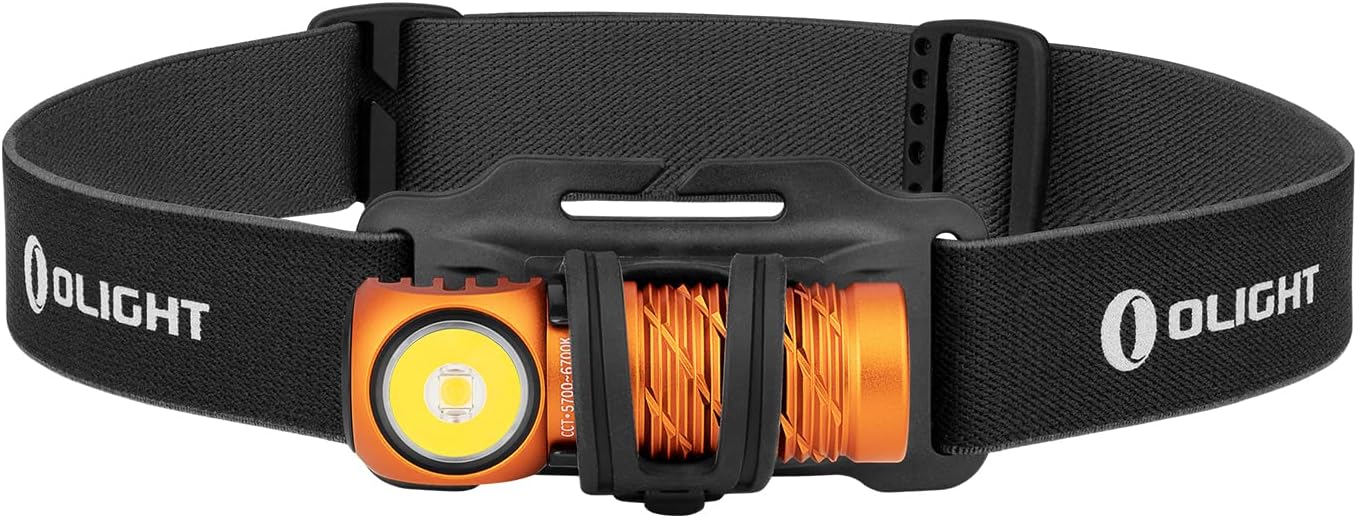
Image 1: The OLIGHT Perun 2 Mini Headlamp mounted on its adjustable headband.
2. Informazioni sulla sicurezza
- Sicurezza degli occhi: Non puntare la luce direttamente negli occhi. Il fascio luminoso potente può causare danni temporanei alla vista o danni permanenti agli occhi.
- Bambini: Tenere fuori dalla portata dei bambini. Questo prodotto non è un giocattolo.
- Calore: il capoamp may become warm during prolonged use, especially on higher modes. Avoid direct contact with hot surfaces.
- Batteria: Use only the specified rechargeable battery. Do not attempt to disassemble or modify the battery.
- Resistenza all'acqua: While IPX8 rated, ensure the charging port is clean and dry before charging to prevent damage.
3. Contenuto della confezione
Verifica che tutti gli articoli siano presenti nel tuo pacco:
- OLIGHT Perun 2 Mini Headlamp
- Batteria ricaricabile (preinstallata)
- Headband with Silicone Mount
- MCC1A Magnetic Charging Cable
- Fermaglio da tasca
- Manuale d'uso

Image 2: Contents of the Perun 2 Mini package.
4. Prodotto finitoview
The Perun 2 Mini features a compact body with a powerful LED, a magnetic tail cap for charging and attachment, and a side switch for operation. It can be used as a headlamp with the included headband or as a handheld flashlight.
Immagine 3: anteriore view of the Perun 2 Mini, highlighting the LED and body design.
5. Impostazione
5.1 Carica iniziale
Prima del primo utilizzo, caricare completamente la testinaamp. Connect the magnetic charging cable (MCC1A) to the magnetic tail cap of the headlamp and a USB power source. The indicator on the charging cable will show red during charging and turn green when fully charged.

Image 4: The Perun 2 Mini connected to its magnetic charging cable.
5.2 Fissaggio alla fascia
Inserisci il capoamp into the silicone mount on the headband. Ensure it is securely seated. The headband is adjustable for a comfortable fit.
6. Istruzioni per l'uso
6.1 Accensione/spegnimento e commutazione della modalità
- Attiva/disattiva: Basta un solo clic sull'interruttore laterale per accendere o spegnere la luce.
- Cambia luminosità: When the light is on, press and hold the side switch to cycle through Low, Medium, and High modes. Release the switch at your desired brightness.
- Modalità al chiaro di luna: When the light is off, press and hold the side switch for approximately one second to activate Moonlight mode.
- Modalità Turbo: Double click the side switch to activate Turbo mode. Double click again to return to the previous mode.
- Modalità luce rossa: Triple click the side switch to activate Red light mode.
- Modalità SOS: From Red light mode, double click the side switch to activate SOS mode.
6.2 Regolazione dell'angolo
il capoamp can be rotated up to 180 degrees within its silicone mount, allowing you to direct the beam precisely where needed. This wide range of adjustment enhances visibility and helps avoid hazards.

Image 5: The Perun 2 Mini demonstrating its 180-degree adjustable angle.
6.3 Scenari di utilizzo
The Perun 2 Mini is suitable for a wide range of activities, including camping, running, hiking, night fishing, auto repair, and as an emergency light during power outages.

Immagine 6: Es.amples of the Perun 2 Mini in use for different activities.
7. Gestione della batteria
7.1 Ricarica
The Perun 2 Mini utilizes a magnetic charging system for convenience. A full charge takes approximately 70 minutes, providing extended runtime.
7.2 Indicatore del livello della batteria
il capoamp features a three-color battery indicator to show the remaining power at a glance:
- Verde: Livello batteria > 60%
- Arancia: Battery level 60% ~ 10%
- Rosso: Battery level 10% ~ 5%
- Rosso lampeggiante: Livello batteria < 5%

Image 7: The Perun 2 Mini's battery level indicator.
8. Manutenzione
- Pulizia: Clean the lens with a soft, clean cloth. For stubborn dirt, use a small amount of rubbing alcohol.
- Porta di ricarica: Keep the magnetic charging port clean and free of debris to ensure proper charging.
- Magazzinaggio: Conservare la testaamp in a cool, dry place. If storing for an extended period, charge the battery every few months to maintain its health.
9. Risoluzione Dei Problemi
- La luce non si accende: Ensure the battery is charged. Check for any physical damage.
- La luce è fioca: La batteria potrebbe essere scarica. Ricaricare la testaamp.
- Problemi di ricarica: Ensure the magnetic charging cable is properly connected and the charging port is clean. Try a different USB power source.
- Inconsistent mode switching: Ensure the side switch is clean and free of obstructions.
10. Specifiche
| Caratteristica | Dettaglio |
|---|---|
| Marca | OLUCE |
| Modello | Perù 2 Mini |
| Colore | Orange (Cool white) |
| Materiale | Alluminio |
| Tipo di sorgente luminosa | GUIDATO |
| Fonte di alimentazione | Batteria ricaricabile |
| Luminosità massima | 1100 lumen |
| Distanza massima del raggio | 150 metri |
| Dimensioni del prodotto | Dimensioni: 2.06 x 2.2 x 6.43 cm |
| Peso del prodotto | 140 g (batteria inclusa) |
| Grado di impermeabilità | Grado di protezione IPX8 |
| Resistenza all'impatto | 1.5 metri |
| Caratteristiche speciali | SOS Mode, Angle Adjustable Strap |
11. Garanzia e supporto
OLIGHT products are covered by a manufacturer's warranty. For detailed warranty information, product support, or service inquiries, please refer to the official OLIGHT webo contattare il rivenditore locale. Conservare la ricevuta d'acquisto per eventuali reclami in garanzia.


