1. Introduzione
This manual provides comprehensive instructions for the installation, operation, and maintenance of the TYAN B7126T65V10E4HR Thunder SX TS65-B7126 Storage Server. Please read this manual thoroughly before operating the server to ensure proper functionality and to prevent damage.
2. Informazioni sulla sicurezza
Osservare le seguenti precauzioni di sicurezza per evitare lesioni e danni all'apparecchiatura:
- Scollegare sempre l'alimentazione prima di eseguire qualsiasi installazione o manutenzione.
- Garantire un'adeguata messa a terra per evitare scosse elettriche.
- Operate the server in a well-ventilated environment to prevent overheating.
- Do not expose the server to moisture or extreme temperatures.
- Only qualified personnel should perform service or repairs.
3. Contenuto della confezione
Verificare che tutti gli articoli siano presenti nel pacco:
- TYAN B7126T65V10E4HR Thunder SX TS65-B7126 Storage Server Unit
- Cavi elettrici)
- Accessory Kit (screws, cables, etc.)
- Quick Installation Guide (this manual serves as the detailed guide)
4. Prodotto finitoview
The TYAN Thunder SX TS65-B7126 is a high-performance storage server designed for demanding data center environments. It features extensive storage capabilities and flexible expansion options.
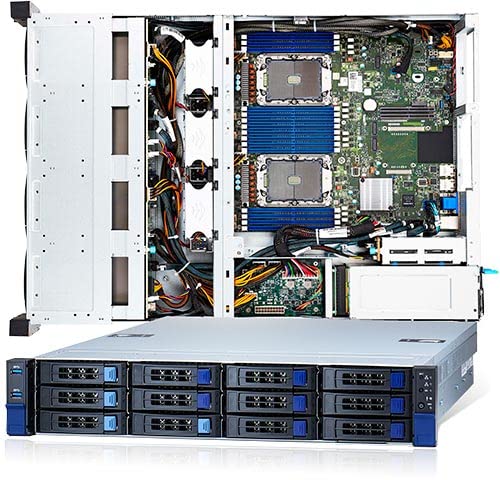
Figura 4.1: Fronte view of the TYAN B7126T65V10E4HR Thunder SX TS65-B7126 Storage Server, showing drive bays and front panel controls.
Caratteristiche principali:
- Memoria: 16 DIMM slots supporting DDR4 3200 memory.
- Front Storage: 12 x 3.5" SATA hot-swap, tool-less drive bays, with optional support for 4 NVMe U.2 drives.
- Rear Storage: 2 x 2.5" SATA hot-swap, tool-less drive bays.
- Creazione di reti: PCIe 3.0 x16 OCP v2.0 LAN mezzanine slot (Type 1).
- Memoria interna: 1 x NVMe/PCIe 3.0 x2 M.2 2280 slot.
5. Impostazione
5.1 Installazione su rack
The server is designed for standard 19-inch rack mounting. Secure the server using appropriate rack rails and screws (typically included in the accessory kit) to ensure stability and proper airflow.
5.2 Installazione dell'unità
- 3.5" SATA/NVMe Drives: Open the drive bay latch, slide the drive into the bay until it clicks into place. For NVMe U.2 drives, ensure the correct backplane configuration is in place.
- 2.5" SATA Rear Drives: Locate the rear 2.5" drive bays. Slide the drives into the bays until secured.
- M.2 NVMe Drive: Install the M.2 drive into the dedicated M.2 2280 slot on the motherboard, securing it with the provided screw.
5.3 Installazione della memoria
Install DDR4 3200 DIMMs into the 16 available slots. Refer to the motherboard manual for specific memory population rules to optimize performance.
5.4 Collegamento di alimentazione
Connect the power cord(s) to the server's power supply unit(s) and then to a grounded power outlet or PDU. Ensure all power connections are secure.
5.5 Avvio iniziale
Press the power button on the front panel. Monitor the boot process and access the BIOS/UEFI setup as needed to configure boot devices, RAID arrays, and other system settings.
6. Istruzioni per l'uso
6.1 Installazione del sistema operativo
Install your preferred operating system (e.g., Windows Server, Linux distribution) using a bootable USB drive or network installation. Ensure all necessary drivers are installed for optimal hardware performance.
6.2 Configurazione della memoria
Configure your storage drives. For SATA drives, you may use the onboard RAID controller or a separate HBA. For NVMe drives, ensure the operating system has the appropriate drivers. Create logical volumes or file systems as required for your application.
6.3 Configurazione di rete
Configure the network interfaces, including the OCP v2.0 LAN mezzanine card, with appropriate IP addresses, subnet masks, and gateway settings for your network environment.
7. Manutenzione
7.1 Pulizia
Regularly clean the server's exterior and ensure air vents are free from dust accumulation. Use compressed air to clear dust from internal components, ensuring power is disconnected first.
7.2 Aggiornamenti firmware
Controllare periodicamente le istruzioni del produttore website for updated BIOS/UEFI, BMC, and RAID controller firmware. Apply updates as recommended to improve stability, performance, and security.
7.3 Sostituzione dell'unità
The server features hot-swap drive bays. For failed drives, identify the faulty unit, unmount it from the operating system (if applicable), and carefully remove it. Insert a new, compatible drive, ensuring it seats correctly.
8. Risoluzione Dei Problemi
8.1 Nessun potere
- Check power cord connections to the server and power outlet.
- Verify the power supply unit (PSU) status indicators.
- Assicurarsi che la presa di corrente sia funzionante.
8.2 Il sistema non si avvia
- Check memory modules are properly seated.
- Verify boot device order in BIOS/UEFI.
- Listen for POST (Power-On Self-Test) beep codes and consult the motherboard manual for their meaning.
8.3 Unità non rilevata
- Ensure the drive is fully seated in its bay.
- Check drive status LEDs.
- Verify cabling for non-hot-swap drives.
- Check BIOS/UEFI or RAID controller settings for drive detection.
9. Specifiche
| Caratteristica | Dettaglio |
|---|---|
| Modello | B7126T65V10E4HR Thunder SX TS65-B7126 |
| Produttore | TIAN |
| Supporto di memoria | 16 DIMM slots, DDR4 3200 |
| Front Drive Bays | 12 x 3.5" SATA (hot-swap, tool-less) w/ opt. 4 NVMe U.2 |
| Rear Drive Bays | 2 x 2.5" SATA (hot-swap, tool-less) |
| Internal M.2 Slot | 1 x NVMe/PCIe 3.0 x2 M.2 2280 |
| LAN Mezzanine Slot | PCIe 3.0 x16 OCP v2.0 (Type 1) |
| ASIN | B0BLGZ15V10E4HR |
| Data prima disponibilità | 4 novembre 2022 |
10. Garanzia e supporto
For warranty information and technical support, please refer to the official TYAN webo contattare il rivenditore autorizzato. Conservare la prova d'acquisto per eventuali reclami in garanzia.
Risorse online: Visit the TYAN official website for the latest drivers, firmware, and additional documentation.


