1. Introduzione
The Maxcom MM724 is a simple mobile phone designed for ease of use, featuring straightforward software and practical functions. It is particularly suitable for users who prefer a device without complicated menus. Key features include an emergency SOS button, a built-in flashlight, and Bluetooth connectivity for hearing aid compatibility.
2. Contenuto della confezione
Si prega di selezionare la casella per i seguenti elementi:
- 1 Maxcom MM724 Mobile Phone
- 1 Desktop Charger
- 1 Matching Cords (for charger)
- 1 Manuale utente (questo documento)
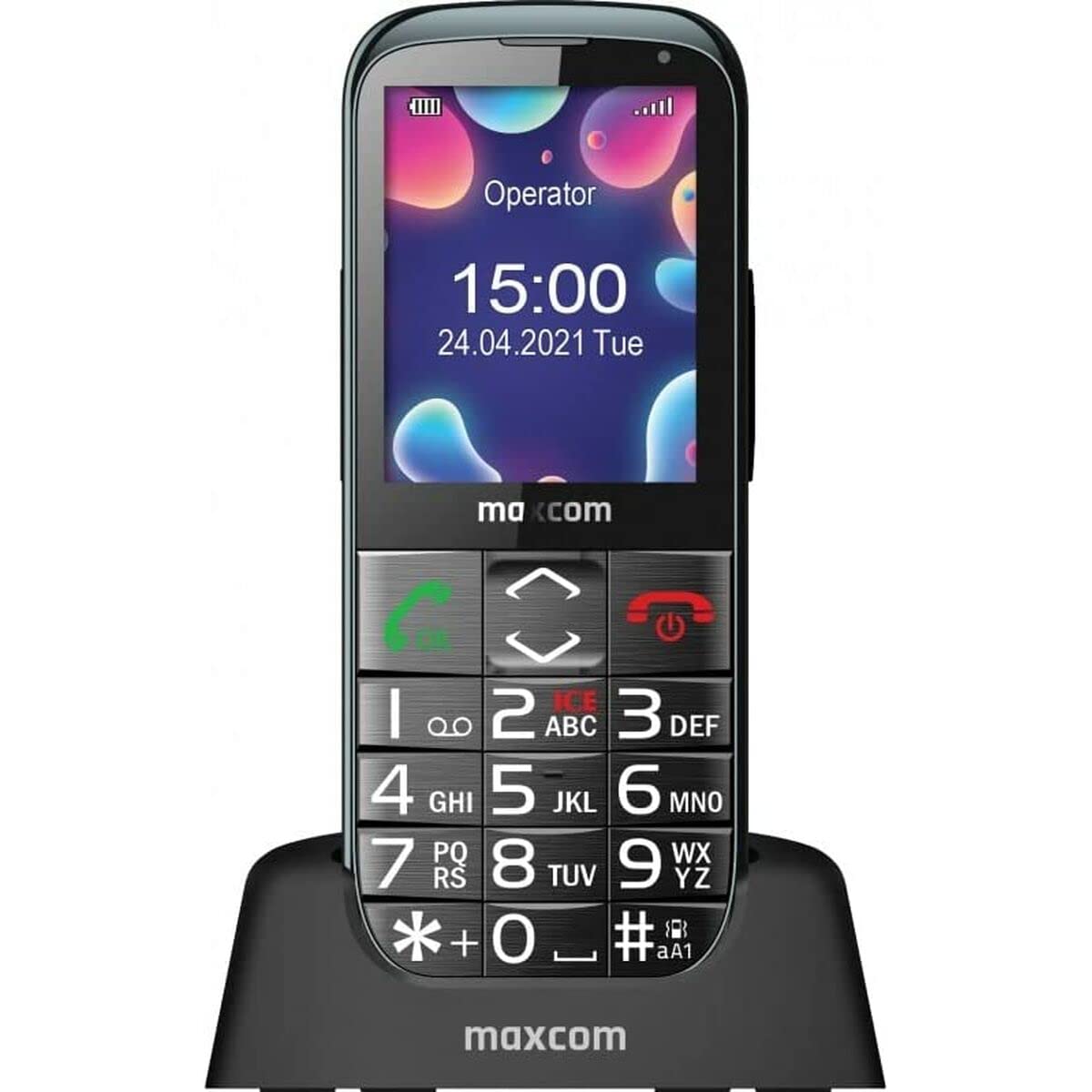
Image: The Maxcom MM724 simple mobile phone, typically black, with a clear display and large buttons.
3. Impostazione
3.1. Inserimento della scheda SIM e della batteria
- Rimuovere con cautela la cover posteriore del telefono.
- Inserire la/le scheda/e SIM negli slot designati con i contatti dorati rivolti verso il basso.
- Inserire la batteria assicurandosi che i contatti siano allineati correttamente.
- Riposizionare il coperchio posteriore finché non scatta saldamente in posizione.
3.2. Carica del dispositivo
The Maxcom MM724 uses a convenient desktop charger. To charge your phone:
- Connect the charger cord to a power outlet.
- Place the phone upright into the desktop charging cradle.
- Ensure the charging indicator on the phone or cradle illuminates, indicating that charging has begun.
- For optimal battery life, keep the phone in the cradle when not in use to ensure it is always charged.
4. Istruzioni per l'uso
4.1. Accensione/Spegnimento
- Per accendere: Tenere premuto il pulsante di accensione/fine chiamata (solitamente rosso) finché lo schermo non si illumina.
- Per spegnere: Tenere premuto il pulsante di accensione/fine chiamata finché non vengono visualizzate le opzioni di spegnimento, quindi confermare.
4.2. Effettuare e ricevere chiamate
- Per effettuare una chiamata: Comporre il numero utilizzando la tastiera e premere il pulsante Chiama (solitamente verde).
- Per ricevere una chiamata: Press the Call button when the phone rings. The phone is designed to ring very loudly to ensure calls are not missed.
- Per terminare una chiamata: Premere il pulsante di accensione/fine chiamata.
4.3. Invio e ricezione di messaggi
Navigate to the 'Messages' menu to compose new SMS messages or read incoming ones. Use the keypad to type your message.
4.4. Utilizzo del pulsante SOS
The SOS button is located on the back of the phone and is designed for emergencies.
- Impostare: Access the phone's settings to pre-define a list of emergency contacts.
- Attivazione: In an emergency, press and hold the SOS button. The phone will automatically call the pre-defined contacts in sequence until one answers.
4.5. Attivazione della torcia
The phone features a dedicated button for the flashlight, making it easy to activate when needed. Refer to your phone's specific button layout for its location.
4.6. Bluetooth and Hearing Aid Compatibility
The Maxcom MM724 supports Bluetooth connectivity, allowing it to pair with compatible devices, including certain hearing aids. This enables hands-free calling.
- Abbinamento: Go to the Bluetooth settings on your phone and enable Bluetooth. Put your hearing aid into pairing mode (consult your hearing aid's manual). Select your hearing aid from the list of available devices on the phone to pair.
- Nota: Compatibility with hearing aids depends on the hearing aid's features. Consult your audiologist for specific compatibility information. The phone also features a ring line and additional gain for improved audio performance with or without hearing aids.
5. Manutenzione
- Pulizia: Utilizzare un panno morbido e asciutto per pulire lo schermo e il corpo del telefono. Evitare l'uso di detergenti liquidi o materiali abrasivi.
- Cura della batteria: Keep the battery charged regularly. Avoid extreme temperatures, which can affect battery performance and lifespan.
- Magazzinaggio: Quando non lo si utilizza per lunghi periodi, conservare il telefono in un luogo fresco e asciutto.
6. Risoluzione Dei Problemi
- Il telefono non si accende: Assicurati che la batteria sia inserita correttamente e carica. Collega il telefono al caricabatterie e riprova.
- Nessun segnale di rete: Controlla che la scheda SIM sia inserita correttamente. Spostati in una zona con una migliore copertura di rete. Contatta il tuo operatore se il problema persiste.
- Impossibile effettuare/ricevere chiamate: Verify that you have sufficient credit or an active plan. Check network signal strength.
- Problemi di associazione Bluetooth: Ensure both devices are in pairing mode and within range. Try restarting both the phone and the Bluetooth device.
7. Specifiche
| Marca | MassimoCom |
| Nome del modello | MM724 |
| Sistema operativo | Android |
| Dimensioni dello schermo | 3 pollici |
| Tecnologia di connettività | Bluetooth |
| Tecnologia cellulare | 4G |
| Tecnologia di rete wireless | GSM |
| Colore | Nero |
| Peso dell'articolo | 85 grammi |
| Operatore di telefonia mobile | Sbloccato |
8. Garanzia e supporto
Warranty information for the Maxcom MM724 mobile phone is typically provided with your purchase documentation or can be found on the official Maxcom website. For technical support or service inquiries, please refer to the contact information provided by your retailer or the manufacturer.


