Introduzione
Thank you for choosing the Havit Gaming Mouse MS955. This optical gaming mouse features a USB interface, adjustable DPI settings, and RGB backlighting, designed to enhance your gaming experience. This manual provides essential information for setting up, operating, and maintaining your mouse.
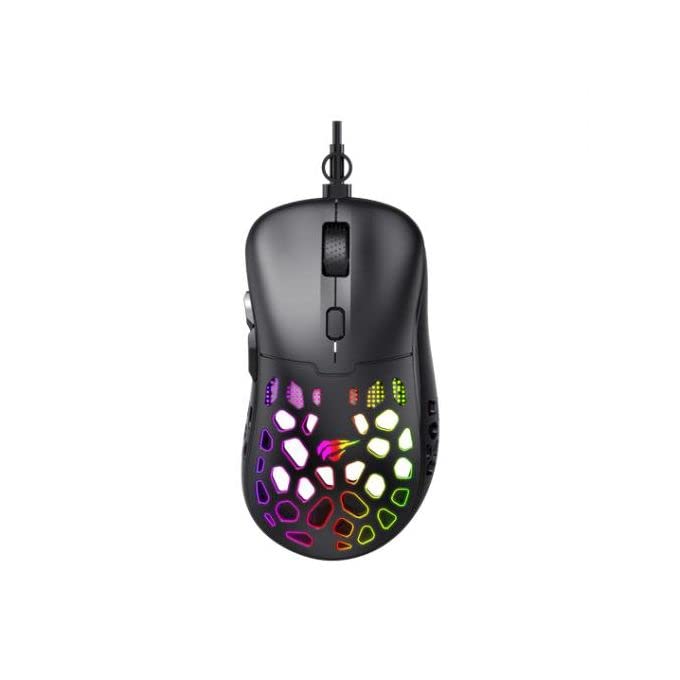
Immagine: dall'alto verso il basso view of the Havit Gaming Mouse MS955, showcasinil suo design ergonomico e la vivace illuminazione RGB attraverso la scocca a nido d'ape.
Impostare
- Disimballare il mouse: Carefully remove the Havit Gaming Mouse MS955 from its packaging.
- Connessione al computer: Locate an available USB port on your computer. Insert the USB connector of the mouse into the USB port.
- Installazione del driver: The mouse is plug-and-play. Your operating system (Windows XP, Windows 7, Linux, etc.) will automatically detect and install the necessary drivers. No additional software installation is typically required for basic functionality.
- Funzionalità di prova: Una volta effettuato il collegamento, muovi il mouse e clicca sui pulsanti per assicurarti che funzioni correttamente.
Istruzioni per l'uso
The Havit Gaming Mouse MS955 features 6 programmable buttons and adjustable DPI settings for precise control.

Immagine: Lato view of the Havit Gaming Mouse MS955, highlighting the left-side buttons and scroll wheel.
- Pulsante sinistro del mouse: Primary button for selection and interaction.
- Pulsante destro del mouse: Secondary button for context menus and alternative actions.
- Rotella di scorrimento: Utilizzato per scorrere i documenti e web pages. It also functions as a clickable middle button.
- Pulsante di regolazione DPI: Located behind the scroll wheel. Press this button to cycle through different DPI sensitivity levels (800-1200-2400-3200 DPI). Each press changes the sensitivity, allowing you to adapt to various gaming or work scenarios.
- Pulsanti laterali: Two buttons are located on the left side of the mouse. These are typically used for 'forward' and 'backward' navigation in web browsers or can be programmed for in-game actions.
Illuminazione RGB
The Havit Gaming Mouse MS955 features an integrated RGB backlight system. The lighting effects are typically automatic and may change with DPI settings or cycle through various colors. There are no dedicated buttons for controlling the RGB lighting directly on the mouse.
Manutenzione
- Pulizia: To clean the mouse, disconnect it from your computer. Use a soft, dry cloth to wipe the surface. For stubborn dirt, a slightly damp cloth can be used, ensuring no liquid enters the mouse. Do not use harsh chemicals or abrasive cleaners.
- Magazzinaggio: Conservare il mouse in un ambiente pulito e asciutto, lontano da temperature estreme e dalla luce solare diretta.
- Cura del cavo: Evitare di piegare o torcere eccessivamente il cavo USB per evitare danni.
Risoluzione dei problemi
- Il mouse non risponde:
- Assicurati che il cavo USB sia collegato saldamente a una porta USB funzionante del tuo computer.
- Prova a collegare il mouse a una porta USB diversa.
- Riavvia il computer.
- DPI non cambia:
- Press the DPI button firmly. Ensure you are pressing the correct button.
- The mouse cycles through fixed DPI settings; there is no visual indicator other than cursor speed change.
- Le luci RGB non funzionano:
- Verify the mouse is properly connected to your computer.
- The RGB lighting is automatic; if the mouse is functioning otherwise, the lighting should also be active.
Specifiche
| Caratteristica | Dettaglio |
|---|---|
| Marca | avere |
| Modello | MS955 |
| Tipo di interfaccia | USB |
| Dimensioni | Dimensioni: 115.2 x 63 x 37.6 mm |
| Numero di chiavi | 6 |
| Chipset | NST5311 |
| Risoluzione DPI | 800-1200-2400-3200 DPI |
| Volume di eserciziotage | 5V |
| Durata della vita della chiave | 3,000,000 clic |
| Lunghezza del cavo | 1.5 metri |
| Rilevamento del movimento | Ottico |
| Orientamento della mano | Giusto |
| Uso consigliato | Gioco d'azzardo |
| Sistemi operativi | Linux, Windows 7, Windows XP |
| Colore | Nero |
Garanzia e supporto
For warranty information or technical support, please refer to the documentation included with your purchase or visit the official Havit websito. Conservare la prova d'acquisto per eventuali reclami in garanzia.