1. Introduzione
Thank you for choosing the MAONO AUA04&PD100U USB Microphone. This dynamic microphone is designed for high-quality audio capture for various applications including podcasting, streaming, gaming, vocal recording, and online meetings. It features a cardioid polar pattern, 192kHz/24bit sampling rate, and plug-and-play compatibility with multiple operating systems. This manual provides essential information for setting up, operating, and maintaining your microphone.
2. Contenuto della confezione
Si prega di controllare il pacco per assicurarsi che siano presenti tutti gli articoli:
- MAONO PD100U Dynamic Microphone
- Adjustable Scissor Arm Stand (if included in specific bundle)
- Metal Shock Mount (if included in specific bundle)
- Pop Filter (if included in specific bundle)
- Foam Mic Windscreen (if included in specific bundle)
- Montaggio da Tavolo Clamp (if included in specific bundle)
- USB-B to USB-A Cable (2-in-1 USB-C cable for connecting PC, smartphones, and tablets)
- Detachable Mic Stand (2.36" extension)
3. Impostazione
3.1 Collegamento del microfono
The MAONO PD100U microphone offers plug-and-play functionality, requiring no additional drivers or software for most devices.
- Connect the provided USB-C cable to the USB-C port at the bottom of the microphone.
- Connect the other end of the USB cable to an available USB port on your computer (Windows, Mac OS), or a compatible smartphone/tablet (iOS, Android OS).
- For connecting to a smartphone or tablet, an OTG adapter (not included) may be required.
- The microphone is not compatible with XBOX consoles.

Immagine 3.1: The MAONO PD100U microphone connected via USB-C, illustrating compatibility with Windows, macOS, PS4/PS5.
3.2 Montaggio del supporto
The microphone comes with a detachable desktop stand for convenient placement.
- Attach the microphone to the included desktop stand. The microphone's angle can be adjusted up to 180 degrees.
- For additional height, use the 2.36-inch detachable mic stand extension.
- The microphone features a standard threaded interface (3/8" and 5/8") for compatibility with various external mic stands or boom arms (sold separately).

Immagine 3.2: The MAONO PD100U microphone with its detachable stand, showing the 60mm extension for adjustable height.

Immagine 3.3: The standard 3/8" and 5/8" threaded interface on the MAONO PD100U microphone for compatibility with various mic stands.
4. Istruzioni per l'uso
4.1 Posizionamento del microfono e diagramma di ripresa
The PD100U is an end-address dynamic microphone with a cardioid polar pattern. This design focuses audio capture directly from the front of the microphone, minimizing sound from the sides and rear.
- Position the microphone so that you are speaking directly into the top (end) of the microphone.
- For optimal sound quality and to reduce plosives, maintain a distance of 2-4 inches from the microphone.
- The built-in double-layer pop filter helps to reduce harsh plosive sounds (P's and B's).

Immagine 4.1: Illustration of the MAONO PD100U's end-address and cardioid pickup pattern, showing the optimal speaking range of 2-4 inches.
4.2 Regolazione del guadagno
The microphone features a gain knob for adjusting the input sensitivity and volume during recording or streaming.
- Turn the gain down: This can effectively reduce the pickup of room noise and background sounds.
- Turn the gain up: This increases the microphone's sensitivity, making your voice more prominent and attractive.
- Adjust the gain to a level that provides clear audio without clipping or distortion.

Immagine 4.2: Close-up of the MAONO PD100U microphone showing the gain control knob for adjusting sensitivity and volume.
5 Caratteristiche
The MAONO PD100U microphone incorporates several features for enhanced audio performance and user convenience:
- Audio ad alta risoluzione: Supports a sampling rate of 192kHz/24bit for clear and undistorted audio reproduction.
- Professional Sound Chipset: Equipped with a built-in professional sound chipset for optimal audio processing.
- Diagramma polare cardioide: Focuses audio capture on the sound source directly in front of the microphone, reducing ambient noise.
- End Address Technology: Designed for speaking directly into the end of the microphone for accurate voice pickup.
- Filtro anti-pop integrato: Double-layer pop filter integrated to minimize plosive sounds and improve vocal clarity.
- Costruzione durevole: All-metal body ensures strong reliability and helps in vibration damping.
- Base stabile: Thick metal base with non-slip rubber feet provides stability and shock absorption.

Immagine 5.1: Interno view highlighting the professional sound chipset and 192kHz/24bit high sampling rate of the MAONO PD100U microphone.
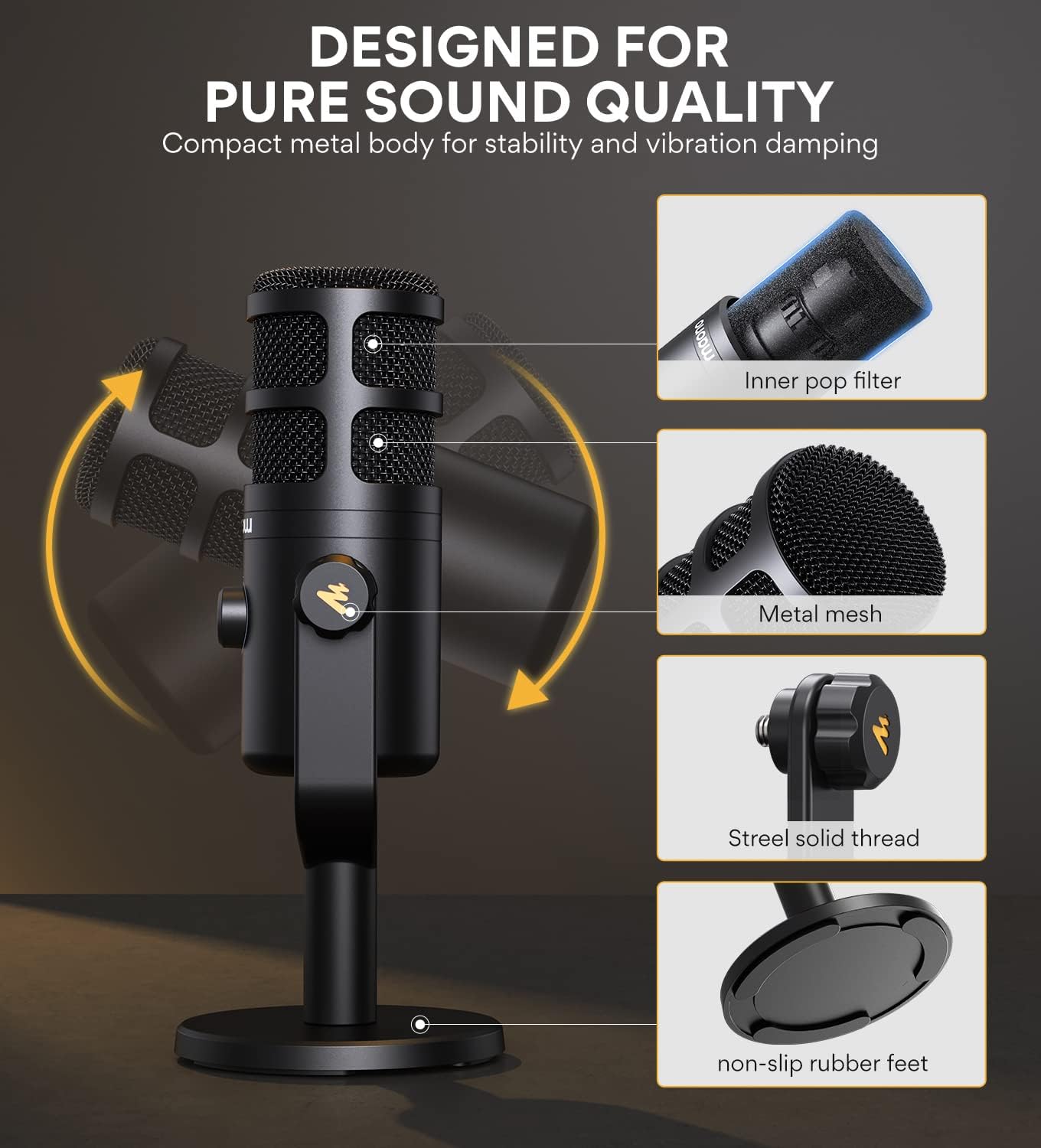
Immagine 5.2: Esploso view of the MAONO PD100U microphone, detailing its inner pop filter, metal mesh, steel solid thread, and non-slip rubber feet for pure sound quality and stability.
6. Manutenzione
To ensure the longevity and optimal performance of your MAONO PD100U microphone, follow these maintenance guidelines:
- Pulizia: Use a soft, dry cloth to wipe the microphone's exterior. Avoid using harsh chemicals, solvents, or abrasive materials.
- Magazzinaggio: Quando non lo si utilizza, conservare il microfono in un luogo pulito e asciutto, lontano da temperature e umidità estreme.
- Gestione: Maneggiare il microfono con cura. Evitare di farlo cadere o di sottoporlo a forti urti, che potrebbero danneggiare i componenti interni.
- Cura del cavo: Do not bend or crimp the USB cable excessively. Always grasp the connector, not the cable, when plugging or unplugging.
7. Risoluzione Dei Problemi
If you encounter issues with your MAONO PD100U microphone, please refer to the following common troubleshooting steps:
- Nessuna uscita audio:
- Assicurati che il cavo USB sia collegato saldamente sia al microfono che al dispositivo.
- Check your computer's sound settings (System Preferences on Mac, Sound Settings on Windows) to ensure the MAONO microphone is selected as the input device.
- Verify that the gain knob on the microphone is not set to minimum.
- Test the microphone with a different USB port or another compatible device.
- Suono distorto o poco chiaro:
- Adjust the gain knob on the microphone. If the sound is distorted, reduce the gain.
- Ensure you are speaking directly into the end of the microphone and maintaining an optimal distance (2-4 inches).
- Check for any background noise in your environment and try to minimize it.
- Ensure the microphone is not too close to speakers or other audio output devices, which can cause feedback.
- Microfono non riconosciuto:
- Riavvia il computer o il dispositivo.
- Prova a collegare il microfono a una porta USB diversa.
- If using with a smartphone/tablet, ensure the OTG adapter (if required) is functioning correctly.
- Confirm your device's operating system is compatible (Windows, Mac OS, iOS, Android OS). Note: Not compatible with XBOX.
If these steps do not resolve the issue, please contact MAONO customer support for further assistance.
8. Specifiche
| Marca | MAONO |
| Modello | AUA04&PD100U |
| Tecnologia di connettività | USB |
| Tipo di connettore | USB-C |
| Modello polare | Unidirezionale (cardioide) |
| Piattaforma hardware | Gaming Console (PS4/PS5), Laptop, PC |
| Dispositivi compatibili | Laptop, Computer, PS4, Smartphones, Tablets |
| Materiale | Metallo |
| Fonte di alimentazione | Elettrico con filo (alimentato tramite USB) |
| Caratteristica speciale | Stand, Gain Control, Built-in Pop Filter |
| Fattore di forma del microfono | Matrice di tabella |
| Peso dell'articolo | 5.1 libbre |
| Usi consigliati | Gaming, Vocal Recording, Streaming, Podcasting, Zoom Meetings, Voice Over |
9. Informazioni sulla sicurezza
Si prega di leggere e seguire queste precauzioni di sicurezza per evitare danni al dispositivo o lesioni personali:
- Non esporre il microfono all'acqua o a umidità eccessiva.
- Avoid placing the microphone near heat sources or in direct sunlight for extended periods.
- Non tentare di smontare o modificare il microfono. Ciò invaliderà la garanzia e potrebbe causare danni.
- Tenere il microfono lontano da forti campi magnetici.
- Utilizzare solo gli accessori forniti o consigliati.
10. Garanzia e supporto
MAONO products are designed and manufactured to the highest quality standards. For information regarding warranty coverage, technical support, or service, please refer to the warranty card included with your product or visit the official MAONO websito. Conservare la prova d'acquisto per eventuali reclami in garanzia.


