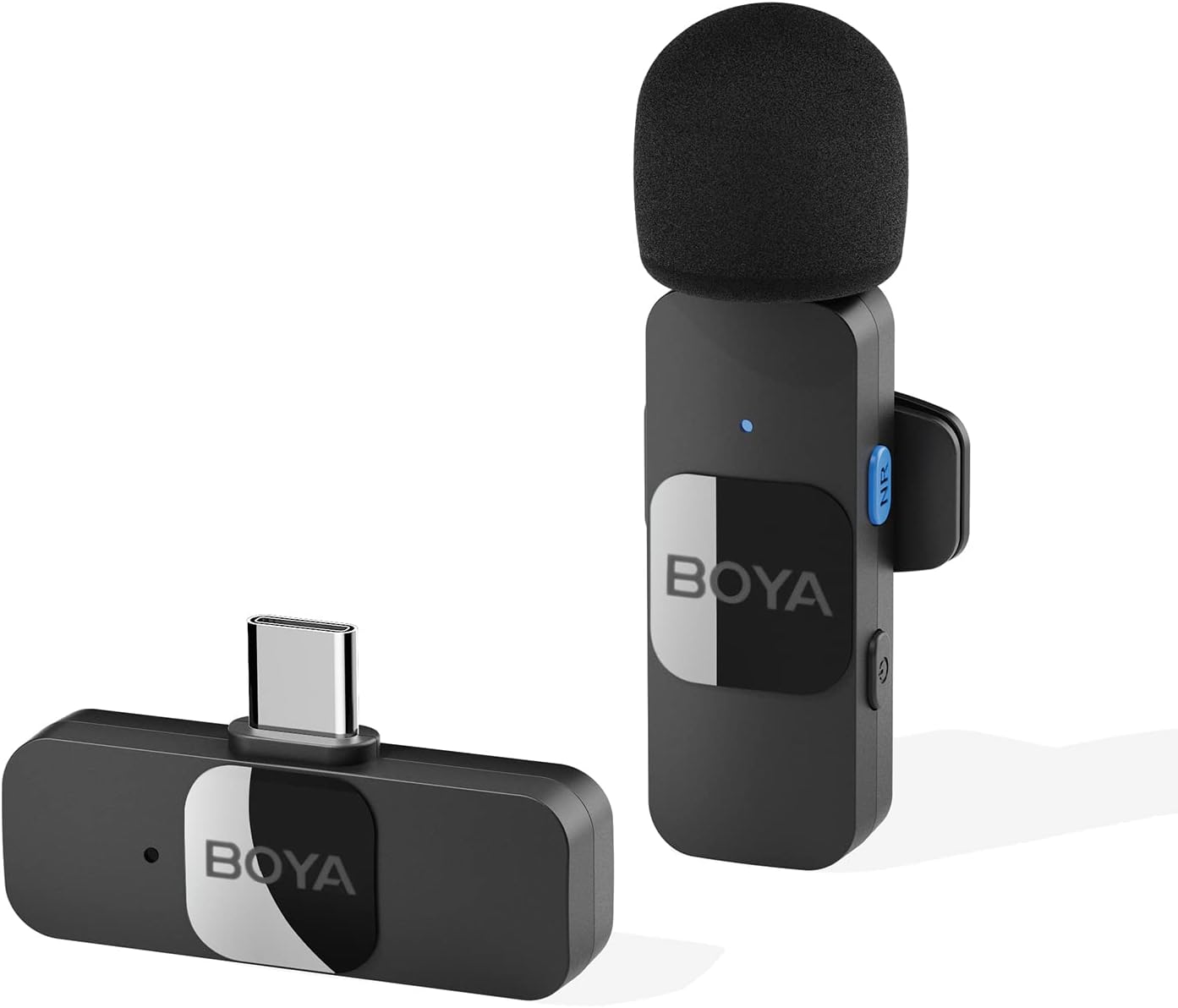
Thank you for choosing the BOYA BY-V10 Wireless Lavalier Microphone. This innovative microphone system is designed to provide high-quality audio for your video recording, live streaming, podcasting, and online conferencing needs. Its compact design, easy setup, and advanced features make it an excellent tool for content creators and professionals alike.
2. Cosa c'è nella scatola
BY-V10-TX Transmitter ×1
BY-V10-RX Receiver ×1
Cavo di ricarica USB-C × 1
Foam Windscreen ×1
Figure 1: BOYA BY-V10 Wireless Lavalier Microphone system, showing the transmitter with a foam windscreen and the USB-C receiver.
3. Guida all'installazione
3.1 Carica iniziale
Before first use, ensure both the transmitter and receiver are fully charged. Connect the provided USB-C charging cable to the charging ports on both units and a power source. A full charge takes approximately two hours, providing up to 9 hours of operation time.
Figure 2: The BOYA BY-V10 offers a long battery life, with a 95mAh capacity providing up to 9 hours of usage after a 2-hour charge.
3.2 Connessione automatica
Plug the BY-V10-RX receiver directly into the USB-C port of your smartphone, tablet, or laptop.
Turn on the BY-V10-TX transmitter. The units will automatically pair within seconds.
Nota importante: For Android devices, ensure the USB OTG (On-The-Go) setting is enabled in your device's settings for proper microphone recognition.
Figure 3: The BY-V10 is widely compatible with Type-C smartphone devices and iOS system devices, including the iPhone 15 series.
4. Istruzioni per l'uso
4.1 Posizionamento del microfono
The BY-V10 transmitter can be handheld or clipped onto your shirt using its rotatable back clip. For optimal sound capture, position the microphone approximately 6-8 inches from your mouth.
4.2 Cancellazione del rumore
The microphone features advanced noise reduction technology. To activate or deactivate noise cancellation, press the dedicated NR (Noise Reduction) button on the transmitter. This feature helps to minimize background noise for clearer audio, especially in noisy environments.
Figure 4: Enhance voice clarity with the one-click noise cancellation feature, activated by the NR button on the transmitter.
4.3 Rilevamento del suono omnidirezionale
Equipped with an omnidirectional pickup microphone, the BY-V10 captures 360-degree sound with precision. This ensures that no audio detail is missed, regardless of the surrounding environment or the direction of the sound source.
4.4 Trasmissione wireless
The system operates on a 2.4G signal, providing stable and low-latency audio transmission. It supports a wireless range of up to 164 feet (50 meters) in open environments without obstacles or interference, allowing for flexible recording distances.
Figure 5: Experience reliable audio transmission up to 164 feet (50 meters) in open, unobstructed environments.
4.5 Ricarica simultanea
The receiver allows you to charge your device simultaneously while recording, ensuring uninterrupted long recording sessions for live streaming or course recording.
5. Manutenzione
Keep the microphone and receiver clean and free from dust. Use a soft, dry cloth for cleaning.
Conservare le unità in un luogo fresco e asciutto, lontano dalla luce solare diretta e da temperature estreme.
Ensure the foam windscreen is securely attached to the transmitter to prevent loss and provide optimal wind noise reduction. Replacement windscreens can be acquired if needed.
Evitare di far cadere o di sottoporre le unità a forti urti.
6. Risoluzione Dei Problemi
Problema
Possibile causa
Soluzione
Microphone not connecting/pairing.
USB OTG not enabled (Android). Unità non accese. Batteria scarica.
Enable USB OTG in your device settings. Ensure both transmitter and receiver are turned on. Caricare completamente entrambe le unità.
Poor sound quality/excessive background noise.
Noise cancellation off. Microphone too far from source. Interferenza ambientale.
Press the NR button to activate noise cancellation. Ensure microphone is within optimal range (6-8 inches). Move to a less noisy environment if possible.
Durata breve della batteria.
Ricarica incompleta. Frequent use of power-intensive features.
Assicurarsi che le unità siano cariche per tutte le 2 ore. Minimize continuous use of noise cancellation if not critical.
7. Specifiche
Caratteristica
Specificazione
Numero di modello
BY-V10
Fattore di forma del microfono
Lavalier
Modello polare
Omnidirezionale
Tecnologia di connettività
Wireless 2.4GHz
Tipo di connettore
USB di tipo C
Dispositivi compatibili
Smartphone, computer portatile, tablet
Sensibilità Audio
42 dB
Signal-to-Noise Ratio
78 dB
Gamma di frequenza
Da 20 Hz a 16 kHz
Peso dell'articolo
5.3 once (150 grammi)
Dimensioni del prodotto
4.72 x 3.15 x 1.18 pollici
Fonte di alimentazione
Alimentato a batteria (sono necessarie 3 batterie agli ioni di litio)
8. Garanzia e supporto
For detailed warranty information and further support, please refer to the official Instructions for Use (IFU) PDF document provided by BOYA.
BOYA BY-M1 Manuale d'uso del microfono lavalier universale Guida completa al microfono lavalier universale BOYA BY-M1, che copre caratteristiche, configurazione, utilizzo con fotocamere e smartphone, risoluzione dei problemi e specifiche.
Domande e risposte sul sistema microfonico wireless BOYA BY-V Guida completa con domande e risposte sul sistema di microfoni wireless BOYA BY-V, che copre configurazione, connettività, problemi audio e suggerimenti per l'utilizzo su vari dispositivi mobili.
Manuale utente del microfono wireless trasformabile BOYA Magic AI-Powered Manuale utente completo per il sistema di microfono wireless trasformabile BOYA Magic AI-Powered, che descrive in dettaglio le sue caratteristiche, la struttura del prodotto, il funzionamento, le specifiche e la risoluzione dei problemi per i creatori di contenuti.
BOYA mini 2: Manuale utente del microfono wireless super mini aggiornato Manuale utente completo per BOYA mini 2, un sistema microfonico wireless super-mini aggiornato con riduzione del rumore tramite intelligenza artificiale, batteria a lunga durata e compatibilità versatile con smartphone, tablet e fotocamere. Scopri di più su configurazione, funzionalità, specifiche e risoluzione dei problemi.