1. Informazioni sulla sicurezza
Si prega di leggere attentamente tutte le avvertenze e le istruzioni di sicurezza prima di utilizzare questo prodotto. Il mancato rispetto di queste istruzioni può causare scosse elettriche, incendi e/o lesioni gravi.
- Non smontare o modificare il dispositivo.
- Non esporre il dispositivo a temperature estreme o alla luce solare diretta per periodi prolungati.
- Prima di guidare, assicurarsi che il dispositivo sia fissato saldamente al casco.
- Dare sempre priorità alla sicurezza stradale. Non utilizzare il dispositivo in modo da distrarti dalla guida.
- Tenere il dispositivo lontano dalla portata dei bambini.
- For better waterproof effect, keep the speaker ports facing downwards for 1-2 hours after use in rainy conditions.
2. Contenuto della confezione
Verifica che tutti gli articoli siano presenti nel tuo pacco:

Image: Contents of the FODSPORTS M1S-AIR package, showing two intercom units, speaker sets, microphone options (boom and button), USB-C charging cables, mounting clips, adhesive pads, and a user manual.
- M1S-AIR Bluetooth Intercom Unit (2x)
- Helmet Speakers (2x sets)
- Boom Microphone (2x)
- Button Microphone (2x)
- Staffa di montaggio (2x)
- Adhesive Pads (various)
- Cavo di ricarica USB-C (2x)
- Manuale dell'utente (questo documento)
3. Prodotto finitoview
The FODSPORTS M1S-AIR is a Bluetooth 5.0 helmet communication system designed for motorcycle riders. It features two-way intercom, music sharing, FM radio, and CVC noise reduction.

Image: A pair of FODSPORTS M1S-AIR intercom units, highlighting their sleek design and primary control buttons. The units are silver and black with blue LED accents.
3.1. Caratteristiche dell'unità
- Tecnologia Bluetooth 5.0 per connessioni stabili.
- Two-way intercom communication.
- Music sharing capability.
- Three distinct music sound effects.
- CVC noise reduction for clear audio.
- Radio FM integrata.
- Porta di ricarica USB-C.
- Glove-friendly buttons for easy operation.

Image: A rider in a helmet and gloves interacting with the M1S-AIR unit, illustrating the ease of use with motorcycle gloves.
3.2. Porte e indicatori

Immagine: Un dettaglio view of the M1S-AIR unit's side, showing the USB-C charging port and an illuminated display indicating battery status. Icons for charging, music, phone calls, standby, and intercom are visible.
- Porta USB-C: Per caricare il dispositivo.
- Speaker/Mic Port: Collega gli altoparlanti e il microfono del casco.
- Indicatore LED: Visualizza lo stato del dispositivo (ad esempio, associazione, connesso, in carica).
4. Configurazione e installazione
Follow these steps to install the M1S-AIR unit onto your helmet.

Image: A step-by-step visual guide demonstrating the installation process of the M1S-AIR unit. It shows attaching the adhesive pad to the mounting clip, securing the clip to the helmet, and sliding the intercom unit into the clip.
- Scegli la posizione di montaggio: Scegli una superficie piana sul lato sinistro del casco.
- Fissare la clip di montaggio:
- Supporto adesivo: Clean the helmet surface. Peel off the protective film from the adhesive pad and firmly press the mounting clip onto the helmet. Hold for 30 seconds.
- Clamp Montare: If your helmet allows, use the clamp mount by sliding it between the helmet shell and padding. Tighten the screws.
- Installare gli altoparlanti: Place the speakers inside the helmet's ear pockets. Ensure they are positioned directly over your ears for optimal sound.
- Installa microfono:
- Microfono a braccio: For open-face or modular helmets. Attach it to the inside of the helmet, positioning the microphone close to your mouth.
- Microfono a pulsante: For full-face helmets. Attach it to the inside of the chin bar, ensuring it is not obstructed.
- Collegare i cavi: Plug the speaker and microphone cables into the corresponding port on the M1S-AIR unit.
- Unità citofonica di montaggio: Slide the M1S-AIR unit onto the installed mounting clip until it clicks into place.
5. Istruzioni per l'uso
5.1. Accensione/spegnimento
- Accensione: Tenere premuto il pulsante di accensione per circa 3 secondi finché l'indicatore LED non si accende.
- Spegni: Tenere premuto il pulsante di accensione per circa 3 secondi finché l'indicatore LED non si spegne.
5.2. Accoppiamento Bluetooth (telefono cellulare)
- With the M1S-AIR powered off, press and hold the Power button for about 5-7 seconds until the LED indicator flashes red and blue alternately, indicating pairing mode.
- On your mobile phone, enable Bluetooth and search for "FODSPORTS M1S-AIR".
- Select the device to connect. Once paired, the LED indicator will flash blue slowly.
5.3. Comunicazione interfonica
The M1S-AIR supports two-way intercom communication between two units.

Image: Two motorcyclists riding on a road, visually representing two-way communication through their M1S-AIR intercom systems. Speech bubbles illustrate a clear conversation between them.
- Ensure both M1S-AIR units are powered on and within range.
- On one unit, press the Intercom button once to initiate pairing with another M1S-AIR unit. The LED will flash rapidly.
- On the second unit, also press the Intercom button once.
- Once connected, both units will have a steady blue LED, and you can begin speaking.
- To end intercom, press the Intercom button once.
5.4. Riproduzione e condivisione di musica
You can play music from your paired phone and share it with another M1S-AIR unit.

Image: Two motorcyclists riding, with a smartphone displaying a music player interface. Music notes are depicted flowing from one rider's helmet to the other, illustrating the music sharing feature of the M1S-AIR intercom system.
- Riproduci/Pausa: Premi una volta il pulsante Multifunzione.
- Traccia successiva: Premere il pulsante Volume su.
- Traccia precedente: Premere il pulsante Volume giù.
- Condivisione di musica: While music is playing, press and hold the Music Share button (specific button, refer to device layout) to share with a paired M1S-AIR unit. Note: Music sharing only works between two M1S-AIR units. Pause music before initiating sharing.
5.5. Effetti sonori
The M1S-AIR offers three distinct sound effects for music playback.

Image: An illustration showing three distinct sound effect modes: "Pure human voice" (depicted by a singer), "Popular Golden Classic" (depicted by a concert stage), and "HiFi bass" (depicted by a saxophonist), indicating customizable audio experiences.
- To cycle through "Pure human voice", "Popular Golden Classic", and "HiFi bass" effects, press the EQ button (refer to device layout).
- Note: The selected music effect needs to be reset each time the M1S-AIR unit is powered on.
5.6. Radio FM
The M1S-AIR includes a built-in FM radio.

Image: A motorcycle helmet with the M1S-AIR unit attached, overlaid with a graphic of radio waves and an FM frequency tuner dial ranging from 76-108 MHz, indicating the device's FM radio capability.
- Accendere/spegnere la radio FM: Premere una volta il pulsante FM.
- Scansione canali: Press and hold the Volume Up or Volume Down button to automatically scan for available FM channels.
- Cambia canale: Briefly press the Volume Up or Volume Down button to switch between saved channels.
5.7. Assistente vocale (Siri/Assistente Google)
Activate your smartphone's voice assistant directly from the M1S-AIR.
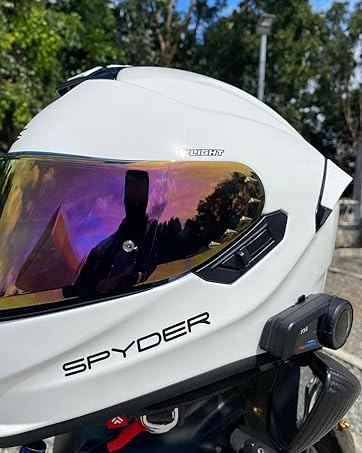
Image: A motorcyclist in a helmet, with a speech bubble indicating "Hey~ Siri, Call Alice!". A smartphone screen shows "Call in progress...", demonstrating the voice command feature for activating a voice assistant like Siri through the M1S-AIR unit.
- Attiva l'assistente vocale: Briefly press the Voice Assistant button (refer to device layout).
5.8. Controllo del volume
- Aumenta volume: Premere il pulsante Volume su.
- Diminuisci volume: Premere il pulsante Volume giù.
6. Manutenzione
- Pulizia: Utilizzare un morbido, damp panno per pulire l'unità. Non utilizzare prodotti chimici aggressivi o detergenti abrasivi.
- Resistenza all'acqua: The M1S-AIR is IP65 waterproof. However, for optimal longevity, avoid prolonged exposure to heavy rain. After use in wet conditions, ensure speaker ports are facing down for 1-2 hours to allow drainage.
- Magazzinaggio: Conservare il dispositivo in un luogo fresco e asciutto quando non viene utilizzato.
- Cura della batteria: Per preservare la salute della batteria, caricarla regolarmente, anche se il dispositivo non viene utilizzato frequentemente.
7. Risoluzione Dei Problemi
If you encounter issues with your M1S-AIR unit, refer to the following common problems and solutions:
| Problema | Possibile causa | Soluzione |
|---|---|---|
| Impossibile accendere | Batteria scarica. | Caricare il dispositivo per almeno 3 ore. |
| Impossibile associare il telefono | Dispositivo non in modalità di associazione; Bluetooth disattivato sul telefono. | Ensure M1S-AIR is in pairing mode (red/blue flashing LED). Enable Bluetooth on your phone. |
| Intercom Connection Issues | Units out of range; incorrect pairing procedure. | Ensure units are within 1000m. Re-initiate intercom pairing. |
| Music Sharing Not Working | Music not paused before sharing; unit occupied. | Pause music on the source unit before sharing. Ensure the unit is not in another mode (e.g., intercom call). |
| Low Volume at High Speed | External noise (wind); speaker placement. | Adjust speaker position closer to ears. Ensure helmet fit is snug to minimize wind noise. The CVC noise reduction helps, but extreme conditions may still affect audio. |
| Sound Effects Reset | Funzionamento normale. | The selected music effect needs to be reset each time the M1S-AIR unit is powered on. This is by design. |

Image: A graphic illustrating the effect of CVC noise control. A motorcyclist is shown with sound waves around their helmet, depicting a reduction in echo and background noise, resulting in clearer audio.
8. Specifiche
Key technical specifications for the FODSPORTS M1S-AIR Bluetooth Motorcycle Intercom System:
| Caratteristica | Dettaglio |
|---|---|
| Nome del modello | M1S-AIR Motorcycle Bluetooth Intercom |
| Versione Bluetooth | 5.0 |
| Tecnologia di connettività | Bluetooth 5, senza fili |
| Interfono Distanza | Fino a 1000 metri (2 ciclisti) |
| Durata della batteria (interfono) | 15 ore |
| Battery Life (Music/Phone) | 15 ore |
| Tempo di standby | 300 ore |
| Tempo di ricarica | 3 ore |
| Interfaccia di ricarica | USB-C |
| Livello di resistenza all'acqua | IP65 impermeabile |
| Controllo del rumore | Active Noise Cancellation, Wind Noise Reduction (CVC) |
| Metodo di controllo | Touch, Voice (Siri/Google Assistant) |
| Peso dell'articolo | 1.52 libbre (per 2 unità) |
| Produttore | FODSPORT |

Image: The underside of the M1S-AIR unit, displaying the FODSPORTS brand, model number (M1S-AIR), and various regulatory compliance logos such as CE, UKCA, FC, and RoHS.
9. Video ufficiale del prodotto
Watch this introductory video for a visual guide to the FODSPORTS M1S-AIR Bluetooth Motorcycle Intercom System.
Video: An official introduction to the Fodsports M1S AIR Motorcycle Bluetooth Intercom, showcasing its features like Bluetooth 5.0, 3-rider intercom, USB-C charging, HiFi sound, and CVC noise reduction technology.
10. Garanzia e supporto
FODSPORTS products are designed for reliability and performance. For warranty information, technical support, or service inquiries, please refer to the contact information provided on the product packaging or visit the official FODSPORTS websito.
Conservare la ricevuta d'acquisto come prova d'acquisto per eventuali reclami in garanzia.


