User Manual: AXIS P1468-LE Compact Outdoor Camera
Model: 02342-001 | Brand: Axis Communications
Introduzione
The AXIS P1468-LE is a robust, outdoor-ready network camera designed for advanced surveillance scenarios. It delivers excellent image quality and incorporates deep learning-based analytics at the edge, enhancing its capabilities for intelligent monitoring. This camera also features built-in cybersecurity measures to ensure secure operation. This manual provides essential information for the setup, operation, and maintenance of your AXIS P1468-LE camera.
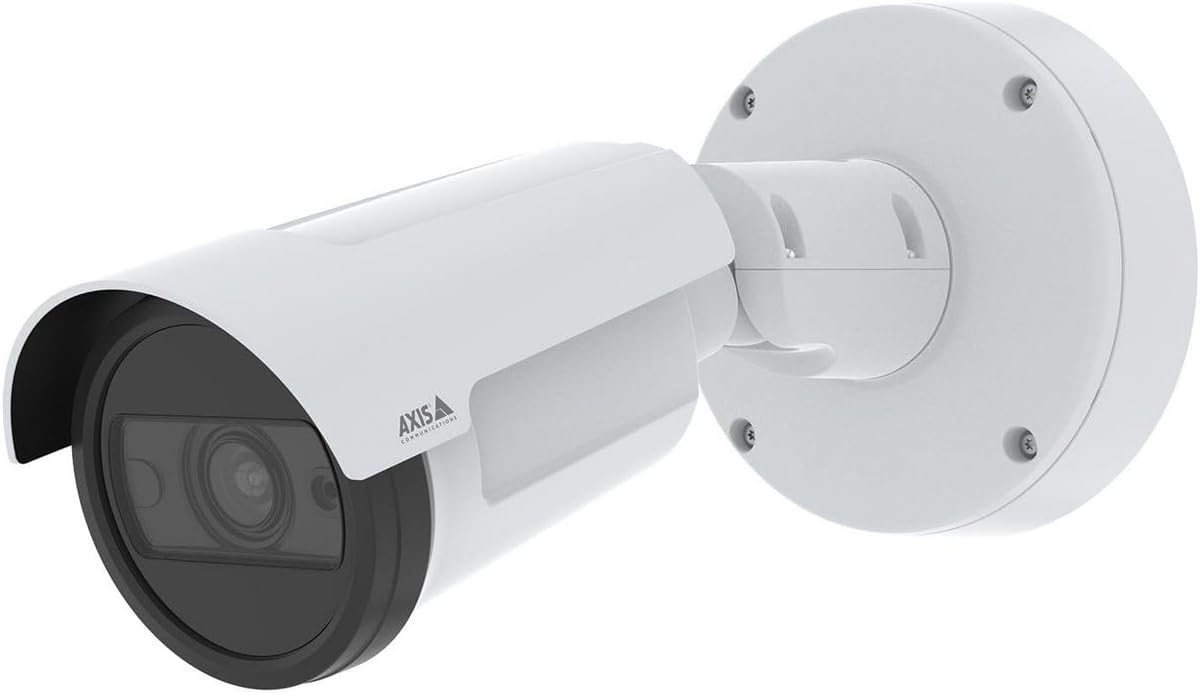
Figura 1: The AXIS P1468-LE Compact Outdoor Camera, showcasing its white cylindrical body, integrated sunshield, and wall-mount bracket. The camera features a dark lens housing and the Axis Communications logo on its side.
Impostare
1. Contenuto della confezione
Prima di iniziare l'installazione, verificare che tutti i componenti siano presenti:
- Telecamera di rete AXIS P1468-LE
- Guida all'installazione
- Staffa di montaggio e hardware
- Modello di trapano
- Resistorx® T20 tool
2. Montaggio della fotocamera
The AXIS P1468-LE is designed for wall or ceiling mounting. Ensure the mounting surface is strong enough to support the camera's weight and withstand environmental conditions.
- Seleziona Località: Scegli una posizione che fornisca il campo desiderato di view and is within reach of network and power connections.
- Prepara la superficie: Use the provided drill template to mark the drilling holes on the mounting surface.
- Installare la staffa: Secure the mounting bracket using appropriate screws and anchors for your surface type.
- Collega la fotocamera: Mount the camera body onto the bracket, ensuring it is securely fastened. Adjust the camera's angle for optimal viewing.
3. Connessione di rete e alimentazione
Connect the camera to your network and power source. The camera supports Power over Ethernet (PoE) for simplified installation.
- Cavo Ethernet: Connect a standard Ethernet cable from your network switch (preferably PoE-enabled) to the camera's Ethernet port.
- Potenza (opzionale): If PoE is not used, connect a compatible power adapter (not included) to the camera's power input. Refer to specifications for voltage requisiti.
4. Configurazione iniziale
Dopo l'installazione fisica, accedere alla telecamera web interfaccia per la configurazione iniziale.
- Scopri la fotocamera: Use the AXIS IP Utility or AXIS Device Manager software to discover the camera on your network.
- Accesso Web Interfaccia: Aprire un web browser e inserisci l'indirizzo IP della telecamera.
- Imposta password di root: For security, you will be prompted to set a new root password upon first access.
- Configura impostazioni: Follow the on-screen wizard to configure basic settings such as IP address, date/time, and video stream settings.
Utilizzo della fotocamera
1. Vivere View e Registrazione
Accedi alla diretta della telecamera view and manage recording settings through its web interface or a compatible Video Management Software (VMS).
- Vivere View: Vai alla sezione "Live" View" per vedere il feed video in tempo reale.
- Registrazione: Configure recording schedules, motion detection triggers, and storage locations (e.g., SD card, network storage) under the "Recordings" or "Events" section.
2. Funzionalità avanzate
The AXIS P1468-LE offers several advanced features for enhanced surveillance:
- Deep Learning Analytics: Utilize built-in analytics for object classification, motion detection, and other intelligent event triggers. Configure these under the "Applications" or "Analytics" menu.
- Cybersecurity Features: The camera includes features like signed firmware and secure boot to prevent unauthorized access and ensure system integrity. Regularly check for firmware updates to maintain security.
- Illuminazione IR: The integrated IR LEDs provide clear video in low-light or complete darkness. This feature is typically automatic but can be adjusted in video settings.
Manutenzione
1. Pulizia della fotocamera
Una pulizia regolare garantisce una qualità dell'immagine ottimale e prolunga la durata della fotocamera.
- Lente: Gently wipe the lens with a soft, lint-free cloth moistened with a mild cleaning solution or lens cleaner. Avoid abrasive materials.
- Alloggiamento: Pulisci l'alloggiamento della fotocamera con un pannoamp stoffa. Non utilizzare detergenti aggressivi o solventi.
2. Aggiornamenti del firmware
Keep the camera's firmware updated to benefit from the latest features, performance improvements, and security patches.
- Controlla gli aggiornamenti: Visit the Axis Communications website or use AXIS Device Manager to check for available firmware updates for your model.
- Installazione: Follow the instructions provided by Axis for safe firmware installation. Ensure a stable power supply during the update process.
Risoluzione dei problemi
| Problema | Possibile causa | Soluzione |
|---|---|---|
| Nessun feed video | Power issue, network cable disconnected, incorrect IP address. | Check power supply/PoE, ensure Ethernet cable is securely connected, verify camera's IP address and network settings. |
| Scarsa qualità dell'immagine | Dirty lens, improper focus, low light conditions, incorrect video settings. | Clean the lens, adjust focus via web interface, ensure IR illumination is active in low light, check resolution and compression settings. |
| Impossibile accedere web interfaccia | Incorrect IP address, network connectivity issue, firewall blocking access. | Verify IP address, check network connection, temporarily disable firewall to test, reset camera to factory defaults if necessary. |
Specifiche
| Caratteristica | Dettaglio |
|---|---|
| Marca | Comunicazioni dell'asse |
| Nome del modello | AXIS P1468-LE - Netzwerk-Überwachungskam |
| Numero modello articolo | 02342-001 |
| ASIN | B0BNZ1MW19 |
| Uso interno/esterno | All'aperto |
| Tecnologia di connettività | Cablato |
| Protocollo di connettività | Spina domestica |
| Tipo di controllore | Iris |
| Tipo di montaggio | Montaggio a parete |
| Colore | Bianco |
| Numero di articoli | 1 |
| Componenti inclusi | Fotocamera/Accessori |
| Numero di canali | 4 |
| Tecnologia di comunicazione wireless | Wifi |
| Materiale | Metallo |
| Cosatage | 16 watt |
| Dimensioni articolo (LxPxA) | 19.69 x 19.69 x 11.02 pollici |
| Sono necessarie batterie? | NO |
| Peso dell'articolo | 1.5 chilogrammi (3.3 libbre) |
| Tipo di zoom | Zoom ottico |
| Tipo di avviso | Solo movimento |
| Tipologia di camera | Ufficio |
| Tipo di sorgente luminosa | Infrarossi |
| Formato di acquisizione video | Formato MPEG-4 |
| Conteggio unità | 1.0 Conteggio |
| Tecnologia del sensore fotografico | CMOS |
| Valutazione internazionale di protezione | IP66, IP67 |
| Metodo di controllo | Applicazione |
| Sistema operativo | iOS |
| Produttore | ASSE - TELECAMERA |
| Data prima disponibilità | 31 luglio 2022 |
| Usi consigliati per il prodotto | Sorveglianza |
| Caratteristica speciale | Mac, Netcam, PC, Wireless connectivit |
Garanzia e supporto
1. Garanzia del prodotto
Axis Communications products typically come with a limited hardware warranty. For specific warranty terms and conditions applicable to your AXIS P1468-LE camera, please refer to the warranty documentation included with your purchase or visit the official Axis Communications websito.
2. Supporto tecnico
For technical assistance, troubleshooting, or further inquiries regarding your AXIS P1468-LE camera, please contact Axis Communications support:
- Supporto online: Visitare il Axis Communications Support Portal for FAQs, documentation, and software downloads.
- Informazioni sui contatti: Find regional contact details for phone or email support on the official Axis Communications websito.
When contacting support, please have your camera's model number (02342-001) and serial number ready.