1. Introduzione
The Sharper Image Smartphone TV Screen Magnifier enhances your mobile viewing experience by transforming your smartphone screen into a larger, 12-inch curved display. This device is cordless and rechargeable, featuring dual 5W wireless speakers for an immersive audio experience. It is designed for convenient viewing of movies, videos, and games, and is suitable for travel or presentations.
2. Prodotto finitoview
Familiarize yourself with the components of your Smartphone TV Screen Magnifier.

Figura 2.1: The Smartphone TV Screen Magnifier with a phone mounted, showing the magnified display.
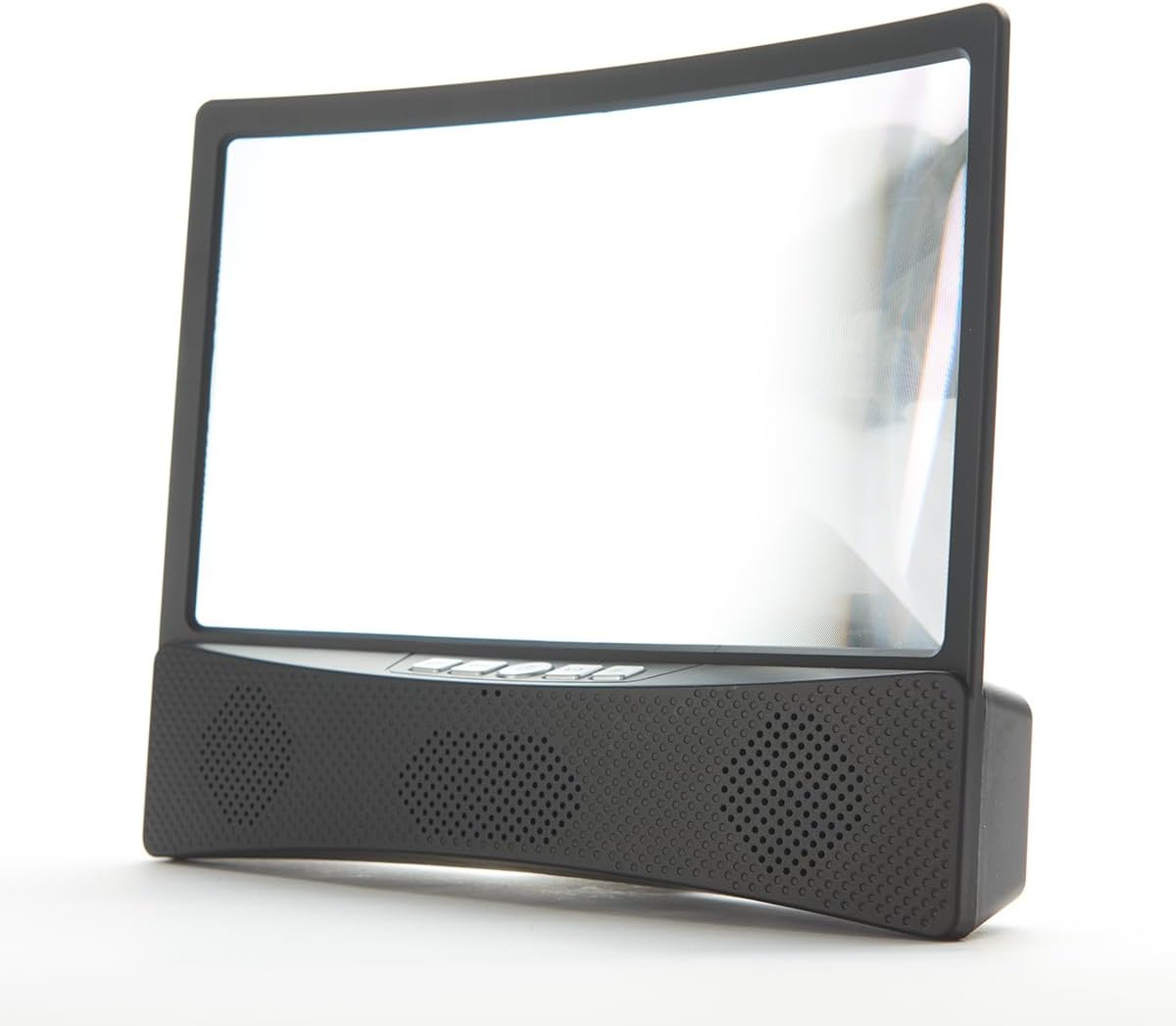
Figura 2.2: Davanti view of the device, highlighting the curved screen and integrated speaker grilles.

Figura 2.3: Lato view illustrating the device's profile and the adjustable phone stand.
Componenti:
- Curved Magnifier Screen: 12-inch display for enlarged viewing.
- Supporto per smartphone: Securely holds your smartphone above the magnifier.
- Integrated Speaker Base: Houses dual 5W wireless speakers and control buttons.
- Pulsanti di controllo: Power, volume, and playback controls (refer to device for specific button layout).
- Porta di ricarica: Per ricaricare la batteria interna.
3. Impostazione
3.1 Ricarica del dispositivo
Before first use, fully charge the Smartphone TV Screen Magnifier. Connect the provided charging cable to the device's charging port and to a suitable USB power source. The charging indicator light will show the charging status.
3.2 Placing Your Smartphone
- Gently pull up the smartphone holder located at the top of the magnifier unit.
- Place your smartphone securely into the holder, ensuring it is stable.
- Adjust the angle of your phone for optimal viewing through the magnifier screen.
3.3 Accensione e associazione Bluetooth
- Press and hold the Power button on the speaker base until the indicator light illuminates.
- Sul tuo smartphone, vai alle impostazioni Bluetooth.
- Cercare available devices and select "Sharper Image Magnifier" (or similar name) to pair.
- Once paired, you will hear a confirmation tone, and audio from your phone will play through the magnifier's speakers.
4. Funzionamento
4.1 Using the Magnifier Screen
Once your smartphone is placed in the holder, content displayed on your phone screen will be magnified and projected onto the 12-inch curved screen. Adjust your viewing distance and the phone's angle for the clearest image.
4.2 Controlli degli altoparlanti
- Pulsante di accensione: Tenere premuto per accendere o spegnere il dispositivo.
- Volume su/giù: Premere i pulsanti '+' o '-' per regolare il volume dell'altoparlante.
- Riproduci/Pausa: Press the Play/Pause button to control media playback on your connected smartphone.
- Salta traccia: Use the appropriate buttons (refer to device markings) to skip forward or backward through tracks.
5. Manutenzione
5.1 Pulizia
- Schermo: Utilizzare un panno morbido e privo di lanugine, leggermente dampened with water or a screen-safe cleaner, to gently wipe the magnifier screen. Avoid abrasive materials or harsh chemicals.
- Corpo: Pulire le superfici esterne con un panno morbido e asciutto.
5.2 Cura della batteria
- Per prolungare la durata della batteria, evitare di scaricare completamente il dispositivo frequentemente.
- Recharge the device regularly, even if not in constant use.
- Conservare il dispositivo in un luogo fresco e asciutto quando non viene utilizzato.
5.3 Conservazione
When not in use, fold down the smartphone holder and store the device in a clean, dry environment away from direct sunlight and extreme temperatures.
6. Risoluzione Dei Problemi
6.1 Nessun potere
- Assicurati che il dispositivo sia completamente carico. Collegalo a una fonte di alimentazione e lascialo caricare per almeno 30 minuti prima di riprovare ad accenderlo.
- Verificare che il cavo di ricarica e l'adattatore funzionino correttamente.
6.2 No Sound from Speakers / Bluetooth Connection Issues
- Assicurarsi che il dispositivo sia acceso e completamente carico.
- Verifica che il Bluetooth sia abilitato sul tuo smartphone.
- Assicurati che il dispositivo si trovi nel raggio d'azione del Bluetooth (in genere 10 metri o 33 piedi).
- Disaccoppia e riassocia il dispositivo dalle impostazioni Bluetooth dello smartphone.
- Increase the volume on both the magnifier and your smartphone.
6.3 Screen Clarity Issues
- Ensure the magnifier screen is clean and free of dust or smudges.
- Adjust the position and angle of your smartphone in the holder.
- Regola il tuo viewing distance from the magnifier screen.
7. Specifiche
- Dimensioni dello schermo: Display curvo da 12 pollici
- Uscita altoparlante: Doppi altoparlanti wireless da 5 W
- Fonte di energia: Batteria interna ricaricabile
- Connettività: Wireless (Bluetooth)
- Numero modello: B0BP6YDWHM
- Produttore: Immagine più nitida
8. Dimostrazioni video
Watch these official videos for visual guidance on using your Sharper Image Smartphone TV Screen Magnifier.
8.1 Prodotto finitoview and Features (1:10)
Questo video fornisce una panoramica generaleview of the Smartphone TV Screen Magnifier and its key features, including the magnified display and wireless speakers.
8.2 Setup and Basic Operation (1:28)
Learn how to set up your device, place your smartphone, and perform initial Bluetooth pairing for audio playback.
8.3 Advanced Usage Tips (1:50)
This video demonstrates additional tips for optimizing your viewing and audio experience with the magnifier.
8.4 Full Demonstration (3:10)
A comprehensive demonstration covering all aspects of the product, from unboxing to advanced features.
9. Informazioni sulla sicurezza
- Non esporre il dispositivo a temperature estreme, alla luce solare diretta o a elevata umidità.
- Tenere il dispositivo lontano da acqua o altri liquidi.
- Do not attempt to disassemble or modify the device. This will void any potential warranty.
- Utilizzare solo il cavo di ricarica fornito o un equivalente certificato.
- Tenere fuori dalla portata dei bambini.
10. Garanzia e supporto
For warranty information or technical support, please contact Sharper Image customer service. Refer to the product packaging or the official Sharper Image websito per i contatti.


