1. Introduzione
This manual provides essential information for the safe and efficient operation of your ATO 5 hp 3.7 kW 460V Three-Phase Variable Frequency Drive (VFD). Please read this manual thoroughly before installation, operation, or maintenance to ensure proper usage and prevent potential hazards.
2. Informazioni sulla sicurezza
AVVERTENZA: rischio di scosse elettriche.
- Read the manual and follow all safety instructions before operation.
- Do not remove the cover while power is applied.
- Wait for at least 10 minutes after disconnecting power supply to open the cover. This allows residual voltage dissipare.
- Do not connect power to output terminals.
- The inverter must be securely grounded (earth).
- Solo personale qualificato dovrebbe eseguire l'installazione e la manutenzione.
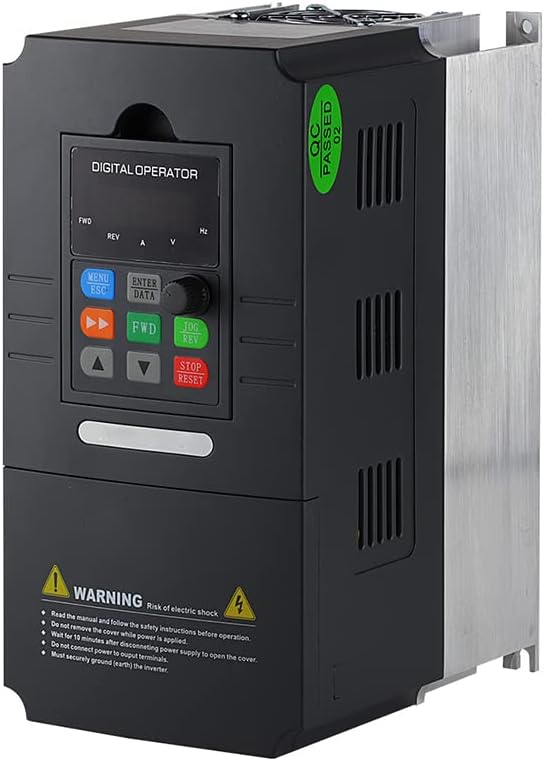
Figura 1: Angolato view of the ATO VFD, highlighting the control panel and safety warning label.
3. Prodotto finitoview
The ATO 5 hp 3.7 kW Three-Phase VFD is designed for precise speed control of three-phase induction motors. It features adjustable output frequency, automatic energy-saving operation, automatic voltage regulation, and current limiting to prevent frequent over-current trips.

Figura 2: Fronte view of the ATO VFD, showing the digital operator panel with buttons and display.
4. Specifiche
| Parametro | Valore |
|---|---|
| Nome del modello | 5 hp 3.7 kW Three Phase VFD Inverter |
| Ingresso volumetage | 3 phase 460V AC ±15% (Optional: 220V/480V) |
| Frequenza di ingresso | Frequenza di campionamento: 50 Hz/60 Hz |
| Potenza di uscita | 3.7kW/4kW (5 hp) |
| Volume di uscitatage | 3 phase AC 0~input voltage |
| Frequenza di uscita | Frequenza |
| Peso dell'articolo | 6.6 libbre |
| Dimensioni del pacco | 11.4 x 9 x 7 pollici |
| Usi consigliati | Fans, power tools, pumps, workshop equipment |
5. Configurazione e installazione
Proper installation is crucial for the VFD's performance and safety. Consult a qualified electrician for wiring if you are unfamiliar with industrial electrical systems.
5.1 Collegamenti di cablaggio
Connect the three-phase input power to the designated input terminals (R, S, T) and the motor to the output terminals (U, V, W). Ensure proper grounding of the VFD chassis.
- Potenza in ingresso: Connect 3-phase 460V AC to the input terminals.
- Collegamento del motore: Connect your 3-phase induction motor to the output terminals.
- Messa a terra: Assicurarsi che il VFD sia correttamente collegato a terra per evitare rischi elettrici.
5.2 Compatibilità del motore
When selecting a VFD, ensure:
- The rated current of the VFD is greater than the rated current of your motor.
- The rated power of the VFD is greater than the rated power of your motor, preferably by at least one level.
If unsure, provide your motor nameplate photo, input power supply details, and requirements to customer support for assistance.
6. Istruzioni per l'uso
The VFD supports various control methods and programmable parameters.
6.1 Funzionamento di base
The digital operator panel allows for direct control and parameter adjustment.
- MENÙ/ESC: Access menu or exit current setting.
- ENTER/DATA: Confirm selection or enter data.
- AVANTI/REV: Control forward/reverse direction.
- Frecce SU/GIÙ: Adjust frequency or navigate parameters.
- JOG/REV: Jog operation or reverse direction.
- ARRESTO/RESET: Stop operation or reset errors.
6.2 Frequency Control Methods
The VFD offers several methods to control motor frequency:
- Switch Button Control: Use external switch signals to start/stop the VFD and activate multi-speed settings.
- Controllo analogico: Control frequency using a 5V or 0-20mA analog signal, in conjunction with switch control for start/stop.
- Controllo potenziometro: Direct frequency control using the VFD's built-in potentiometer input terminal.
- Modbus-RTU Control: Utilize the RS485 interface for data transmission with Modbus-RTU protocol to monitor, modify frequency, start, and stop the VFD.
- DTU Wireless Remote Control: Combine a DTU terminal with the VFD for wireless transmission, where the DTU outputs an analog quantity to control VFD frequency.
6.3 Parametri di programmazione
The VFD supports customization of various parameters, including acceleration/deceleration time, frequency settings, and motor protection. Refer to the detailed programming guide (if provided separately) for specific parameter codes and values.
7. Manutenzione
Una manutenzione regolare garantisce la longevità e le prestazioni ottimali del vostro VFD.
- Mantenere il VFD pulito e libero da polvere e detriti.
- Assicurare un'adeguata ventilazione attorno all'unità per evitare il surriscaldamento.
- Controllare periodicamente tutti i collegamenti elettrici per verificarne la tenuta e l'eventuale presenza di segni di usura.
- Inspect cooling fans for proper operation and clear any obstructions.
8. Risoluzione Dei Problemi
8.1 Problemi comuni e soluzioni
- Volume di uscita erratotage (e.g., 380V instead of 460V): If the factory default output voltage is incorrect, adjust parameter P0.08 to the desired voltage (e.g., P0.08 = 460V).
- VFD Not Responding: Check power connections, input voltage, and ensure no error codes are displayed.
- Motore non in funzione: Verify motor wiring, VFD output frequency, and motor parameters.
8.2 Ripristino delle impostazioni di fabbrica
To restore the VFD to factory settings, set parameter Pd.01 = 1.
9. Assistenza clienti
If you have any questions, encounter issues with the product, or require technical assistance, please do not hesitate to contact ATO customer support. Our professional technicians are available to help you.
Ci impegniamo a rispondere a tutte le richieste entro 12 ore.


