Introduzione
This manual provides comprehensive instructions for the Keychron K1 Pro TKL Ultra-Slim QMK/VIA Custom Mechanical Keyboard. It covers setup, operation, maintenance, and troubleshooting to ensure optimal use of your device. The K1 Pro features a tenkeyless (TKL) layout, ultra-slim design, QMK/VIA programmability, Bluetooth wireless and USB wired connectivity, hot-swappable low-profile Gateron mechanical switches, and RGB backlighting with durable PBT keycaps.
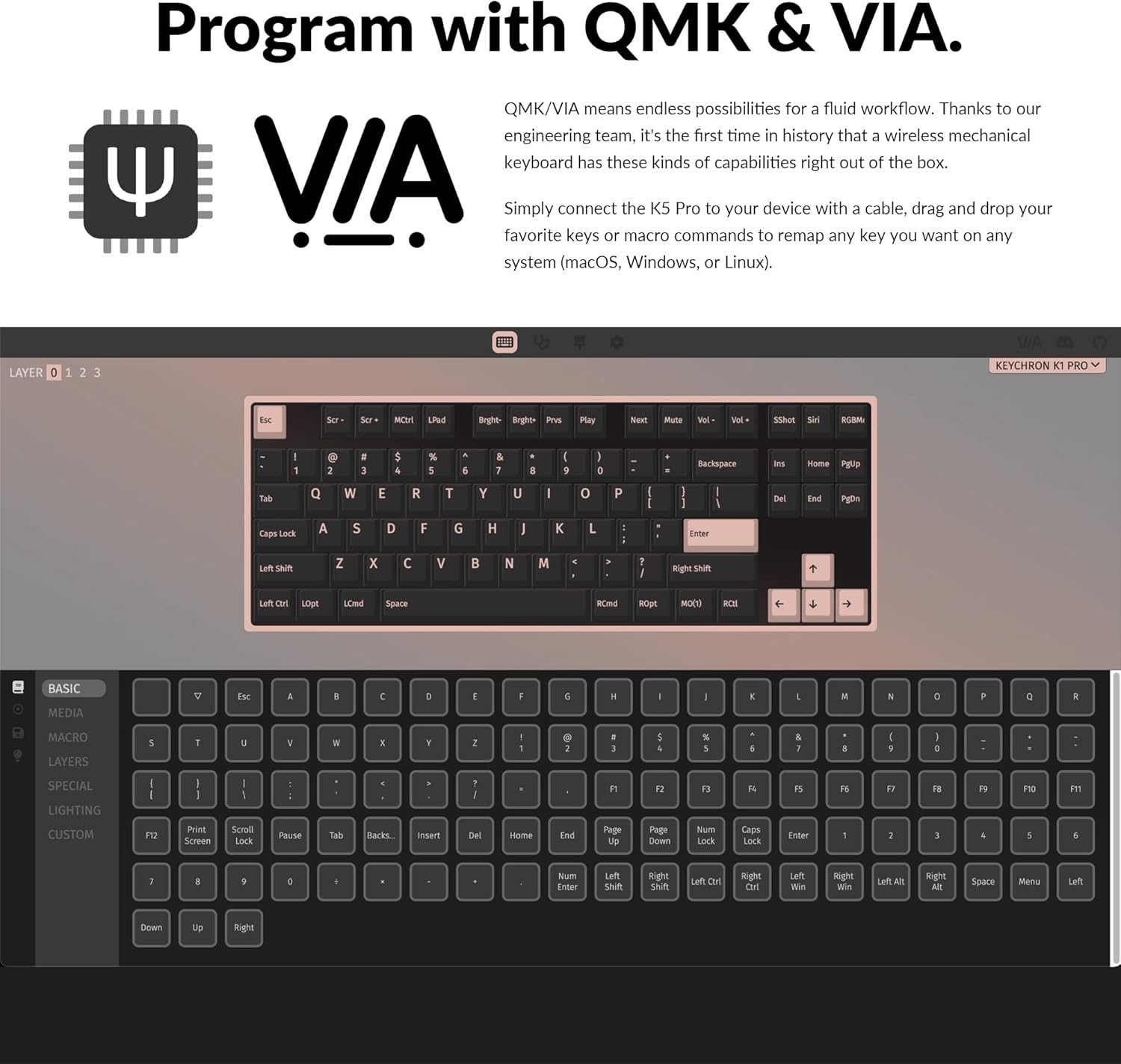
Image: The Keychron K1 Pro TKL mechanical keyboard, showcasing its compact tenkeyless layout and sleek design.
Impostare
Componenti inclusi
The Keychron K1 Pro package includes:
- 1x Fully Assembled Keyboard (including case, PCB, keycaps, and Gateron low-profile interruttori)
- 1x cavo da tipo A a tipo C
- 1x Estrattore per interruttori
- 1x estrattore per keycap

Immagine: Lato view of the Keychron K1 Pro, highlighting the physical switches for connectivity and operating system selection.
Connessione iniziale
To begin, connect the keyboard to your computer using the provided USB Type-C cable. This will power the keyboard and allow for wired operation.
Cambio del sistema operativo
Locate the operating system switch on the side of the keyboard. Slide it to the appropriate position for your system (Mac/iOS or Windows/Android) to ensure correct key mapping and functionality.
Accoppiamento Bluetooth
The K1 Pro supports Bluetooth 5.1, allowing connection to up to 3 devices wirelessly. To pair:
- Assicurarsi che la tastiera sia in modalità Bluetooth utilizzando l'interruttore laterale.
- Premere e tenere premuto il tasto Fn + 1 (O 2, 3) key combination for 4 seconds until the key starts flashing, indicating it is ready for pairing.
- On your device (laptop, phone, tablet), search for Bluetooth devices and select "Keychron K1 Pro" to connect.
- Repeat for additional devices using Fn + 2 or Fn + 3.
- Switch between paired devices by pressing Fn + 1, 2, O 3.
Istruzioni per l'uso
Modalità di connettività
The K1 Pro offers both wireless and wired connectivity:
- Senza fili Bluetooth: Connects to up to 3 devices via Broadcom Bluetooth 5.1 for seamless multitasking.
- USB Type-C cablato: Provides a stable connection with a 1000 Hz polling rate, suitable for competitive gaming.
QMK & VIA Customization
The K1 Pro is fully programmable with QMK and VIA software, allowing you to remap keys, create macros, and customize layers. Connect the keyboard via USB-C, then use the VIA software (available for macOS, Windows, or Linux) to drag and drop commands to your desired keys.

Image: Screenshot of the QMK and VIA software interface, demonstrating how to customize key assignments and macros for the Keychron K1 Pro.
Interruttori sostituibili a caldo
The K1 Pro features hot-swappable sockets, allowing you to change low-profile Gateron mechanical switches without soldering. This enables customization of your typing experience. Use the included switch puller to carefully remove and insert switches. Note: The K1 Pro is compatible only with Gateron low-profile interruttori meccanici.

Immagine: un primo piano view of the hot-swappable low-profile Gateron mechanical switches on the Keychron K1 Pro, showing how they can be easily removed and replaced.
Retroilluminazione RGB
The keyboard includes over 22 types of RGB backlight settings, along with a static white backlight option. You can fine-tune the RGB hue, saturation, brightness, and effect speed using onboard key combinations or the VIA software.

Image: The Keychron K1 Pro keyboard illuminated with vibrant RGB backlighting, showcasing vari effetti di colore.
Basso-Profile Tasti PBT a doppio colpo
The K1 Pro is equipped with durable low-profile double-shot PBT keycaps. These keycaps offer excellent oil resistance for long-term use and a comfortable typing experience.

Image: The Keychron K1 Pro keyboard on a desk, highlighting the texture and profile of its low-profile tasti PBT a doppio colpo.
Caratteristiche ergonomiche
The K1 Pro is designed for comfort with three levels of adjustable typing angle, providing ergonomic wrist support. It also features redesigned stabilizers for large keys (space bar, left Shift, backspace, Enter) to ensure reliability and minimize wobble.

Image: A split image showing the redesigned stabilizers on large keys and the adjustable typing angles of the Keychron K1 Pro for ergonomic support.

Image: An illustration comparing the ultra-slim profile of the Keychron K1 Pro (17mm) with a conventional mechanical switch and a Gateron Low-Profile 2.0 Mechanical Switch, alongside a quarter for scale.
Manutenzione
Pulizia
Per mantenere le prestazioni e l'aspetto della tastiera:
- Scollegare la tastiera dall'alimentazione prima di pulirla.
- Utilizzare un panno morbido e privo di lanugine leggermente dampPulire i tasti e il telaio con acqua o una soluzione detergente delicata.
- Per rimuovere polvere e detriti tra i tasti, utilizzare aria compressa o una piccola spazzola.
- Evitare prodotti chimici aggressivi o materiali abrasivi che potrebbero danneggiare la finitura o le legende dei tasti.
Risoluzione dei problemi
Problemi di connettività
- Disconnessione Bluetooth: Ensure the keyboard is charged. Re-pair the device if connection is lost. Some operating systems may require manual reconnection after waking from sleep.
- Connessione cablata non rilevata: Controlla la connessione del cavo USB-C a entrambe le estremità. Prova una porta USB o un cavo diverso.
Key Input Problems
- I tasti non rispondono: Ensure the correct operating system mode is selected. If using hot-swappable switches, ensure switches are fully seated.
- Output chiave errato: Verify the keyboard layout in your operating system settings. If using VIA, check your custom keymaps for unintended reassignments.
Problemi di retroilluminazione
- La retroilluminazione non funziona: Ensure the backlight is enabled and brightness is adjusted. Check keyboard battery level if in wireless mode.
- Dim LEDs: The brightness of the LEDs can vary. Ensure maximum brightness is set.
Physical Switches (Bluetooth/Cable, Win/Mac)
- Difficulty Reading Labels: The labels on the small physical switches for connectivity and OS selection can be very small. Use adequate lighting or a magnifier if needed to ensure correct selection.
Specifiche
| Marca | Chiave di cronaca |
| Numero di modello | K1PH3 |
| Descrizione della tastiera | Meccanico |
| Tecnologia di connettività | USB-C, Bluetooth 5.1 |
| Dispositivi compatibili | macOS, Windows, Linux |
| Caratteristica speciale | Backlit (RGB), Hot-swappable, QMK/VIA Programmable, Ultra-Slim |
| Supporto del colore della retroilluminazione della tastiera | Colore RGB |
| Dimensioni del prodotto | 13.62 x 4.67 x 0.95 pollici (34.59 x 11.86 x 2.41 cm) |
| Peso dell'articolo | 1.98 libbre (0.9 kg) |
| Batterie | 1 batteria ai polimeri di litio (inclusa) |
| Data prima disponibilità | 14 dicembre 2022 |
Garanzia e supporto
Per informazioni sulla garanzia, supporto tecnico o ulteriore assistenza, fare riferimento al sito ufficiale Keychron websito o contattare direttamente il servizio clienti. Conservare la ricevuta d'acquisto per eventuali reclami in garanzia.


