Prodotto finitoview
The Zendure SuperBase Pro 1500 is a portable power station designed to provide reliable power for various applications, from outdoor adventures to emergency home backup. It features a 1440 Wh capacity and a 1500W output, capable of powering a wide range of electronic devices and appliances.

Figura 1: Fronte view of the Zendure SuperBase Pro 1500, showing the main display and control buttons.
Guida all'installazione
1. Disimballaggio e ispezione iniziale
Carefully remove the SuperBase Pro 1500 from its packaging. Inspect the unit for any signs of damage during transit. Ensure all accessories listed in the packing list are present.
2. Ricarica iniziale
Before first use, it is recommended to fully charge the SuperBase Pro 1500. Connect the provided AC charging cable to the AC input port on the unit and then to a standard wall outlet. The display will indicate the charging status and battery percentage.
- Charging time may vary based on the input power source.
- Per una durata ottimale della batteria, evitare di scaricarla completamente prima di ricaricarla.

Figura 2: lato view of the SuperBase Pro 1500, highlighting the AC output ports and DC output port.
Istruzioni per l'uso
1. Accensione/Spegnimento
To power on the unit, press and hold the main power button for approximately 3 seconds. The display will illuminate. To power off, press and hold the main power button again until the display turns off.
2. Comprensione del display
Il display LCD fornisce informazioni in tempo reale sullo stato della centrale elettrica:
- Livello della batteria: Mostra la percentuale attuale della batteriatage.
- Potenza in ingresso: Indicates the power (in Watts) being drawn into the unit during charging.
- Potenza di uscita: Shows the power (in Watts) being consumed by connected devices.
- Durata residua/Tempo di ricarica: Estimates how long the unit can power devices or how long until fully charged.
- Indicatori di stato della porta: Icons for AC, DC, USB, and other ports indicate if they are active.
3. Collegamento dei dispositivi
The SuperBase Pro 1500 offers various output ports:
- Uscita CA: Press the AC power button to enable the AC outlets. Connect your AC-powered devices (e.g., laptops, small appliances) to these ports. Ensure the total power consumption does not exceed 1500W.
- Uscita CC: Press the DC power button to enable the DC output ports. These are suitable for devices requiring 12V DC power.
- Uscita USB: Connect USB-powered devices (e.g., smartphones, tablets) to the USB-A or USB-C (PD 100W, PD 20W) ports. These ports are typically always active when the unit is on.
4. Charging the SuperBase Pro 1500
The unit can be charged using multiple methods:
- Presa a muro CA: Connect the AC charging cable to a standard wall outlet.
- Pannelli solari (opzionali): Connect compatible solar panels to the solar input port. Ensure the solar panel voltage e la corrente rientrano nei limiti specificati.
- Car Charger (Optional): Use a car charger adapter to charge the unit from your vehicle's 12V cigarette lighter port.
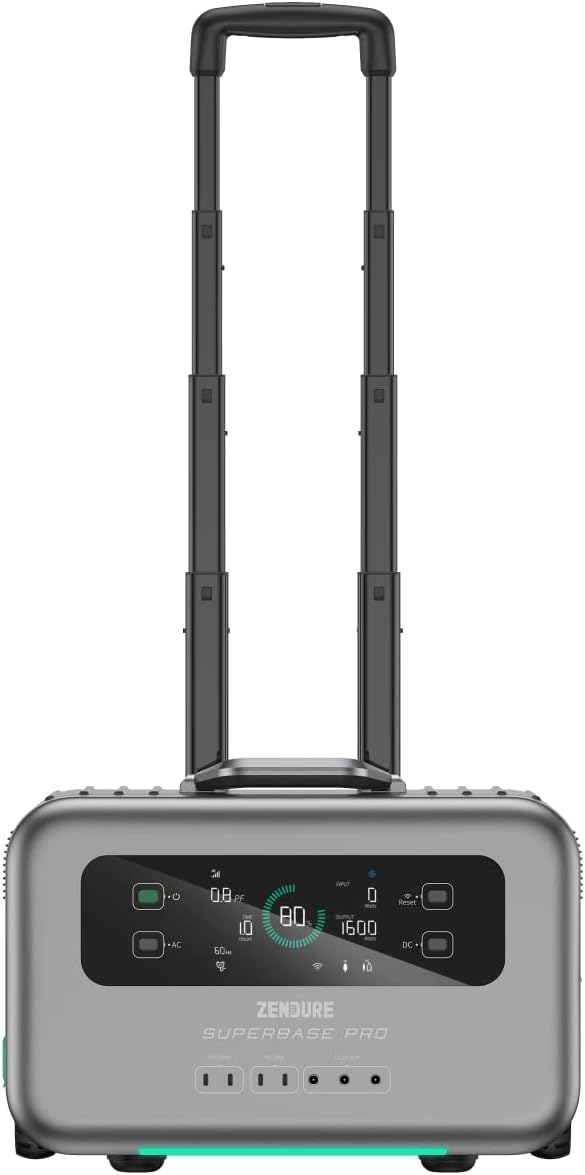
Figure 3: The SuperBase Pro 1500 with its retractable handle extended for easy transport.
Manutenzione
1. Pulizia
Regularly clean the exterior of the unit with a soft, dry cloth. Do not use abrasive cleaners or solvents. Ensure all ports are free of dust and debris.
2. Conservazione
When storing the SuperBase Pro 1500 for extended periods, ensure it is charged to approximately 50-80% capacity. Store it in a cool, dry place, away from direct sunlight and extreme temperatures. Recharge the unit every 3-6 months to maintain battery health.
3. Cura della batteria
The SuperBase Pro 1500 uses a lithium-ion battery. To maximize its lifespan:
- Evitare scariche complete frequenti.
- Do not expose the unit to temperatures below -10°C (14°F) or above 45°C (113°F) for prolonged periods.
- If the unit will not be used for a long time, charge it to 80% every 3 months.
Risoluzione dei problemi
| Problema | Possibile causa | Soluzione |
|---|---|---|
| L'unità non si accende. | La batteria è completamente scarica. | Connect to an AC outlet and charge for at least 10 minutes before attempting to power on. |
| Nessuna uscita CA. | Uscita CA non abilitata; protezione da sovraccarico attivata. | Press the AC power button to enable. Reduce the load on AC outlets; restart the unit. |
| Nessuna uscita CC. | Uscita CC non abilitata; protezione da sovraccarico attivata. | Press the DC power button to enable. Reduce the load on DC outlets; restart the unit. |
| L'unità non si carica. | Charging cable not properly connected; Input source issue. | Ensure all charging cables are securely connected. Verify the wall outlet or solar panel is functioning correctly. |
| Il display mostra un codice di errore. | Errore interno del sistema. | Note the error code and refer to the Zendure support websito o contattare il servizio clienti per assistenza. |
Specifiche
| Caratteristica | Dettaglio |
|---|---|
| Modello | SUPERBASE PRO |
| Capacità | 1440 Wh |
| Potenza di uscita CA | 1500 Watts (Rated) |
| Tipo di batteria | Agli ioni di litio |
| Dimensioni (L x P x A) | Dimensioni: 50 x 50 x 28 cm |
| Peso | 10.89 kg |
| Voltage | 1.5E+3 Volt (CC) |
| Colore | Nero |
| Codice UPC | 850020422692 |
Informazioni sulla garanzia
Zendure products typically come with a limited warranty. For detailed information regarding the warranty period, coverage, and terms and conditions for your SuperBase Pro 1500, please refer to the warranty card included with your product or visit the official Zendure websito.
Conserva la prova d'acquisto per le richieste di garanzia.
Assistenza clienti
For technical assistance, troubleshooting not covered in this manual, or service inquiries, please contact Zendure customer support.
Contact information and support resources can typically be found on the official Zendure websito:
- Zendure Official Support Page (Exampil collegamento, attuale URL può variare)
- Refer to the product packaging or included documentation for specific regional contact details.


