1. Introduzione
This manual provides essential information for the setup, operation, and maintenance of your Casio AP-470 CELVIANO Digital Piano. Please read it thoroughly to ensure proper use and to maximize your enjoyment of this instrument.
The Casio AP-470 CELVIANO is an 88-key digital cabinet piano featuring advanced sound technology for an authentic playing experience. Key features include:
- Multi-dimensional Morphing AiR Sound Source: Reproduces the rich, resonating tones of an acoustic piano with expanded memory for longer sampling duration and enhanced waveform data quality.
- String Resonance System: Incorporates a stereo resonance simulator for all 88 keys, reproducing the complex sympathetic resonances of an acoustic piano.
- Key Off Simulator: Recreates tonal variations based on the speed at which fingers are released from the keys, adding realism to reverberations.
- Hall Simulator: Simulates the acoustic characteristics of various concert halls.
- Tri-sensor Scaled Hammer Action Keyboard II: Provides a grand piano's unique sounding timing and touch response with three sensors detecting key touches sequentially.

Figure 1: Casio AP-470 CELVIANO Digital Piano with accessories.
2. Impostazione
2.1 Disimballaggio e montaggio
Carefully unpack all components from the packaging. The Casio AP-470 is a cabinet-style digital piano and requires assembly. Refer to the separate assembly guide included with your product for detailed instructions on assembling the main unit, pedal unit, and stand. Ensure all screws and fasteners are securely tightened before use.
2.2 Collegamento dell'alimentazione
- Connect the supplied AC adapter to the DC IN terminal on the rear of the piano.
- Collegare l'adattatore CA a una presa a muro standard.
2.3 Collegamento delle cuffie
For private practice, connect headphones to the 3.5mm headphone jack located on the front or side of the piano. The piano features two headphone jacks for duet practice or student/teacher use.
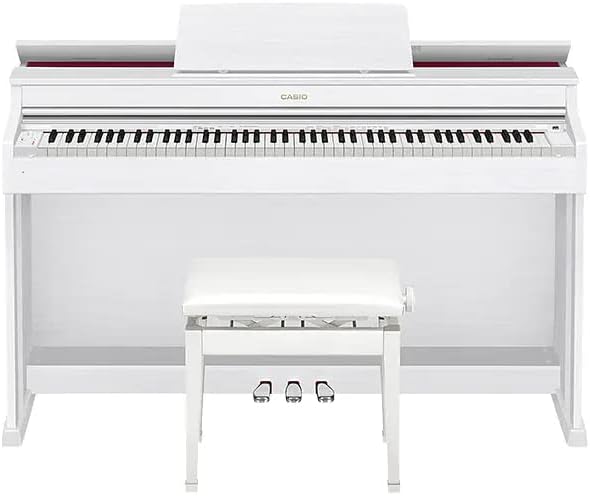
Figure 2: Assembled Casio AP-470 Digital Piano.
3. Istruzioni per l'uso
3.1 Accensione/spegnimento
Premere il tasto ENERGIA button to turn the piano on. Press and hold the ENERGIA pulsante per spegnerlo.
3.2 Regolazione del volume
Utilizzare il VOLUME knob or buttons to adjust the overall sound level. Ensure the volume is set to an appropriate level before playing.
3.3 Selezione del suono
The AP-470 offers a variety of instrument tones. The primary grand piano sounds include Concert, Mellow, and Bright variations. Use the dedicated PIANOFORTE A CODA button or other TONO selection buttons to cycle through or directly select different sounds. Refer to the detailed tone list in the full user manual for all available options.
3.4 Funzioni del pedale
The AP-470 includes three pedals: Damper (right), Sostenuto (middle), and Soft (left). These pedals function similarly to those on an acoustic grand piano, allowing for expressive control over sustain, selective sustain, and softer tones.
3.5 Hall Simulator
Activate the Hall Simulator function to apply various acoustic environments to your sound. This feature allows you to experience the sound of your piano as if played in different concert halls. Consult the full manual for specific hall types and adjustment procedures.
3.6 Key Off Simulator Adjustment
The Key Off Simulator can be adjusted to four levels to fine-tune the tonal nuances produced when releasing keys. Experiment with these settings to find your preferred response.

Figure 3: Keyboard and control panel of the AP-470.
4. Manutenzione
4.1 Pulizia dello strumento
To clean the piano's surface, use a soft, dry cloth. For stubborn dirt, lightly dampen the cloth with water and a mild, neutral detergent, then wipe dry immediately. Avoid using abrasive cleaners, solvents, or chemical sprays, as these can damage the finish. The included polishing cloth is ideal for maintaining the piano's appearance.
4.2 Cura generale
- Avoid exposing the piano to direct sunlight, extreme temperatures, or high humidity.
- Do not place heavy objects on the keyboard or lid.
- Keep liquids away from the instrument to prevent damage to electronic components.
5. Risoluzione Dei Problemi
If you encounter issues with your Casio AP-470, please refer to the following common solutions before contacting support.
| Problema | Possibile causa/soluzione |
|---|---|
| Nessun suono |
|
| Suono distorto o poco chiaro |
|
| Keys not responding or inconsistent touch |
|
For issues not covered here, please consult the comprehensive user manual or contact customer support.
6. Specifiche
| Caratteristica | Dettaglio |
|---|---|
| Nome del modello | CELVIANO AP-470 |
| Numero di chiavi | 88 |
| Tipo di tastiera | Tri-sensor Scaled Hammer Action Keyboard II |
| Sorgente sonora | Multi-dimensional Morphing AiR |
| Dimensioni (prodotto) | 60 x 22 x 23 pollici (circa) |
| Peso dell'articolo | 140 libbre (circa) |
| Fonte di alimentazione | Adattatore CA |
| Connettività | 3.5mm Jack (Headphones), Auxiliary |
| Colore | Bianco |
| Codice UPC | 840262228213 |
7. Informazioni sulla garanzia
Specific warranty terms and conditions for the Casio AP-470 CELVIANO Digital Piano are provided by the manufacturer, Casio. Please refer to the warranty card included with your product or visit the official Casio website for detailed information regarding coverage, duration, and service procedures. Additional protection plans may be available from your retailer at the time of purchase.
8. Assistenza clienti
For technical assistance, troubleshooting beyond this manual, or warranty claims, please contact Casio customer support. You can typically find contact information on the official Casio websito o tramite il rivenditore presso cui hai acquistato il prodotto.
Visit the official Casio store for more information: Negozio Casio su Amazon


