Introduzione
Thank you for choosing the iGear Spectrum Mini Bluetooth Speaker. This portable speaker is designed to deliver a rich, immersive audio experience with dynamic lighting. Please read this manual carefully before use to ensure proper operation and to maximize your enjoyment of the product.
Cosa c'è nella scatola
- 1 x iGear Spectrum Mini Bluetooth Speaker
- Cavo 1 x AUX
- 1 x cavo di ricarica (tipo C)
- 1 x Scheda di garanzia
- 1 x Manuale d'uso
Caratteristiche del prodotto
The iGear Spectrum Mini Bluetooth Speaker offers a range of features designed for an enhanced audio and visual experience:
- 360-Degree Immersive Sound: Experience audio from all directions with powerful 15W output.
- Luci LED dinamiche: Features 9 light modes and 180-degree pulsating lights to complement your music.
- Tempo di riproduzione esteso: Goditi fino a 12 ore di riproduzione musicale continua con una singola carica.
- Tecnologia True Wireless Stereo (TWS): Connect two Spectrum Mini speakers wirelessly for a stereo sound experience.
- Molteplici opzioni di connettività: Supports Bluetooth, AUX input, USB input, and TF card slot.
- Ricarica rapida di tipo C: Convenient and quick charging via a Type-C port.
- Design portatile: Lightweight at 650 grams, making it easy to carry.

Image: The iGear Spectrum Mini Bluetooth Speaker showcasing i suoi effetti di luce dinamici.

Image: An illustration highlighting the 15W stereo speaker and extra bass feature.
Impostare
1. Ricarica iniziale
Before first use, fully charge the speaker. Connect the provided Type-C charging cable to the speaker's charging port and the other end to a USB power adapter (not included). The charging indicator will show the charging status. A full charge takes approximately 2 hours.
2. Accensione/Spegnimento
Premere e tenere premuto il pulsante di accensione (⏻) for 2-3 seconds to turn the speaker on or off. A sound prompt will indicate the power status.
Operazione
1. Accoppiamento Bluetooth
- Accendi l'altoparlante. Entrerà automaticamente in modalità di associazione Bluetooth, indicata da una luce LED lampeggiante.
- Abilita il Bluetooth sul tuo dispositivo (smartphone, tablet, ecc.).
- Cercare "iGear Spectrum Mini" in your device's Bluetooth list and select it to connect.
- Una volta effettuato il collegamento, la luce LED diventerà fissa e verrà emesso un suono di conferma.
2. Controlli di base
- Riproduci/Pausa: Premere il pulsante Riproduci / Pausa (▶‖) una volta.
- Aumenta volume: Premere il pulsante Volume su (+).
- Volume basso: Premere il pulsante Volume giù (-).
- Traccia successiva: Premere e tenere premuto il pulsante Volume su (+).
- Traccia precedente: Premere e tenere premuto il pulsante Volume giù (-).
3. Controllo della modalità luce
Press the Light Mode button (💡) to cycle through the 9 available light modes. Press and hold to turn the lights off or on.
4. Accoppiamento True Wireless Stereo (TWS)
To pair two iGear Spectrum Mini speakers for TWS stereo sound:
- Ensure both speakers are turned off and not connected to any Bluetooth device.
- Accendere entrambi gli altoparlanti.
- Su un altoparlante (che sarà l'altoparlante principale), premere due volte il pulsante Riproduci/Pausa (▶‖). It will search for the secondary speaker.
- Once paired, you will hear a confirmation sound, and the LED indicators on both speakers will synchronize.
- Collega il tuo dispositivo all'altoparlante principale tramite Bluetooth come descritto nel passaggio 1.
Opzioni di connettività
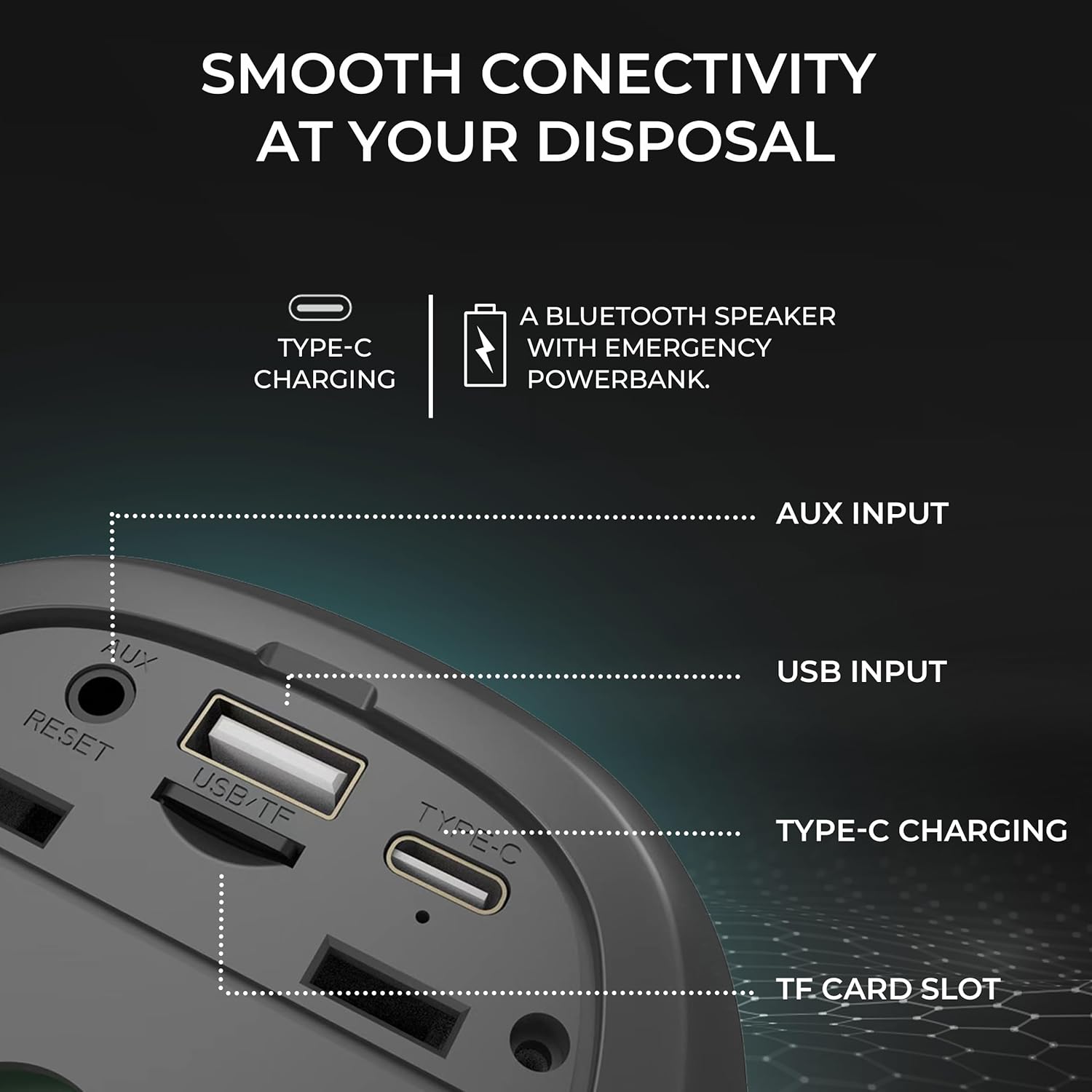
Immagine: dettagliata view of the speaker's input ports for various connectivity options.
- Bluetooth: Connettiti in modalità wireless ai tuoi dispositivi.
- Ingresso AUX: Use the provided AUX cable to connect to devices without Bluetooth capabilities. Insert the 3.5mm jack into the AUX port on the speaker and your audio source.
- Ingresso USB: Inserisci un'unità flash USB con audio files into the USB port to play music directly.
- Slot per schede TF: Inserire una scheda TF (MicroSD) con audio files into the TF card slot to play music directly.
Ricarica
The iGear Spectrum Mini speaker is powered by a built-in Lithium Ion battery. To charge the speaker:
- Connect the Type-C charging cable to the speaker's Type-C port.
- Collegare l'altra estremità del cavo a una fonte di alimentazione USB standard (ad esempio, un adattatore da parete, una porta USB del computer).
- Il tempo di ricarica completo è di circa 2 ore.
- A fully charged speaker provides up to 12 hours of playtime, depending on volume and light usage.

Image: The speaker highlighting its 12-hour playtime capability.
Manutenzione
To ensure the longevity and optimal performance of your iGear Spectrum Mini speaker, follow these maintenance guidelines:
- Pulizia: Utilizzare un panno morbido e asciutto per pulire la superficie dell'altoparlante. Non utilizzare detergenti abrasivi, alcol o solventi chimici.
- Magazzinaggio: Conservare l'altoparlante in un luogo fresco e asciutto, lontano dalla luce solare diretta e da temperature estreme.
- Esposizione all'acqua: The product is not waterproof. Avoid exposing it to water or high humidity to prevent damage.
- Cura della batteria: Se non lo si utilizza per lunghi periodi, caricare l'altoparlante almeno una volta ogni tre mesi per preservare la salute della batteria.
Risoluzione dei problemi
| Problema | Possibile soluzione |
|---|---|
| L'altoparlante non si accende | Assicurati che l'altoparlante sia carico. Collegalo a una fonte di alimentazione tramite il cavo Type-C. |
| Nessun suono | Check volume levels on both the speaker and your connected device. Ensure the device is properly paired via Bluetooth or connected via AUX/USB/TF card. |
| L'associazione Bluetooth non riesce | Ensure the speaker is in pairing mode (flashing LED). Turn off and on Bluetooth on your device. Move the speaker closer to your device. Disconnect from other Bluetooth devices. |
| L'associazione TWS non riesce | Ensure both speakers are off and not connected to any device before initiating TWS pairing. Follow TWS pairing steps carefully. |
| Le luci non funzionano | Press the Light Mode button (💡) to cycle through modes or turn lights on. |
Specifiche
| Caratteristica | Dettaglio |
|---|---|
| Nome del modello | Spettro Mini |
| Numero modello articolo | iG-1149 |
| Audio Wattage | 15 Watt |
| Tecnologia di connettività | Bluetooth |
| wireless Range | Fino a 10 metri |
| Tipo di batteria | Ioni di litio |
| Tempo di gioco | Fino a 12 ore |
| Tempo di ricarica | Circa 2 ore |
| Porta di ricarica | Tipo C |
| Metodo di controllo | Tocco |
| Materiale | ABS + tessuto |
| Peso dell'articolo | 650 grammi |
| Dimensioni del prodotto | 10D x 10W x 12.3H centimetri |
| Impermeabile | NO |
Garanzia e supporto
The iGear Spectrum Mini Bluetooth Speaker comes with a 1 Year Carry-In Warranty. For warranty claims or technical support, please refer to the contact information provided on your warranty card or visit the official iGear websito.
Produttore / importatore: iGear Tech Private Limited, Goregaon west, Mumbai 400063, Contact: 9327667193


