Introduzione
Thank you for choosing the Hadulcet Mobile Standing Desk. This adjustable, rolling desk is designed to provide a versatile and ergonomic workspace for various environments, including home offices, bedrooms, and more. Featuring a built-in charging station and a sturdy design, it offers convenience and flexibility. This manual provides detailed instructions for assembly, operation, maintenance, and troubleshooting to ensure optimal use and longevity of your desk.

The Hadulcet Adjustable Mobile Standing Desk, showcasing its ergonomic design and flexible mobility.
Informazioni sulla sicurezza
Si prega di leggere attentamente tutte le avvertenze di sicurezza prima di montare o utilizzare questo prodotto. Il mancato rispetto di queste istruzioni può causare lesioni o danni al prodotto.
- Be cautious when adjusting the desk height to avoid injury.
- Prima dell'uso, assicurarsi che la scrivania sia correttamente montata e stabile.
- Keep heavy objects away from the edges to prevent tipping.
- Do not place hot objects on the desk to avoid damage or burns.
- Scollegare sempre la stazione di ricarica quando non è in uso.
- Do not overload the desk. The maximum weight recommendation is 110 pounds.
- Tenere bambini e animali domestici lontani dalla scrivania durante la regolazione dell'altezza.
Prodotto finitoview e Caratteristiche
The Hadulcet Mobile Standing Desk is designed for versatility and user comfort. Key features include:
- Altezza regolabile: Ergonomically designed, the desk height can be adjusted from 26.3 inches to 45.3 inches, allowing seamless transitions between sitting and standing positions for a healthier work routine.
- Stazione di ricarica integrata: The desktop features a built-in power strip with 3 standard electrical outlets and 2 USB ports, providing convenient charging for multiple devices.
- Progettazione mobile: Equipped with 360° rolling and lockable wheels, the desk can be easily moved and secured in place, making it ideal as a portable laptop desk, rolling computer desk, or standing workstation.
- Ampia superficie di lavoro: The main desktop measures 31.5 inches (L) x 23.6 inches (W), providing ample space for laptops, monitors, and other essentials. An additional adjustable-angle surface is perfect for keyboards or tablets.
- Soluzioni di archiviazione: A lower deck offers space for larger office supplies like computer towers or printers, while a barrier strip and tablet slot on the main surface prevent items from sliding.
- Costruzione durevole: Made from MDF and metal, ensuring a stable and sturdy structure that minimizes shaking.

Dettagliato view of the desk's features, including the suppressible L-shaped hook, tablet/phone slot, and barrier strip.

An infographic highlighting the desk's detail-oriented design, including power outlets, spacious workspace, headphone hook, rotating knob for easy operation, heavy-duty steel frame, and flexible casters.
Elenco dei componenti
Before assembly, please ensure all parts are present and undamaged. Refer to the packaging for specific part labels.
- Desktop Panels (Main and Adjustable)
- Componenti del telaio in metallo
- Ruote girevoli
- Charging Station (Power Strip with 3 AC outlets and 2 USB ports)
- Vassoio per la gestione dei cavi
- Cup Holder (Optional/Included)
- Gancio per cuffie
- Keyboard Tray (Adjustable section)
- Ferramenta di montaggio (viti, bulloni, dadi, chiave a brugola)
Istruzioni di installazione
Assembly is required. While specific steps are not detailed here, generally follow these guidelines:
- Disimballare e verificare: Carefully unpack all components and compare them against the components list to ensure nothing is missing or damaged.
- Preparare l'area di lavoro: Clear a spacious area for assembly. It is recommended to assemble on a soft surface to prevent scratches.
- Montare il telaio di base: Begin by assembling the metal base frame, attaching the casters securely. Ensure the locking mechanism on the casters is functional.
- Fissare i supporti verticali: Connect the vertical metal supports to the base frame.
- Installa i pannelli desktop: Secure the main desktop and the adjustable desktop panels to the vertical supports. Pay attention to the orientation of each panel.
- Stazione di ricarica integrata: Install the charging station into its designated slot on the desktop. Route the power cord safely.
- Aggiungi accessori: Attach the headphone hook, cable management tray, and any other included accessories.
- Serraggio finale: Once all parts are loosely assembled, gradually tighten all screws and bolts. Do not overtighten.
- Controllo di stabilità: Before use, gently shake the desk to ensure it is stable and all connections are secure.

The Hadulcet Mobile Standing Desk, fully assembled and ready for use in a home environment.
Istruzioni per l'uso
Regolazione dell'altezza della scrivania
The desk features a manual height adjustment mechanism. To adjust the height:
- Locate the rotating knobs on the vertical support poles.
- Allentare le manopole ruotandole in senso antiorario.
- Carefully raise or lower the desktop to your desired height (between 26.3" and 45.3"). Ensure the desk is level.
- Tighten the knobs firmly by turning them clockwise to secure the desk at the new height.
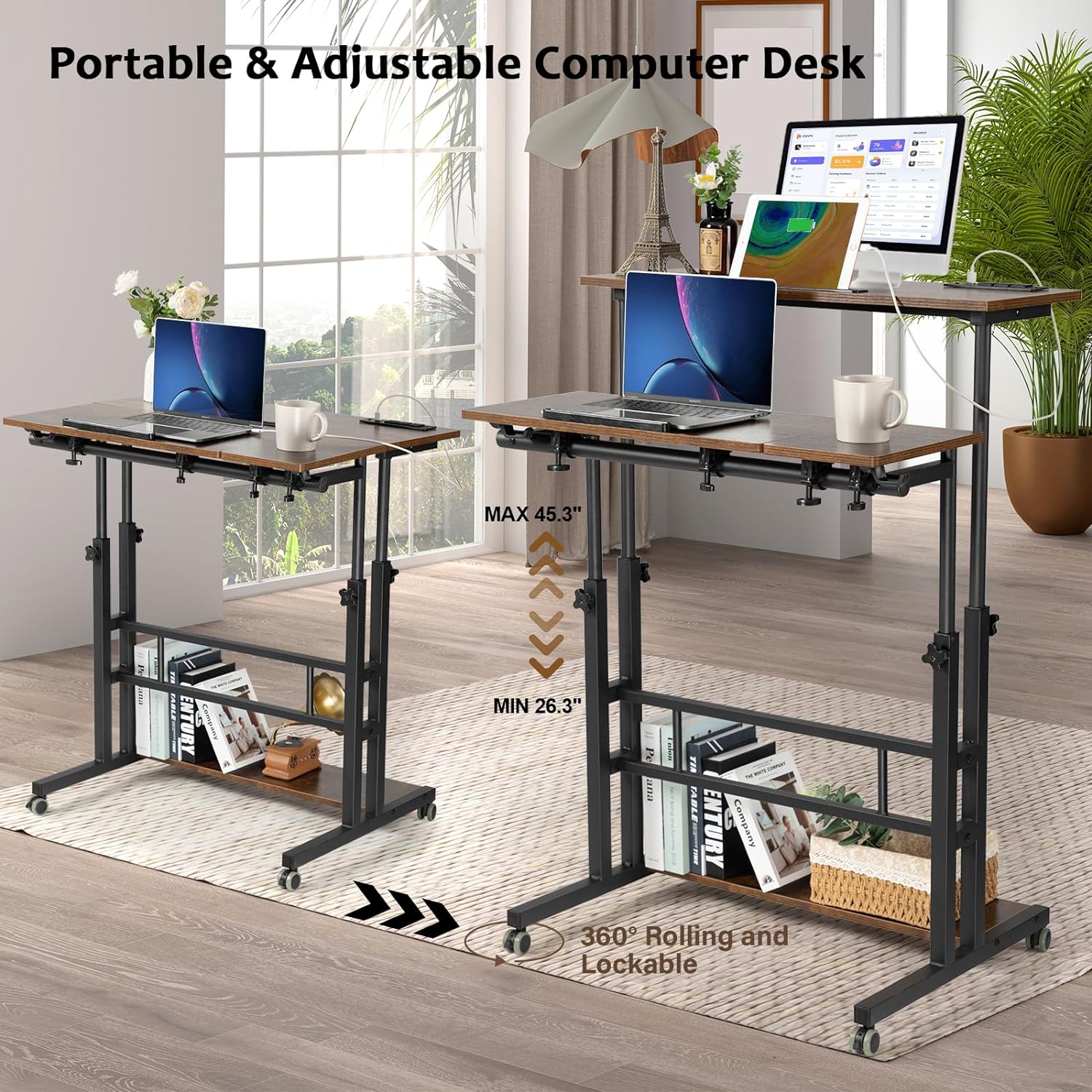
The desk's adjustable height feature, allowing transition from sitting (Min 26.3") to standing (Max 45.3") positions.

The desk supports both sitting and standing postures, promoting a healthier work environment.
Utilizzo della stazione di ricarica
La stazione di ricarica integrata garantisce un comodo accesso all'energia:
- Collegare il cavo di alimentazione principale della scrivania a una presa a muro standard.
- Use the 3 AC outlets for devices requiring standard power plugs.
- Use the 2 USB ports to charge compatible USB devices like smartphones and tablets.
- Unplug the desk from the wall outlet when the charging station is not in use.

The built-in charging station with 3 AC outlets and 2 USB ports for convenient device charging.

The charging station allows for simultaneous charging of multiple devices, including lamps, phones, tablets, and laptops.
Ruote mobili e bloccabili
The desk is equipped with wheels for easy movement:
- To move the desk, unlock the casters by flipping the small lever on each wheel.
- Roll the desk to the desired location.
- To secure the desk in place, lock the casters by flipping the lever back.
Adjusting the Tilting Surface
The smaller desktop surface can be tilted for ergonomic typing or drawing:
- Locate the adjustment mechanism beneath the tilting surface.
- Adjust the angle to your preference.
- Ensure the surface is securely locked in place before placing items on it.
- Utilize the barrier strip at the bottom of the tilting surface to prevent items from sliding off.

A diagram illustrating the desk's dimensions and the 180-degree flip range of the adjustable surface.
Manutenzione
Proper maintenance will extend the life of your Hadulcet Mobile Standing Desk:
- Pulizia: Pulisci le superfici della scrivania con un panno asciutto. Per macchie ostinate, un panno leggermenteamp È possibile utilizzare un panno imbevuto di sapone neutro, quindi asciugare immediatamente. Evitare prodotti chimici aggressivi o detergenti abrasivi.
- Controllo hardware: Controllare periodicamente tutte le viti e i bulloni per assicurarsi che siano ben serrati. Serrarli nuovamente se necessario per mantenere la stabilità.
- Cura delle rotelle: Keep the casters free of dust and debris to ensure smooth rolling.
- Evitare il sovraccarico: Do not exceed the maximum weight capacity of 110 pounds to prevent damage to the desk structure.
- Condizioni ambientali: Avoid exposing the desk to extreme temperatures or high humidity, which can affect the wood and metal components.
Risoluzione dei problemi
Se riscontri problemi con la tua scrivania, fai riferimento ai seguenti problemi comuni e alle relative soluzioni:
- La scrivania è traballante:
- Assicurarsi che tutte le viti e i bulloni di montaggio siano ben serrati.
- Check that the desk is on a flat, even surface.
- Verify that the height adjustment knobs are fully tightened after adjustment.
- Le rotelle non girano fluidamente:
- Check for debris (hair, lint) wrapped around the wheels and remove it.
- Ensure the caster locks are disengaged.
- Stazione di ricarica non funzionante:
- Verificare che il cavo di alimentazione principale della scrivania sia collegato saldamente a una presa a muro funzionante.
- Check if the wall outlet itself is functional (test with another device).
- Assicurarsi che i dispositivi siano collegati correttamente alle prese/porte USB.
- Adjustable Surface Does Not Stay Tilted:
- Ensure the locking mechanism for the tilting surface is fully engaged.
- Avoid placing excessive weight on the tilting section.
If problems persist, please contact Hadulcet customer support for assistance.
Specifiche
| Attributo | Dettaglio |
|---|---|
| Marca | Hadulcet |
| Numero di modello | UP-01RB8 |
| Nome del modello | Scrivania per computer regolabile in piedi in stile rustico marrone con ruote |
| Dimensioni del prodotto (P x L x A) | 23.6"P x 31.5"L x 26.3"A |
| Intervallo di altezza regolabile | Da 26.3" a 45.3" |
| Peso massimo raccomandato | 110 libbre |
| Materiale | Legno ingegnerizzato (parte superiore), metallo (base) |
| Colore | Marrone rustico |
| Stazione di ricarica | 3 prese AC, 2 porte USB |
| Caratteristica speciale | Adjustable, Rolling, Charging Station |
| Assemblaggio richiesto | SÌ |
| Grado del prodotto | Nuovo |
Detailed dimensions of the Hadulcet Mobile Standing Desk.
Garanzia e supporto
The Hadulcet Mobile Standing Desk comes with a limited manufacturer's warranty. For specific warranty details, claims, or technical support, please refer to the warranty card included with your product or visit the official Hadulcet websito. Puoi anche contattare il servizio clienti tramite il rivenditore presso cui hai acquistato il prodotto.
Per ulteriore assistenza, visitare il sito Hadulcet Store on Amazon.