1. Introduzione
The KGUSS Topping HS02 is a high-performance USB 2.0 audio isolator designed to eliminate ground loop interference and noise in audio systems. It features a fully isolated design, ensuring that auxiliary power supply usage does not introduce new interference while isolating the audio signal from ground loop noise. This device supports high-resolution audio formats such as PCM32bit/768kHz and DSD512 Native with ultra-low latency, making it suitable for demanding audio applications.

2. Informazioni sulla sicurezza
- Non esporre il dispositivo all'acqua o a umidità eccessiva.
- Evitare di posizionare il dispositivo vicino a fonti di calore o alla luce diretta del sole.
- Use only the specified power supply if an external one is required.
- Non tentare di smontare o modificare il dispositivo. Per qualsiasi intervento di manutenzione, rivolgersi a personale qualificato.
- Tenere fuori dalla portata dei bambini.
3. Contenuto della confezione
Verificare che tutti gli articoli siano presenti nel pacco:
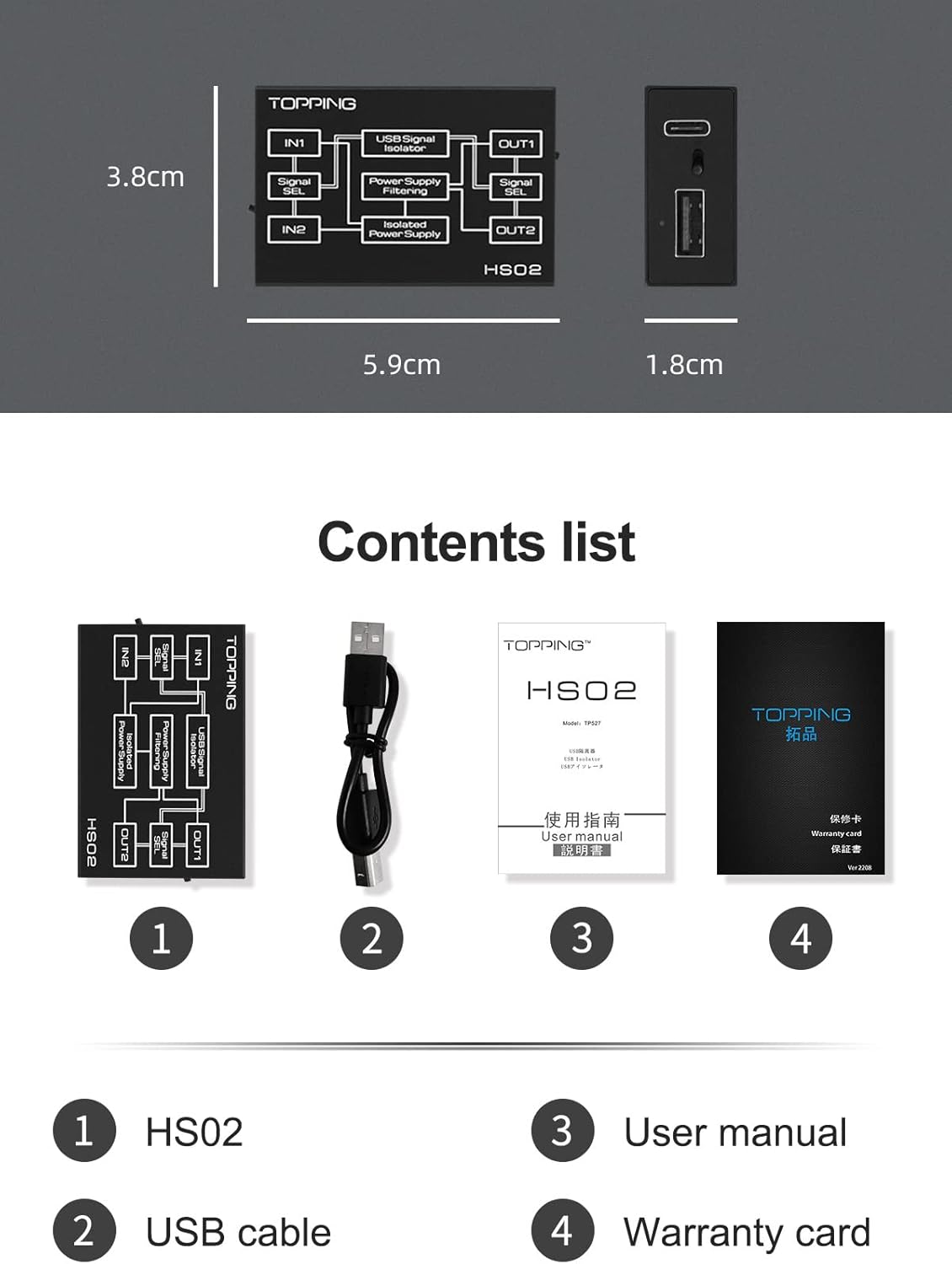
- 1 x KGUSS Topping HS02 USB Audio Isolator
- 1 cavo USB
- 1 x Manuale utente (questo documento)
- 1 x Scheda di garanzia

4. Prodotto finitoview
The HS02 features a robust design with multiple input and output options to accommodate various audio setups. It is engineered to provide superior audio signal isolation.
4.1. Interfacce e controlli

- IN1: USB-B Input: Connects to the source device (e.g., computer) using a USB-B cable.
- IN2: Type-C Input: Connects to the source device (e.g., computer) using a USB Type-C cable.
- Interruttore di ingresso: Toggles between IN1 and IN2 to select the active input source.
- Indicatore LED: Provides status feedback for the device.
- Interruttore di uscita: Toggles between OUT1 and OUT2 to select the active output port.
- OUT1: Type-C Output: Connects to the USB audio device (e.g., DAC) using a USB Type-C cable.
- OUT2: USB-A Output: Connects to the USB audio device (e.g., DAC) using a USB-A cable.
Note: The input ports are for connecting to a computer, while the output ports are for connecting to USB audio devices.
5. Impostazione
Follow these steps to set up your KGUSS Topping HS02 USB Audio Isolator:
- Connettiti alla fonte: Connect one of the HS02's input ports (USB-B or Type-C) to your computer or audio source using a compatible USB cable.
- Connetti al dispositivo audio: Connect one of the HS02's output ports (USB-A or Type-C) to your USB audio device (e.g., DAC, audio interface).
- Alimentazione (opzionale): For USB devices that are not USB-powered, a 5V DC auxiliary power supply may be connected to the HS02. If your USB device is self-powered, an external 5V power supply for the HS02 is not required.
- Select Inputs/Outputs: Use the input and output switches on the HS02 to select the desired active ports.

Raccomandazione: It is recommended to connect the HS02 directly to a PC's USB root port instead of an external USB hub for optimal performance and stability.
6. Istruzioni per l'uso
Once connected, the HS02 operates automatically to isolate the audio signal. The primary user interaction involves selecting the desired input and output ports.
- Selezione input: Use the 'Input switch' to toggle between the USB-B (IN1) and Type-C (IN2) input ports. The LED indicator will confirm the active input.
- Selezione dell'uscita: Use the 'Output switch' to toggle between the Type-C (OUT1) and USB-A (OUT2) output ports.
- The HS02 will automatically identify USB 2.0 transmission speeds (low, full, and high speed) and is compatible with high-resolution audio formats.
7. Caratteristiche principali e prestazioni
7.1. Fully Isolated Design
The HS02 incorporates a fully isolated design. This means that the audio signal is electrically separated from ground loop interference, even when an auxiliary power supply is used. This design prevents the introduction of new noise, ensuring a clean audio signal.

7.2. High Speed and Compatibility
The HS02 supports automatic identification of USB 2.0 transmission at low, full, and high speeds. Its robust transmission capabilities ensure compatibility with high-resolution audio formats, including PCM32bit/768kHz and DSD512 Native.

7.3. Latenza ultra-bassa
The device boasts an ultra-low latency of only 0.073 microseconds, which is crucial for high-fidelity and professional audio applications where timing accuracy is paramount.
7.4. Effective Noise Elimination
The HS02 effectively eliminates noise introduced by ground loops. Real-world measurements demonstrate a noise reduction of up to 50dB, significantly improving audio clarity.

8. Manutenzione
The KGUSS Topping HS02 requires minimal maintenance:
- Mantenere pulito il dispositivo strofinandolo con un panno morbido e asciutto.
- Evitare l'uso di prodotti chimici aggressivi o detergenti abrasivi.
- Ensure proper ventilation and avoid covering the device during operation.
- Conservare in luogo fresco e asciutto quando non in uso.
9. Risoluzione Dei Problemi
If you encounter issues with your HS02, refer to the following troubleshooting guide:
| Problema | Possibile causa | Soluzione |
|---|---|---|
| No audio output or intermittent audio. | Incorrect input/output selection, loose cable connections, compatibility issues with USB 3.0 ports. | Ensure the correct input and output ports are selected using the switches. Check all USB cable connections. Try connecting the HS02 to a USB 2.0 port on your computer, as some USB 3.0 ports may have compatibility issues with USB 2.0 devices. |
| Ground loop hum or noise persists. | External power supply interference, faulty cables, or the noise source is not a ground loop. | Ensure the HS02 is connected directly to the PC's root USB port. If using an auxiliary power supply, ensure it is a clean 5V DC source. Try different USB cables. Verify that the noise is indeed a ground loop and not another type of interference. |
| Dispositivo non riconosciuto dal computer. | Driver issues, faulty USB port, or incorrect connection. | Try connecting to a different USB port on your computer. Restart your computer. Ensure the USB cable is functioning correctly. No specific drivers are usually needed for the HS02 as it's a passive isolator, but ensure your DAC/audio device drivers are up to date. |
10. Specifiche
- Modello: HS02
- Dimensioni del prodotto: 2.32 x 1.54 x 7.09 pollici
- Peso dell'articolo: 1.59 once
- Interfacce di ingresso: USB-B, Type-C
- Interfacce di uscita: USB-A, tipo C
- Standard USB: USB 2.0 (Low Speed, Full Speed, High Speed)
- Compatibilità audio: PCM32bit/768kHz, DSD512 Native
- Audio Signal Isolation Voltage: >1500KV RMS
- Latenza: 0.073 microsecondi
- Riduzione del rumore: Up to 50dB (real-world measurement)
- Produttore: GUARNIZIONE
- Colore: Nero
11. Garanzia e supporto
The KGUSS Topping HS02 comes with a standard warranty. Please refer to the included Warranty Card for specific terms and conditions regarding coverage and duration. For technical support or service inquiries, please contact your retailer or the manufacturer directly. Keep your purchase receipt as proof of purchase for warranty claims.


