1. Introduzione
The FOXWELL NT624 Elite is a professional diagnostic scan tool designed for comprehensive vehicle system analysis and maintenance services. This device provides full OBD2 functions, all-system diagnostics, and various special reset functions for a wide range of vehicle makes.
2. Caratteristiche principali
- Tutte le diagnosi di sistema: Legge e cancella i codici di errore, views live data, and retrieves ECU information for all available vehicle systems (Engine, ABS, SRS, Transmission, etc.).
- Funzioni OBD2 complete: Supports all 10 OBD2 test modes, including reading/clearing codes, live data, freeze frame, I/M readiness, O2 monitor test, on-board monitor test, component test, vehicle information, and module present.
- 8 Servizi di manutenzione a caldo: Includes Oil Light Reset, SAS (Steering Angle Sensor) Calibration, EPB (Electronic Parking Brake) Service, Throttle Body Relearn, ABS Bleeding, Injector Coding, BRT (Battery Replacement) Service, and DPF (Diesel Particulate Filter) Regeneration.
- Ampia copertura del veicolo: Compatible with over 90 vehicle makes.
- Scansione automatica VIN: Identifica automaticamente le informazioni del veicolo per una diagnosi rapida.
- Visualizzazione dei dati in tempo reale: Shows live sensor data in text and graph formats for easy analysis.
- Aggiornamenti gratuiti a vita: Ensures the tool stays current with the latest vehicle models and diagnostic functions.
3. Contenuto della confezione
The FOXWELL NT624 Elite package typically includes the following items:
- FOXWELL NT624 Elite Main Unit
- Diagnostic Cable (OBDII connector)
- Cavo USB per gli aggiornamenti
- Manuale d'uso
- Custodia protettiva per il trasporto
- SD Card (pre-installed in the device)
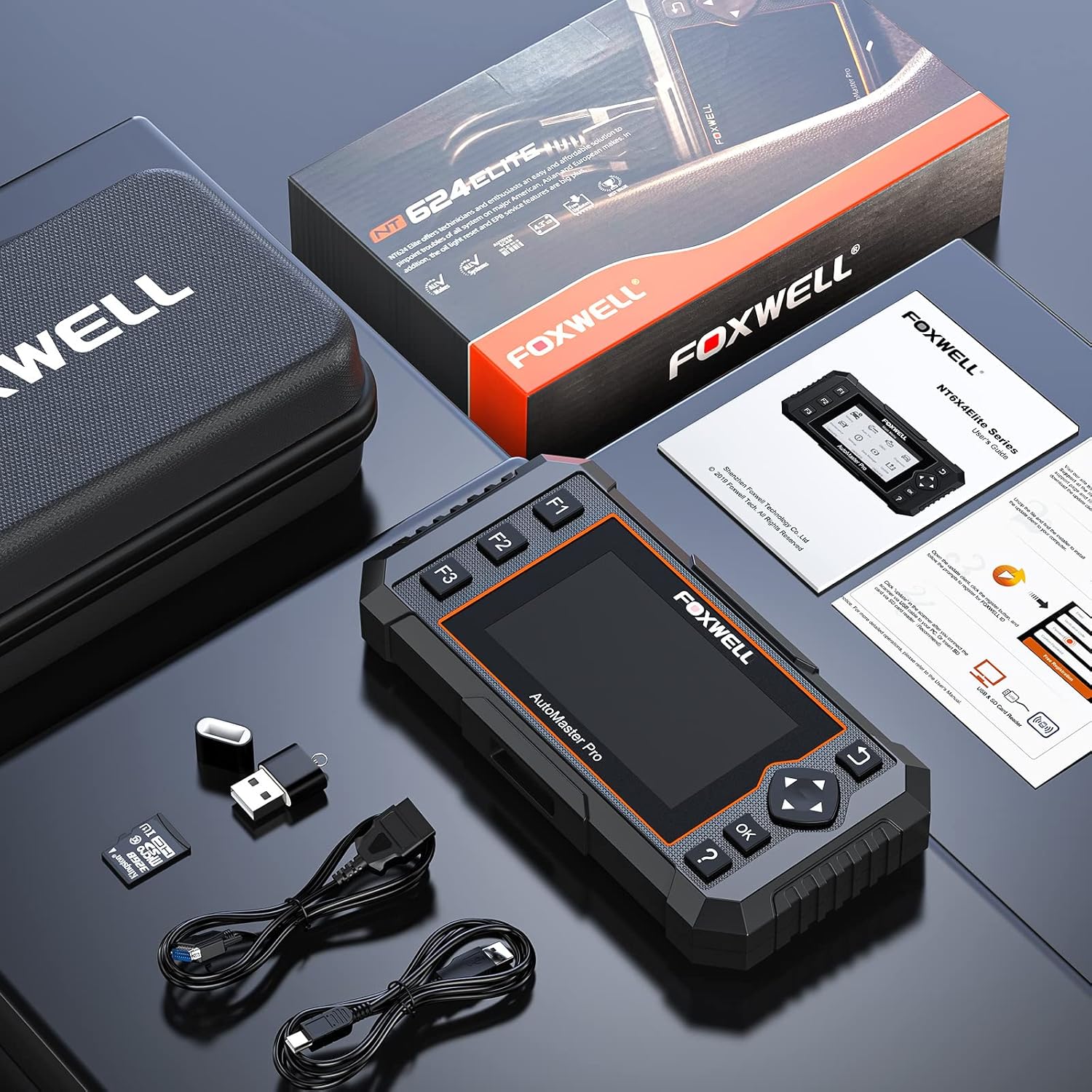
Image: Contents of the FOXWELL NT624 Elite package, showing the diagnostic tool, OBDII cable, USB cable, SD card, and carrying case.
4. Configurazione e primo utilizzo
- Accensione: Connect the diagnostic cable to the vehicle's OBDII port, usually located under the dashboard on the driver's side. The device will power on automatically.
- Impostazioni di lingua e unità: Upon first use, navigate to "Settings" from the main menu to select your preferred language and measurement units (e.g., Metric or Imperial).
- Aggiornamento software: It is recommended to update the software to the latest version before first use. Connect the device to a computer via the USB cable and visit the official FOXWELL websito per istruzioni di aggiornamento e software.

Image: The FOXWELL NT624 Elite diagnostic tool connected to a vehicle's OBDII port, ready for operation.
5. Istruzioni per l'uso
5.1. Navigazione nel menu principale
Use the directional buttons (up, down, left, right) to navigate through the menu options on the 4.3-inch screen. Press the "OK" button to confirm a selection and "Back" to return to the previous screen.

Image: The main menu of the FOXWELL NT624 Elite, showing options like History, Auto VIN, OBDII, Diagnostic, Maintenance, Settings, Data Manager, and Update.
5.2. Tutta la diagnostica di sistema
- From the Main Menu, select "Diagnostic".
- Choose the vehicle make, model, and year. The Auto VIN function can often detect this automatically.
- Select "Auto Scan" to scan all available systems or choose a specific system (e.g., Engine, ABS, SRS).
- The tool will display fault codes (DTCs), live data streams, and other system information.
- Per cancellare i codici, seleziona l'opzione "Cancella codici" dopo aver risolto il problema di fondo.

Image: The FOXWELL NT624 Elite displaying diagnostic results for various automotive systems, including ABS, SRS, Engine, and ESP.
5.3. Funzioni OBD2
- From the Main Menu, select "OBDII".
- Choose the desired OBD2 function:
- Leggi i codici: Visualizza i codici di errore diagnostici correnti, in sospeso e permanenti.
- Cancella codici: Cancella i codici di errore diagnostici dal computer del veicolo.
- Dati in tempo reale: Shows real-time data from vehicle sensors.
- Cornice di congelamento: Displays a snapshot of operating conditions when an emission-related fault occurred.
- Prontezza I/M: Controlla che i vari sistemi correlati alle emissioni funzionino correttamente e siano pronti per l'ispezione e i test di manutenzione.
- Test del monitor O2: Recupera i risultati del test del monitor del sensore O2.
- Test del monitor di bordo: Retrieves results for emission-related powertrain components and systems that are continuously monitored.
- Prova dei componenti: Consente di avviare un test di tenuta per il sistema EVAP del veicolo.
- Informazioni sul veicolo: Recupera VIN, Cal ID, CVN, ecc.
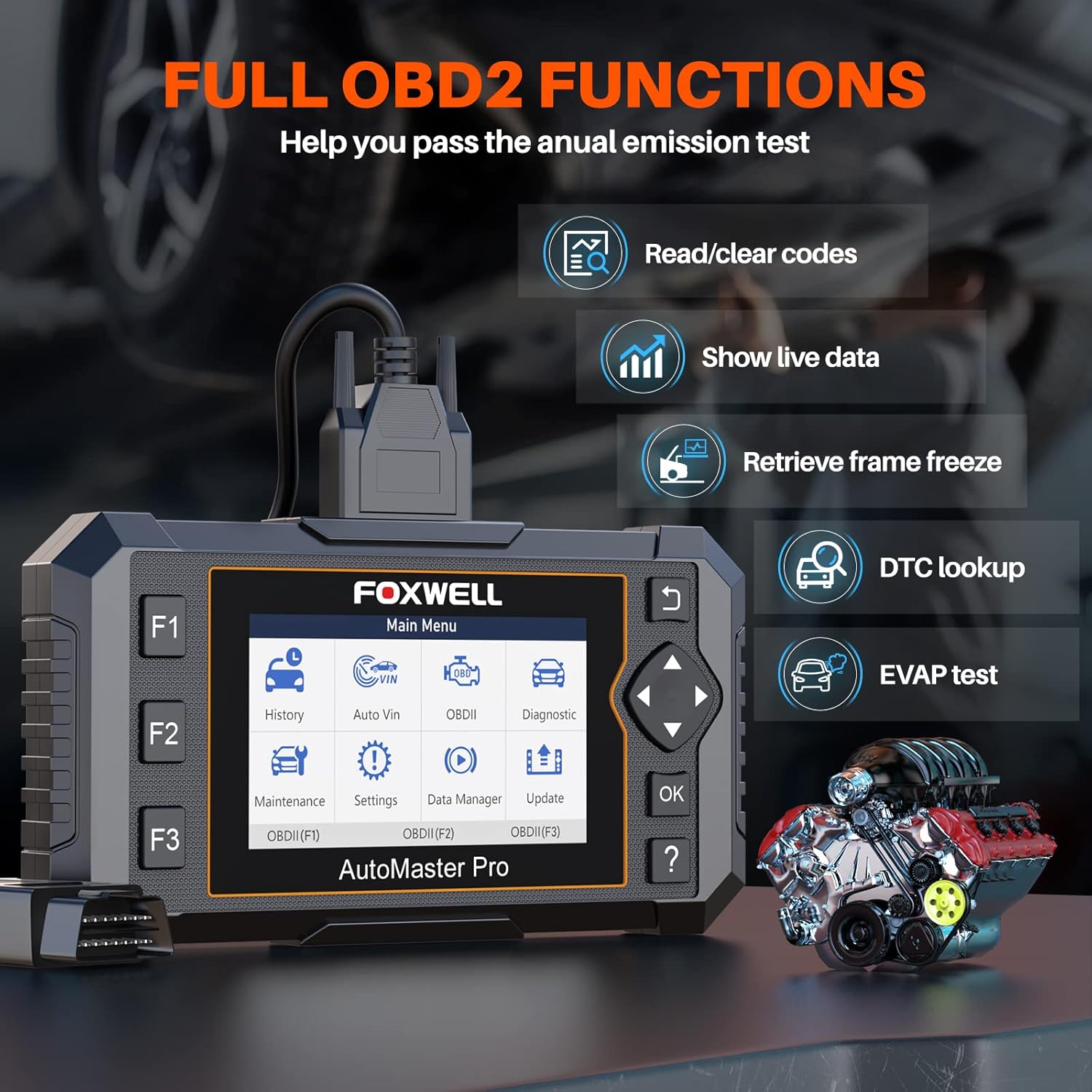
Image: The FOXWELL NT624 Elite screen showing various full OBD2 functions, including Read/Clear codes, Show live data, Retrieve frame freeze, DTC lookup, and EVAP test.
5.4. Servizi di manutenzione
From the Main Menu, select "Maintenance" to access special reset functions. Follow the on-screen prompts for each service.
- Ripristino spia olio: Ripristina la spia di manutenzione dell'olio dopo un cambio dell'olio.
- Calibrazione SAS: Calibra il sensore dell'angolo di sterzata.
- Servizio EPB: Deactivates and reactivates the Electronic Parking Brake system for brake pad replacement.
- Riapprendimento del corpo farfallato: Riapprende la posizione del corpo farfallato dopo la pulizia o la sostituzione.
- Sanguinamento ABS: Esegue procedure di spurgo dei freni ABS.
- Codifica iniettore: Codifica i nuovi numeri degli iniettori nella centralina.
- BRT Service: Performs battery replacement registration.
- Rigenerazione DPF: Avvia la rigenerazione del filtro antiparticolato diesel.

Image: The FOXWELL NT624 Elite screen highlighting the 8 hot maintenance services available, including Oil Light Reset, ABS Bleeding, Throttle, Injector, SAS, BRT, EPB, and DPF.
6. Data Management and Analysis
The NT624 Elite allows you to view and analyze live data streams, which can be displayed in both text and graphical formats. This helps in understanding vehicle performance and diagnosing intermittent issues.

Image: The FOXWELL NT624 Elite displaying live data in a graphical format on its screen, illustrating sensor readings over time for detailed analysis.
The device also stores diagnostic history, which can be reviewed later. Connect the tool to a computer to print diagnostic reports or manage saved data.
7. Manutenzione e aggiornamenti
7.1. Aggiornamenti software
The FOXWELL NT624 Elite offers lifetime free software updates. To update the device:
- Visita il sito ufficiale FOXWELL webposto (www.foxwelltech.com).
- Scarica e installa il software client di aggiornamento sul tuo computer.
- Register your device and create an account.
- Connect the NT624 Elite to your computer using the provided USB cable.
- Follow the on-screen instructions in the update client to download and install the latest software versions.
7.2. Cura del dispositivo
- Mantenere il dispositivo pulito, privo di polvere e umidità.
- Quando non lo si utilizza, riporre il dispositivo nella sua custodia protettiva.
- Evitare di far cadere il dispositivo o di esporlo a temperature estreme.
8. Risoluzione Dei Problemi
| Problema | Possibile causa | Soluzione |
|---|---|---|
| Il dispositivo non si accende. | Loose OBDII connection; vehicle's ignition is off; vehicle battery low. | Assicurarsi che il cavo OBDII sia collegato saldamente. Ruotare l'accensione del veicolo in posizione ON. Controllare la tensione della batteria del veicolo.tage. |
| Errore di comunicazione con il veicolo. | Incorrect vehicle protocol selected; faulty OBDII port; software issue. | Verify vehicle compatibility. Check the OBDII port for damage. Update the device software. Try on another compatible vehicle. |
| Lo schermo si blocca o il dispositivo non risponde. | Problema software; bassa potenza. | Restart the device by disconnecting and reconnecting. Ensure stable power supply from the vehicle. Perform a software update. |
| Update fails. | Unstable internet connection; incorrect update client usage; firewall issues. | Ensure a stable internet connection. Follow the update instructions carefully. Temporarily disable firewall/antivirus if necessary. |
9. Specifiche
- Modello: Elite NT624
- Display: Schermo a colori da 4.3 pollici
- Sistema operativo: Windows XP (for update client compatibility, device runs proprietary OS)
- Connettività: OBDII, USB
- Dimensioni: 8.8 x 3 x 13.1 pollici (circa)
- Peso: 2.07 libbre (circa)
- Energia: 8-18V vehicle power via OBDII
- Temperatura di esercizio: da 0 a 60°C (da 32 a 140°F)
- Temperatura di conservazione: Da -20 a 70°C (da -4 a 158°F)
10. Supporto e garanzia
For technical support, product inquiries, or warranty information, please contact FOXWELL customer service through their official websito o i recapiti forniti sulla confezione del prodotto.
The FOXWELL NT624 Elite comes with a standard manufacturer's warranty. Please refer to the warranty card included in your package for specific terms and conditions.
Video: Un oltreview of the FOXWELL NT624 Elite diagnostic tool's features and functions. This video demonstrates the user interface and capabilities of the device.


