1. Introduzione
Thank you for choosing the FLEXISPOT EF1 Basic Plus Electric Height-Adjustable Desk. This manual provides essential information for the safe and efficient assembly, operation, and maintenance of your new desk. Please read these instructions thoroughly before use and retain them for future reference.
Avvertenze di sicurezza
- Always follow the assembly instructions carefully to prevent accidents and ensure proper function.
- Do not exceed the maximum load capacity of 70 kg (154 lbs) on the desktop. Overloading can compromise stability and cause damage.
- To prevent tipping, especially when the desk is at its maximum height (121 cm), ensure the desk is anchored correctly to a stable wall.
- Keep children and pets away from the desk during operation to avoid injury from moving parts.
- Assicurarsi che non vi siano ostacoli lungo il percorso della scrivania durante la regolazione dell'altezza.
- Non stare né seduto né in piedi sulla scrivania.
- Scollegare l'alimentazione prima di effettuare operazioni di pulizia o manutenzione.
2. Installazione e assemblaggio
The FLEXISPOT EF1 Basic Plus desk requires assembly. Please ensure all components are present before beginning. Refer to the included assembly guide for detailed step-by-step instructions.
Disimballaggio e controllo dei componenti
Carefully unpack all parts and lay them out on a soft, clean surface to prevent scratches. Verify that all components listed in the packing list are present.
assemblaggio finitoview
- Fissare le colonne di sollevamento ai piedi della scrivania.
- Connect the crossbar to the lifting columns.
- Fissare il piano del tavolo al telaio assemblato.
- Install the control panel and cable management tray (if included).
- Connect all motor and control cables according to the wiring diagram.
- Collegare il cavo di alimentazione a una presa con messa a terra.

Figura 1: The FLEXISPOT EF1 Basic Plus Electric Height-Adjustable Desk with a black tabletop and white frame, set up in a home office environment.

Figura 2: This image illustrates the smooth, single-piece desktop construction of the FlexiSpot desk, contrasting it with typical multi-piece desktops that may have uneven surfaces.

Figura 3: An illustrative diagram detailing various desktop size and color options, along with key specifications for the desk frame, including adjustable height range, static and dynamic load capacities, and lifting noise levels.
3. Istruzioni per l'uso
Pannello di controllo Fineview

Figura 4: Un dettagliato view of the desk's Smart Control Panel, highlighting the LED display, the up and down adjustment buttons, and four numbered buttons for memory presets.
The desk is equipped with an advanced all-in-one keypad for easy height adjustment and memory functions.
- Display a LED: Mostra l'altezza attuale della scrivania in centimetri.
- Up/Down Buttons (⌃ / ⌄): Press and hold to manually adjust the desk height upwards or downwards. Release the button to stop at the desired height.
- Preimpostazioni di memoria (1, 2, 3, 4): Four programmable buttons to save and recall your preferred sitting and standing heights.
Impostazione delle preimpostazioni di memoria
- Regolare la scrivania all'altezza desiderata utilizzando i pulsanti Su/Giù.
- Press the "M" or "SET" button (if available, otherwise proceed to step 3) to activate memory mode.
- Press one of the numbered preset buttons (1, 2, 3, or 4) within 3 seconds. The LED display will show "S-1", "S-2", etc., indicating the height has been saved to that preset.
Richiamo delle preimpostazioni di memoria
Basta premere il pulsante preimpostato numerato desiderato (1, 2, 3 o 4). La scrivania si sposterà automaticamente all'altezza salvata.
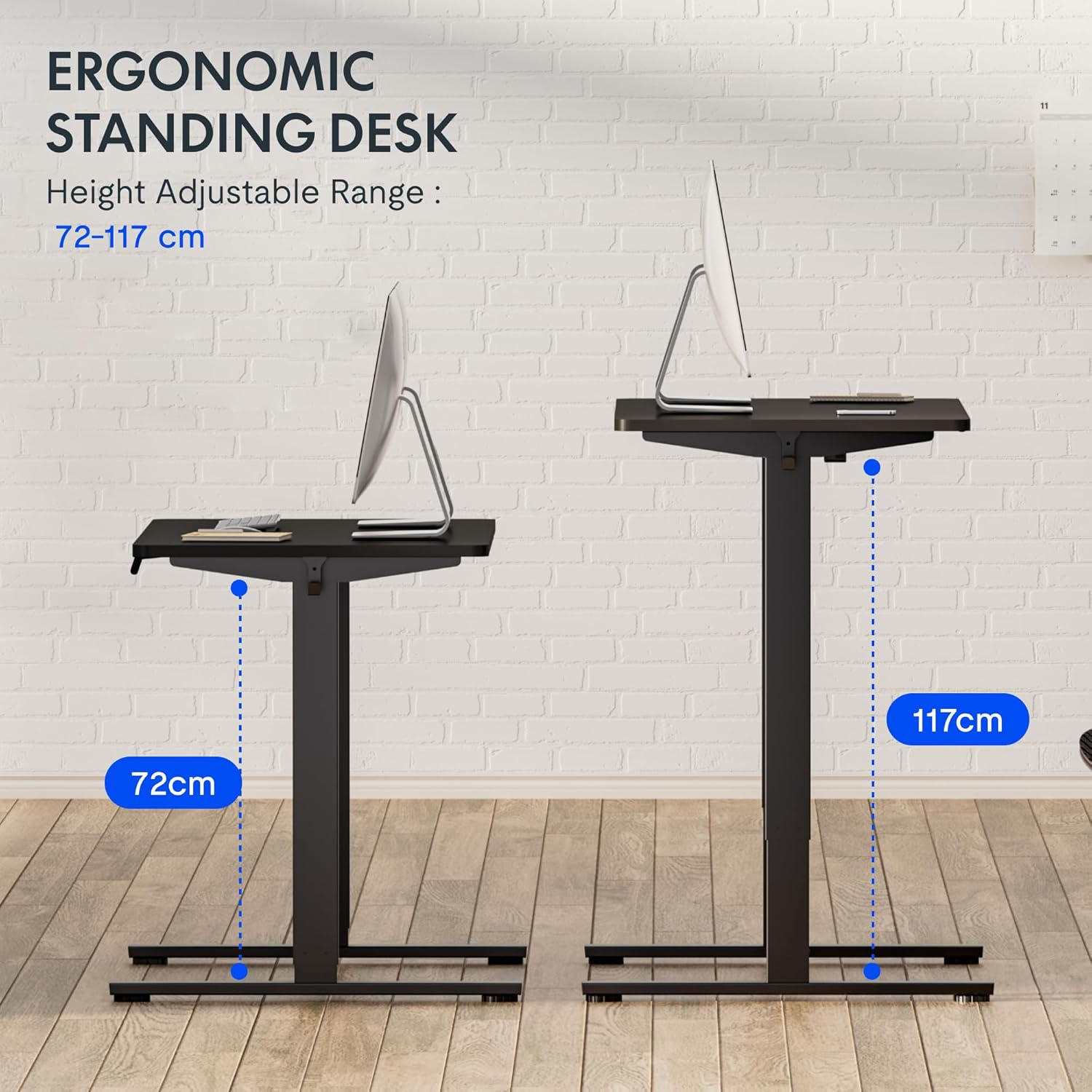
Figura 5: This image demonstrates the height adjustment capabilities of the desk, showing a range from 72 cm (sitting height) to 117 cm (standing height). Note that the full adjustable range for this model is 71 cm to 121 cm.
4. Manutenzione
Una manutenzione regolare garantisce la longevità e le prestazioni ottimali della tua scrivania FLEXISPOT.
- Pulizia: Pulisci il desktop e la cornice con un panno morbido eamp panno. Evitare detergenti abrasivi o prodotti chimici aggressivi che potrebbero danneggiare la finitura.
- Gestione dei cavi: Periodically check and organize cables to prevent tangles and ensure smooth operation.
- Ispezione: Controllare regolarmente tutte le viti e i bulloni per assicurarsi che siano ben serrati. Serrarli nuovamente se necessario.
- Lubrificazione: The lifting columns are generally maintenance-free. Do not attempt to lubricate internal components unless specifically instructed by customer support.
5. Risoluzione Dei Problemi
Se riscontri problemi con la tua scrivania, fai riferimento ai seguenti problemi comuni e alle relative soluzioni.
| Problema | Possibile causa | Soluzione |
|---|---|---|
| La scrivania non si muove. |
|
|
| La scrivania si muove in modo irregolare o produce rumori insoliti. |
|
|
| Error code displayed on LED. |
|
|
Procedura di ripristino
If the desk is not functioning correctly, a reset may resolve the issue.
- Press and hold the "Down" button until the desk reaches its lowest position and slightly retracts, then releases.
- If this does not initiate a reset, unplug the desk from the power outlet for at least 10 seconds, then plug it back in.
- Repeat step 1. The desk should now be reset.
6. Specifiche
| Marca | FLESSIBILE |
| Numero di modello | HU-XI-201 |
| Desktop Dimensions (L x W x Thickness) | Dimensioni: 120 x 80 x 2.5 cm |
| Adjustable Height Range (without tabletop) | 71 centimetri - 121 centimetri |
| Max Lifting Speed | 2.5 centimetri/secondo |
| Capacità di carico massima | 70 kg (154 libbre) |
| Livello di rumore di sollevamento | <50 dB |
| Materiale del desktop | Engineered Wood (MDF) with High-Pressure Laminate |
| Materiale del telaio | Acciaio verniciato a polvere |
| Colore | Black tabletop + White frame |
| Caratteristiche | Electric height adjustment, 4 memory presets |
7. Garanzia e supporto
Informazioni sulla garanzia
FLEXISPOT stands behind the quality of its products. Your EF1 Basic Plus desk comes with the following warranty:
- Garanzia di 3 anni: Covers controllers and motors.
- Garanzia di 5 anni: Covers the desk frame.
Si prega di conservare la prova d'acquisto per eventuali reclami in garanzia. La garanzia copre i difetti di fabbricazione in condizioni di normale utilizzo. Non copre danni causati da uso improprio, incidenti, modifiche non autorizzate o mancato rispetto delle istruzioni contenute nel presente manuale.

Figura 6: An image outlining the warranty coverage for FlexiSpot desks, specifically mentioning a 3-year warranty for controllers and motors, and a 5-year warranty for the desk frame.
Assistenza clienti
For technical assistance, warranty claims, or any questions regarding your FLEXISPOT EF1 Basic Plus desk, please contact FLEXISPOT customer support.
Websito: www.flexispot.com (o equivalente regionale)
E-mail: Refer to your purchase documentation or the official FlexiSpot websito per email di contatto.
Telefono: Refer to your purchase documentation or the official FlexiSpot websito per il numero di telefono di contatto.


