1. Introduzione
Thank you for choosing the Wicked Audio Growl Bluetooth Speaker. This manual provides essential information for the safe and optimal use of your device. The Growl speaker is designed for portability and durability, featuring IP67 waterproof and dustproof ratings, true wireless stereo pairing, and a built-in power bank function.
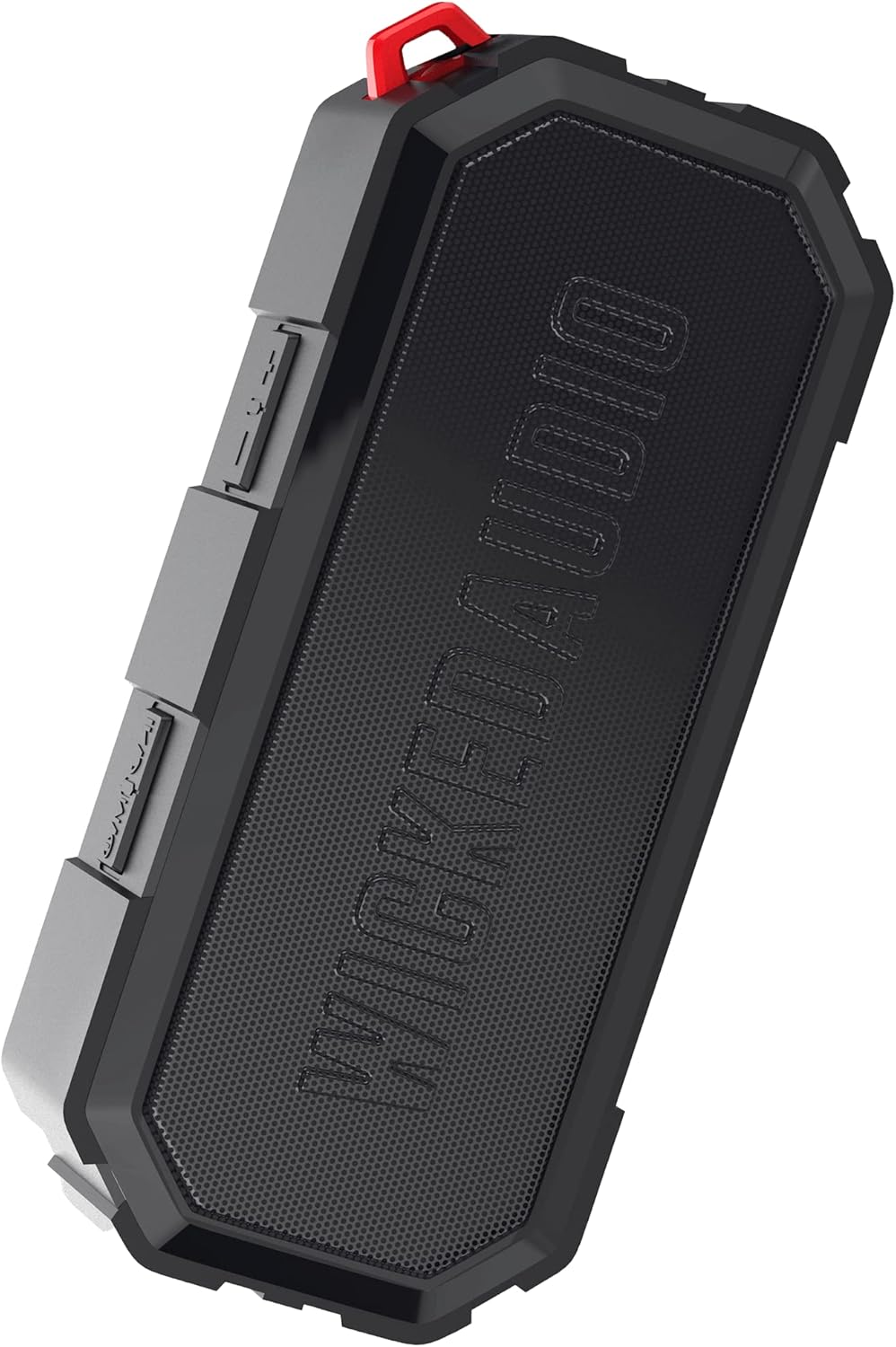
Image 1.1: The Wicked Audio Growl Bluetooth Speaker, showcasingrazie al suo design compatto e robusto.
2. Contenuto della confezione
Si prega di selezionare la casella per i seguenti elementi:
- Wicked Audio Growl Bluetooth Speaker
- Manuale dell'utente (questo documento)
- Cavo di ricarica USB-C
- Auxiliary (AUX) Audio Cable
3. Caratteristiche del prodotto
The Wicked Audio Growl speaker offers a range of features designed for an enhanced audio experience:
- IP67 impermeabile e antipolvere: Provides protection against water immersion and dust ingress, making it suitable for various environments.
- Rugged & Durable Design: Constructed with a durable silicone case and protective covers for buttons and ports.
- True Wireless Stereo (TWS) Linkable Tech: Connect two Growl speakers wirelessly for a stereo sound experience.
- Power Bank integrato: Features a 2600mAh battery that can be used to charge other devices via its USB-A output port.
- Tempo di riproduzione esteso: Fino a 40 ore di durata della batteria con una singola carica.
- Deep Bass & Dynamic Sound: Equipped with dual 52mm drivers for powerful audio with enhanced bass, rich mids, and clear highs.
- Connettività Bluetooth 5.0: Offers a stable wireless connection up to 32 feet (10 meters).

Image 3.1: Visual representation of the speaker's waterproof, dustproof, and rugged characteristics.

Image 3.2: The Growl speaker highlighting its IP67 waterproof and dustproof rating.

Image 3.3: Key features of the Growl speaker including extended battery, dual drivers, and linkable tech.

Image 3.4: Close-up emphasizing the enhanced bass and dual 52mm drivers for superior sound.
4. Impostazione
4.1 Ricarica dell'altoparlante
Before first use, fully charge your Growl speaker. The speaker has a USB-C charging port located under a protective cover.
- Open the protective cover on the side of the speaker to access the ports.
- Collegare il cavo di ricarica USB-C in dotazione alla porta USB-C dell'altoparlante.
- Collegare l'altra estremità del cavo a un adattatore di alimentazione USB (non incluso) o alla porta USB di un computer.
- La spia di carica si illuminerà. Una carica completa richiede in genere circa 3 ore.
- Once fully charged, disconnect the cable and securely close the protective cover to maintain IP67 rating.

Image 4.1: Illustration of the speaker's 40-hour battery life and 3-hour charging time.
4.2 Accensione/Spegnimento
To power on or off the speaker, locate the power button on the control panel.
- Accensione: Press and hold the Power button for a few seconds until you hear an audible indication.
- Spegni: Press and hold the Power button again for a few seconds until you hear an audible indication.
4.3 Associazione Bluetooth
Connect your Growl speaker to a Bluetooth-enabled device.
- Assicurati che l'altoparlante sia acceso e che si trovi entro 10 metri dal dispositivo.
- L'altoparlante entrerà automaticamente in modalità di associazione, indicata da una luce LED lampeggiante.
- Sul tuo dispositivo (smartphone, tablet, ecc.), vai alle impostazioni Bluetooth e abilita il Bluetooth.
- Cercare available devices and select "Wicked Growl" from the list.
- Una volta effettuata la connessione, l'indicatore LED smetterà di lampeggiare e rimarrà fisso, e si sentirà un suono di conferma.
4.4 Accoppiamento True Wireless Stereo (TWS)
For an immersive stereo experience, you can pair two Growl speakers together.
- Ensure both Growl speakers are powered on and not connected to any other Bluetooth device.
- On one speaker (this will be your primary speaker), press and hold the TWS pairing button (refer to button layout in section 5.1).
- L'oratore principale cercherà l'oratore secondario.
- Once connected, both speakers will emit a confirmation sound, and their LED indicators will synchronize.
- Ora collega il tuo dispositivo all'altoparlante principale tramite Bluetooth come descritto nella sezione 4.3. L'audio verrà riprodotto in stereo da entrambi gli altoparlanti.

Image 4.2: Diagram illustrating the process of wirelessly pairing two Growl speakers for dual audio.
4.5 Ingresso ausiliario (AUX)
You can connect devices without Bluetooth using the 3.5mm AUX input.
- Aprire il coperchio protettivo sul lato dell'altoparlante.
- Connect one end of the provided 3.5mm AUX cable to the speaker's AUX port.
- Collegare l'altra estremità al jack delle cuffie o all'uscita audio del dispositivo.
- L'altoparlante passerà automaticamente alla modalità AUX.
5. Istruzioni per l'uso
5.1 Funzioni dei pulsanti
The Growl speaker features intuitive controls on its top panel:
| Pulsante | Funzione (pressione breve) | Funzione (pressione lunga) |
|---|---|---|
| Pulsante di accensione | N / A | Accensione/spegnimento |
| Pulsante di riproduzione/pausa | Riproduci/Metti in pausa la musica; Rispondi/Termina chiamata | Rifiuta chiamata |
| Volume su (+) | Aumentare il volume | Traccia successiva |
| Volume basso (-) | Diminuire il volume | Traccia precedente |
| Pulsante TWS | N / A | Avvia l'associazione TWS |
5.2 Utilizzo come Power Bank
The Growl speaker can provide a power boost to your other devices.
- Aprire il coperchio protettivo sul lato dell'altoparlante.
- Connect your device's charging cable (USB-A end) to the speaker's USB-A output port.
- Collega l'altra estremità del cavo di ricarica del tuo dispositivo al dispositivo stesso.
- The speaker will begin charging your device. Note that using the power bank feature will reduce the speaker's playback time.
- Once charging is complete or you wish to stop, disconnect the cable and securely close the protective cover.

Image 5.1: The speaker functioning as a backup power bank for a smartphone.

Image 5.2: The Growl speaker connected via USB to charge a smartphone, demonstrating its power bank capability.
6. Manutenzione
Proper care will ensure the longevity of your Wicked Audio Growl speaker.
- Pulizia: Pulisci l'altoparlante con un morbido, damp cloth. Do not use abrasive cleaners or solvents. Ensure all port covers are securely closed before cleaning with water.
- Esposizione all'acqua: While IP67 rated, avoid prolonged submersion or exposure to high-pressure water jets. Always ensure port covers are sealed when near water.
- Magazzinaggio: Conservare l'altoparlante in un luogo fresco e asciutto, lontano da temperature estreme e dalla luce solare diretta.
- Cura della batteria: Per una durata ottimale della batteria, evitare di scaricarla completamente frequentemente. Caricare regolarmente l'altoparlante, anche se non lo si utilizza per periodi prolungati.
7. Risoluzione Dei Problemi
If you encounter issues with your Growl speaker, refer to the following common solutions:
| Problema | Possibile soluzione |
|---|---|
| L'altoparlante non si accende | Assicurarsi che la batteria sia carica. Collegare a una fonte di alimentazione tramite il cavo USB-C. |
| Impossibile effettuare l'associazione tramite Bluetooth | Ensure the speaker is in pairing mode (flashing LED). Turn off and on Bluetooth on your device. Forget "Wicked Growl" from your device's Bluetooth list and try pairing again. Ensure no other devices are connected to the speaker. |
| Nessun suono | Check volume levels on both the speaker and your connected device. Ensure the correct input mode (Bluetooth or AUX) is selected. If using AUX, ensure the cable is fully inserted. |
| Scarsa qualità del suono | Move the speaker closer to your Bluetooth device to reduce interference. Ensure the speaker is not obstructed. Check the audio source quality. |
| L'associazione TWS non riesce | Ensure both speakers are powered on and not connected to any other Bluetooth device. Try resetting both speakers by powering them off and on, then re-attempt TWS pairing. |
| Il power bank non carica il dispositivo | Ensure the speaker has sufficient charge. Check the USB cable and connection. Some devices may require more power than the speaker can provide. |
8. Specifiche
Detailed technical specifications for the Wicked Audio Growl Bluetooth Speaker:
| Caratteristica | Specificazione |
|---|---|
| Nome del modello | Ringhiare |
| Numero modello articolo | WIBTS70 |
| Versione Bluetooth | 5.0 |
| wireless Range | Fino a 32 piedi (10 metri) |
| Dimensioni dell'altoparlante | Doppio driver da 52 mm |
| Potenza massima in uscita dell'altoparlante | 5 Watt |
| Risposta in frequenza | Frequenza 20000 Hz |
| Impedenza | 16 Ohm |
| Tipo di batteria | 1 batteria agli ioni di litio |
| Capacità della batteria | 2600 mAh |
| Tempo di gioco | Fino a 40 ore |
| Tempo di ricarica | Circa 3 ore |
| Porta di ricarica | USB-C |
| Power Bank Output | USB-A |
| Grado di impermeabilità | Grado di protezione IP67 |
| Dimensioni del prodotto | 20.5D x 5.5W x 15H centimetri |
| Peso | 680 grammi |
| Colore | Nero |

Image 8.1: Visual summary of the speaker's sleek design, durability, and key specifications.
9. Garanzia e supporto
Wicked Audio provides a Garanzia limitata di 12 mesi for the Growl Bluetooth Speaker from the date of purchase. This warranty covers manufacturing defects and ensures your product performs as expected under normal use.
For warranty claims, technical support, or any inquiries regarding your Wicked Audio Growl speaker, please contact Wicked Audio customer service through their official websito o le informazioni di contatto fornite con la documentazione di acquisto.
Conservare la prova d'acquisto per l'assistenza in garanzia.


