LFF Atomic Clock LWC205 User Manual
Model: LWC205
Digital Wall Clock with Indoor/Outdoor Temperature and Wireless Sensor
1. Introduzione
Grazie per l'acquistoasing the LFF Atomic Clock LWC205. This digital clock features a large, easy-to-read display, atomic time synchronization, indoor and outdoor temperature monitoring, and an alarm function. This manual provides detailed instructions for setup, operation, maintenance, and troubleshooting to ensure optimal performance of your device.
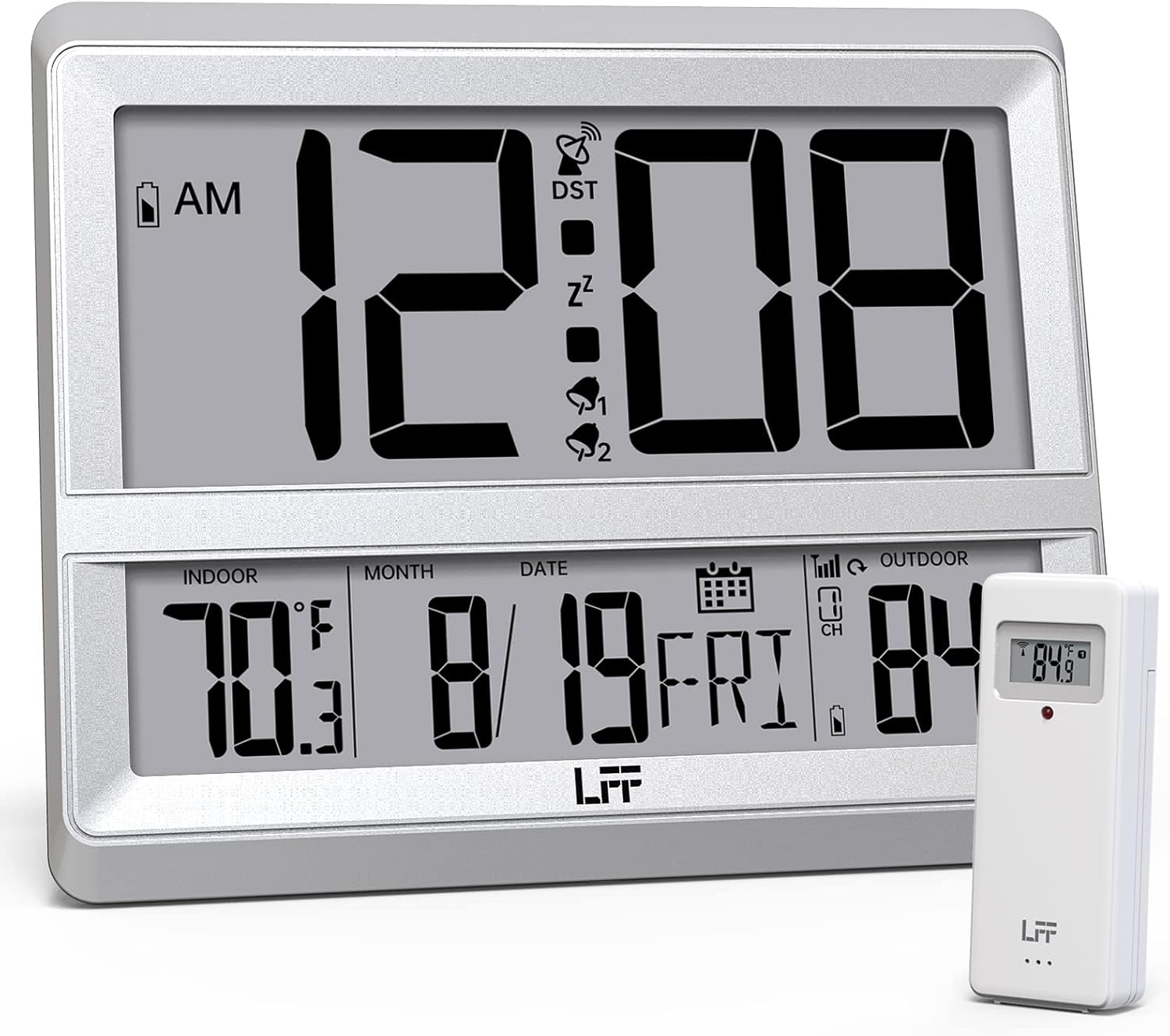
Image 1.1: The LFF Atomic Clock LWC205 main unit and its accompanying wireless outdoor sensor.
2. Prodotto finitoview
2.1 Elementi di visualizzazione

Image 2.1: Detailed diagram illustrating the various display elements and control buttons on the LFF Atomic Clock LWC205. Key features include the alarm clock icon, time display, RCC reception icon, DST symbol, outdoor temperature, indoor temperature, date, and weekday.
2.2 Control Buttons (Rear View)
The control buttons are located on the back of the main clock unit:
- Pulsante IMPOSTA: Utilizzato per immettere e confermare le impostazioni.
- Pulsante ALLARME: Used to set and activate/deactivate the alarm.
- Pulsante CANALE: Used to select the outdoor sensor channel (if multiple sensors are used).
- DOWN/WAVE/°C/°F Button: Used to decrease values during setting, manually initiate atomic time synchronization (wave), or switch between Celsius and Fahrenheit.
- UP/ALARM Button: Used to increase values during setting or activate/deactivate the alarm.
3. Impostazione
3.1 Disimballaggio
Carefully remove all components from the packaging. Ensure you have the main atomic clock unit and the wireless outdoor sensor.
3.2 Installazione della batteria
Both the main clock unit and the wireless outdoor sensor require batteries (not included).
- Unità orologio principale: Open the battery compartment on the back of the clock. Insert 3 batterie AA, assicurando la corretta polarità (+/-).
- Sensore esterno senza fili: Open the battery compartment on the back of the sensor. Insert 2 batterie AAA, ensuring correct polarity (+/-). For temperatures below -4°F (-20°C), lithium batteries are recommended for the outdoor sensor.

Image 3.1: Instructions for installing 3xAA batteries in the main clock unit and 2xAAA batteries in the wireless outdoor sensor.
3.3 Posizionamento del sensore
Place the wireless outdoor sensor in a shaded, dry location away from direct sunlight and precipitation. The sensor has a wireless range of up to 330 feet (100 meters) from the main unit. Ensure there are no major obstructions between the sensor and the clock for optimal signal transmission.

Image 3.2: Illustration of the 330ft wireless range between the main clock unit and the outdoor temperature sensor.
3.4 Clock Placement
The LFF Atomic Clock LWC205 offers two placement options:
- Orologio da tavolo: Use the integrated stand on the back of the unit to place it on a desk, nightstand, or shelf.
- Orologio da parete: Utilize the keyhole slot on the back of the unit to mount it securely on a wall.

Image 3.3: The LFF Atomic Clock can be placed on a table using its built-in stand or mounted on a wall.
4. Istruzioni per l'uso
4.1 Atomic Time Synchronization (WWVB)
The clock automatically synchronizes with the WWVB radio broadcast from Fort Collins, Colorado, ensuring accurate time. This process typically occurs overnight. For best reception, place the clock near a window and away from electronic interference.

Image 4.1: The atomic clock automatically corrects its time daily by receiving the WWVB signal, covering eight time zones and adjusting for Daylight Saving Time.
4.2 Impostazione manuale di ora e data
In areas where the WWVB signal is weak or unavailable, you can manually set the time and date:
- Premere e tenere premuto il tasto IMPOSTATO pulsante per accedere alla modalità di impostazione dell'ora.
- Utilizzare il UP or GIÙ pulsanti per regolare il valore lampeggiante (ad esempio, ora, minuto, anno, mese, giorno).
- Premere il tasto IMPOSTATO pulsante per confermare ogni impostazione e passare a quella successiva.
- The clock will exit setting mode automatically after a few seconds of inactivity or by pressing IMPOSTATO repeatedly until all settings are confirmed.
4.3 Visualizzazione della temperatura (°C/°F)
The clock displays both indoor and outdoor temperatures. To switch between Celsius (°C) and Fahrenheit (°F):
- Premere il tasto DOWN/WAVE/°C/°F pulsante per cambiare l'unità di temperatura.
4.4 Formato 12/24 ore
To switch between 12-hour and 24-hour time formats:
- Premere il tasto UP pulsante per passare dal formato 12 ore (con indicatore AM/PM) a quello 24 ore.
4.5 Funzione di allarme
Per impostare la sveglia:
- Premere il tasto ALLARME premere una volta il pulsante per visualizzare l'ora corrente della sveglia.
- Premere e tenere premuto il tasto ALLARME pulsante per accedere alla modalità di impostazione della sveglia.
- Utilizzare il UP or GIÙ pulsanti per regolare l'ora e i minuti.
- Premere il tasto ALLARME pulsante per confermare ogni impostazione.
Per attivare/disattivare l'allarme:
- Premere il tasto ALLARME button repeatedly to cycle through alarm ON/OFF states. An alarm icon will appear on the display when activated.
5. Manutenzione
5.1 Sostituzione della batteria
When the low battery indicator appears on the display, replace the batteries in the respective unit (main clock or outdoor sensor) promptly to ensure continuous operation and accurate readings. Refer to Section 3.2 for battery types and installation.
5.2 Pulizia
Clean the clock and sensor with a soft, dry cloth. Do not use abrasive cleaners or solvents, as these may damage the display or casing.
5.3 Considerazioni ambientali
The outdoor sensor is designed for outdoor use but should be protected from extreme weather conditions. The recommended operating temperature range for the outdoor sensor is -58°F to 158°F (-50°C to 70°C). For temperatures below -4°F (-20°C), lithium batteries are required in the outdoor sensor for reliable performance.
6. Risoluzione Dei Problemi
- Nessun display / Display debole: Check battery installation and replace with fresh batteries if necessary. Ensure correct polarity.
- Nessuna lettura della temperatura esterna:
- Assicurarsi che le batterie siano installate correttamente nel sensore esterno.
- Verify the sensor is within the 330ft wireless range of the main unit.
- Premere il tasto CANALE button on the main unit to ensure it is on the correct channel (if applicable).
- Relocate the sensor or main unit to improve signal reception, avoiding large metal objects or other electronic devices.
- Ora errata:
- Ensure the clock is attempting to receive the WWVB signal (look for the RCC reception icon).
- Place the clock near a window and away from electronic interference for better signal reception.
- Avviare manualmente una ricerca del segnale premendo il tasto DOWN/WAVE pulsante.
- If atomic synchronization fails, manually set the time as described in Section 4.2.
- Le letture della temperatura sembrano imprecise:
- Assicurarsi che il sensore esterno sia posizionato in una zona ombreggiata, lontano dalla luce solare diretta o da fonti di calore.
- Controllare i livelli della batteria in entrambe le unità.
7. Specifiche
| Caratteristica | Dettaglio |
|---|---|
| Marca | LFF |
| Numero di modello | LWC205 |
| Tipo di visualizzazione | Digitale |
| Colore | Argento |
| Caratteristica speciale | Atomic Time, Indoor/Outdoor Temperature, Alarm |
| Dimensioni del prodotto | 7.48"L x 8.66"A |
| Fonte di alimentazione (orologio) | 3 batterie AA (non incluse) |
| Fonte di alimentazione (sensore) | 2 batterie AAA (non incluse) |
| Uso interno/esterno | Indoor (Clock), Outdoor (Sensor) |
| Intervallo di temperatura esterna | Da -58°C a 158°C (da -50°F a 70°F) |
| Intervallo di temperatura interna | da 32°F a 122°F (da 0°C a 50°C) |
| Portata del sensore wireless | Fino a 330 piedi (100 metri) |
| Tipo di montaggio | Montaggio a parete, da tavolo |
| Materiale | Plastica acrilonitrile butadiene stirene (ABS). |
| Peso dell'articolo | 0.9 libbre (14.4 once) |
8. Informazioni sulla garanzia
Warranty information was not provided in the product data. Please refer to the product packaging or contact the manufacturer directly for details regarding warranty coverage and terms.
9. Assistenza clienti
For further assistance or inquiries, please contact LFF customer support. Contact details were not provided in the product data. Please refer to the product packaging or the official LFF websito per informazioni di contatto del servizio clienti.


