1. Introduzione e oltreview
IL ViewSonic OMNI VX2428 is a 24-inch (23.8-inch viewable) Full HD monitor designed for gaming and entertainment. It features a sleek 3-sided frameless design, providing an immersive viewing experience, especially in multi-monitor setups. Key performance specifications include a 180Hz refresh rate and a 0.5ms (MPRT) response time, which, combined with AMD FreeSync Premium technology, aim to deliver a fluid and tear-free gaming experience. Connectivity options include two HDMI (v1.4) inputs and one DisplayPort (v1.2) input.

Immagine: Il ViewSonic VX2428 monitor showcasing its high refresh rate, low response time, and FreeSync Premium features during a gaming session.
Video: Un funzionario sopraview del ViewSonic OMNI VX2428 monitor, highlighting its key features such as adaptive synchronization, refresh rate, response time, and HDR10 support.
2. Istruzioni per l'installazione
2.1 Cosa c'è nella scatola
Prima di iniziare, assicurarsi che tutti i componenti siano presenti:
- ViewSonic VX2428 Monitor
- Cavo di alimentazione (può variare in base alla regione)
- Cavo DisplayPort
- Guida Rapida

Immagine: Il ViewSonic VX2428 monitor and its included accessories: power cable, DisplayPort cable, and QuickStart Guide.
2.2 Montaggio del supporto
- Estrarre con cautela il monitor e i componenti del supporto dalla confezione.
- Fissare la base del supporto al collo del supporto, fissandola con la vite in dotazione.
- Allineare il supporto assemblato con i punti di montaggio sul retro del monitor.
- Secure the stand to the monitor until it clicks into place or is fastened with screws, depending on the design.
2.3 Cavi di collegamento
Connect the necessary cables to the monitor and your computer or other devices:
- Cavo di alimentazione: Collegare un'estremità all'ingresso di alimentazione del monitor e l'altra a una presa di corrente.
- Cavo DisplayPort: For optimal performance (180Hz refresh rate), connect the included DisplayPort cable from your computer's graphics card to the monitor's DisplayPort input.
- Cavi HDMI: Alternatively, connect up to two HDMI cables from your devices to the monitor's HDMI inputs.
- Uscita audio: If using external speakers or headphones, connect them to the Audio Out port.
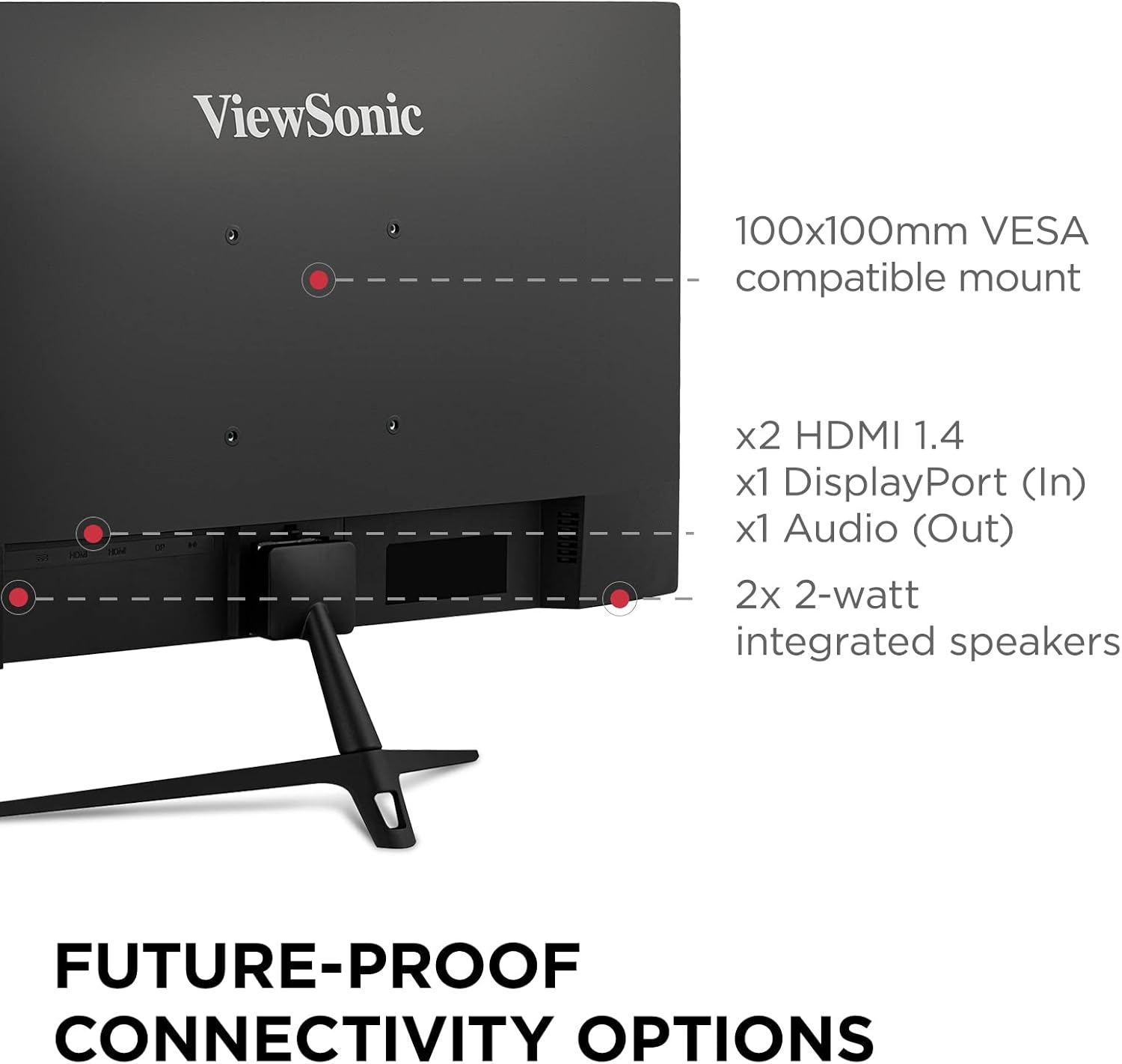
Immagine: dettagliata view of the monitor's rear panel, highlighting the HDMI, DisplayPort, and Audio Out ports, along with the VESA mount and integrated speakers.

Image: Visual representation of the monitor's HDMI, DisplayPort, and Audio Out connectivity options.
3. Istruzioni per l'uso
3.1 Accensione/spegnimento
Press the power button located on the monitor's bottom right side to turn the monitor on or off. The power indicator light will illuminate when the monitor is on.
3.2 Navigazione nel menu OSD (On-Screen Display)
Use the control buttons (usually located on the bottom or rear of the monitor) to access and navigate the OSD menu. The OSD menu allows you to adjust various display settings.
3.3 Regolazione delle impostazioni di visualizzazione
Nel menu OSD è possibile personalizzare impostazioni quali:
- Luminosità/Contrasto: Adjust for desired image luminance.
- Impostazioni colore: Regola con precisione la temperatura del colore, la gamma e i singoli livelli RGB.
- Selezione input: Passa manualmente tra gli ingressi DisplayPort e HDMI.
- View Modalità: Select pre-calibrated modes for different content types (e.g., Standard, Game, Movie, Text, Mono, Web).
- Tempo di risposta: Adjust the pixel response time for reduced motion blur.
- Stabilizzazione del nero: Enhance visibility in dark scenes.
- Overclocking: Enable to achieve the maximum 180Hz refresh rate via DisplayPort.

Immagine: Examples of various view modes (Movie, Mono, Text, Game, Web) available on the monitor.
4. Caratteristiche dello schermo
4.1 Elevata frequenza di aggiornamento e tempo di risposta
The VX2428 features a 180Hz refresh rate and a 0.5ms (MPRT) response time, crucial for smooth motion and reduced ghosting in fast-paced gaming scenarios.

Image: The monitor highlighting its 180Hz refresh rate, 0.5ms MPRT, and AMD FreeSync Premium for optimal gaming visuals.

Image: A visual demonstration of a high refresh rate, showing multiple frames for smoother motion.

Image: A comparison illustrating the difference between normal and fastest response times, demonstrating reduced motion blur.
4.2 AMD FreeSync Premium
AMD FreeSync Premium technology synchronizes the monitor's refresh rate with your graphics card's frame rate, eliminating screen tearing and stuttering for a seamless gaming experience.

Image: A visual comparison demonstrating the effect of AMD FreeSync Premium, showing a tear-free image when enabled.
4.3 Full HD IPS Panel
The 24-inch Full HD (1920x1080p) IPS panel delivers vibrant colors, enhanced contrast, and wide 178-degree viewangoli di inclinazione.

Image: The monitor highlighting its IPS panel for enhanced contrast and wider viewangoli di inclinazione.

Image: A visual representation of the monitor's wide 178-degree viewangoli di inclinazione.

Image: A comparison demonstrating the clarity of Full HD (1920x1080) resolution versus standard HD.
4.4 Tecnologia per la cura degli occhi
The monitor incorporates Flicker-Free technology and a Blue Light Filter to reduce eye strain and fatigue during extended viewperiodi di tempo.

Image: A visual explanation of eye-care technology, including Flicker-Free and Blue Light Filter features.
4.5 HDR10 Content Support
The monitor supports HDR10 content, providing deeper contrast, richer colors, and more vibrant details for compatible media.
5. Opzioni di connettività
The VX2428 offers versatile connectivity for various devices:
- 2 x HDMI (v1.4): Per collegare console di gioco, lettori Blu-ray o altri dispositivi abilitati HDMI.
- 1 x DisplayPort (v1.2): Recommended for PC gaming to achieve the highest refresh rates and FreeSync Premium.
- 1 uscita audio: Per collegare altoparlanti esterni o cuffie.
5.1 Altoparlanti integrati
The monitor includes two 2-watt integrated speakers for basic audio output.

Image: The rear of the monitor, indicating the position of the integrated 2-watt speakers.
5.2 Compatibilità con il montaggio VESA
The monitor is compatible with 100x100mm VESA mounts, allowing for flexible installation options such as wall mounting or multi-monitor setups.

Image: A monitor mounted on an arm, demonstrating its 100x100mm VESA mount compatibility for flexible setups.

Image: A multi-monitor setup demonstrating the seamless viewing experience provided by the monitor's frameless design.
6. Manutenzione
Per garantire la longevità e le prestazioni ottimali del tuo ViewSonic VX2428 monitor, follow these maintenance guidelines:
- Pulizia dello schermo: Pulisci delicatamente lo schermo con un panno morbido e privo di lanugine. Per le macchie ostinate, utilizza una soluzione detergente specifica per monitor, applicata sul panno e non direttamente sullo schermo.
- Pulizia del Casing: Utilizzare un panno morbido e asciutto per pulire il monitor.asing. Evitare detergenti abrasivi o solventi.
- Ventilazione: Assicurarsi che le aperture di ventilazione del monitor non siano ostruite per evitare il surriscaldamento.
- Spegnimento quando non in uso: Spegnere il monitor quando non lo si utilizza per lunghi periodi per risparmiare energia e prolungarne la durata.
- Evitare la luce solare diretta: Non esporre il monitor alla luce solare diretta o a temperature estreme.
7. Risoluzione Dei Problemi
Se riscontri problemi con il tuo ViewSonic VX2428 monitor, refer to the following common troubleshooting steps:
7.1 Nessuna immagine o messaggio "Nessun segnale"
- Check if the monitor is powered on and the power indicator light is illuminated.
- Verify that the video cable (DisplayPort or HDMI) is securely connected to both the monitor and your computer/device.
- Assicurarsi che sul monitor sia selezionata la sorgente di ingresso corretta tramite il menu OSD.
- Test with a different video cable or another device to rule out cable or source issues.
7.2 Display Problems (Flickering, Distorted Image, Incorrect Colors)
- Regola la risoluzione del monitor e le impostazioni della frequenza di aggiornamento nelle impostazioni di visualizzazione del computer.
- Reset the monitor to its factory default settings via the OSD menu.
- Aggiorna i driver della tua scheda grafica alla versione più recente.
- Check for any physical damage to the video cable or monitor ports.
7.3 Refresh Rate Not Reaching 180Hz
- Ensure you are using a DisplayPort connection. HDMI 1.4 may not support 180Hz.
- Verify that the refresh rate is set to 180Hz in your computer's display settings.
- Check the monitor's OSD menu for an "Overclocking" option and enable it if available.
- Ensure your graphics card supports 180Hz at 1080p resolution.
7.4 No Audio from Integrated Speakers
- Check the volume settings on both the monitor (via OSD) and your computer/device.
- Ensure the audio output is directed to the monitor in your computer's sound settings.
- If using HDMI, ensure the HDMI cable supports audio transmission.
8. Specifiche
| Caratteristica | Specificazione |
|---|---|
| Dimensioni dello schermo | 24 pollici (23.8 pollici) viewcapace) |
| Risoluzione | Full HD (1920x1080p) |
| Tipo di pannello | Informazione pubblica |
| Frequenza di aggiornamento | 180 Hz (tramite DisplayPort) |
| Tempo di risposta | 0.5 ms (MPRT) |
| Sincronizzazione adattiva | AMD FreeSync Premium |
| Supporto HDR | L'HDR10 |
| Connettività | 2x HDMI (v1.4), 1x DisplayPort (v1.2), 1x uscita audio |
| Altoparlanti | 2 altoparlanti integrati da 2 watt |
| Supporto VESA | 100x100mm |
| Dimensioni (LxWxH) | 7.2 x 21.3 x 16.3 pollici (con supporto) |
| Peso | 6.82 libbre |
| Colore | Nero |

Image: Physical dimensions of the ViewSonic VX2428 monitor.
9. Garanzia e supporto
Per informazioni sulla garanzia e supporto tecnico, fare riferimento al sito ufficiale ViewSonico websito o contattare il servizio clienti. Conservare la ricevuta d'acquisto per eventuali reclami in garanzia.
Ufficiale ViewSonico Websito: Italiano:viewsonic.com


