1. Introduzione e oltreview
Il Neroview BV5200Pro is a rugged smartphone designed for durability and performance in challenging environments. It features advanced protection against water, dust, and drops, combined with a powerful processor and versatile camera system. This manual provides essential information for setting up, operating, and maintaining your device.

Immagine: Il Neroview BV5200Pro is built to withstand harsh conditions, meeting MIL-STD-810H military standards for drop resistance, IP68 for water immersion up to 1.5 meters for 30 minutes, and IP69K for protection against high-pressure, high-temperature water jets and 360° dust ingress.
2. Configurazione del dispositivo
2.1 Installazione della scheda SIM e della memoria
The BV5200Pro supports dual 4G LTE SIM cards and a TF (microSD) card for expanded storage. It features three dedicated card slots.
- Individuare il vassoio della scheda SIM sul lato del telefono.
- Utilizzare lo strumento di espulsione SIM in dotazione per aprire il vassoio.
- Carefully place your Nano-SIM cards and/or TF card into the designated slots. Ensure the gold contacts face downwards.
- Spingere delicatamente il vassoio nel telefono finché non è a filo con il corpo del dispositivo.

Image: The phone features three card slots, allowing for two 4G LTE SIM cards and one TF card for memory expansion up to 1TB simultaneously.
2.2 Accensione iniziale e impostazioni di base
To power on your device, press and hold the power button located on the side until the Blackview logo appears. Follow the on-screen prompts to complete the initial setup, including selecting your language, connecting to a Wi-Fi network, and setting up your Google account.
3. Utilizzo del dispositivo
3.1 Display e interfaccia utente
The BV5200Pro features a 6.1-inch HD+ display with a resolution of 720x1560 pixels and 500 nits brightness, ensuring clear visuals even in bright conditions. It runs on Android 12 with Doke OS 3.0, offering an intuitive and customizable user experience.

Image: The 6.1-inch HD+ display provides a wide view and immersive experience with 720x1560 resolution, 83% screen-to-body ratio, and 500 cd/m² brightness.
3.2 Prestazioni e archiviazione
Powered by the MediaTek Helio G35 Octa-Core processor, the phone offers smooth performance for daily tasks and entertainment. It comes with 4GB of RAM, expandable to 7GB (with 3GB virtual RAM), and 64GB of internal storage, which can be further expanded up to 1TB using a TF card.

Image: Visual representation of the MediaTek Helio G35 processor, 7GB RAM (4GB physical + 3GB virtual), and 64GB ROM, with 1TB TF card expandability.
3.3 Batteria e ricarica
The device is equipped with a 5180mAh battery, providing extended usage times: up to 642 hours standby, 26.5 hours calling, 20 hours music playback, and 8.8 hours video playback. It supports 10W fast charging and OTG reverse charging, allowing you to use your phone as a power bank for other devices.

Immagine: Oltreview of the 5180mAh battery, showing usage durations for various activities and the OTG reverse charging capability.
3.4 Caratteristiche della fotocamera
The BV5200Pro features a 13MP Sony IMX258 rear camera and an 8MP Samsung5K4H7 front camera. It utilizes ArcSoft technology for enhanced photography, offering various modes:
- 360° Panorama Capture: For wide scenic shots.
- Modalità notturna: Migliora la fotografia in condizioni di scarsa illuminazione.
- HDR migliorato: Balances exposure in high-contrast scenes.
- Modalità ritratto: Creates a bokeh effect for professional-looking portraits.
- Luce di riempimento del viso: Enhances selfies in dim lighting.
- Modalità Bellezza: Optimizes facial features for flattering photos.
The camera also boasts a 0.1s ultra-fast PDAF for quick and accurate focusing.

Image: Details of the 8MP front camera and 13MP+2MP+2MP rear camera with ArcSoft technology for enhanced photo quality.

Immagine: Examples of various camera modes available on the BV5200Pro, including Beauty Mode, Night Mode, Portrait Mode, and Pro Mode.
3.5 Security and Convenience Features
The phone includes several features for security and user convenience:
- NFC: Per pagamenti contactless e trasferimento rapido dei dati.
- Identificazione facciale: Secure and convenient facial recognition for unlocking.
- Modalità guanto: Consente l'utilizzo del touchscreen indossando i guanti.
- Customized Function Button: A programmable button for quick access to 5 essential functions or your favorite apps.
3.6 Navigation and Toolkit
Integrated GPS, GLONASS, Beidou, and Galileo systems provide accurate positioning. The device also comes with a useful toolkit of professional apps, including Compass, Gradienter, Barometer, Protractor, SoundMeter, and FM radio.

Immagine: Un completo view of the phone's utility features, including the customizable shortcut button, Face Unlock, 3 card slots, Glove Mode, NFC, advanced GPS, and a suite of toolkit applications.
4. Manutenzione e durata
Il Neroview BV5200Pro is engineered for extreme durability, making it suitable for rugged use. To ensure its longevity, follow these guidelines:
- Impermeabile (IP68): The phone can withstand immersion in water up to 1.5 meters deep for 30 minutes. Ensure all port covers are securely closed before exposure to water.
- Antipolvere (IP69K): It offers 360° protection against dust and can resist high-pressure, high-temperature water jets.
- Dropproof (MIL-STD-810H): Certified to military standard MIL-STD-810H, the phone is drop-resistant from heights up to 1.5 meters.
- Pulizia: Utilizzare un morbido, damp panno per pulire il dispositivo. Evitare prodotti chimici aggressivi o materiali abrasivi.
- Temperatura: Operate the phone within its specified temperature range to prevent damage to the battery and internal components.
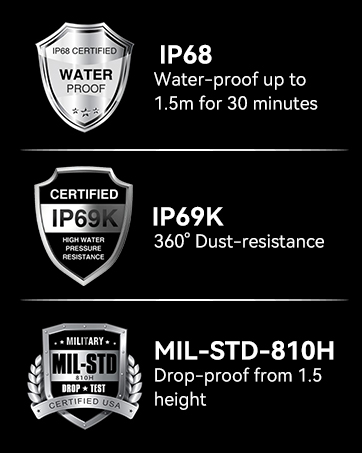
Immagine: Il Neroview BV5200Pro submerged in water, illustrating its IP68 waterproof rating.
5. Risoluzione Dei Problemi
5.1 Compatibilità di rete
Il Neroview BV5200Pro is compatible with GSM network carriers such as T-Mobile, BTC, MetroPCS, H2O, Movistar, Telcel, Tigo, Claro, Vivacom, Ultra Mobile, Lycamobile, Tello Mobile, Bell Wireless, Rogers Wireless, Chatr, Luck Mobile, Virgin Mobile, Telus, Fido, FIZZ, and Shaw Mobile.
Importante: This phone is NON compatible with AT&T and Cricket Wireless SIM cards.

Image: A visual guide to the supported 2G, 3G, and 4G network bands and compatible US carriers for the Blackview BV5200Pro.
5.2 Problemi comuni
- Il dispositivo non si accende: Assicurati che la batteria sia carica. Collega il telefono al caricabatterie e attendi qualche minuto prima di riprovare ad accenderlo.
- Scarsa ricezione del segnale: Check your SIM card installation. If the issue persists, contact your network provider.
- App che si bloccano: Svuota la cache dell'app problematica o reinstallala. Assicurati che il software di sistema sia aggiornato.
- Mancata risposta del touchscreen: Restart the device. If using Glove Mode, ensure it is enabled correctly.
6. Specifiche
| Caratteristica | Specificazione |
|---|---|
| Nome del modello | BV5200Pro |
| Sistema operativo | Androide 12.0 |
| Processore | MediaTek Helio G35 Octa-Core |
| Memoria RAM | 4 GB (espandibile a 7 GB) |
| Memoria interna | 64 GB |
| Archiviazione espandibile | Fino a 1 TB tramite scheda TF |
| Dimensioni dello schermo | 6.1 pollici HD+ |
| Risoluzione | 720x1560 |
| Telecamera posteriore | 13MP Sony IMX258 |
| Fotocamera frontale | 8MP Samsung5K4H7 |
| Capacità della batteria | 5180mAh |
| Ricarica | Ricarica rapida da 10 W, ricarica inversa OTG |
| Valutazioni di durabilità | IP68 Waterproof, IP69K Dustproof, MIL-STD-810H Dropproof |
| Connettività | Dual 4G LTE, Wi-Fi (802.11 a/b/g/n/ac), Bluetooth 5.0, NFC |
| Navigazione | GPS, GLONASS, Beidou, Galileo |
| Dimensioni | Dimensioni: 161.8 x 77.86 x 13.65 mm |
| Peso | 268g |
7. Garanzia e supporto
Neroview offers a 2-year warranty on all Blackview cell phones purchased from authorized retailers. This includes a 24-month free repair warranty and lifetime technician support. For any issues or inquiries, please contact Blackview assistenza clienti.

Immagine: Informazioni riguardanti Blackview's two-year warranty support, emphasizing strict quality control and dedicated customer service.
8. Video del prodotto finitoview
Video: Un funzionario sopraview del Neroview BV5200Pro Rugged Cell Phone, highlighting its key features and durability.


