1. Introduzione
The Tapo C420 is an add-on outdoor wireless security camera designed to expand your existing Tapo smart home security system. This camera requires the Tapo Smart IoT Hub H200 (sold separately) to function. It offers 2K QHD video resolution, color night vision, and intelligent detection features for enhanced outdoor surveillance. This manual provides essential information for the proper installation, operation, and maintenance of your Tapo C420 camera.
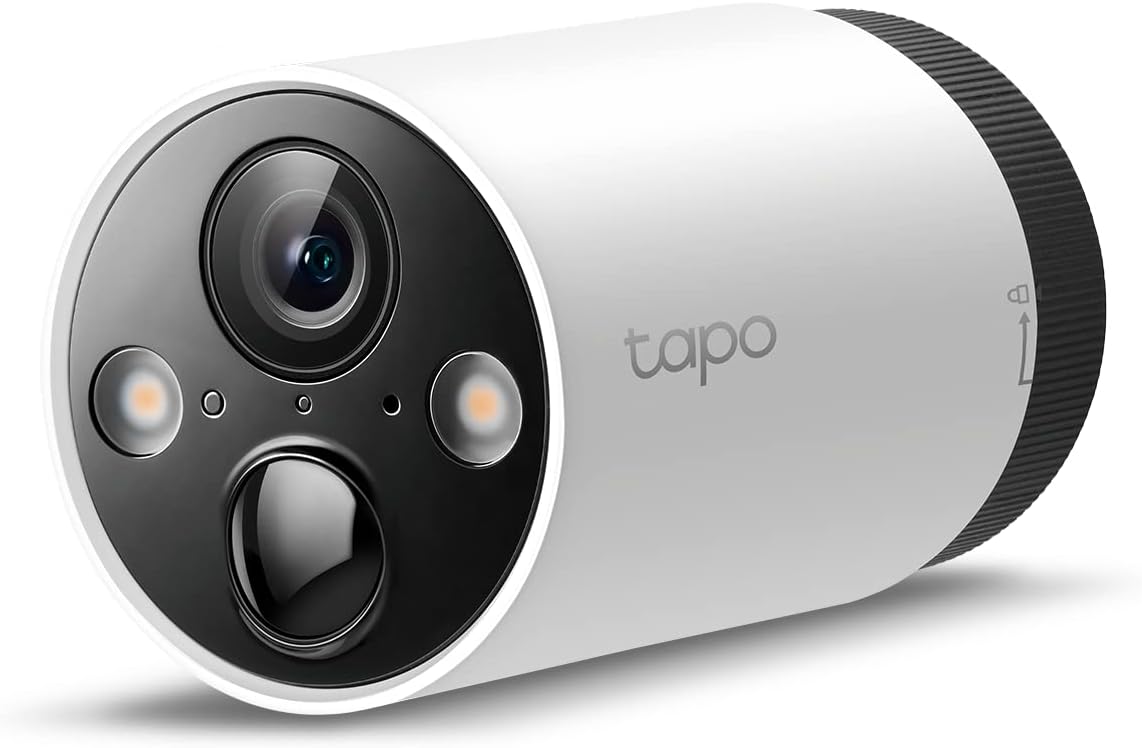
Immagine 1.1: anteriore view of the Tapo C420 Outdoor Wireless Security Camera.
2. Cosa c'è nella scatola
Verifica che tutti i componenti siano presenti nel tuo pacchetto:
- 1x Tapo C420 Camera (Battery Included)
- Adattatore USB
- Cavo adattatore USB
- Viti di montaggio
- Modelli di montaggio
- Supporto per telecamera
- Guida rapida
3. Istruzioni per l'installazione
3.1 Prerequisiti
- Tapo Smart IoT Hub H200 (sold separately)
- Stable Wi-Fi network (2.4 GHz)
- Smartphone with the Tapo App installed (available on Android and iOS)

Image 3.1: The Tapo C420 camera requires the Tapo H200 Hub to operate. The H200 Hub supports up to 4 cameras.
3.2 Caricamento della batteria
Before initial use, fully charge the camera's battery using the provided USB adapter and cable. The battery is removable for convenient charging.

Immagine 3.2: Interno view of the Tapo C420 showing the removable battery and key components.
3.3 Installazione della telecamera
- Seleziona una posizione: Choose an outdoor location that provides the desired viewing angle and is within range of your Tapo H200 Hub. The camera is weatherproof (IP65 rated).
- Montare la staffa: Use the mounting template and screws to securely attach the camera bracket to a wall or other suitable surface.
- Collega la fotocamera: Secure the Tapo C420 camera to the mounted bracket. Adjust the angle for optimal coverage.
Image 3.3: The Tapo C420 camera is designed for outdoor deployment with robust weatherproofing.
3.4 Connessione all'app Tapo
- Scarica l'app Tapo: Cercare 'Tapo' in the App Store (iOS) or Google Play Store (Android) and install the application.
- Accedi o registrati: Open the Tapo App and log in with your TP-Link ID. If you don't have one, create a new account.
- Aggiungi dispositivo: Tap the '+' icon in the app, select your Tapo C420 camera, and follow the on-screen instructions to pair it with your Tapo H200 Hub.
4. Istruzioni per l'uso
4.1 Vivere View e Registrazione
Access the live feed of your camera through the Tapo App. You can view real-time video, take snapshots, and manually record footage. The camera records in 2K QHD (2560x1440) resolution, providing clear and detailed images.

Image 4.1: Comparison illustrating the enhanced clarity of 2K QHD (4MP) resolution over 1080p Full HD.
4.2 Visione notturna
The Tapo C420 features advanced night vision capabilities:
- Sensore di luce stellare: Captures high-quality images in low-light conditions.
- Apertura F1.6: Allows more light to enter the lens for improved visibility in darker environments.
- Visione notturna a colori: Dual integrated spotlights enable full-color video at night. An 850nm IR sensor provides visibility up to 49 feet in darkness.

Image 4.2: Visual comparison of different night vision modes, including standard infrared and full-color with starlight sensor and spotlights.
4.3 AI Detection and Activity Zones
Receive instant push notifications for detected motion. The camera supports free AI detection for persons, vehicles, and pets. You can also define custom activity zones to focus detection on specific areas.

Image 4.3: The Tapo App interface for configuring AI detection and activity zones.
4.4 Audio bidirezionale
Utilize the built-in microphone and speaker to communicate with visitors or deter unwanted guests directly through the Tapo App.
Image 4.4: Illustration of the two-way audio function, allowing communication through the camera.
4.5 Opzioni di archiviazione
The Tapo C420 offers flexible storage solutions:
- Archiviazione locale: Salva footage on a microSD card (up to 512 GB, not included) inserted into the Tapo H200 Hub.
- Archiviazione cloud: Subscribe to Tapo Care for cloud storage, which provides a 30-day video history and additional features.

Image 4.5: The Tapo H200 Hub supports local microSD card storage, and the Tapo App integrates with Tapo Care cloud services.
4.6 Sirena integrata
Activate the integrated siren through the Tapo App to deter intruders or alert others to an event.

Image 4.6: The Tapo C420 camera can activate its siren and spotlights to deter unwanted activity.
5. Manutenzione
5.1 Gestione della batteria
The Tapo C420 camera is equipped with a battery designed for up to 180 days of use under laboratory conditions (triggering 10-20 events per day). Actual battery life may vary based on device settings, usage frequency, and environmental factors. Recharge the battery when indicated by the Tapo App.

Image 5.1: Illustration of inserting the battery into the Tapo C420 camera.
5.2 Pulizia
Per mantenere prestazioni ottimali, pulire periodicamente l'obiettivo e l'alloggiamento della fotocamera con un panno morbido e asciutto.amp panno. Evitare l'uso di prodotti chimici aggressivi o materiali abrasivi che potrebbero danneggiare la fotocamera.
5.3 Aggiornamenti firmware
Ensure your camera's firmware is always up to date. The Tapo App will notify you of available updates. Firmware updates often include performance improvements, new features, and security enhancements.
6. Risoluzione Dei Problemi
If you encounter issues with your Tapo C420 camera, consider the following common solutions:
- Fotocamera non in linea: Check the battery level. Ensure the camera is within range of the Tapo H200 Hub and that the Hub is powered on and connected to the internet.
- Problemi di rilevamento: Verify that AI detection and activity zones are configured correctly in the Tapo App. Ensure there are no obstructions (e.g., windows, screens) directly in front of the camera that could interfere with detection.
- Scarsa qualità video: Check your Wi-Fi signal strength. Ensure the lens is clean and free from smudges or dirt.
- Batteria non in carica: Confirm the USB adapter and cable are properly connected and functional.
For more detailed troubleshooting steps, refer to the FAQ section within the Tapo App or visit the official TP-Link support websito.
7. Specifiche
| Caratteristica | Specificazione |
|---|---|
| Nome del modello | È diventato C420 |
| Risoluzione di acquisizione video | 2K QHD (2560x1440p) / 4 MP |
| Campo di View | 97 gradi |
| Gamma di visione notturna | 49 Feet (with 850nm IR sensor) |
| Fonte di alimentazione | Alimentato a batteria (1 batteria agli ioni di litio inclusa) |
| Protocollo di connettività | Wi-Fi, Sub-1G (to Hub) |
| Resistenza alle intemperie | IP65 (impermeabile) |
| Tipo di controllore | Android, iOS (via Tapo App) |
| Dimensioni (L x P x A) | 7.17 x 2.6 x 2.6 pollici |
| Peso dell'articolo | 5.8 once (164 grammi) |
| Opzioni di archiviazione | MicroSD card (up to 512GB, not included), Tapo Care Cloud Storage |
| Caratteristiche speciali | Motion Sensor, Night Vision, Starlight Sensor, Full-Color Night Vision, AI Detection (Person/Vehicle/Pet), Two-Way Audio, Built-in Siren |
8. Informazioni sulla garanzia
Warranty information for the Tapo C420 camera is typically provided with the product packaging or can be found on the official TP-Link websito. Conservare la prova d'acquisto per eventuali reclami in garanzia.
9. Supporto
For technical assistance, product inquiries, or further support, please contact TP-Link Tapo customer service:
- Telefono: (866) 225-8139
- Websito: myproducts.tp-link.com/us
- E-mail: support.USA@tp-link.com


