Prodotto finitoview
The Biorunn Android 13 Car Radio Stereo is an advanced in-dash navigation and multimedia system designed specifically for the Ford Focus MK2 (2004-2011) with Manual AC and Silver trim. This unit features a 9-inch IPS touchscreen, an 8-core processor, 4GB RAM, and 32GB ROM, providing a powerful and responsive user experience. It integrates modern connectivity and entertainment options to enhance your driving experience.

Figura 1: Fronte view of the Biorunn Android 13 Car Radio Stereo unit.
Key features include built-in wireless Car-play and Android Auto, Bluetooth 5.0 for hands-free calling and music streaming, FM/AM RDS radio, and support for various multimedia formats. The system also supports steering wheel controls, GPS navigation, and can be expanded with optional accessories like ADAS DVR, OBD II, and TPMS.
Installazione e configurazione
Before beginning installation, ensure your vehicle is compatible with this unit. This model is designed for Ford Focus MK2 (2004-2011) with Manual AC and Silver trim. If your car has steering wheel control buttons, a wire harness with Canbus is required and included.
Contenuto della confezione:
- 1 x Main Unit (Android 13 Car Radio Stereo)
- 1 x cavo di alimentazione
- 1 x Canbus Decoder (if applicable for steering wheel controls)
- 2 x Cavi USB
- 1 x Cavo RCA
- 1 antenna GPS
- 1 antenna 4G
- 1 x Microfono
Fasi di installazione:
- Preparazione: Disconnect the vehicle's battery to prevent electrical shorts. Carefully remove the original car radio and trim panel.
- Collegamenti elettrici: Connect the provided power cable, Canbus decoder (if needed), USB cables, RCA cable, GPS antenna, 4G antenna, and microphone to their respective ports on the new head unit and the vehicle's wiring harness. Refer to the wiring diagram for correct connections.
- Montaggio: Secure the new head unit into the dashboard opening. Ensure it fits snugly and is properly aligned.
- Prova: Reconnect the vehicle's battery. Turn on the ignition and test all functions of the car radio, including power, audio, touchscreen, Bluetooth, GPS, and steering wheel controls.
- Assemblaggio finale: Once all functions are verified, reattach the trim panel and any other components removed during installation.

Figure 2: Detailed wiring diagram for the Biorunn Car Radio Stereo. Ensure all connections are secure, especially the power, ground, and speaker wires. Note the specific ports for USB, GPS, and 4G antennas.
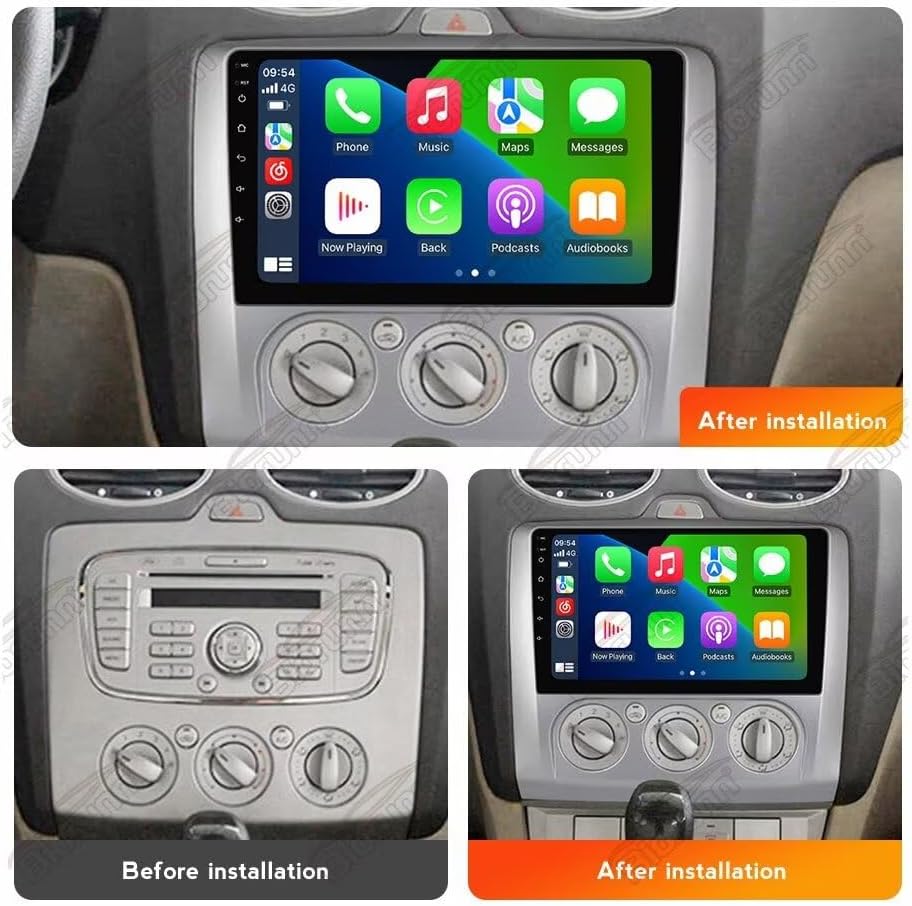
Figure 3: Visual comparison of the car's center console before and after installation of the Biorunn Car Radio Stereo, demonstrating seamless integration.
Istruzioni per l'uso
Funzionamento di base:
- Accensione/spegnimento: Tenere premuto il pulsante di accensione sull'unità oppure utilizzare l'accensione del veicolo.
- Controllo del volume: Regolare utilizzando i pulsanti fisici sull'unità o i comandi al volante.
- Navigazione tramite touchscreen: Tocca le icone per aprire le applicazioni, scorri per navigare nei menu e pizzica per ingrandire le mappe.
Car-play and Android Auto:
The unit supports both wireless Car-play and Android Auto, allowing seamless integration with your smartphone. Connect your phone via Bluetooth or USB to access navigation, music, calls, and messages directly from the car's display.

Figure 4: The user interface displaying options for Android Auto and Apple Carplay, enabling smartphone integration for navigation, communication, and entertainment.
FM/AM RDS Radio:
Access FM and AM radio stations with RDS (Radio Data System) support. The system allows for automatic station search and manual tuning. You can save your favorite stations for quick access.

Figure 5: The radio interface showing available FM frequencies and preset stations. Users can easily switch between stations and utilize automatic search functions.
Funzionalità Bluetooth:
Pair your mobile phone via Bluetooth 5.0 for hands-free calling, phonebook synchronization, and audio streaming (A2DP). The unit supports caller ID display and allows you to manage calls directly from the touchscreen.

Figure 6: The Bluetooth interface displaying a dial pad and options for managing calls, including incoming, dialed, and missed calls, with caller ID support.
Navigazione GPS:
Utilize the built-in global positioning system for accurate navigation. The system provides real-time traffic conditions and supports various map applications. Ensure the GPS antenna is properly installed for optimal signal reception.

Figure 7: A screenshot of the GPS navigation display, showing a map with route information, current location, and estimated arrival time.
Controllo del volante (SWC):
If your vehicle supports it and the Canbus is connected, you can control the car radio using your original steering wheel buttons. This allows for safe operation of music playback and hands-free calling without taking your hands off the wheel.

Figure 8: The steering wheel control learning interface, where users can program the unit to recognize their vehicle's steering wheel buttons for various functions.
Manutenzione
Proper maintenance ensures the longevity and optimal performance of your Biorunn car radio stereo.
- Pulizia dello schermo: Utilizzare un panno morbido e privo di lanugine per pulire delicatamente il touchscreen. Per le macchie ostinate, strofinare leggermenteampPulisci il panno con acqua o un detergente per schermi. Evita materiali abrasivi o sostanze chimiche aggressive.
- Pulizia generale: Mantenere l'unità libera da polvere e detriti. Utilizzare una spazzola morbida o aria compressa per pulire intorno ai pulsanti e alle prese d'aria.
- Temperatura: Evitare di esporre l'unità a temperature estreme, sia calde che fredde, per periodi prolungati.
- Aggiornamenti software: Periodically check for software updates from Biorunn to ensure the system has the latest features and bug fixes.
Risoluzione dei problemi
If you encounter issues with your Biorunn car radio stereo, refer to the following common troubleshooting steps:
| Problema | Possibile causa | Soluzione |
|---|---|---|
| Nessun potere | Collegamento elettrico allentato, fusibile bruciato. | Controllare i collegamenti dei cavi di alimentazione. Ispezionare e sostituire il fusibile del veicolo, se necessario. |
| Nessun suono | Volume troppo basso, cavi degli altoparlanti scollegati, impostazioni audio errate. | Increase volume. Check speaker wire connections. Verify audio output settings in the system menu. |
| Touchscreen non responsivo | Blocco del sistema, problema software temporaneo. | Restart the unit by pressing the reset button (if available) or turning off the vehicle's ignition and restarting. |
| Segnale GPS perso/debole | Antenna GPS non collegata correttamente oppure ostruita. | Assicurarsi che l'antenna GPS sia collegata saldamente e posizionata in un luogo libero da ostacoli (ad esempio, sul cruscotto). |
| Problemi di connessione Bluetooth | Telefono non rilevabile, procedura di associazione errata. | Assicurati che il Bluetooth sia abilitato su entrambi i dispositivi. Elimina gli abbinamenti precedenti e ripeti l'abbinamento. Riavvia entrambi i dispositivi. |
If the problem persists after attempting these solutions, please contact Biorunn customer support for further assistance.
Specifiche
| Caratteristica | Dettaglio |
|---|---|
| Sistema operativo | Androide 13 |
| Processore | 8 Nucleo |
| Dimensioni dello schermo | 9 pollici |
| Memoria RAM | 4 GB |
| ROM | 32 GB |
| Risoluzione | 1280 x 720 (IPS Screen) |
| Versione Bluetooth | BT5.0 è un'auto a motore. |
| Processore DSP | Processore DSP integrato |
| Integrazione smartphone | Car-play wireless integrato e Android Auto |
| Connettività | Support 4G LTE, 5Ghz WIFI |
| Navigazione | Built-in Global Positioning System (GPS) |
| Supporto formato audio | MP3, WMA, AAC, RM, FALC etc. |
| Supporto formato video | MPEG-1/2/4, H264, H263, VC1, RV, RMVB, DivX, Sorenson SparK, Spark, VP8, AVS Stream |
| Supporto per il formato delle foto | JPG/BMP/JEPG/GIF/PNG |
| Controllo del volante | Support original steering wheel remote control |
| Porte USB | USB1; USB2 |
Garanzia e supporto
Informazioni sulla garanzia:
The Biorunn Android 13 Car Radio Stereo comes with a Garanzia di 1 anno dalla data di acquisto. La presente garanzia copre difetti di fabbricazione e malfunzionamenti in condizioni di normale utilizzo. Si prega di conservare la prova d'acquisto per eventuali reclami in garanzia.
Nota: La garanzia non copre i danni causati da installazione impropria, uso improprio, incidenti, riparazioni non autorizzate o calamità naturali.
Assistenza clienti:
For technical assistance, troubleshooting beyond the scope of this manual, or warranty inquiries, please contact Biorunn customer support. Biorunn is committed to providing excellent service and professional technical support.
You can find contact information on the official Biorunn website or through your purchase platform. When contacting support, please have your product model number (8-Core, 4GB+32GB) and purchase details ready.