1. Introduzione
The Keychron Q5 Pro is a highly customizable 96% layout wireless mechanical keyboard designed for a premium typing experience. It features QMK/VIA support for key remapping, a full aluminum body, double-gasket design, hot-swappable switches, and KSA Double-Shot PBT keycaps. This manual provides detailed instructions for setting up, operating, and maintaining your Keychron Q5 Pro keyboard.

2. Contenuto della confezione
Verify that all items are present in your Keychron Q5 Pro package:
- 1x Fully Assembled Keyboard (including Aluminum Case, PCB, PC Plate, Sound Absorbing Foam, Case Foam, Battery, Silicone Gaskets, Bottom Case)
- 1x Cavo da Tipo-C a Tipo-C
- 1x adattatore da tipo A a tipo C
- 1x Estrattore per interruttori
- 1x estrattore per keycap
- 1x Cacciavite
- 1x chiave esagonale
- 14 guarnizioni (10 installate e 4 nella confezione)
- 7 set x stabilizzatori
- 1 set x Keycaps (Double-Shot KSA PBT)
- 1 set x Interruttori

3. Impostazione
3.1 Carica iniziale
Before first use, connect the keyboard to a power source using the provided USB Type-C cable to fully charge the internal 4000mAh battery. The charging indicator will show the charging status.

3.2 Connecting Wirelessly (Bluetooth)
- Locate the mode switch on the back of the keyboard. Slide it to the 'BT' position for Bluetooth mode.
- Sul tuo dispositivo (computer, tablet, smartphone), attiva il Bluetooth e cerca i dispositivi disponibili.
- Select 'Keychron Q5 Pro' from the list of devices to pair.
- La tastiera può connettersi a un massimo di 3 dispositivi. Utilizzare Fn + 1, Fn + 2 o Fn + 3 per passare da un dispositivo associato all'altro.
3.3 Connecting Wired (USB)
- Locate the mode switch on the back of the keyboard. Slide it to the 'Cable' position for wired mode.
- Collegare il cavo USB Type-C in dotazione dalla tastiera alla porta USB del computer.
- La tastiera verrà riconosciuta automaticamente dal sistema operativo.
3.4 Cambio di compatibilità del sistema operativo
The Keychron Q5 Pro includes a switch to toggle between Windows and macOS layouts. Ensure this switch is set to your operating system for correct key functionality.

4. Istruzioni per l'uso
4.1 QMK/VIA Key Remapping
The Keychron Q5 Pro supports QMK/VIA, an open-source software that allows you to remap keys and program macros. This includes customizing the rotary knob functions.
- Scarica il software VIA dal sito ufficiale Keychron websito.
- Connect the keyboard in wired mode to your computer. Key remapping can only be performed in wired mode.
- Launch the VIA software and follow the on-screen instructions to customize key assignments and macros.
- Once programmed, the custom keymap will function in both wired and wireless modes.
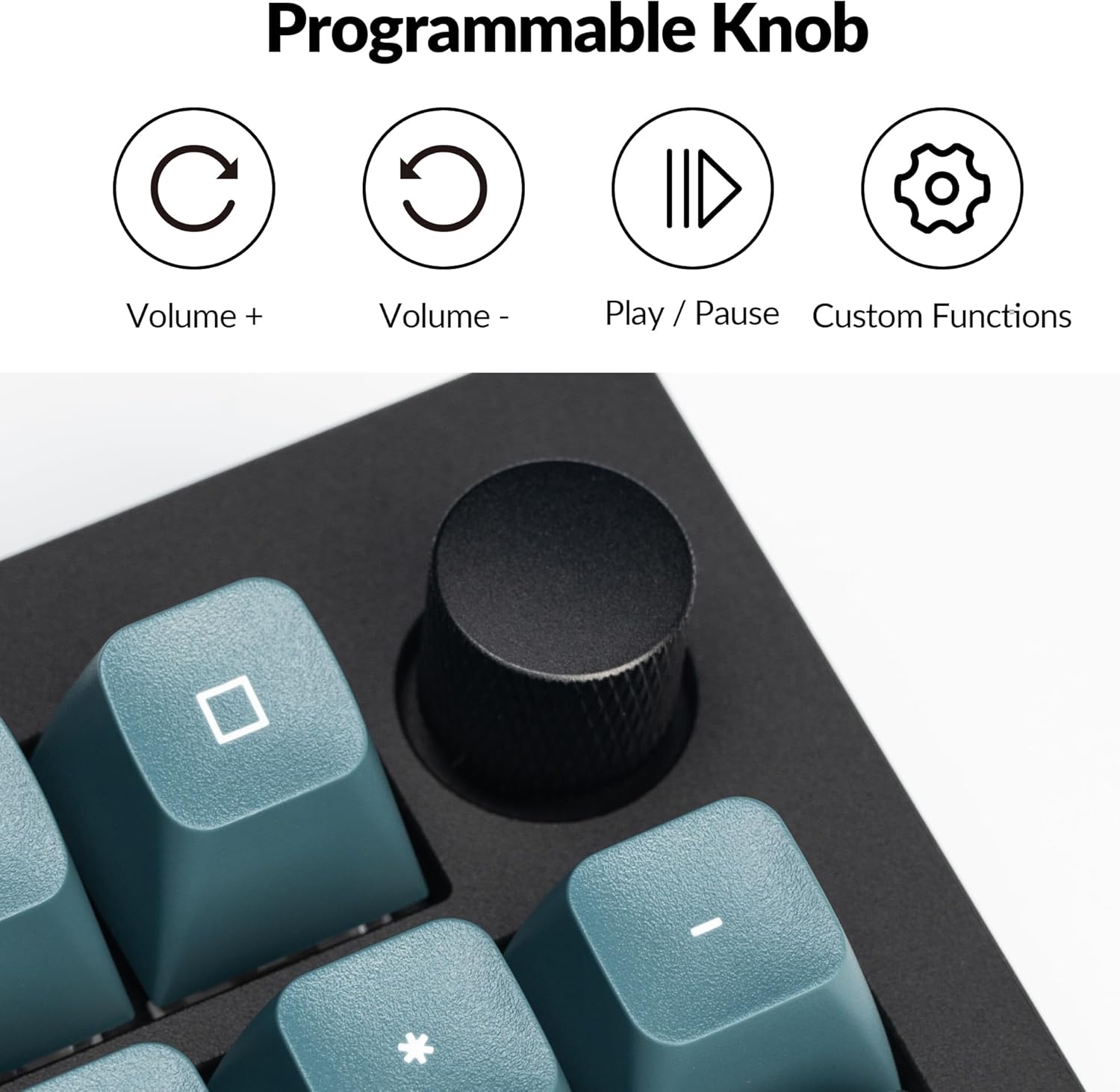
4.2 Manopola rotante programmabile
The rotary knob on the Keychron Q5 Pro offers versatile control. By default, it controls volume (rotate) and play/pause (press). Its functions can be customized using the VIA software.
- Ruotare in senso orario: Aumentare il volume
- Ruota in senso antiorario: Diminuire il volume
- Premere: Riproduci/Metti in pausa
- Custom functions can be assigned via VIA software.

4.3 Switch sostituibili a caldo
The Q5 Pro features hot-swappable sockets, allowing you to change mechanical switches without soldering. This supports most 3-pin and 5-pin MX-style mechanical switches.
- Spegnere la tastiera o scollegarla dal computer.
- Utilizzare l'estrattore per tasti in dotazione per rimuovere con cautela il tasto desiderato.
- Use the provided switch puller to gently grip and pull the switch vertically out of its socket.
- Allineare i pin del nuovo interruttore con i fori sul PCB. Assicurarsi che i pin siano dritti.
- Premere con decisione il nuovo interruttore nella presa finché non scatta in posizione.
- Sostituire il tasto.


4.4 Keycaps and Backlighting
The Q5 Pro comes with KSA profile double-shot PBT keycaps, known for their durability and oil resistance. The keyboard features south-facing RGB backlighting, which is optimized for non-shine-through keycaps.

5. Manutenzione
5.1 Pulizia
- Pulizia generale: Utilizzare un panno morbido e asciutto per pulire la superficie della tastiera. Per lo sporco ostinato, leggermente dampen il panno con acqua o una soluzione detergente delicata.
- Pulizia dei tasti: Keycaps can be removed using the provided keycap puller and cleaned with mild soap and water. Ensure they are completely dry before reattaching.
- Rimozione della polvere: Utilizzare aria compressa per rimuovere polvere e detriti tra i tasti e gli interruttori.
5.2 Stabilizzatori
The Q5 Pro utilizes screw-in stabilizers for enhanced key stability. If a large key (e.g., Spacebar, Shift, Enter) feels wobbly or rattles, the stabilizers may need lubrication or adjustment. Refer to online resources or Keychron support for detailed stabilizer maintenance guides.

6. Risoluzione Dei Problemi
- La tastiera non risponde: Ensure the keyboard is charged. Check the mode switch (BT/Cable) and ensure it's set correctly. If in Bluetooth mode, re-pair the device. If in wired mode, try a different USB port or cable.
- Le chiavi non si registrano: If a specific key is not working, try hot-swapping the switch with a known working one to determine if the issue is with the switch or the PCB socket. Ensure switches are fully seated.
- Problemi di connettività Bluetooth: Ensure the keyboard is within range of your device. Remove and re-pair the keyboard in your device's Bluetooth settings. Ensure no other devices are interfering with the connection.
- QMK/VIA software not detecting keyboard: Ensure the keyboard is connected in wired mode. Download the latest VIA software and firmware from the official Keychron websito.
- Retroilluminazione non funzionante: Check the keyboard's backlight settings. Ensure the brightness is turned up. If specific LEDs are not working, it may indicate a hardware issue.
7. Specifiche
| Caratteristica | Dettaglio |
|---|---|
| Numero di modello | Q5P-M3 |
| Disposizione | 96% |
| Connettività | Bluetooth 5.1 (Wireless), USB Type-C (Wired) |
| Tasso di sondaggio | 1000 Hz (cablato), 90 Hz (wireless) |
| Interruttori | Hot-swappable K Pro Brown Switch (3-pin & 5-pin MX style compatible) |
| keycaps | KSA Profile PBT a doppio colpo |
| Materiale del corpo | Full Aluminum |
| Progettazione della guarnizione | Double-Gasket |
| Batteria | Polimero di litio da 4000 mAh |
| Compatibilità del sistema operativo | macOS, Windows, Linux |
| Retroilluminazione | RGB esposto a sud |
| Dimensioni del prodotto | 16.06 x 5.71 x 1.41 pollici |
| Peso dell'articolo | 4.76 libbre |
7.1 Keychron K Pro Switch Features

7.2 Esploso View di componenti

8. Garanzia e supporto
Per informazioni sulla garanzia, supporto tecnico o ulteriore assistenza, visitare il sito ufficiale Keychron websito o contattare il servizio clienti. Conservare la prova d'acquisto per eventuali reclami in garanzia.
- Ufficiale Websito: www.keychron.com
- E-mail di supporto: Fare riferimento al funzionario websito per informazioni aggiornate sui contatti di supporto.


