1. Introduzione
Thank you for choosing the RORRY A3 3-in-1 Magnetic Wireless Charger. This device is designed to provide convenient and efficient wireless charging for your compatible iPhone, Apple Watch, and AirPods. It also features a versatile ring holder for enhanced usability.
2. Cosa c'è nella scatola
- RORRY A3 Magnetic Wireless Charger
- Cavo da USB-C a USB-C
- Adhesive Metal Ring
- Manuale d'uso

Image: The RORRY A3 charger, USB-C cable, and adhesive metal ring.
3. Compatibilità
The RORRY A3 Magnetic Wireless Charger is compatible with a wide range of Apple devices:
- iPhone: iPhone 15/14/13/12/11/XS/XR series (MagSafe compatible models for magnetic attachment, others via adhesive metal ring).
- Orologio Apple: Apple Watch Series 9/Ultra2/8/Ultra/7/6/5/4/3/SE.
- AirPods: AirPods (2nd Gen), AirPods (3rd Gen), AirPods Pro, AirPods Pro (2nd Gen) with wireless charging cases.

Image: Visual guide to compatible iPhone, Apple Watch, and AirPods models.
4. Istruzioni per l'installazione
- Connetti alimentazione: Connect the provided USB-C to USB-C cable to the charger's USB-C port and then to a compatible power adapter (20W or above recommended for optimal fast charging, adapter not included).
- Magnetic Attachment (iPhone): For MagSafe-compatible iPhones, simply align the charger with the back of your iPhone. The magnets will automatically snap it into place.
- Adhesive Metal Ring (Non-MagSafe Devices): If your phone is not MagSafe compatible or you use a non-MagSafe case, use the included adhesive metal ring. Clean the back of your phone or case, peel off the adhesive backing from the metal ring, and firmly attach it to the desired charging area on your device. This will enable magnetic attachment for the charger.
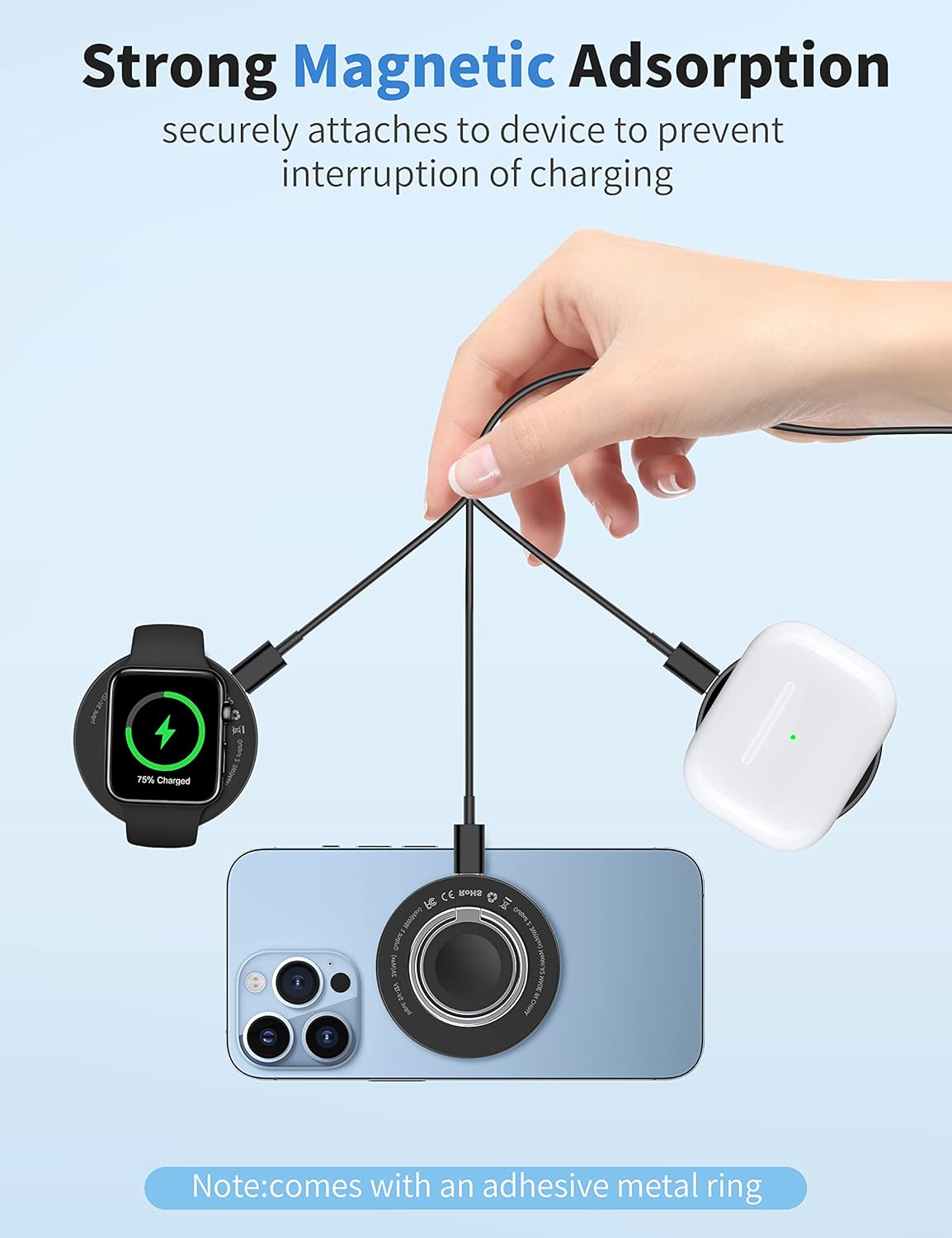
Image: Demonstrates magnetic attachment for iPhone, Apple Watch, and AirPods.
5. Istruzioni per l'uso
5.1 Ricaricare l'iPhone
- Attach the RORRY A3 charger magnetically to the back of your iPhone. Ensure proper alignment for efficient charging.
- The charger supports up to 15W fast wireless charging for compatible iPhones.
5.2 Ricaricare l'Apple Watch
- The charger features a dedicated magnetic module for Apple Watch. Place your Apple Watch on this module for charging.
- The charger supports up to 3W wireless charging for compatible Apple Watch models.
5.3 Ricarica degli AirPods
- Place your AirPods wireless charging case on the flat surface of the charger. Ensure the case is centered for optimal charging.
- The charger supports up to 5W wireless charging for compatible AirPods cases.
5.4 Using as a Phone Stand/Ring Holder
- The integrated ring on the charger can be unfolded and used as a kickstand for your iPhone, allowing for hands-free viewsia in orientamento verticale che orizzontale.
- The ring also functions as a secure grip for your phone, reducing the risk of accidental drops.

Image: The charger functioning as a phone stand for hands-free use.
Video: Demonstrates the RORRY A3 Magnetic Wireless Charger's features, including its 3-in-1 functionality and phone stand capability.
Video: Showcases the portable design and useful ring feature for Apple Watch and iPhone charging.
6. Caratteristiche di sicurezza
The RORRY A3 charger incorporates multiple safety protections to ensure safe and reliable charging:
- oltre il volumetage Protezione: Misure di salvaguardia contro la volemia eccessivatage ingresso.
- Protezione da sovracorrente: Previene i danni causati da un flusso di corrente eccessivo.
- Protezione da sovratemperatura: Monitora e regola la temperatura per evitare il surriscaldamento.
- Rilevamento di oggetti estranei: Detects foreign metallic objects on the charging surface to prevent hazards.

Image: Visual representation of the charger's built-in safety mechanisms.
7. Fast Charging Information
The RORRY A3 charger supports various charging speeds depending on the device:
- per iPhone: Fino a 15 W (max)
- Orologio Apple: Fino a 3 W (max)
- AirPods: Fino a 5 W (max)
For optimal fast charging, a 20W or above AC adapter is required (not included).

Image: Illustrates the maximum wattage output for iPhone, Apple Watch, and AirPods.
8. Manutenzione
- Mantenere il caricabatterie pulito e privo di polvere e detriti. Utilizzare un panno morbido e asciutto per la pulizia.
- Evitare di esporre il caricabatterie a temperature estreme, umidità o liquidi.
- Do not disassemble or attempt to repair the charger yourself. Contact customer support if service is required.
9. Risoluzione Dei Problemi
- Dispositivo non in carica:
- Ensure the charger is properly connected to a power source (20W+ adapter recommended).
- Verify that your device is correctly aligned on the charging surface.
- Check if your device's case is too thick or contains metallic objects that interfere with wireless charging.
- Verifica che il tuo dispositivo sia compatibile con la ricarica wireless.
- Ricarica lenta:
- Use a power adapter with at least 20W output.
- Assicurarsi che non vi siano oggetti estranei tra il caricabatterie e il dispositivo.
- Evita di utilizzare il dispositivo in modo eccessivo durante la ricarica, poiché ciò potrebbe rallentare il processo.
- Surriscaldamento:
- Remove your device from the charger and allow both to cool down.
- Assicurarsi che il caricabatterie sia posizionato in un'area ben ventilata.
- Evitare di caricare alla luce diretta del sole o in ambienti caldi.
10. Specifiche
| Numero di modello | A3 |
| Dimensioni del prodotto | 2.36 x 2.36 x 0.39 pollici |
| Peso dell'articolo | 3.52 once |
| Ingresso volumetage | CC 5V-9V/2A (massimo) |
| Output (iPhone) | 15 W (massimo) |
| Uscita (Apple Watch) | 3 W (massimo) |
| Output (AirPods) | 5 W (massimo) |
| Tipo di connettore | USB tipo C |
11. Garanzia e supporto
RORRY is committed to providing excellent customer service. For any inquiries or support, please refer to the following:
- Servizio post-vendita: 7x24 Hour Support
- Servizio di cambio: 30-Day Exchange Policy
- Piano di assistenza: 12-Month Care Plan
For further assistance, please contact RORRY customer support through your purchase platform.


