1. Introduzione
Thank you for choosing the SPLITSKY NZFS Kids Alarm Clock. This device combines an alarm clock, white noise sleep aid, and an 8-mode RGB night light, designed to assist with sleep and wake-up routines for children and adults. Please read this manual thoroughly to understand its features and ensure proper operation.
Informazioni sulla sicurezza:
- Tenere il dispositivo lontano dall'acqua e da ambienti ad alta umidità.
- Non tentare di smontare o riparare il dispositivo da soli.
- Use only the provided USB-C power cable or a certified equivalent.
- Garantire un'adeguata ventilazione intorno al dispositivo.
2. Contenuto della confezione
Verifica che tutti gli articoli siano presenti nel tuo pacco:
- SPLITSKY NZFS Kids Alarm Clock
- 1.2M (4.7 inch) USB-C Power Cable
- Manuale dell'utente (questo documento)
- 1 x CR2032 Lithium Ion Battery (pre-installed for memory backup)
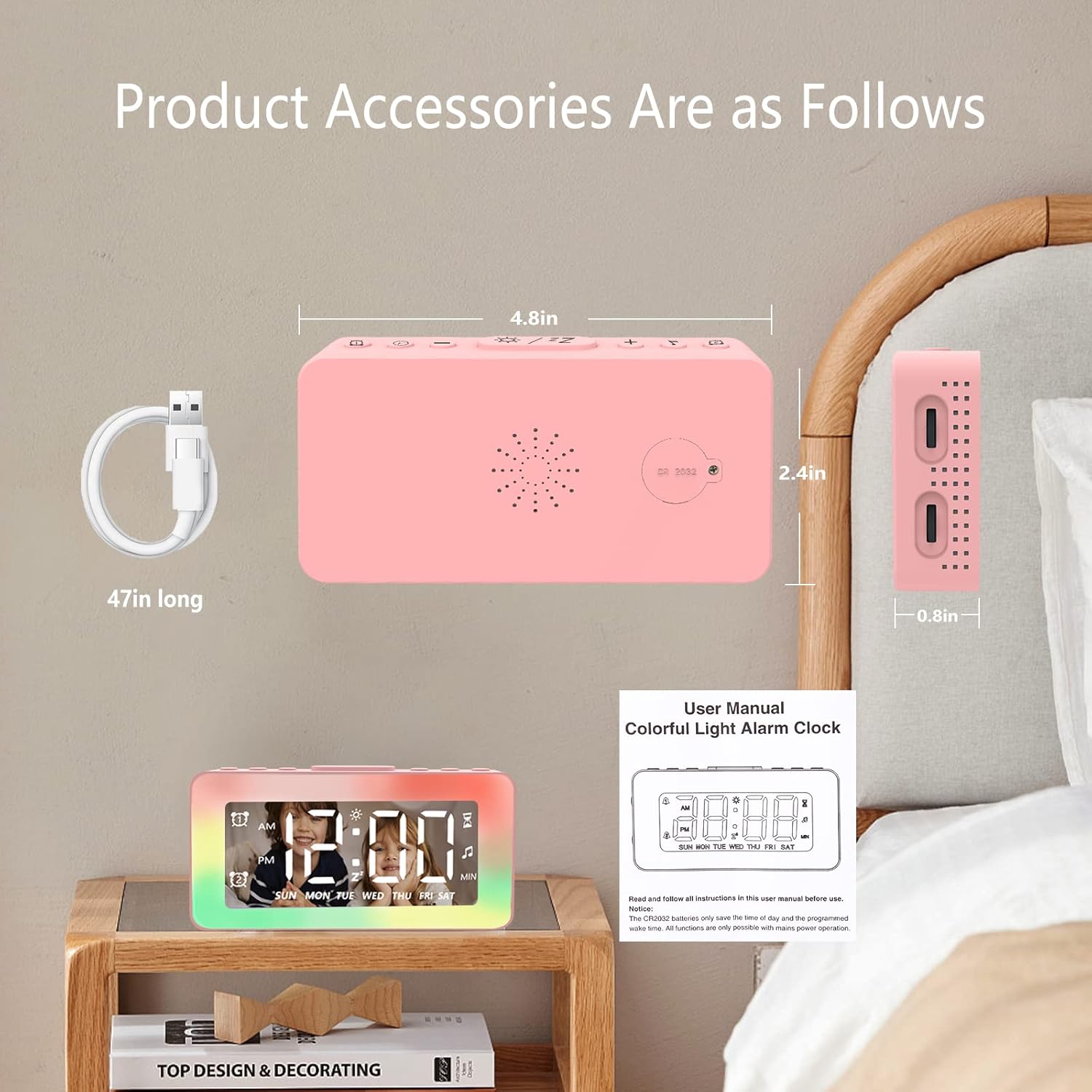
Image: The SPLITSKY NZFS Kids Alarm Clock, a USB-C power cable, and the user manual are included in the package.
3. Prodotto finitoview
Familiarizza con i pulsanti e le porte della tua sveglia:

Immagine: dettagliata view of the alarm clock's top buttons and side ports, including Alarm 1, Time Setting, Light Minus/Settings, Snooze/Light Mode Switch, Light Plus/Setup, Music Switch, Alarm 2, Volume Setting, Time Brightness Setting, USB Output Charging Port, and Type-C Input Interface.
- Pulsante allarme 1: Set and activate Alarm 1.
- Pulsante di impostazione dell'ora: Regola l'ora corrente.
- Light Minus / Settings Button: Decrease light brightness or navigate settings.
- Snooze / Light Mode Switch Button: Activate snooze, or cycle through light modes.
- Light Plus / Setup Button: Increase light brightness or confirm settings.
- Music Switch Button: Cycle through white noise sounds.
- Pulsante allarme 2: Set and activate Alarm 2.
- Volume Setting Wheel (Side): Adjust alarm and white noise volume.
- Time Brightness Setting Wheel (Side): Regola la luminosità del display.
- USB Output Charging Port (Side): Charge external devices.
- Type-C Input Interface (Side): Connect power cable to the alarm clock.
4. Impostazione
4.1 Collegamento di alimentazione
- Connect the provided USB-C power cable to the Type-C Input Interface on the side of the alarm clock.
- Collegare l'altra estremità del cavo USB-C a un adattatore di alimentazione USB compatibile (non incluso) o a una porta USB.
- Il display si illuminerà, indicando che l'orologio è acceso.

Image: The SPLITSKY NZFS Kids Alarm Clock is shown powered on and connected via its USB-C port, also demonstrating its capability to charge a smartphone.
4.2 Installazione della batteria (backup della memoria)
The alarm clock includes a pre-installed CR2032 battery. This battery serves as a memory backup to retain time and alarm settings during a power outage or when the main power is disconnected. It does not power the clock for regular operation.
- If the battery needs replacement, locate the battery compartment on the back of the unit.
- Utilizzare un piccolo cacciavite per aprire il vano.
- Sostituire con una nuova batteria CR2032, prestando attenzione alla corretta polarità.
- Chiudere bene lo scomparto.
5. Istruzioni per l'uso
5.1 Setting the Time (12H/24H Format)
- Premere e tenere premuto il tasto Pulsante di impostazione dell'ora finché le cifre delle ore non iniziano a lampeggiare.
- Utilizzare il Light Minus / Settings Button (giù) o Light Plus / Setup Button (up) to adjust the hour.
- Premere il tasto Pulsante di impostazione dell'ora again to move to minute adjustment. Adjust minutes using the Light Minus/Plus buttons.
- Premere il tasto Pulsante di impostazione dell'ora a third time to select 12-hour or 24-hour format. Adjust using the Light Minus/Plus buttons.
- Premere il tasto Pulsante di impostazione dell'ora ancora una volta per confermare e uscire dalla modalità di impostazione dell'ora.
5.2 Setting Alarms (Dual Alarm, Daily/Weekday/Weekend Mode)
L'orologio supporta due sveglie indipendenti (Sveglia 1 e Sveglia 2).
- Premere e tenere premuto il tasto Pulsante Allarme 1 (for Alarm 1) or Pulsante Allarme 2 (for Alarm 2) until the alarm hour digits flash.
- Utilizzare il Light Minus / Settings Button or Light Plus / Setup Button per regolare l'ora.
- Press the respective Alarm Button again to move to minute adjustment. Adjust minutes using the Light Minus/Plus buttons.
- Press the respective Alarm Button again to select the alarm mode:
- Modalità giornaliera: La sveglia suona ogni giorno.
- Weekday Mode: La sveglia suona dal lunedì al venerdì.
- Modalità weekend: La sveglia suona sabato e domenica.
- Press the respective Alarm Button once more to confirm and exit alarm setting mode.
- To enable/disable an alarm, short press the Pulsante Allarme 1 or Pulsante Allarme 2. Un'icona di allarme apparirà/scomparirà sul display.
5.3 Funzione posticipa
Quando suona un allarme, tocca il Snooze / Light Mode Switch Button on top to activate snooze. The alarm will pause for 9 minutes and then sound again. This can be repeated multiple times.
5.4 Night Light (8 Modes RGB, 10-level dimming)
The alarm clock features 6 solid color lights and 2 ambient colorful lights.
- Premere brevemente il tasto Snooze / Light Mode Switch Button to turn on the night light and cycle through the 8 color modes.
- To adjust the brightness (10 levels), use the Light Minus / Settings Button or Light Plus / Setup Button while the night light is active.
- To turn off the night light, continue pressing the Snooze / Light Mode Switch Button finché la luce non si spegne.

Image: Multiple SPLITSKY NZFS Kids Alarm Clocks are shown, each displaying a different color from the 8 available RGB night light modes.
5.5 White Noise Sleep Aid (8 Sounds)
L'orologio offre 8 suoni rilassanti per favorire il sonno.
- Premere brevemente il tasto Pulsante di commutazione della musica to turn on the white noise and cycle through the available sounds.
- To adjust the volume (16 levels), use the Volume Setting Wheel on the side of the clock.
- To turn off the white noise, continue pressing the Pulsante di commutazione della musica until the sound stops.

Image: The SPLITSKY NZFS Kids Alarm Clock is displayed on a bedside table, with icons illustrating the various white noise options such as rain, cicadas, piano, bonfire, waves, birdsong, and church bells.
5.6 Sleep Timer (10-120 minutes)
The sleep timer allows you to set a duration for the white noise and/or night light to play before automatically turning off.
- While white noise or night light is active, press and hold the Pulsante di commutazione della musica (for white noise timer) or Snooze / Light Mode Switch Button (for light timer).
- Utilizzare il Light Minus / Settings Button or Light Plus / Setup Button to select the desired timer duration (10, 20, 30, 60, 90, 120 minutes).
- Press the respective button again to confirm the timer setting. The timer icon will appear on the display.
5.7 Regolazione della luminosità del display
Regolare la luminosità del display LED dell'ora utilizzando Time Brightness Setting Wheel on the side of the clock.
5.8 porta di ricarica USB
The USB output charging port on the side of the alarm clock can be used to charge other small electronic devices, such as smartphones. Connect your device's charging cable to this port.
6. Manutenzione
6.1 Pulizia
- Assicurarsi che il dispositivo sia scollegato prima della pulizia.
- Pulisci la superficie con un panno morbido e asciutto.
- Non utilizzare detergenti abrasivi, solventi o spray chimici.
6.2 Conservazione
When not in use for extended periods, store the alarm clock in a cool, dry place, away from direct sunlight and extreme temperatures.
7. Risoluzione Dei Problemi
If you encounter issues with your SPLITSKY NZFS Kids Alarm Clock, refer to the table below for common problems and solutions.
| Problema | Possibile causa | Soluzione |
|---|---|---|
| Il display dell'orologio è spento o poco luminoso. | Not connected to power; Time brightness set too low. | Ensure USB-C cable is securely connected to a power source. Adjust the Time Brightness Setting Wheel. |
| L'allarme non suona. | Allarme non attivato; volume dell'allarme troppo basso. | Check if the alarm icon is displayed. If not, short press the respective Alarm Button to activate. Adjust the Volume Setting Wheel. |
| Time/settings reset after power disconnection. | CR2032 backup battery is depleted or missing. | Replace the CR2032 battery in the battery compartment. |
| Night light or white noise not working. | Function not activated; Sleep timer active. | Premere brevemente il tasto Snooze / Light Mode Switch Button or Pulsante di commutazione della musica to activate. Check if a sleep timer is set. |
8. Specifiche
| Caratteristica | Dettaglio |
|---|---|
| Marca | SPLITSKY |
| Numero di modello | NZFS |
| Tipo di visualizzazione | LED digitale |
| Dimensioni del prodotto | 3.17"W x 3.17"H (approximately 8.05 cm W x 8.05 cm H) |
| Peso dell'articolo | 8.1 once (circa 230 grammi) |
| Fonte di alimentazione | Corded Electric (USB-C), Battery Powered (CR2032 for memory) |
| Modalità luce notturna | 8 (6 solid colors, 2 ambient colorful) with 10-level dimming |
| Suoni di rumore bianco | 8 suoni rilassanti |
| Toni di allarme | 7 wake-up alarm tones with 16-level volume control |
| Funzioni di allarme | Dual Alarm, Daily/Weekday/Weekend modes, 9-minute Snooze |
| Funzione timer | 10-120 minute sleep timer for sounds and lights |
| Connettività | USB-C Input, USB-A Output (for charging external devices) |
| Materiale | Acrilonitrile-butadiene-stirene |
9. Garanzia e supporto
9.1 Informazioni sulla garanzia
Please refer to the warranty information provided at the time of purchase or contact your retailer for details regarding the product warranty. Keep your proof of purchase for any warranty claims.
9.2 Assistenza clienti
For technical assistance, troubleshooting beyond this manual, or general inquiries, please contact the seller through the platform where you purchased the product. Provide your order number and a detailed description of the issue for prompt support.


