1. Introduzione
Thank you for choosing the EIGHTREE ET25 5GHz Smart Plug. This smart plug allows you to control your electronic devices remotely, monitor energy consumption, and automate your home with ease. It supports both 2.4GHz and 5GHz Wi-Fi networks for enhanced connectivity and stability. Please read this manual carefully before use to ensure proper operation and safety.
2. Informazioni sulla sicurezza
- Non smontare o modificare il dispositivo.
- Non esporre il dispositivo all'acqua o ad ambienti umidi.
- Tenere fuori dalla portata dei bambini.
- Ensure the connected appliance's power consumption does not exceed the smart plug's maximum rating (16A, 3680W).
- Utilizzare solo in luoghi interni asciutti.
3. Contenuto della confezione
- EIGHTREE ET25 5GHz Smart Plug (1 unit)
- Manuale dell'utente (questo documento)
4. Prodotto finitoview
The EIGHTREE ET25 Smart Plug is a compact device designed for easy integration into your home. It features a single power button and an indicator light.

This image shows the EIGHTREE ET25 Smart Plug alongside a smartphone screen displaying detailed electricity consumption statistics, including power, current, voltage, and cost over a weekly period. The plug itself is white with a blue power button.
Caratteristiche principali:
- Monitoraggio energetico: Track real-time and historical power consumption.
- Controllo vocale: Compatibile con Alexa e Google Home.
- Telecomando: Manage devices from anywhere via the app.
- Timer e programmi: Automate on/off times for appliances.
- Condivisione dispositivi: Condividi il controllo con i membri della famiglia.
- Controllo di gruppo: Gestisci più prese intelligenti contemporaneamente.
- 5GHz Wi-Fi Support: Enhanced stability and faster response times.

This image highlights the key features of the EIGHTREE 5GHz Smart Plug, including energy monitoring, voice control, remote control, timers and scheduling, device sharing, and group control. A smart plug is shown connected to a coffee machine, demonstrating its practical application.
5. Istruzioni per l'installazione
5.1 Scarica l'app Smart Life
The EIGHTREE Smart Plug uses the Smart Life app for control and configuration. Cercare "Smart Life" in your smartphone's app store (Google Play Store for Android or Apple App Store for iOS) and download it.
5.2 Plug In the Smart Plug
Plug the EIGHTREE Smart Plug into a standard wall outlet. The indicator light on the plug should start blinking, indicating it's in pairing mode.
5.3 Connessione al Wi-Fi
The EIGHTREE ET25 Smart Plug supports both 2.4GHz and 5GHz Wi-Fi networks. For optimal performance, connecting to a 5GHz network is recommended, but 2.4GHz is also supported.

This image depicts the easy installation process for the EIGHTREE Smart Plug. A hand holds a smartphone displaying the Smart Life app, which automatically detects the smart plug via Bluetooth for connection to a 5GHz (or 2.4GHz) Wi-Fi network, shown with a router.
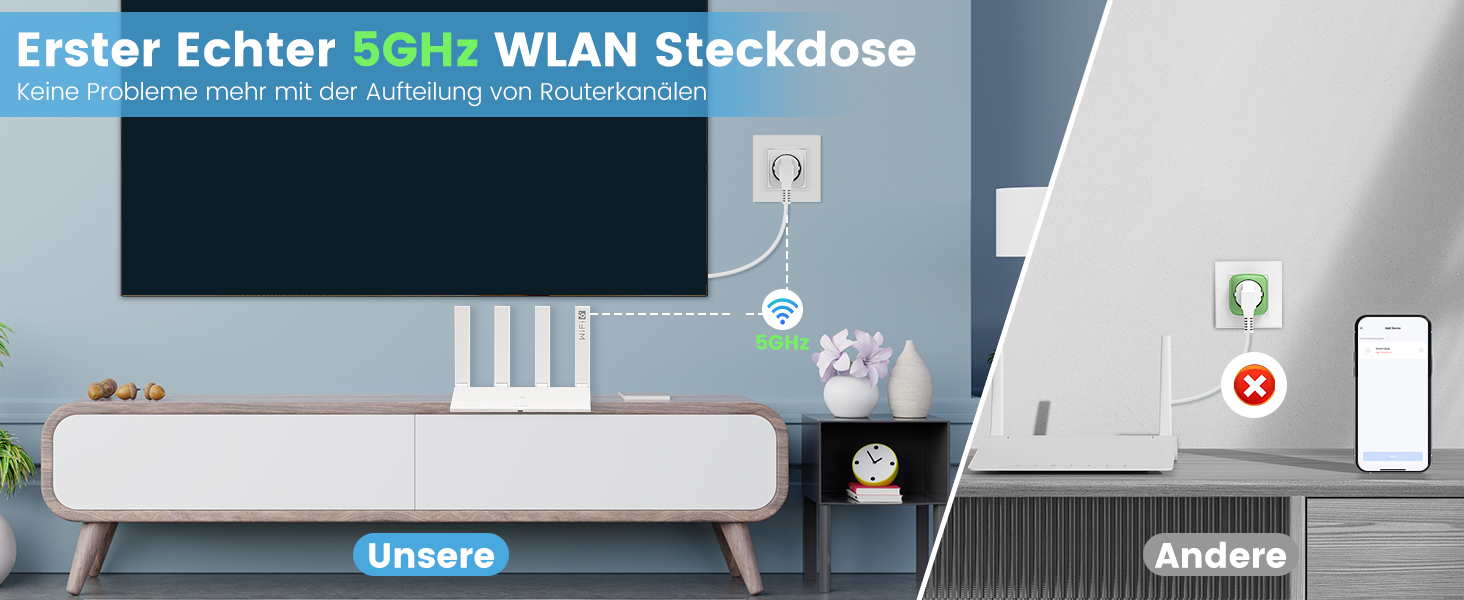
This image compares the EIGHTREE 5GHz Smart Plug's stable connection with a 5GHz router to other smart plugs that might experience connectivity issues due to router separation or incompatible frequencies. It emphasizes the EIGHTREE plug's reliable 5GHz Wi-Fi capability.
5.4 Pairing Steps (Smart Life App)
- Start the Smart Life App: Open the Smart Life application on your smartphone.
- Aggiungi dispositivo: Tap the "+" icon or "Add Device" button in the app. The app should automatically detect the smart plug via Bluetooth. Tap "Add" to proceed.
- Inserisci la password Wi-Fi: Select your 5GHz (or 2.4GHz) Wi-Fi network and enter the correct password.
- Attendi la connessione: Follow the on-screen instructions and wait for the smart plug to connect to your Wi-Fi network. Once connected, the indicator light will stop blinking and remain solid.

This image provides a visual, four-step guide for setting up the EIGHTREE Smart Plug. It shows screenshots of the Smart Life app: 1) Starting the app, 2) Tapping "Add" to find the device, 3) Entering the 5GHz Wi-Fi password, and 4) Waiting for the connection to complete.
6. Istruzioni per l'uso
6.1 Controllo manuale
Press the physical power button on the smart plug to manually turn the connected appliance on or off. The indicator light will change state accordingly.
6.2 Controllo dell'app
Once paired, you can control the smart plug through the Smart Life app:
- Acceso/Spento: Tap the power icon in the app to toggle the connected appliance.
- Timer e programmi: Set specific times for the plug to turn on or off automatically. This allows for intelligent programming of your appliances.

This image illustrates the timers and schedules feature of the EIGHTREE Smart Plug. A humidifier is shown in a living room setting, with on/off times (e.g., 7:00 PM ON, 10:00 PM OFF, 8:00 AM ON) indicating automated control of appliances.
- Conto alla rovescia: Imposta un timer con conto alla rovescia affinché la spina si spenga dopo un intervallo di tempo specificato.
6.3 Monitoraggio energetico
The smart plug allows you to monitor the energy consumption of your connected devices and estimate electricity costs. This feature helps you make informed decisions to reduce energy usage.
- View Statistiche: Access real-time and historical data on power, current, voltage, and energy consumption within the Smart Life app.
- Esporta dati: Easily export detailed energy consumption data in PDF format for analysis and budgeting.

This image illustrates the energy monitoring capability of the EIGHTREE Smart Plug. A graph on a smartphone screen displays weekly electricity consumption in kWh, allowing users to track and estimate costs. The smart plug is shown connected to a microwave oven.
6.4 Controllo vocale
Integrate your EIGHTREE Smart Plug with voice assistants like Amazon Alexa and Google Home for hands-free control.
- Collega account: Follow the instructions in the Smart Life app to link your account with Alexa or Google Home.
- Comandi vocali: Use commands such as "Alexa, turn on the living room light" or "Hey Google, turn off the fan."

This image demonstrates the voice control feature of the EIGHTREE Smart Plug. A Google Home speaker is shown next to a smart plug connected to a floor lamp, with text indicating voice commands like "OK Google, turn on the light." It also shows compatibility with Alexa, Google Home, and SmartThings.
7. Manutenzione
- Mantenere pulita la presa intelligente pulendola con un panno asciutto e morbido.
- Non utilizzare prodotti chimici aggressivi o detergenti abrasivi.
- Conservare il dispositivo in un luogo fresco e asciutto quando non viene utilizzato.
- Regularly check for any signs of damage to the plug or connected cables.
8. Risoluzione Dei Problemi
8.1 Il dispositivo non si connette al Wi-Fi
- Assicurati che la tua rete Wi-Fi sia attiva e stabile.
- Verifica di aver inserito la password Wi-Fi corretta.
- Assicurati che la presa intelligente si trovi nel raggio d'azione del tuo router Wi-Fi.
- Try resetting the smart plug by unplugging it for 10 seconds and plugging it back in.
- Confirm your router supports 5GHz (or 2.4GHz if you are trying to connect to that band) and that the network name (SSID) is visible.
8.2 Device Not Responding to App/Voice Commands
- Check if the smart plug is connected to Wi-Fi (solid indicator light).
- Assicurati che il tuo smartphone abbia una connessione Internet attiva.
- Verify that the Smart Life app is up to date.
- For voice control, ensure your Alexa/Google Home account is correctly linked to Smart Life.
- Se il problema persiste, prova a rimuovere il dispositivo dall'app e ad associarlo di nuovo.
8.3 Potenza in uscitatage/Router Restart
In caso di mancanza di correntetage or router restart, the smart plug should automatically reconnect to your Wi-Fi network once power and network services are restored. If it does not, follow the Wi-Fi connection troubleshooting steps above.
9. Specifiche
| Caratteristica | Specificazione |
|---|---|
| Numero di modello | ET25 |
| Dimensioni (L x P x A) | Dimensioni: 5.5 x 5.8 x 8.7 cm |
| Peso | 100 grammi |
| Materiale | addominali |
| Modalità operativa | Acceso-Spento-Acceso |
| Valutazione attuale | 16 A |
| Volume di eserciziotage | 230 Volt (CA) |
| Tipo di contatto | Normalmente aperto |
| Tipo di connettore | Plug-in (Type F) |
| Produttore | Ottanta |
10. Garanzia
The EIGHTREE ET25 Smart Plug comes with a 24 mesi di garanzia senza preoccupazioni from the date of purchase. This warranty covers manufacturing defects and ensures fast service for a great user experience. Please retain your proof of purchase for warranty claims.

This image displays EIGHTREE's commitment to quality and customer satisfaction, featuring certifications (ETL, Intertek, FCC) and highlighting a "24 months worry-free warranty" and fast service.
11. Assistenza clienti
If you encounter any issues or have questions regarding your EIGHTREE ET25 Smart Plug, please refer to the troubleshooting section of this manual. For further assistance, contact EIGHTREE customer support through the official websito o le informazioni di contatto fornite con l'acquisto.
We are always here to help you enjoy the convenience that smart home technology brings to your life.


