Introduzione
This manual provides detailed instructions for the TELE System 27-inch Full HD LED TV, model palco hevc s2. Please read this manual carefully before using the product to ensure proper operation, maximize its lifespan, and understand its features. Keep this manual for future reference.
1. Impostazione
1.1 Disimballaggio
Estrarre con cautela il televisore e tutti gli accessori dall'imballaggio. Assicurarsi che tutti i componenti siano presenti:
- TELE System 27-inch Full HD LED TV
- Telecomando
- Cavo di alimentazione
- Manuale dell'utente (questo documento)
- Componenti del supporto TV (se applicabile)
1.2 Fissaggio del supporto o montaggio a parete
Per l'installazione del supporto:
- Posizionare lo schermo del televisore su una superficie morbida e pulita per evitare graffi.
- Allineare i componenti del supporto con i fori di montaggio nella parte inferiore del televisore.
- Fissare il supporto utilizzando le viti fornite. Non serrare eccessivamente.
Per il montaggio a parete:
This TV supports wall mounting. Refer to the specific instructions provided with your wall mount kit for proper installation. Ensure the wall mount is compatible with the TV's VESA mounting pattern and weight.
1.3 Collegamento dell'alimentazione
Connect the power cable to the TV's power input, then plug the other end into a suitable electrical outlet. The TV will enter standby mode.
1.4 Collegamento di dispositivi esterni
Use the available ports on the TV to connect your external devices:
- HDMI: Per video e audio ad alta definizione da dispositivi come lettori Blu-ray, console di gioco o decoder.
- USB: Per collegare dispositivi di archiviazione USB per riprodurre contenuti multimediali files.
- Antenna/cavo: Connect your DVB-T2 antenna for digital terrestrial television reception.
1.5 Prima configurazione
Alla prima accensione, il televisore ti guiderà attraverso una procedura di configurazione iniziale. Questa in genere include:
- Selezione della lingua.
- Selezione Paese/Regione.
- Automatic channel scanning for DVB-T2 broadcasts.
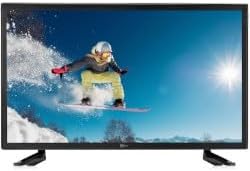
Questa immagine mostra la parte anteriore view of the TELE System 27-inch Full HD LED TV, model palco hevc s2, with its stand attached. The screen displays a vibrant image of a snowboarder in action, highlighting the display quality.
2. Istruzioni per l'uso
2.1 Controlli di base
Use the remote control to operate your TV. Key functions include:
- Pulsante di accensione: Accende o spegne la TV (modalità standby).
- Volume su/giù: Regola il livello del suono.
- Canale su/giù: Cambia canale TV.
- Tasti numerici (0-9): Selezione diretta del canale.
- Disattiva audio: Silences the TV sound.
2.2 Selezione dell'ingresso
Premere il tasto FONTE or INGRESSO button on your remote control to cycle through available input sources (e.g., HDMI1, HDMI2, USB, DVB-T2). Select the desired input for your connected device.
2.3 Navigazione nel menu
Premere il tasto MENU button to access the TV's main menu. Use the arrow buttons (Up, Down, Left, Right) to navigate through options and the OK or ENTRARE button to confirm selections. The menu allows you to adjust picture settings, sound settings, channel settings, and more.
2.4 DVB-T2 Tuner Usage
After completing the channel scan during initial setup, you can access digital terrestrial channels. Use the Channel Up/Down buttons or direct number input to switch channels. The TV supports DVB-T2 for high-quality digital broadcast reception.
2.5 Riproduzione multimediale USB
Insert a USB storage device into the TV's USB port. The TV should automatically detect the device and prompt you to open the media browser. You can then navigate and play supported video, audio, and image fileè memorizzato sul dispositivo USB.
3. Manutenzione
3.1 Pulizia dello schermo e Casing
- Schermo: Pulire delicatamente lo schermo con un panno morbido e privo di lanugine. Per macchie ostinate, strofinare leggermenteampImmergere il panno in acqua o in un detergente specifico per schermi. Non spruzzare mai liquidi direttamente sullo schermo.
- Casing: Utilizzare un panno morbido e asciutto per pulire la TV casing. Evitare l'uso di detergenti abrasivi, cere o solventi poiché possono danneggiare la finitura.
Importante: Prima di pulire il televisore, scollegarlo sempre dalla presa di corrente.
3.2 Aggiornamenti software
The TV's software may receive updates to improve performance or add new features. Check the TV's menu for a 'Software Update' or 'System Update' option. Follow the on-screen instructions carefully if an update is available. (Note: Software update guarantee information is not available for this model.)
3.3 Precauzioni di sicurezza
- Non ostruire le aperture di ventilazione.
- Non esporre il televisore alla pioggia o all'umidità.
- Evitare di posizionare il televisore alla luce diretta del sole o vicino a fonti di calore.
- Non aprire la TV casing; affidare ogni intervento di manutenzione a personale qualificato.
4. Risoluzione Dei Problemi
Prima di contattare l'assistenza, prova le seguenti soluzioni per i problemi più comuni:
| Problema | Possibile soluzione |
|---|---|
| Nessun potere | Ensure the power cable is securely plugged into both the TV and the wall outlet. Check if the outlet is working by plugging in another device. |
| Nessuna immagine, ma l'audio è presente | Controllare la sorgente di ingresso. Premere il tasto FONTE button on the remote to ensure the correct input (e.g., HDMI1) is selected. |
| Nessun suono, ma l'immagine è presente | Check the volume level and ensure the TV is not muted. If using external audio, ensure it is correctly connected and powered on. |
| Il telecomando non funziona | Sostituisci le batterie del telecomando. Assicurati che non ci siano ostacoli tra il telecomando e il sensore IR del televisore. |
| Poor DVB-T2 Signal/No Channels | Check your antenna connection. Try repositioning the antenna or performing a new channel scan in the TV's menu. |
| USB Media Not Playing | Ensure the USB device is formatted correctly (e.g., FAT32) and the media files are in a supported format. Try another USB device. |
5. Specifiche
The following are the technical specifications for the TELE System 27-inch Full HD LED TV (Model: palco hevc s2):
- Nome modello: palco hevc s2
- Dimensioni dello schermo: 27 pollici
- Tecnologia di visualizzazione: GUIDATO
- Risoluzione: 1080p (Full HD)
- Frequenza di aggiornamento: 120 hertz
- Tecnologia del sintonizzatore: DVB-T2
- Interfaccia hardware: Cavo HDMI
- Porte USB totali: 1
- Proporzioni: 16:9
- Modalità di uscita audio: Stereo
- Configurazione Surround: 2.0
- Tipo di montaggio: Montaggio a parete
- Caratteristica speciale: Schermo piatto
- Anno modello: 2010
Specifications are subject to change without notice. For the most up-to-date information, please refer to the product packaging or manufacturer's websito.
6. Informazioni sulla garanzia
This TELE System TV comes with a manufacturer's warranty. The specific terms and duration of the warranty may vary by region and retailer. Please retain your proof of purchase for warranty claims. For detailed warranty information, refer to the warranty card included with your product or visit the official TELE System websito.
7. Assistenza clienti
If you encounter issues that cannot be resolved using the troubleshooting guide, or if you require further assistance, please contact TELE System customer support. Contact details can typically be found on the official TELE System websito o sulla confezione del prodotto.
Supporto online: Visit the official TELE System websito per FAQ, articoli di supporto e moduli di contatto.
Supporto telefonico: Check the TELE System websito per i numeri di contatto regionali.


