Introduzione
Welcome to the user manual for your new Dragon Touch Notepad 102 Android Tablet. This guide provides detailed instructions on setting up, operating, maintaining, and troubleshooting your device to ensure you get the most out of its powerful features. The Notepad 102 is designed for versatile use, offering a seamless experience for entertainment, productivity, and communication.
Key features include a large 128GB storage capacity, 8GB RAM, an Octa-Core 2.0GHz processor, a vibrant 10-inch IPS HD display, and a 13MP camera, all running on the latest Android 12 operating system.
Cosa c'è nella scatola
Si prega di controllare il contenuto della confezione per assicurarsi che siano presenti tutti gli articoli:
- 1 x Dragon Touch Notepad 102 Tablet
- 1 x Caricabatterie
- 1 cavo USB
Prodotto finitoview
Caratteristiche principali
- 128GB Large Storage Capacity: Expandable up to 256GB via microSD card slot for all your media and files.
- 2.0 Ghz Octa-Core Processor and 8GB RAM: Ensures powerful and fast performance for streaming and multitasking.
- Versatile Use As Tablet Or Laptop: Easily connect to a docking keyboard (not included) for a laptop-like experience.
- Batteria a lunga durata: Powered by a 6000mAh battery, offering up to 6 hours of video playback.
- 8MP Front + 13MP Rear Camera: For video calls, selfies, and capturing moments.
- Native and Latest Android OS: GMS certified Android 12 for a smooth, fast, and customizable user experience with full Google Play access.
- Ultra-fast 2.4GHz and 5GHz WiFi: Provides top-of-the-line connectivity.
- GPS integrato: Supports offline GPS navigation.
Componenti
Prendi familiarità con i componenti fisici del tuo tablet:

Figura 1: Fronte e retro view of the Dragon Touch Notepad 102 tablet.

Figura 2: Fronte view of the Dragon Touch Notepad 102 tablet, showcasinil suo display IPS HD da 10 pollici.

Figura 3: lato view of the Dragon Touch Notepad 102 tablet, highlighting its slim profile e posizioni portuali.

Figura 4: Posteriore view of the Dragon Touch Notepad 102 tablet, showing the camera and Dragon Touch branding.
Impostare
1. Ricarica iniziale
Before first use, fully charge your tablet. Connect the included USB cable to the tablet's USB Type-C port and the other end to the charger. Plug the charger into a power outlet. The battery indicator on the screen will show charging progress.
2. Accensione/Spegnimento
- Per accendere: Press and hold the Power button located on the side of the tablet until the Dragon Touch logo appears.
- Per spegnere: Tenere premuto il pulsante di accensione finché non viene visualizzato il menu delle opzioni di risparmio energetico. Selezionare "Spegni" e confermare.
- Ricominciare: Dal menu delle opzioni di risparmio energia, seleziona "Riavvia" e conferma.
3. Configurazione iniziale di Android
Upon first power-on, the tablet will guide you through the initial Android 12 setup process. This includes selecting your language, connecting to a Wi-Fi network, setting up your Google account, and configuring basic settings.
4. Connessione al Wi-Fi
- Vai a Impostazioni > Rete e Internet > Wifi.
- Attiva/disattiva Wi-Fi On.
- Seleziona la rete Wi-Fi desiderata dall'elenco.
- Se richiesto, immettere la password di rete, quindi toccare Collegare.
5. Optional Docking Keyboard Connection
The Notepad 102 is compatible with a docking keyboard (sold separately) for enhanced productivity. The tablet features smart absorption technology for a strong and comfortable connection.
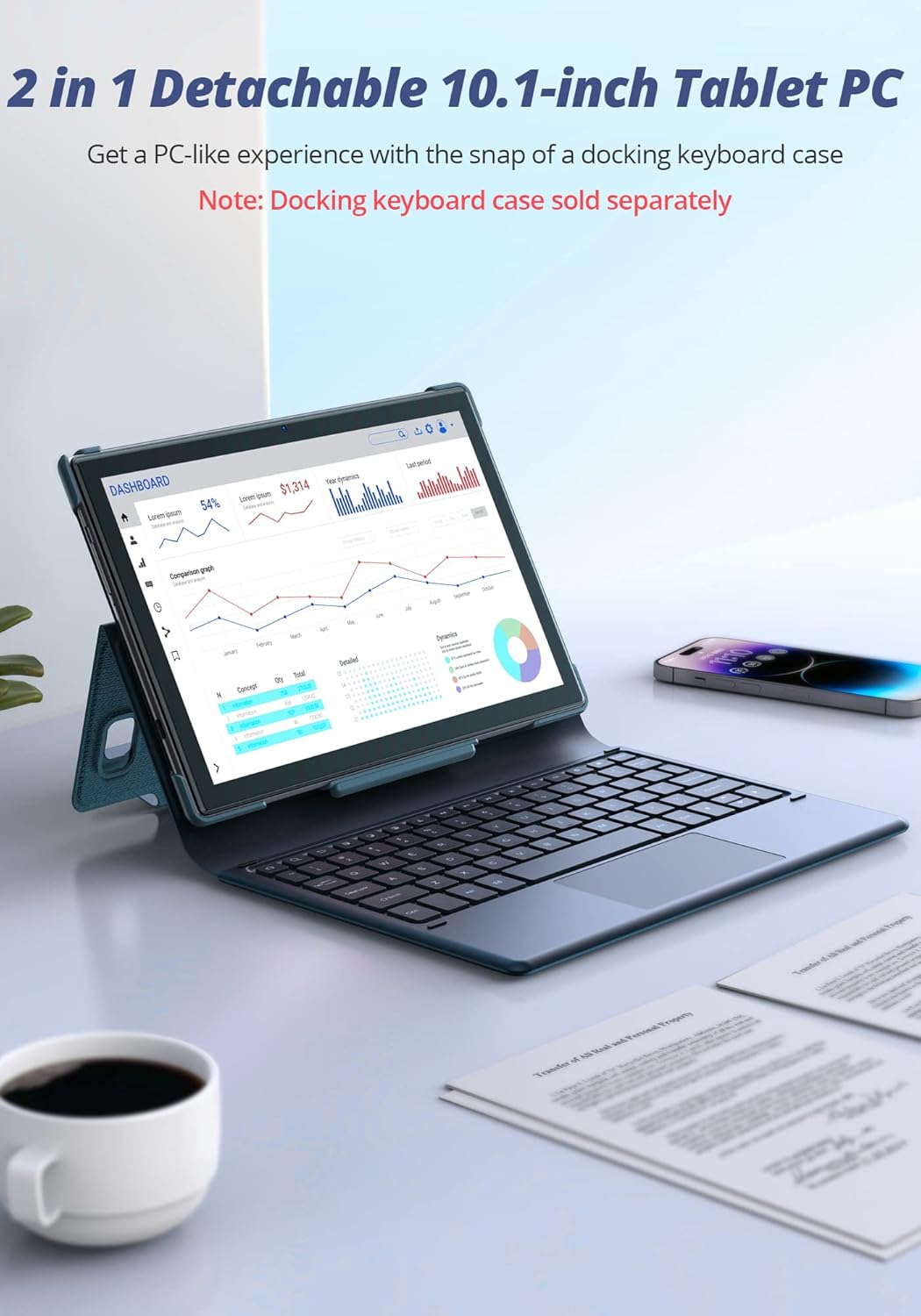
Figure 5: The Dragon Touch Notepad 102 tablet connected to an optional docking keyboard, transforming it into a laptop-like device.
Utilizzo del tablet
Navigazione e gesti
- Rubinetto: Seleziona un elemento o apri un'app.
- Scorri: Scroll through screens, web pages, or lists.
- Pizzica per ingrandire: Ingrandisci o rimpicciolisci le foto e web pagine.
- Premere a lungo: Accedi ai menu contestuali o sposta le icone delle app.
Gestione delle app
The tablet runs on Android 12, providing full access to the Google Play Store. You can download and install a wide variety of applications.
- Installa app: Open the Google Play Store app, search for your desired app, and tap "Install".
- Disinstallare le app: Long-press the app icon on the home screen or app drawer, then drag it to "Uninstall" or select "App info" and then "Uninstall".
Utilizzo della fotocamera
The tablet features an 8MP front camera and a 13MP rear camera for photos and video calls.

Figure 6: A user taking a photo with the Dragon Touch Notepad 102 tablet's rear camera.

Figure 7: A video call in progress on the Dragon Touch Notepad 102 tablet, demonstrating its front camera capabilities.
Gestione dell'archiviazione
Your tablet comes with 128GB of internal storage, which can be expanded up to 256GB using a microSD card (not included). To manage your storage:
- Vai a Impostazioni > Magazzinaggio A view utilizzo dello spazio di archiviazione e liberare spazio.
- Insert a microSD card into the designated slot to expand storage for photos, videos, and other files.

Figure 8: The tablet offers 128GB of internal storage, expandable up to 512GB with a microSD card.
Durata della batteria
The 6000mAh battery provides extended usage times. For optimal battery performance:
- Charge the tablet fully before first use.
- Evitare temperature estreme.
- Chiudi le app inutilizzate in esecuzione in background.
- Regolare la luminosità dello schermo a un livello confortevole.

Figure 9: The 6000mAh battery provides up to 6 hours of video playback, 10 hours of daily use, and 15 hours of music playback.
Prestazioni e visualizzazione
The Octa-Core 2.0GHz processor and 8GB RAM ensure smooth performance for all your tasks. The 10-inch IPS HD display offers clear and vibrant visuals.

Figure 10: The tablet's powerful Octa-Core processor and 8GB RAM deliver an ultimate entertainment experience.

Figure 11: The 10.1-inch IPS HD display features 2.5D curved glass and eye protection for comfortable viewing.
Manutenzione
Pulizia del tablet
Per mantenere il tuo tablet in condizioni ottimali:
- Per pulire lo schermo e il corpo, utilizzare un panno morbido e privo di lanugine.
- Evitare l'uso di prodotti chimici aggressivi o materiali abrasivi.
- Non spruzzare i detergenti direttamente sullo schermo.
Aggiornamenti software
Controlla e installa regolarmente gli aggiornamenti di sistema per assicurarti che il tuo tablet disponga delle funzionalità più recenti, delle patch di sicurezza e dei miglioramenti delle prestazioni.
- Vai a Impostazioni > Sistema > Aggiornamento del sistema.
- Seguire le istruzioni visualizzate sullo schermo per scaricare e installare gli aggiornamenti disponibili.
Cura della batteria
Per prolungare la durata della batteria:
- Evitare di scaricare completamente la batteria frequentemente.
- Non lasciare il tablet collegato alla presa di corrente per periodi prolungati dopo averlo caricato completamente.
- Store the tablet in a cool, dry place when not in use for long periods.
Risoluzione dei problemi
This section addresses common issues you might encounter with your Dragon Touch Notepad 102 tablet.
Il tablet non si accende
- Controllare la batteria: Ensure the tablet is charged. Connect the charger and wait a few minutes before attempting to power on.
- Ripristino completo: Per forzare il riavvio, tenere premuto il pulsante di accensione per 10-15 secondi.
Problemi di connettività Wi-Fi
- Riavvia il router: Power cycle your Wi-Fi router.
- Dimentica la rete: Go to Wi-Fi settings, forget the network, and reconnect.
- Controllare il segnale: Assicurati di trovarti nel raggio di azione del tuo router Wi-Fi.
App che si bloccano o si bloccano
- Chiudi app: Force close the app from recent apps or through Settings > Apps.
- Cancella cache: Vai su Impostazioni > App > [Nome app] > Archiviazione e cache > Cancella cache.
- Aggiorna app: Assicurati che l'app sia aggiornata all'ultima versione disponibile sul Google Play Store.
- Riavvia il tablet: Spesso un semplice riavvio può risolvere problemi temporanei del software.
Prestazioni lente
- Chiudi le app in background: Too many apps running can slow down the tablet.
- Libera spazio di archiviazione: Elimina non necessario fileo app per liberare spazio.
- Ripristino di fabbrica: As a last resort, if issues persist, you may perform a factory reset (Settings > System > Reset options > Erase all data). Warning: This will erase all data on your tablet. Back up important information first.
Specifiche tecniche
| Caratteristica | Specificazione |
|---|---|
| Marca | Tocco del drago |
| Nome del modello | Notepad 102 |
| Sistema operativo | Androide 12 |
| Dimensioni dello schermo | 10 pollici |
| Risoluzione dello schermo | 1280 x 800 pixel |
| Processore | 2 GHz Octa-Core (MediaTek) |
| Memoria RAM | 8 GB |
| Memoria interna | 128 GB |
| Archiviazione espandibile | Fino a 256 GB tramite scheda microSD |
| Telecamera posteriore | 13 MP |
| Fotocamera frontale | 8 MP |
| Tipo senza fili | 802.11g (2.4GHz & 5GHz WiFi) |
| Durata media della batteria | 6 ore (riproduzione video) |
| Peso dell'articolo | 2.01 libbre |
| Dimensioni del prodotto | 9.5 x 6.37 x 0.31 pollici |
| Colore | Argento |
Garanzia e supporto
Your Dragon Touch Notepad 102 tablet comes with a standard manufacturer's warranty. Please refer to the warranty card included in your product packaging for specific terms and conditions.
For technical support, warranty claims, or further assistance, please visit the official Dragon Touch website or contact their customer service department. Contact details are typically available on the brand's official support page or in the product packaging.
Puoi anche visitare il Negozio Dragon Touch su Amazon per ulteriori informazioni e risorse.