1. Introduzione
Grazie per l'acquistoasing the FEELWORLD F6 PLUSX 5.5-inch 4K HDMI Field Monitor. This manual provides essential information for the safe and efficient operation of your device. Please read it thoroughly before use and retain it for future reference.
2. Informazioni sulla sicurezza
- Non esporre il monitor alla pioggia o all'umidità per evitare scosse elettriche o incendi.
- Evitare di posizionare il monitor alla luce diretta del sole o vicino a fonti di calore.
- Use only the specified power adapter or compatible battery types.
- Non tentare di smontare o modificare il monitor. Per qualsiasi intervento di assistenza, rivolgersi a personale qualificato.
- Pulisci lo schermo con un panno morbido e asciutto. Evita di usare prodotti chimici aggressivi.
3. Contenuto della confezione
Verifica che tutti gli articoli elencati di seguito siano inclusi nel tuo pacchetto:
- FEELWORLD F6 PLUSX Monitor x1
- Micro HDMI Cable x1
- Tilt Arm x1
- Sunshade x1
- Manuale utente x1

4. Prodotto finitoview
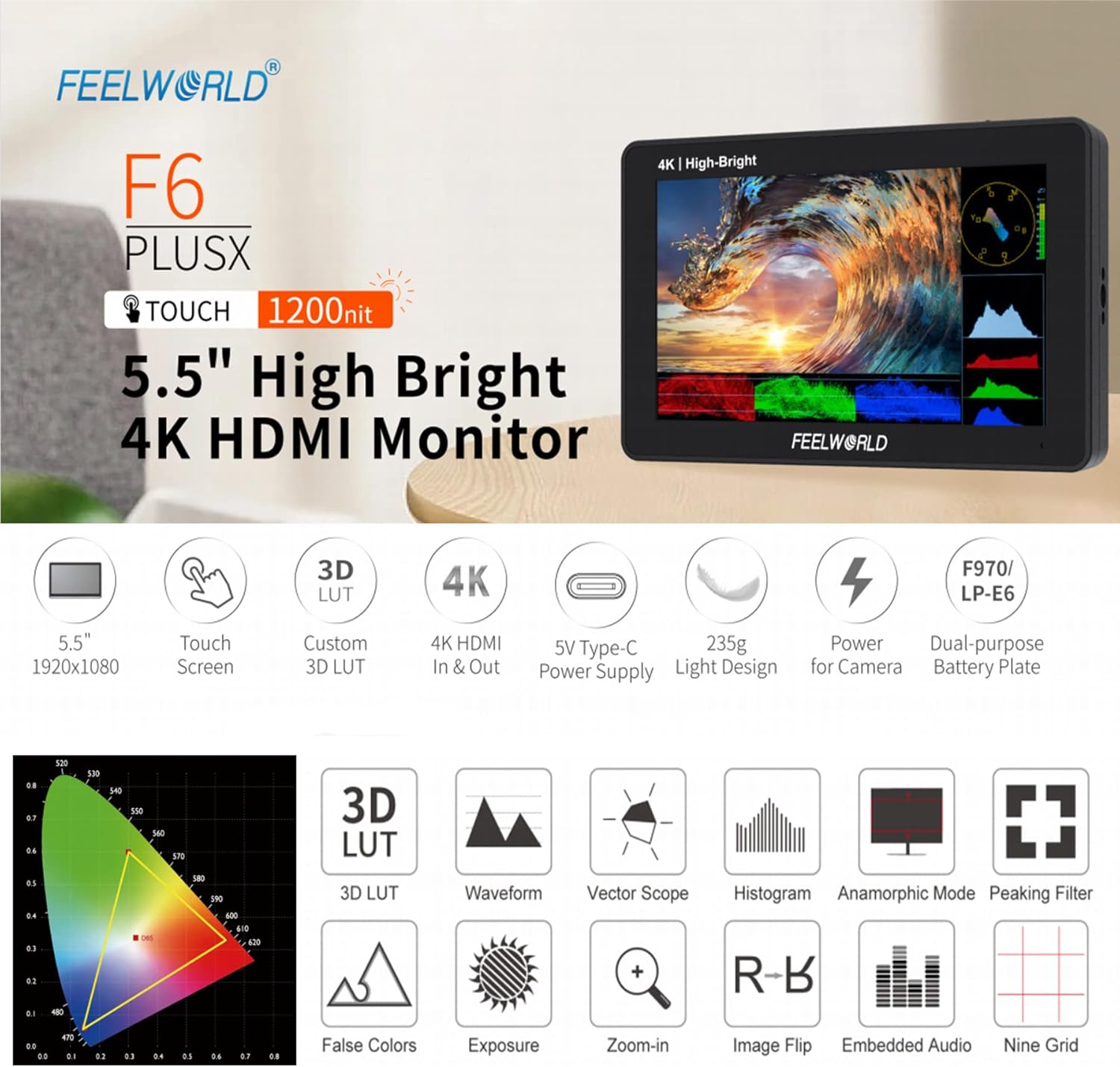
4.1 Caratteristiche principali
- 5.5-inch IPS Touchscreen Display with 1920x1080 resolution.
- 1200 nits high brightness for outdoor visibility.
- 4K HDMI Input and Loop Output.
- Support for 3D LUT import via SD card.
- HDR (High Dynamic Range) monitoring.
- Advanced monitoring functions: Waveform, Vector Scope, Histogram, False Colors, Peaking Filter, Zoom-in, Image Flip, Embedded Audio, Nine Grid, Anamorphic Mode.
- Flexible power options: DC 12V input, 5V Type-C input, and dual-purpose battery plate (F970/LP-E6).
- Lightweight design (235g).

4.2 Monitor Layout and Ports
The F6 PLUSX features multiple ports for connectivity and power:
- INGRESSO HDMI: Connects to your camera or video source.
- USCITA HDMI: Loops out the HDMI signal to another monitor or device.
- USCITA CC 8V: Provides power to compatible cameras or accessories.
- Slot per scheda SD: For importing 3D LUTs and firmware updates.
- INGRESSO CC 12V: Main power input for the monitor.
- 3.5mm Ear Phone Slot: Per il monitoraggio audio.
- DC IN 5V (tipo C): Alternative power input, compatible with portable power banks.

4.3 Controlli
The monitor features a touchscreen interface and physical controls for navigation:
- Power Button / Touch Lock: Press and hold to power on/off. Short press to lock/unlock the touchscreen.
- Menu Scroll Wheel: Utilizzato per navigare nei menu e confermare le selezioni.
- 1/4 Screw Holes: For mounting the monitor to various camera rigs or accessories.

5. Impostazione
5.1 Alimentazione del monitor
The F6 PLUSX offers several power options:
- Ingresso CC 12 V: Connect the included power adapter to the DC 12V port.
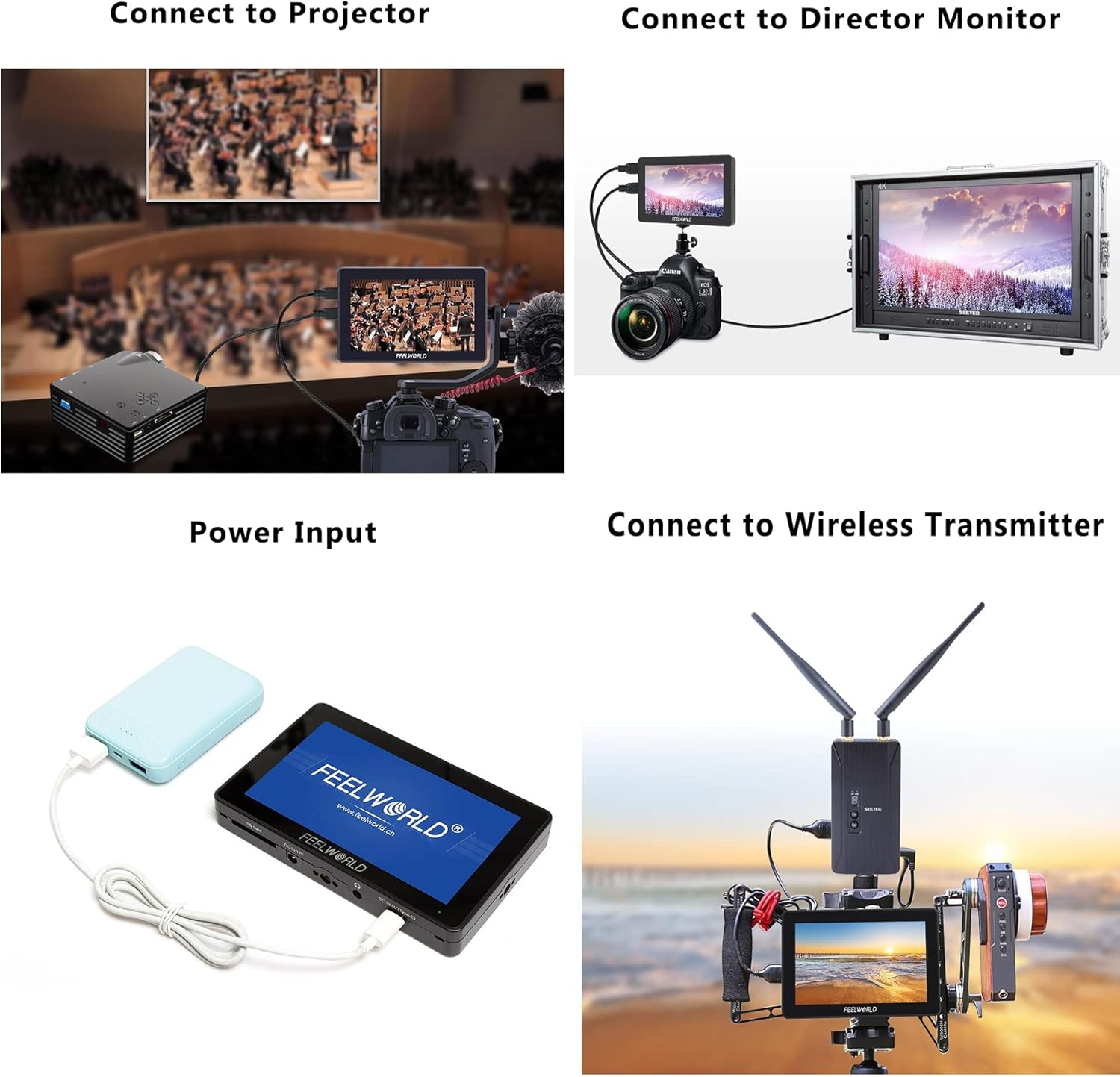
- Ingresso tipo C 5V: Use a compatible USB Type-C cable and a 5V power source (e.g., power bank) to the DC IN 5V (Type-C) port.
- Piastra batteria: Attach a compatible F970 or LP-E6 battery to the battery plate on the rear of the monitor.
5.2 Collegamento a una telecamera
- Assicurati che sia il monitor sia la telecamera siano spenti.
- Connect one end of the Micro HDMI cable to your camera's HDMI output port.
- Connect the other end of the Micro HDMI cable to the HDMI IN port on the F6 PLUSX monitor.
- Power on the monitor, then power on your camera. The camera's video feed should appear on the monitor.
5.3 Montaggio del monitor
Use the included tilt arm or other compatible mounting accessories with the 1/4 screw holes to attach the monitor to your camera, cage, or stand.
6. Istruzioni per l'uso
6.1 Funzionamento di base
- Accensione/spegnimento: Press and hold the power button on the top of the monitor.
- Controllo touchscreen: Tap icons or swipe on the screen to access and adjust settings.
- Navigazione nel menu: Use the menu scroll wheel to navigate through menu options and press to confirm.
- Touch Lock: Short press the power button to lock or unlock the touchscreen to prevent accidental changes.
6.2 Utilizzo di LUT 3D
The F6 PLUSX supports importing custom 3D LUTs to preview il tuo cazzotage with specific color grades or log conversions.
- Save your .cube format 3D LUT files su una scheda SD.
- Inserire la scheda SD nello slot per schede SD del monitor.
- Access the LUT menu via the touchscreen or scroll wheel.
- Select 'Import LUT' and choose the desired LUT file dalla scheda SD.
- Una volta importato, puoi applicare la LUT al tuo feed video per la pre-produzione in tempo realeview.

6.3 Funzioni di monitoraggio avanzate
The monitor includes various tools to assist with exposure, focus, and color accuracy:
- Forma d'onda: Visualizza i livelli di luminanza e crominanza del segnale video.
- Ambito di vettore: Shows the color information of your video signal, useful for color balancing.
- Falsi colori: Helps set proper exposure by displaying different exposure levels as distinct colors.
- Filtro di picco: Highlights sharp edges in the image to assist with focus.
- Ingrandire: Ingrandisce una parte dell'immagine per un controllo critico della messa a fuoco.
- Monitoraggio HDR: Abilita viewing of HDR signals for enhanced clarity and detail.
7. Manutenzione
- Pulizia: Use a soft, lint-free cloth to clean the screen and body of the monitor. For stubborn marks, slightly dampen the cloth with water. Avoid alcohol or abrasive cleaners.
- Magazzinaggio: When not in use, store the monitor in a dry, cool place, away from direct sunlight and extreme temperatures.
- Aggiornamenti del firmware: Periodically check the FEELWORLD official websito per gli aggiornamenti del firmware per garantire prestazioni ottimali e l'accesso a nuove funzionalità. Seguire attentamente le istruzioni fornite con l'aggiornamento del firmware.
8. Risoluzione Dei Problemi
- Nessuna immagine sullo schermo:
- Ensure the monitor is powered on and receiving power.
- Check HDMI cable connections at both the camera and monitor.
- Verify the camera's HDMI output is active and configured correctly.
- Prova un cavo HDMI diverso.
- Nessun audio:
- Ensure headphones are properly connected to the 3.5mm jack.
- Check the audio settings on both the monitor and the camera.
- Touchscreen non reattivo:
- Check if the touchscreen lock is enabled (short press the power button to toggle).
- Riavviare il monitor.
- Surriscaldamento del monitor:
- Assicurare un'adeguata ventilazione attorno al monitor.
- Avoid prolonged use in direct sunlight or high ambient temperatures.
9. Specifiche
| Caratteristica | Specificazione |
|---|---|
| Dimensioni dello schermo | 5.5 pollici |
| Risoluzione | 1920 x 1080 pixel |
| Luminosità | 1200 nidi |
| Rapporto di contrasto | 1000:1 |
| Viewangolo di ing | 160° (O/V) |
| Porte di ingresso | 1 x HDMI, 1 x DC 12V, 1 x DC 5V (Type-C) |
| Porte di uscita | 1 x HDMI, 1 x DC OUT 8V, 1 x 3.5mm Ear Phone |
| Slot per scheda SD | Yes (for 3D LUTs and firmware) |
| Consumo energetico | Circa. 8 W. |
| Piastra batteria | F970 / LP-E6 compatible |
| Dimensioni | Circa. 148mm x 93mm x 20mm |
| Peso | Circa 235 g |
10. Garanzia e supporto
FEELWORLD products are designed and manufactured to high quality standards. For warranty information and technical support, please refer to the warranty card included with your product or visit the official FEELWORLD websito. Conservare la ricevuta d'acquisto come prova d'acquisto per eventuali reclami in garanzia.


