1. Prodotto finitoview
The Poly Voyager 4320 UC is a wireless stereo headset designed for professionals requiring seamless connectivity and productivity in various work environments. It features a noise-canceling boom microphone with Acoustic Fence technology, ensuring clear audio transmission by blocking background noise. The headset connects to PC/Mac via a BT700 USB-C Bluetooth adapter (with an included USB-C to USB-A adapter) and to mobile devices via Bluetooth 5.2. It offers up to 24 hours of talk time and includes a desktop charging stand for convenient power management. This model is Microsoft Teams certified and integrates with other communication platforms like Zoom.

Image 1.1: The Poly Voyager 4320 UC Wireless Headset shown on its included desktop charging stand. The headset features over-the-head stereo design with a flexible boom microphone.
2. Caratteristiche principali
- Qualità audio nitida: Features a noise-canceling dual microphone with Acoustic Fence technology to minimize background noise, ensuring your voice is heard clearly.
- Connettività flessibile: Connects wirelessly to computers (PC/Mac) via the included BT700 USB-C Bluetooth adapter (with USB-C to USB-A adapter) and to mobile phones via Bluetooth 5.2.
- Extended Mobility: Offers a wireless range of up to 164 feet (50 meters) from your computer, allowing freedom of movement during calls.
- Batteria a lunga durata: Provides up to 24 hours of talk time on a single charge. Can also be used as a wired headset via audio-over-USB mode.
- Design confortevole: Equipped with an adjustable padded headband and memory foam ear cushions for comfortable extended wear.
- Pulsante dedicato a Microsoft Teams: Instant access to the Microsoft Teams app for seamless collaboration. Also compatible with Zoom and other platforms.
- Desktop Charging Stand: Simplifies charging and provides a convenient storage solution.
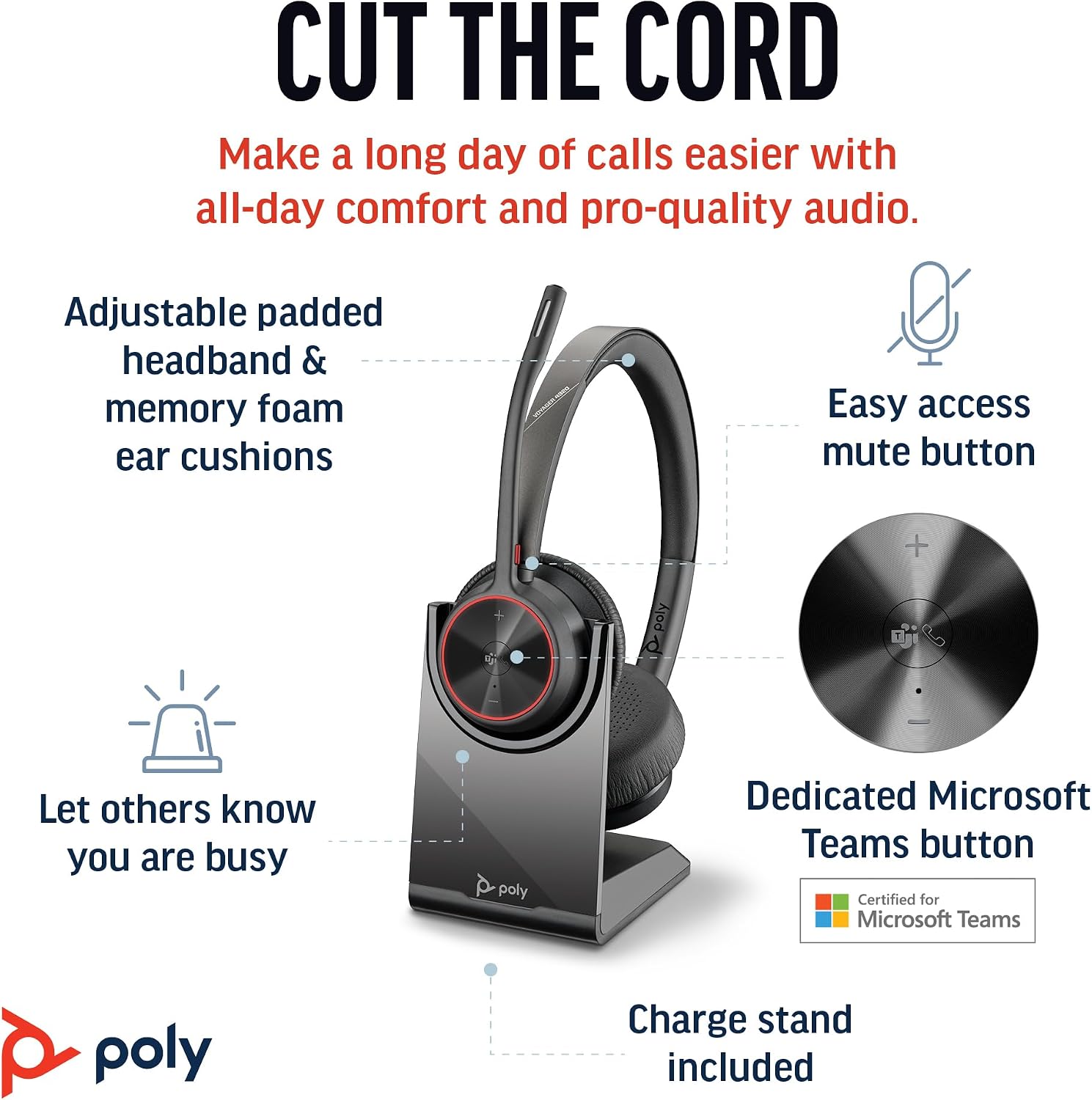
Image 2.1: The Poly Voyager 4320 UC Headset highlighting its adjustable padded headband, memory foam ear cushions, easy access mute button, dedicated Microsoft Teams button, and included charge stand.

Image 2.2: Illustration demonstrating the noise-canceling dual microphone with Acoustic Fence technology, which filters out background noise for clear communication.
3. Guida all'installazione
3.1 Contenuto della confezione
Verifica che tutti gli articoli siano presenti nel tuo pacco:
- Auricolare wireless Poly Voyager 4320 UC
- Supporto di ricarica da tavolo
- BT700 USB-C Bluetooth Adapter
- Adattatore da USB-C a USB-A
- Cavo di ricarica USB
- Travel Pouch (may be included with some versions)
3.2 Ricarica dell'auricolare
Before first use, fully charge your headset. The headset can be charged using the included desktop charging stand or directly via the USB charging cable.
- Utilizzo del supporto di ricarica: Connect the USB charging cable to the charging stand and then to a powered USB port (e.g., computer, wall adapter). Place the headset onto the charging stand. The headset's LED indicator will show charging status.
- Ricarica USB diretta: Connect the USB charging cable directly to the headset's USB-C port and then to a powered USB port.
A full charge takes approximately 1.5 hours. The headset provides up to 24 hours of talk time and 47 hours of listening time.
3.3 Connessione ai dispositivi
The Voyager 4320 UC headset offers multiple connection options:
3.3.1 Connecting to PC/Mac (via USB Adapter)
- Insert the BT700 USB-C Bluetooth adapter into an available USB-C port on your computer. If your computer only has USB-A ports, use the included USB-C to USB-A adapter.
- The adapter's LED will flash blue, indicating it is searching for the headset.
- Power on your headset. The headset and adapter are pre-paired and should connect automatically. The adapter's LED will turn solid blue when connected.
- Select the Poly Voyager 4320 UC as your audio input and output device in your computer's sound settings and communication applications (e.g., Microsoft Teams, Zoom).
3.3.2 Connecting to Mobile Phone (via Bluetooth)
- With the headset powered on, press and hold the Bluetooth pairing button on the headset until the headset's LED flashes red and blue, indicating pairing mode.
- Sul tuo telefono cellulare, vai alle impostazioni Bluetooth e abilita il Bluetooth.
- Select "Poly Voyager 4320 UC" from the list of available devices.
- Once paired, the headset's LED will stop flashing and remain solid blue.

Image 3.1: Diagram illustrating the multiple connection options for the Poly Voyager 4320 UC headset, including connection to a PC/Mac via the USB-C BT700 Bluetooth adapter (with USB-A adapter option) and direct Bluetooth connection to a mobile device.
4. Istruzioni per l'uso
4.1 Indossare l'auricolare
The headset can be worn with the microphone boom on either the right or left side. Rotate the boom up and over to align with the desired side. For optimal microphone performance, position the boom approximately two finger-widths from the corner of your mouth.
4.2 Controlli delle cuffie
- Volume su/giù (+/-): Adjusts listening volume.
- Pulsante di chiamata: Premere per rispondere o terminare una chiamata.
- Tasto muto: Located on the microphone boom. Press to mute/unmute your microphone. A dynamic mute alert will notify you if you speak while muted.
- Pulsante Microsoft Teams: Dedicated button for instant access to the Microsoft Teams application.
- Pulsante di accensione: Slide to power on/off.
4.3 Indicatori LED
The headset and USB adapter feature LED indicators to provide status information:
- LED auricolare:
- Solid Blue: Connected/In call
- Flashing Red/Blue: Pairing mode
- Rosso fisso: disattivato
- Ambra fissa: in carica
- Flashing Red: Low battery
- USB Adapter LED (BT700):
- Solid Blue: Connected/In call
- Flashing Blue: Searching for headset
- Rosso fisso: disattivato
5. Manutenzione
5.1 Pulizia
Per mantenere le prestazioni e l'igiene delle cuffie:
- Pulisci i cuscinetti auricolari e l'archetto con un panno morbido e asciutto.amp stoffa. Evitare l'uso di prodotti chimici aggressivi o materiali abrasivi.
- Non immergere l'auricolare in acqua o altri liquidi.
- Keep the charging contacts on the headset and stand clean and free of debris.
5.2 Conservazione
When not in use, store the headset on its charging stand or in the included travel pouch to protect it from dust and damage. Avoid storing in extreme temperatures.
6. Risoluzione Dei Problemi
6.1 Nessun audio o scarsa qualità audio
- Verifica connessione: Ensure the headset is properly connected to your device (solid blue LED on headset and adapter).
- Livelli del volume: Verify that headset, computer, and application volume levels are not muted or set too low.
- Dispositivo predefinito: Confirm that the Poly Voyager 4320 UC is selected as the default playback and recording device in your computer's sound settings and communication software.
- Allineare: Ensure you are within the wireless range (up to 50 meters) of your connected device.
- Interferenza: Allontanarsi da altri dispositivi wireless che potrebbero causare interferenze.
6.2 Il microfono non funziona
- Controlla Muto: Ensure the microphone is not muted (headset LED should not be solid red).
- Posizione del microfono: Adjust the microphone boom to be two finger-widths from your mouth.
- Dispositivo predefinito: Confirm the headset is selected as the default recording device in your computer's sound settings and communication software.
- Impostazioni software: Controlla le impostazioni sulla privacy del microfono nel tuo sistema operativo.
6.3 Headset Not Pairing/Connecting
- Ciclo di alimentazione: Turn the headset off and on again.
- Riparazione: Follow the pairing instructions in Section 3.3 to re-pair the headset with your device or USB adapter.
- Adapter Reset: If using the USB adapter, try unplugging and re-inserting it.
- Clear Device List: On your mobile device, forget the headset from the Bluetooth device list and attempt to pair again.
7. Specifiche
| Caratteristica | Specificazione |
|---|---|
| Nome del modello | Voyager 4320 Teams Version with Charge Stand, USB-C BT700 with USB-C to USB-A Adapter |
| Tecnologia di connettività | Senza fili (Bluetooth 5.2) |
| wireless Range | Fino a 50 metri (164 piedi) |
| Tempo di conversazione | Fino a 24 ore |
| Tempo di ascolto | Fino a 47 ore |
| Tempo di ricarica | ca. 1.5 ore per la ricarica completa |
| Microfono | Noise-canceling dual mic with Acoustic Fence technology |
| Dispositivi compatibili | Cellulari, computer fissi, computer portatili, tablet |
| Tipo di controllo | Controllo multimediale, tocco |
| Peso dell'articolo | 162 grammi (5.7 once) |
| Dimensioni del prodotto | 3.94 x 0.79 x 1.06 pollici |
| Tipo di batteria | 1 batteria agli ioni di litio (inclusa) |
| Codice UPC | 017229196667, 196548548736 |
8. Garanzia e supporto
Per informazioni sulla garanzia e supporto tecnico, fare riferimento al sito ufficiale Poly websito o contattare il servizio clienti. Conservare la prova d'acquisto per eventuali reclami in garanzia.


