1. Introduzione
Grazie per l'acquistoasing the DAYTECH Window and Door Opening Sensor. This device is designed to enhance security and convenience in your home or business by detecting the opening and closing of doors, windows, and other entry points. It features multiple operation modes, adjustable volume, and remote control functionality. Please read this manual carefully before use to ensure proper installation and operation.
2. Prodotto finitoview
2.1 Contenuto della confezione
- Main Sensor Unit (Receiver)
- Magnetic Strip (Transmitter)
- Telecomando
- Nastro biadesivo
- Manuale d'uso
2.2 Identificazione dei componenti
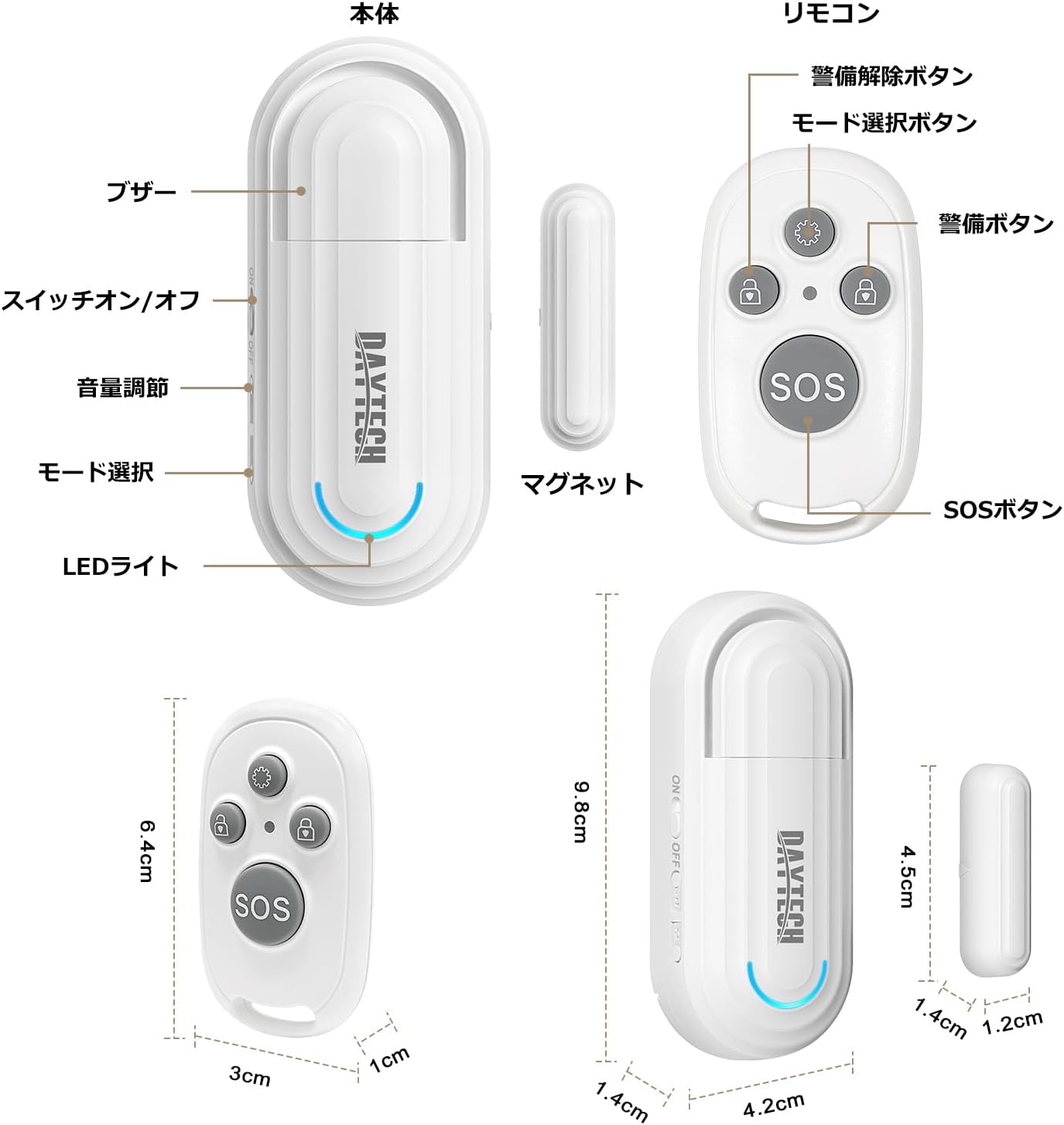
Figura 1: Main Sensor Unit, Magnetic Strip, and Remote Control. The main unit features an ON/OFF switch, volume adjustment buttons, mode selection, and an LED indicator. The remote control has arm, disarm, mode selection, and SOS buttons.
- Unità sensore principale: Contains the alarm speaker, LED light, ON/OFF switch, volume adjustment buttons, and mode selection button.
- Banda magnetica: The smaller component that triggers the sensor when separated from the main unit.
- Telecomando: Used to arm/disarm the alarm, select modes, and activate an SOS function.
3 Caratteristiche
- Funzionalità del telecomando: Conveniently arm, disarm, and select modes from a distance.
- Four Operation Modes:
- Elderly Monitoring: Alerts when a door is opened, useful for monitoring elderly individuals.
- Visitor Chime: Functions as a doorbell, notifying you of visitors.
- Refrigerator Reminder: Prevents leaving the refrigerator door open.
- Allarme antifurto: Triggers a loud alarm upon unauthorized entry through windows or doors.
- Four-Level Volume Adjustment: Adjust the alarm volume from 0dB (silent) to 120dB to suit your environment and needs.
- Installazione semplice: Simple adhesive installation. Easily attaches to any flat surface like doors, windows, refrigerators, or cabinets using the included double-sided tape.
- Promemoria batteria scarica: The sensor emits a sound every 5 minutes when the battery is low.

Figura 2: Illustrates the four versatile usage modes of the sensor.
4. Configurazione e installazione
4.1 Installazione della batteria (unità principale)
The main unit requires two AAA alkaline dry cell batteries (not included). Open the battery compartment on the back of the main unit and insert the batteries, ensuring correct polarity. Close the compartment securely.
4.2 Battery Installation (Magnetic Strip & Remote Control)
The magnetic strip (transmitter) and remote control come with pre-installed batteries. If replacement is needed for the magnetic strip, it uses a 12V 23A battery. For the remote control, it uses a CR2032 button cell battery. Carefully open the casing e sostituire la batteria, rispettando la polarità.
1 video: Demonstrates how to replace the battery in the magnetic strip (transmitter unit).
4.3 Pairing the Remote Control with the Main Unit
- Turn on the main sensor unit using the ON/OFF switch.
- Press and hold the mode selection button on the main unit for approximately 5 seconds until you hear a "beep" sound and the LED indicator flashes. This indicates pairing mode.
- While the main unit is in pairing mode, press any button on the remote control. The main unit will emit a confirmation sound, indicating successful pairing.
- Se necessario, ripetere l'operazione per altri telecomandi.
4.4 Installazione fisica
The sensor can be installed using the provided double-sided adhesive tape. Ensure the installation surface is clean and dry.
- Attach the main sensor unit to the door/window frame.
- Attach the magnetic strip to the door/window itself, aligning it with the main sensor unit.
- Ensure the gap between the main unit and the magnetic strip is less than 1.5 cm (0.6 inches) when the door/window is closed. The triangular marks on both components should align.

Figura 3: Correct installation method for the sensor, highlighting the maximum gap between the main unit and magnetic strip.
2 video: Provides a visual guide on how to set up and pair the door sensor, including battery installation and pairing steps.
5. Istruzioni per l'uso
5.1 Accensione/spegnimento
Use the ON/OFF switch on the side of the main sensor unit to power the device on or off.
5.2 Regolazione del volume
Press the volume adjustment button on the main unit to cycle through the four volume levels (0dB, 60dB, 90dB, 120dB).

Figura 4: Visual representation of the 4-level volume adjustment feature.
5.3 Selezione della modalità
Press the mode selection button on the main unit or the mode selection key on the remote control to cycle through the four operation modes:
- Elderly Monitoring Mode: Alerts when a door is opened.
- Visitor Chime Mode: Plays a chime when a door is opened.
- Refrigerator Reminder Mode: Alerts if the refrigerator door remains open.
- Anti-theft Alarm Mode: Triggers a loud alarm upon unauthorized opening.
5.4 Funzioni del telecomando

Figura 5: Funzioni dei pulsanti del telecomando.
- Tasto di selezione della modalità: Cycles through the four operation modes.
- Pulsante di attivazione: Activates the alarm/monitoring function.
- Pulsante di disarmo: Deactivates the alarm/monitoring function.
- Pulsante SOS: Attiva un allarme di emergenza.
3 video: Demonstrates the sensor triggering an alarm when a door is opened, showcasing its basic functionality and installation.
6. Manutenzione
6.1 Pulizia
Pulire il dispositivo con un panno morbido e asciutto. Non utilizzare detergenti abrasivi o solventi.
6.2 Sostituzione della batteria
When the main unit emits a sound every 5 minutes, it indicates a low battery. Replace the two AAA alkaline batteries in the main unit. For the magnetic strip, replace the 12V 23A battery. For the remote control, replace the CR2032 button cell battery as needed.
7. Risoluzione Dei Problemi
- No alarm when door/window opens:
- Assicurarsi che l'unità principale sia accesa.
- Check if the gap between the main unit and magnetic strip is less than 1.5 cm.
- Verificare che le batterie siano installate correttamente e non siano scariche.
- Confirm the correct mode is selected (e.g., Anti-theft Alarm mode).
- Telecomando non funzionante:
- Controllare la batteria del telecomando.
- Re-pair the remote control with the main unit (refer to Section 4.3).
- L'allarme è troppo forte/basso:
- Adjust the volume using the volume adjustment button on the main unit (refer to Section 5.2).
- Low battery reminder constantly sounding:
- Sostituire le batterie nell'unità principale.
8. Specifiche
| Caratteristica | Dettaglio |
|---|---|
| Marca | DAYTECH |
| Numero di modello | DA09 |
| Dimensioni del prodotto (unità principale) | Dimensioni: 5 x 2 x 8 cm |
| Peso del prodotto | 100 grammi |
| Fonte di alimentazione (unità principale) | 2 x AAA Alkaline Batteries (1.5V DC, not included) |
| Power Source (Magnetic Strip) | 1 batteria da 12 V 23 A (inclusa) |
| Power Source (Remote Control) | 1 x CR2032 Button Cell Battery (included) |
| Tecnologia | Sensore magnetico |
| Livelli di volume | 4 levels (0dB, 60dB, 90dB, 120dB) |
| Tipo di installazione | Supporto adesivo |
9. Informazioni sulla sicurezza
- Tenere il dispositivo lontano dall'acqua e dall'umidità elevata.
- Non tentare di smontare o riparare il dispositivo da soli. Se necessario, contattare l'assistenza clienti.
- Smaltire le batterie usate secondo le normative locali.
- Tenere le batterie fuori dalla portata dei bambini.
10. Garanzia e supporto
DAYTECH offers a lifetime quality guarantee for this product. If you have any questions or encounter issues during use, please feel free to contact our customer support. We are committed to providing high-quality products and services.
Contact information can typically be found on the product packaging or the official DAYTECH websito.


