1. Introduzione
This manual provides comprehensive instructions for the installation, operation, and maintenance of the Senzooe XY-ST10 Temperature Controller Module. The XY-ST10 is designed for precise temperature acquisition and control in both refrigeration and heating applications. Please read this manual thoroughly before using the device to ensure safe and optimal performance.
2. Prodotto finitoview
The Senzooe XY-ST10 is a compact and versatile temperature control module featuring a clear digital display and intuitive controls. It includes a wired temperature probe for accurate readings.
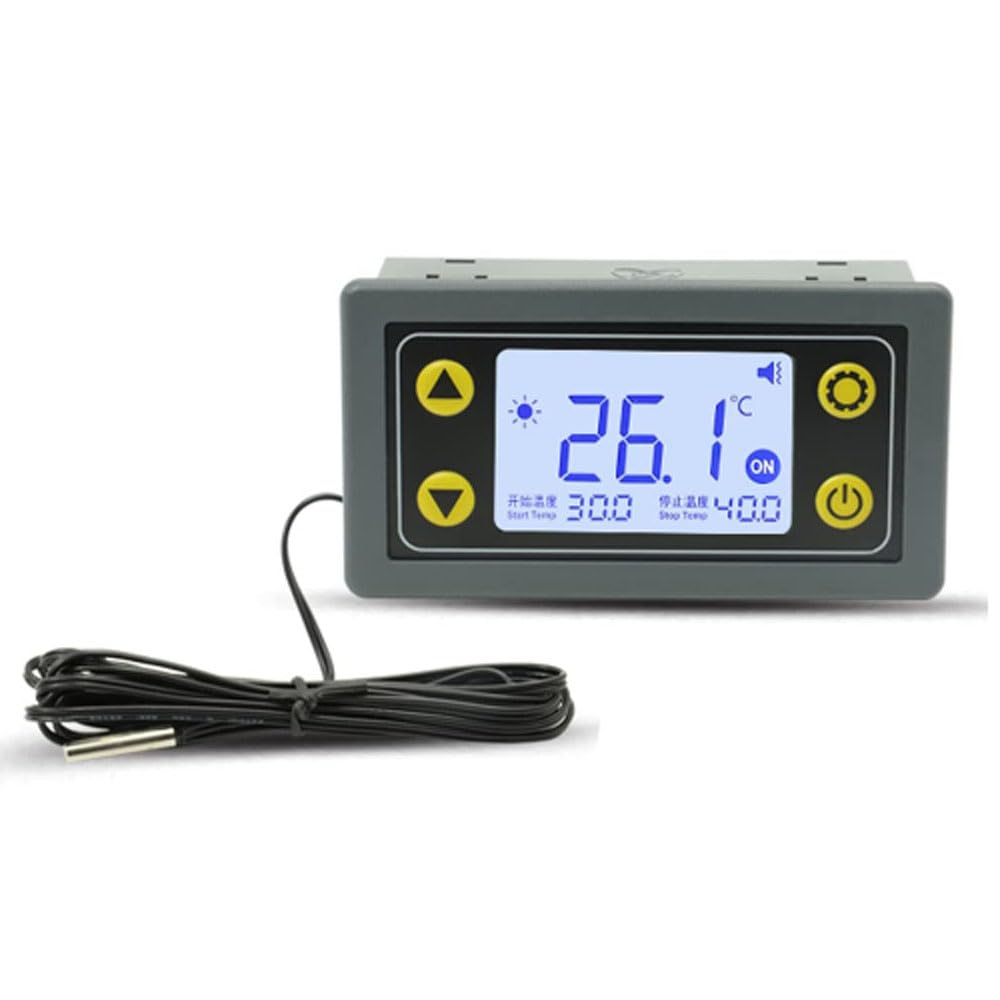
Figura 2.1: Senzooe XY-ST10 Temperature Controller Module. The module features a digital display showing the current temperature (26.1°C), set start temperature (30.0), and set stop temperature (40.0). Control buttons include Up, Down, Set (gear icon), and Power. A wired temperature probe is connected to the unit.
Componenti chiave:
- Display digitale: Shows current temperature, start temperature, stop temperature, and operational status.
- Pulsante Su (▲): Utilizzato per aumentare i valori o navigare nei menu.
- Pulsante Giù (▼): Utilizzato per diminuire i valori o navigare nei menu.
- Set Button (⚙): Utilizzato per accedere alla modalità impostazioni e confermare le selezioni.
- Pulsante di accensione (⏻): Utilizzato per accendere o spegnere il dispositivo.
- Sonda di temperatura: External sensor for accurate temperature measurement.
3. Specifiche
| Parametro | Valore |
|---|---|
| Marca | Senzooe |
| Modello | XY-ST10 |
| Funzione | Refrigeration/Heating Temperature Control |
| ASIN | B0C776SS6V |
| Codice UPC | 707638015894 |
4. Impostazione
- Collegamento elettrico: Connect the module to a stable power source according to the voltage requirements specified on the device or packaging. Ensure all connections are secure to prevent electrical hazards.
- Temperature Probe Installation: Insert the wired temperature probe into the designated port on the module. Place the probe in the environment where temperature measurement and control are required. Ensure the probe is not exposed to extreme physical stress or moisture beyond its intended use.
- Connessione di carico: Connect your heating or refrigeration device to the appropriate output terminals of the XY-ST10 module. Refer to the wiring diagram (if provided separately) for correct connections. Always ensure the load's power requirements do not exceed the module's specifications.
Nota di sicurezza: Always disconnect power before making any wiring connections. If you are unsure about electrical wiring, consult a qualified electrician.
5. Istruzioni per l'uso
5.1 Accensione/Spegnimento
- Per accendere: Press and hold the Power button (⏻) for a few seconds until the display illuminates.
- Per spegnere: Press and hold the Power button (⏻) again for a few seconds until the display turns off.
5.2 Impostazione dei parametri di temperatura
The module allows you to set a 'Start Temperature' and a 'Stop Temperature' to define your desired control range.
- Accedi alla modalità Impostazioni: Press the Set button (⚙) once. The 'Start Temp' value will begin to flash.
- Adjust Start Temperature: Use the Up (▲) and Down (▼) buttons to adjust the desired start temperature.
- Confirm Start Temperature: Press the Set button (⚙) again. The 'Stop Temp' value will begin to flash.
- Adjust Stop Temperature: Use the Up (▲) and Down (▼) buttons to adjust the desired stop temperature.
- Salva impostazioni: Press the Set button (⚙) one more time to save both settings and exit the settings mode. The display will return to showing the current temperature.
5.3 Operating Modes (Refrigeration/Heating)
The XY-ST10 automatically determines the operating mode based on the relationship between the Start Temperature and Stop Temperature.
- Modalità di refrigerazione: If the 'Start Temperature' is set più alto than the 'Stop Temperature', the module will operate in refrigeration mode. The cooling device will activate when the current temperature rises above the Start Temperature and will deactivate when it drops below the Stop Temperature.
- Modalità riscaldamento: If the 'Start Temperature' is set inferiore than the 'Stop Temperature', the module will operate in heating mode. The heating device will activate when the current temperature drops below the Start Temperature and will deactivate when it rises above the Stop Temperature.
The "ON" indicator on the display illuminates when the connected load (refrigeration or heating device) is active.
6. Manutenzione
- Pulizia: Gently wipe the module's surface with a soft, dry cloth. Do not use abrasive cleaners or solvents, as these can damage the display or casing. Assicurarsi che nessun liquido penetri nel dispositivo.
- Cura della sonda di temperatura: Keep the temperature probe clean and free from debris. Avoid bending or kinking the probe cable excessively. If the probe is used in a liquid, ensure it is rated for immersion and properly sealed.
- Magazzinaggio: Quando non viene utilizzato per lunghi periodi, conservare il modulo in un luogo fresco e asciutto, lontano dalla luce solare diretta e da temperature estreme.
- Ispezione: Periodically inspect all wiring connections for signs of wear, corrosion, or looseness. Tighten connections as necessary.
7. Risoluzione Dei Problemi
| Problema | Possibile causa | Soluzione |
|---|---|---|
| Il dispositivo non si accende. | No power supply; loose connection; faulty power source. | Check power connections. Ensure power source is active. Verify correct voltage. |
| Lettura della temperatura errata. | Faulty probe; probe not properly placed; environmental interference. | Ensure probe is securely connected and correctly positioned. Check probe for damage. Compare with a known accurate thermometer. |
| Load (heater/cooler) not activating. | Incorrect temperature settings; faulty load connection; load itself is faulty. | Verify Start and Stop temperature settings. Check wiring to the load. Test the load independently. |
| Settings not saving. | Impostazioni non confermate correttamente. | Ensure you press the Set button (⚙) after adjusting the Stop Temperature to save changes. |
8. Garanzia e supporto
For warranty information, please refer to the documentation provided with your purchase or contact the retailer/manufacturer directly. Senzooe provides support for its products. For technical assistance or inquiries, please reach out to the customer support channels specified by your point of purchase.