Introduzione
Thank you for choosing the Syncwire Bluetooth 5.3 FM Transmitter Car Adapter. This device allows you to stream music and calls wirelessly from your Bluetooth-enabled device to your car's FM radio, while also providing fast charging capabilities for your mobile devices. Please read this manual carefully to ensure proper use and optimal performance.
Informazioni sulla sicurezza
- Use according to manufacturer's instructions.
- Evitare interferenze con altri dispositivi wireless.
- Maneggiare il dispositivo con cura per evitare danni.
- Follow temperature and humidity guidelines for storage and operation.
- Non smontare né tentare di riparare da soli il dispositivo.
Caratteristiche del prodotto
- Tecnologia Bluetooth 5.3: Provides a fast, stable, and smart connection with minimal sound quality loss for music and calls.
- Dual USB Fast Charging: Equipped with a PD 36W USB-C port and a 12W USB-A port, allowing simultaneous charging of two devices. Features over-current, over-voltage, intelligent temperature, and short-circuit protection.
- Hi-Fi Deep Bass: Enhance your audio experience with deep bass by pressing the dedicated 'B' button.
- Ambient LED Light: Features a colorful rainbow light design that can be easily turned on or off by double-pressing the 'B' button.
- Chiamate in vivavoce: Noise Suppression (CVC) technology and echo-cancellation ensure clear hands-free communication.
- USB Drive Support: Play music directly from a USB stick (up to 64GB).
Istruzioni di installazione
- Inserire il trasmettitore: Plug the Syncwire FM Transmitter into your car's 12V/24V cigarette lighter socket. The LED display will light up, showing the current FM frequency.
- Seleziona una frequenza FM non utilizzata: Tune your car's FM radio to an empty frequency with no active broadcast. This will minimize interference and provide the clearest audio.
- Frequenza del trasmettitore corrispondente: On the Syncwire transmitter, long-press the multi-function knob (phone button) until the frequency display flashes. Use the left/right arrows (or rotate the knob) to adjust the transmitter's frequency to match the empty frequency on your car radio. Once matched, the display will stop flashing.
- Accoppiamento con Bluetooth: Attiva il Bluetooth sul tuo dispositivo mobile. Cercare available devices and select "SW-XC727" to pair. Once connected, the display will show "bt" (Bluetooth) and you can start streaming audio.
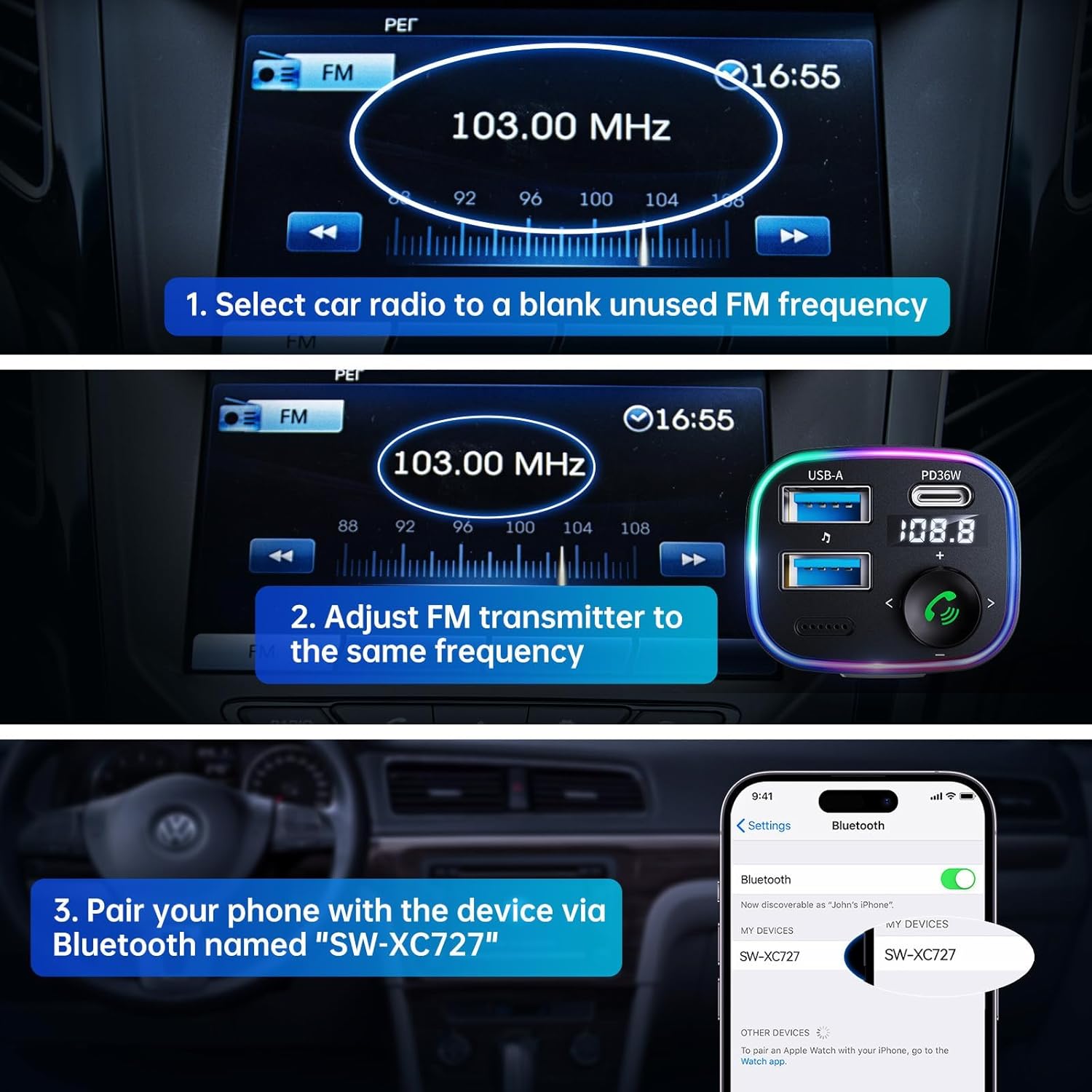
Image: Visual guide for connecting the Syncwire FM Transmitter to your car radio and phone.
Istruzioni per l'uso
Riproduzione musicale
- Streaming Bluetooth: After successful Bluetooth pairing, play music from your phone. The audio will transmit to your car's speakers.
- Riproduzione da unità USB: Insert a USB flash drive (up to 64GB) containing MP3/WMA/WAV/FLAC files into the designated USB-A port (with music note icon). The device will automatically detect and play music from the drive.
- Regola volume: Ruotare la manopola multifunzione in senso orario per aumentare il volume, in senso antiorario per diminuirlo.
- Traccia successiva / precedente: Use the left (<) and right (>) arrow buttons to skip tracks.
- Aumento dei bassi: Press the 'B' button once to activate Hi-Fi Deep Bass mode (display shows 'b1'). Press again to deactivate (display shows 'b0').
Chiamata a mani libere
- Rispondi/Termina chiamata: Press the multi-function knob (phone button) once to answer an incoming call or end an ongoing call.
- Rifiuta chiamata: Long-press the multi-function knob to reject an incoming call.
- Ricomposizione: Double-press the multi-function knob to redial the last number.
Dispositivi di ricarica
The adapter features two charging ports:
- PD 36W USB-C Port: Per dispositivi compatibili con la ricarica rapida.
- Porta USB-A da 12 W: For standard charging of devices.

Image: Detail of the charging and USB drive ports on the Syncwire FM Transmitter.
Ambient LED Light Control
The device features a colorful LED light ring. To turn the lights on or off, double-press the 'B' button located on the side of the adapter.
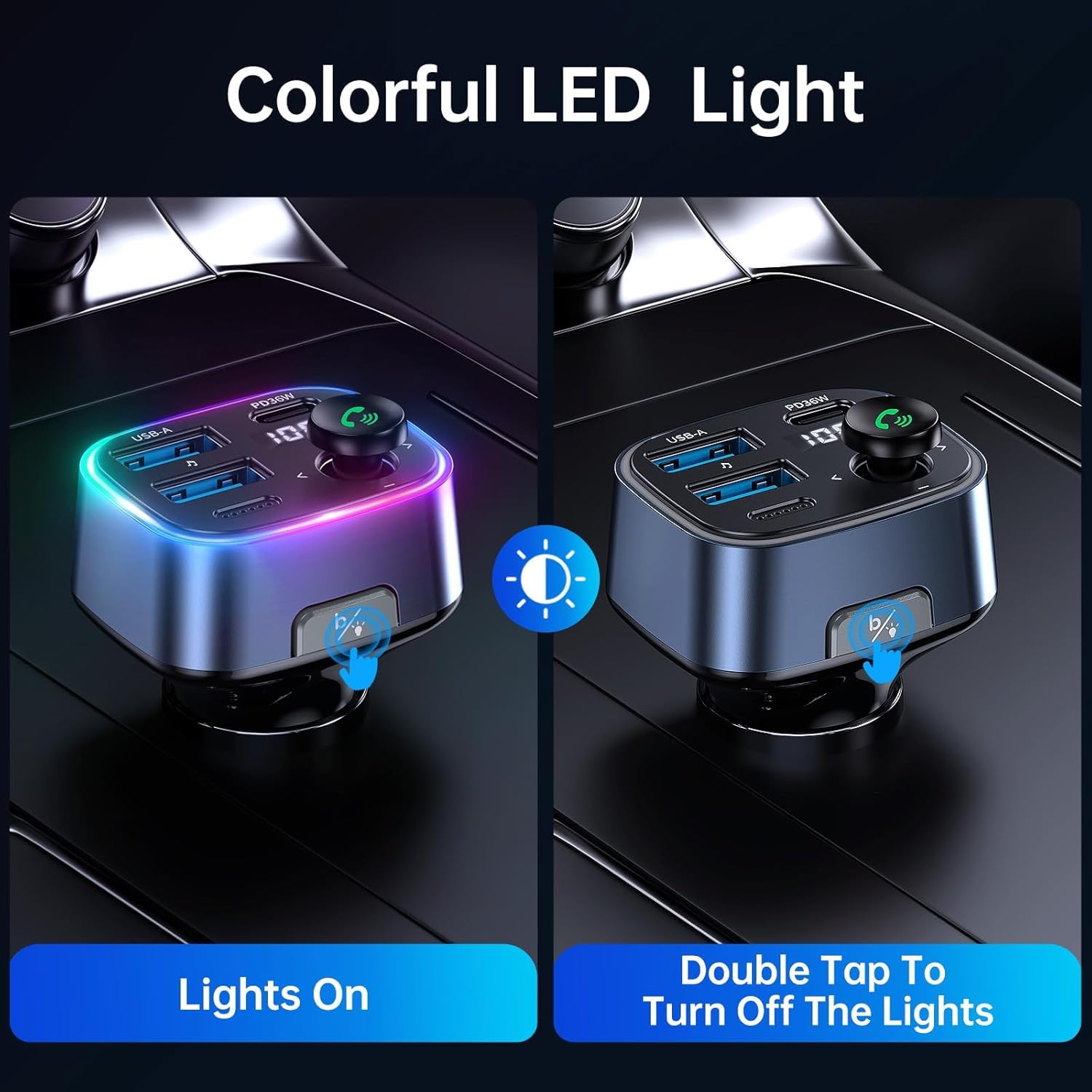
Image: Demonstrating how to control the ambient LED lights on the Syncwire FM Transmitter.
Manutenzione
- Mantenere pulito il dispositivo strofinandolo con un panno morbido e asciutto.
- Evitare di esporre il dispositivo a temperature estreme, alla luce solare diretta o all'umidità.
- Non utilizzare detergenti abrasivi o solventi.
- Conservare in luogo fresco e asciutto quando non in uso.
Risoluzione dei problemi
- Scarsa qualità audio/disturbo statico:
- Ensure your car radio and the FM transmitter are tuned to the exact same unused frequency.
- Try a different FM frequency if the current one has interference.
- Adjust the volume on both your phone and car radio to an appropriate level.
- Problemi di connessione Bluetooth:
- Make sure Bluetooth is enabled on your phone and the transmitter is powered on.
- Elimina il dispositivo dalle impostazioni Bluetooth del telefono e riprova ad associarlo.
- Riavviare sia il telefono che il trasmettitore FM.
- Ricarica non funzionante:
- Check if the transmitter is securely plugged into the car's power outlet.
- Assicurati che il cavo di ricarica non sia danneggiato e che sia collegato correttamente.
- Verify that your device is compatible with the charging ports (e.g., PD fast charging).
Specifiche
| Caratteristica | Dettaglio |
|---|---|
| Numero di modello | SW-XC727 |
| Versione Bluetooth | 5.3 |
| Ingresso volumetage | 12V-24V (Vehicle Powered) |
| Uscita USB-C | PD 36 W |
| Uscita USB-A | 12W |
| Produzione totale | 48W |
| Formati audio supportati | Formato MP3, WMA, WAV, FLAC |
| Capacità dell'unità USB | Fino a 64 GB |
| Materiale | Plastica |
| Dimensioni | 4.45 x 3.35 x 1.42 pollici |
| Peso | 2.57 once |
Garanzia e supporto
Syncwire provides a Garanzia di 36 mesi E supporto a vita for this product. If you encounter any issues or have questions, please contact Syncwire customer service for assistance. They are committed to finding a satisfying solution.
For support, please contact the seller, Syncwire Shop, through the platform where you purchased the product.


