1. Informazioni sulla sicurezza
Indossa sempre un casco quando guidi.
Operating an electric kickscooter carries inherent risks, including but not limited to loss of control, collisions, and falls. To minimize these risks, it is crucial to read and follow all instructions and warnings in this manual. Ensure you understand how to operate the kickscooter safely before your first ride.
- Indossare sempre indumenti di sicurezza adeguati, inclusi casco, ginocchiere e gomitiere.
- Do not ride in wet conditions, on slippery surfaces, or in poor visibility.
- Adhere to local laws and regulations regarding electric kickscooter use.
- Mantenere una velocità e una distanza di sicurezza dagli altri veicoli e dai pedoni.
- Avoid sudden maneuvers, sharp turns, and excessive speeds.
- Do not allow children under the recommended age or individuals exceeding the weight limit to operate the kickscooter.
- Regularly inspect the kickscooter for any damage or loose parts before each ride.
2. Prodotto finitoview
The Segway Ninebot F2 Pro Electric KickScooter is designed for urban commuting, offering a balance of performance, safety, and convenience. It features a robust design with advanced functionalities.
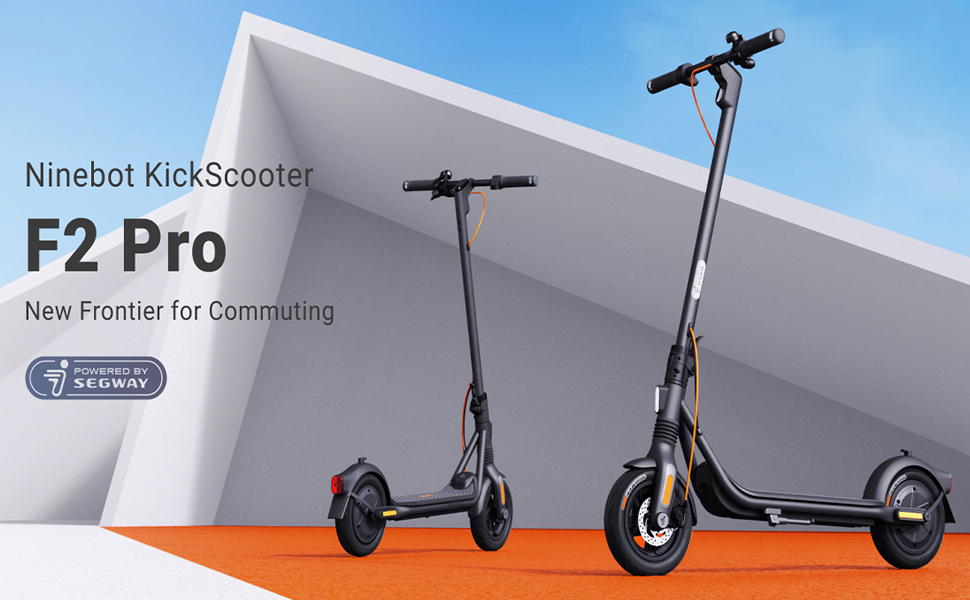
Image: The Segway Ninebot F2 Pro Electric KickScooter, showcasing its design for urban commuting.
Caratteristiche principali:
- Velocità massima: 32 km/h (20 mph)
- Gamma massima: Fino a 55 km (34 miglia)
- Uscita motore: 800W maximum power
- Pneumatici: 10-inch self-sealing tubeless tires
- Sospensione: Front spring suspension for a smoother ride
- Sistema frenante: Dual braking system (front disc brake + rear E-ABS)
- Caratteristiche di sicurezza: Integrated turn signals, Traction Control System (TCS), high-decibel electric horn, built-in LED headlight.
- Connettività: Bluetooth connection, Apple Find My compatibility.
- Portabilità: Portable folding design.

Immagine: Frontale view of the Segway Ninebot F2 Pro Electric KickScooter.

Immagine: Lato view of the Segway Ninebot F2 Pro Electric KickScooter.

Immagine: Posteriore view of the Segway Ninebot F2 Pro Electric KickScooter.
3. Impostazione
3.1 Apertura del KickScooter
- Posizionare il monopattino su una superficie piana.
- Lift the stem until it locks into the upright position. Ensure the locking mechanism is securely engaged.
- Aprire il cavalletto per sostenere lo scooter.

Image: Dimensions of the Segway Ninebot F2 Pro KickScooter in both folded and unfolded states.
3.2 Carica iniziale
Before first use, fully charge the kickscooter's battery. Connect the charger to the charging port and then to a power outlet. The charging indicator on the charger will change color (e.g., red to green) when fully charged.
- Il tempo di ricarica è di circa 8 ore per una ricarica completa.
- Only use the official charger provided with the kickscooter.

Immagine: Interna view of the battery cells within the kickscooter deck, illustrating the 34-mile max range and 8-hour fast charging capability.
3.3 Connecting to the Smart App
Download the official Segway-Ninebot app from your smartphone's app store. Follow the in-app instructions to connect your F2 Pro KickScooter via Bluetooth. The app allows for firmware updates, riding status monitoring, and scooter locking/unlocking.

Image: Screenshot of the Segway-Ninebot smart app, demonstrating features like Bluetooth connection, lock/unlock, riding status, cruise mode, and firmware updates.
4. Istruzioni per l'uso
4.1 Accensione/Spegnimento
- Accensione: Press the power button located on the display panel.
- Spegni: Tenere premuto il pulsante di accensione per alcuni secondi.
4.2 Riding the KickScooter
- Posizionare saldamente un piede sul ponte.
- Spingi con l'altro piede per acquisire slancio iniziale.
- Una volta in movimento, premere delicatamente la leva dell'acceleratore per avviare il motore.
- Posiziona il secondo piede sul ponte.
- To slow down, release the throttle. To brake, use the brake lever on the handlebar.

Image: Detail of the front wheel, highlighting the disc brake and front suspension system.

Image: Diagram showing the front spring suspension, designed for smooth riding over bumps.
4.3 Using Turn Signals and Horn
- Indicatori di direzione: Use the switch on the handlebar to activate the integrated turn signals for indicating turns.
- Corno: Press the horn button on the handlebar to alert others.

Image: Close-up of the handlebar, showing the activated turn signal for improved visibility.
4.4 Piegatura per il trasporto
To fold the kickscooter for storage or transport:
- Ensure the kickscooter is powered off.
- Locate the folding mechanism at the base of the stem.
- Follow the specific instructions in the quick start guide to release the latch and fold the stem down until it clicks into place.

Image: A person carrying the folded Segway Ninebot F2 Pro KickScooter, demonstrating its portability.
5. Manutenzione
Regular maintenance ensures the longevity and safe operation of your Segway Ninebot F2 Pro KickScooter.
5.1 Pulizia generale
Pulisci il monopattino con un panno morbido eamp cloth. Do not use alcohol, gasoline, kerosene, or other corrosive chemical solvents to clean the scooter. Do not wash the scooter with a high-pressure water jet.
5.2 Cura degli pneumatici
The F2 Pro features 10-inch self-sealing tubeless tires, which reduce the risk of punctures. However, it is important to regularly check tire pressure and inflate to the recommended PSI for optimal performance and safety.

Image: Diagram showing the self-sealing layer within the tire, designed to prevent punctures.
5.3 Manutenzione della batteria
- Evitare di scaricare completamente la batteria. Caricarla regolarmente, anche se non viene utilizzata per periodi prolungati.
- Conservare il monopattino in un luogo fresco e asciutto, lontano dalla luce solare diretta e da temperature estreme.
- Non tentare di smontare o modificare il pacco batteria.
5.4 Controllo del sistema frenante
Periodically check the functionality of both the front disc brake and the rear E-ABS brake. Ensure the brake levers operate smoothly and the braking power is effective. If you notice any issues, consult a qualified technician.

Image: Illustration detailing the dual braking system, which includes a front disc brake and a rear E-ABS for effective stopping power.
6. Risoluzione Dei Problemi
This section addresses common issues you might encounter with your F2 Pro KickScooter.
6.1 KickScooter Not Powering On
- Controlla il livello della batteria: Ensure the battery is sufficiently charged. Connect the charger and attempt to power on after a short charge.
- Pulsante di accensione: Confirm the power button is being pressed correctly and held for the required duration.
6.2 Problemi di connessione all'app
- Bluetooth: Ensure Bluetooth is enabled on your smartphone and the kickscooter is within range.
- Riavvio dell'app: Close and reopen the Segway-Ninebot app.
- Aggiornamento del firmware: If possible, check for and install any pending firmware updates via the app on a successful connection.
6.3 Reduced Performance or Range
- Pressione degli pneumatici: Incorrect tire pressure can significantly impact range and performance. Check and adjust to recommended levels.
- Condizioni di guida: Steep inclines, heavy loads, and aggressive riding (e.g., frequent acceleration/braking) will reduce range.
- Stato della batteria: Over time, battery capacity may decrease. Ensure proper battery maintenance.
7. Specifiche
| Caratteristica | Specificazione |
|---|---|
| Nome del modello | F2 Pro |
| Numero modello articolo | 051203U |
| Marca | Segway |
| Velocità massima | 32 km/h (20 mph) |
| Gamma massima | Fino a 55 km (34 miglia) |
| Uscita motore | 900 W (picco) |
| Grado collina | Fino al 22% |
| Dimensioni del pneumatico | 10 Inches (Self-Sealing Tubeless) |
| Tipo di freno | Front Disc Brake, Rear E-ABS |
| Sospensione | Front Spring Suspension |
| Tipo di batteria | Ioni di litio (1 richiesto, incluso) |
| Tempo di ricarica | Circa 8 ore |
| Dimensioni del prodotto (aperto) | Dimensioni: 56.9 x 125.22 x 115.82 cm |
| Peso dell'articolo | 18.5 kg (circa 39 libbre) |
| Capacità massima di peso | 265 libbre |
| Fascia di età | Adulto |
| Materiale | Aluminum (Frame: Alloy Steel) |
| Resistenza all'acqua | IPX5 Resistant |
| Componenti inclusi | Caricabatterie |

Image: Infographic detailing key specifications and features such as range, speed, power, climbing slope, TCS, dual braking, front suspension, electric horn, self-sealing tires, and Apple Find My compatibility.
8. Garanzia e supporto
Specific warranty details and support contact information are typically provided with the product packaging or available on the manufacturer's official website. Please refer to the documentation included with your purchase or visit the official Segway website for the most up-to-date information regarding warranty coverage and customer support.
9. Video di prodotto
Nei dati disponibili non sono stati forniti video ufficiali del prodotto da parte del venditore da incorporare in questo manuale.


