Introduzione
Welcome to the user manual for your new FERMAX Duox Plus Veo 4.3" Monitor. This manual provides essential information for the proper installation, operation, and maintenance of your device. Please read this manual thoroughly before using the product to ensure safe and efficient operation.
Informazioni importanti sulla sicurezza
- Sicurezza elettrica: Ensure all electrical connections are made by a qualified professional and comply with local electrical codes. Disconnect power before installation or maintenance.
- Condizioni ambientali: Do not expose the monitor to extreme temperatures, humidity, or direct sunlight. Install in a dry, well-ventilated area.
- Gestione: Handle the monitor with care to avoid damage to the screen or internal components.
- Pulizia: Per la pulizia, utilizzare un panno morbido e asciutto. Non utilizzare detergenti abrasivi o solventi.
- Disposizione: Dispose of the product and its components according to local electronic waste regulations.
Contenuto della confezione
Si prega di verificare che tutti gli articoli elencati di seguito siano inclusi nel pacchetto:
- FERMAX Duox Plus Veo 4.3" Monitor Unit
- Staffa di fissaggio
- Cavi di collegamento (se applicabile)
- Viti e tasselli
- Manuale dell'utente (questo documento)
Caratteristiche del prodotto
The FERMAX Duox Plus Veo 4.3" Monitor offers advanced features for your intercom system:
- 4.3-inch color display for clear video communication.
- Comunicazione audio a mani libere.
- Intuitive button interface for call answer, door release, and additional functions.
- Sleek, compact design suitable for modern interiors.
- Compatible with Duox Plus digital systems.
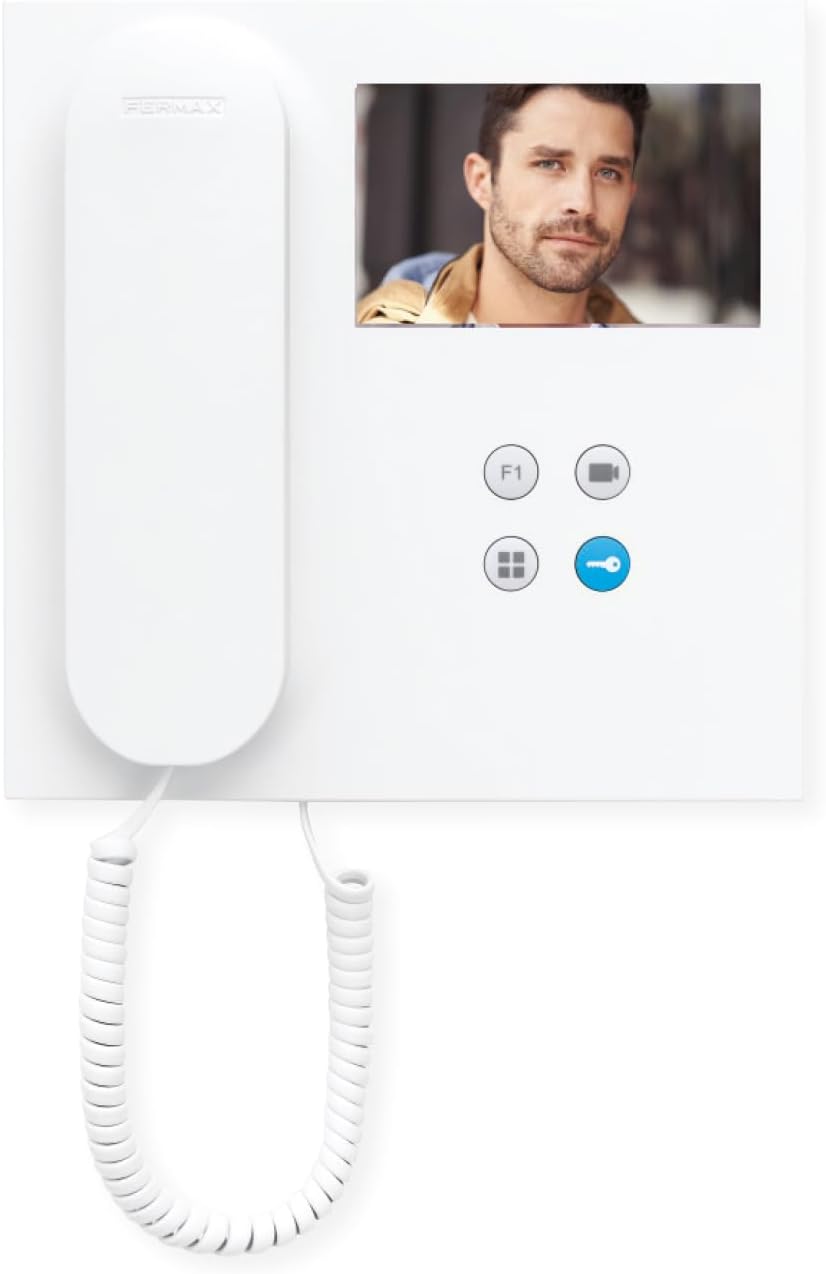
Immagine: Frontale view of the FERMAX Duox Plus Veo 4.3" Monitor, showing the display, handset, and control buttons.
Configurazione e installazione
1. Montaggio del monitor
- Scegli la posizione: Select a suitable indoor location, away from direct heat sources or moisture.
- Segnare i punti di foratura: Utilizzare la staffa di montaggio come modello per contrassegnare i punti di foratura sulla parete.
- Fori di perforazione: Praticare dei fori nei punti segnati e inserire i tasselli.
- Staffa di sicurezza: Fissare la staffa di montaggio alla parete utilizzando le viti fornite.
2. Collegamenti elettrici
Avvertimento: Ensure power is disconnected before making any electrical connections. Refer to your system's wiring diagram for specific connections.
- Connect the Duox Plus bus wires (data and power) to the designated terminals on the monitor.
- Connect any additional wires for auxiliary functions (e.g., second door release, panic button) as per your system's requirements.
- Assicurarsi che tutti i collegamenti siano sicuri e adeguatamente isolati.
3. Fissaggio del monitor
- Allineare con attenzione il monitor alla staffa di montaggio.
- Far scorrere il monitor sulla staffa finché non scatta saldamente in posizione.
- Ripristinare l'alimentazione al sistema.
Istruzioni per l'uso
Ricevere una chiamata
- When a visitor calls from the outdoor panel, the monitor will ring and display the visitor's image.
- Per rispondere alla chiamata, premere il tasto Pulsante di risposta (typically indicated by a phone icon).
- Per terminare la chiamata, premere il tasto Pulsante di fine chiamata (often the same button or a distinct hang-up icon).
Aprire la porta
- During a call, or when monitoring the outdoor panel, press the Pulsante di apertura della porta (typically indicated by a key icon) to open the main entrance door.
Monitoring the Outdoor Panel
- A view la telecamera del pannello esterno senza una chiamata in arrivo, premere il tasto Pulsante di monitoraggio (often indicated by a camera icon). The display will show the live feed.
Regolazione delle impostazioni
- Volume: Use the volume controls (if present, or via menu) to adjust the ringtone and conversation volume.
- Luminosità/Contrasto: Access the monitor's menu (refer to specific button layout) to adjust display settings.
Manutenzione
- Pulizia: Utilizzare un panno morbido e privo di lanugine per pulire delicatamente lo schermo e casing. Do not use liquid cleaners, aerosols, or abrasive materials.
- Ispezione: Controllare periodicamente tutti i cavi e i collegamenti per verificare la presenza di eventuali segni di usura o danni.
- Aggiornamenti software: Se applicabile, controllare le istruzioni del produttore website for any firmware updates for your Duox Plus system.
Risoluzione dei problemi
| Problema | Possibile causa | Soluzione |
|---|---|---|
| Nessuna immagine sullo schermo. | No power; loose connection; camera issue. | Check power supply. Ensure all cables are securely connected. Verify outdoor panel camera is functioning. |
| Nessun audio durante la chiamata. | Volume too low; faulty connection; microphone/speaker issue. | Increase volume. Check audio cable connections. Contact support if issue persists. |
| L'apertura della porta non funziona. | Incorrect wiring; faulty lock mechanism; system error. | Verify wiring to the door strike. Test the lock mechanism independently. Consult system installer. |
| Il monitor non squilla. | Ringtone volume off; system not registered; faulty outdoor panel button. | Check ringtone volume. Ensure monitor is properly registered to the system. Test outdoor panel button. |
If the problem persists after attempting these solutions, please contact FERMAX technical support or your installer.
Specifiche tecniche
| Caratteristica | Dettaglio |
|---|---|
| Modello | 90b61eff-c290-484c-aba5-73e26c52e3da |
| Dimensioni dello schermo | 4.3 pollici |
| Risoluzione | 800x600 |
| Proporzioni | 4:3 |
| Rapporto di contrasto dell'immagine | 2000:1 |
| Superficie dello schermo | Lucido |
| Produttore | Fermata |
| Dimensioni del pacco | 8.74 x 8.15 x 2.01 pollici |
Garanzia e supporto
FERMAX products are designed for durability and reliability. For information regarding warranty terms and conditions, please refer to the warranty card included with your product or visit the official FERMAX websito.
For technical support, installation assistance, or service inquiries, please contact your local FERMAX distributor or visit the support section of the FERMAX websito:

Image: FERMAX brand logo with the slogan "Connectivity for All".


