1. Introduzione
Thank you for choosing the Dragon Touch Notepad-102 Android 12 Tablet. This manual provides essential information for setting up, operating, maintaining, and troubleshooting your device. Please read it thoroughly to ensure optimal performance and longevity of your tablet.
2. Prodotto finitoview
The Dragon Touch Notepad-102 is a 10.1-inch Android 12 tablet designed for versatile use, from entertainment to productivity. It features an 8-core CPU, 8GB RAM, 128GB internal storage, and a vibrant IPS display.

Immagine 2.1: Davanti e dietro view of the Dragon Touch Notepad-102 tablet. The front displays 'Android 12' and '8GB+128GB', while the back shows a silver finish and the rear camera module.
2.1. Componenti e porte
Familiarizza con le caratteristiche fisiche del tablet:
- Display: Schermo IPS da 10.1 pollici.
- Fotocamera frontale: 8MP, typically located at the top center when held vertically.
- Telecamera posteriore: 13MP, posizionati sul pannello posteriore.
- Pulsante di accensione: Utilizzato per accendere/spegnere il tablet o metterlo in modalità sospensione.
- Pulsanti del volume: Regola i livelli audio.
- Porta USB di tipo C: Per la ricarica e il trasferimento dei dati.
- Jack per cuffie da 3.5 mm: Per l'uscita audio.
- Slot per scheda MicroSD: For storage expansion (up to 128GB).
- Relatori: Doppi altoparlanti stereo per l'uscita audio.

Immagine 2.2: Lato view of the tablet highlighting the various ports and buttons, including the USB Type-C port and volume controls.
3. Impostazione
3.1. Accensione iniziale
- Premere e tenere premuto il tasto Pulsante di accensione finché lo schermo non si accende.
- Segui le istruzioni sullo schermo per selezionare la lingua, la regione e accettare i termini e le condizioni.
3.2. Connessione wifi
- Durante la configurazione iniziale o in seguito, vai a Impostazioni > Rete e Internet > Wifi.
- Attiva/disattiva Wi-Fi On.
- Seleziona la rete Wi-Fi desiderata dall'elenco.
- Se richiesto, immettere la password di rete, quindi toccare Collegare.
3.3. Configurazione dell'account Google
Accedi con il tuo account Google per accedere al Google Play Store, a Gmail e ad altri servizi Google. Se non hai un account, puoi crearne uno in questa fase.
4. Funzionamento di base
4.1. Navigazione in Android 12
The tablet runs on Android 12, offering an intuitive user interface. Common gestures include:
- Rubinetto: Seleziona un elemento o apri un'app.
- Scorri: Scorrere le pagine o i menu.
- Pizzica per ingrandire: Ingrandisci o rimpicciolisci il contenuto sullo schermo.
- Premere a lungo: Accedi ai menu contestuali o sposta le icone.
4.2. Installazione dell'app
Download and install applications from the Google Play Store. Ensure you have a stable internet connection.

Immagine 4.1: The tablet screen showing a collection of application icons and photo thumbnails, demonstrating its multimedia capabilities and storage capacity.
5. Funzionalità avanzate
5.1. Telecamere
The tablet is equipped with an 8MP front camera and a 13MP rear camera. Open the Camera app to capture photos and videos. The front camera is ideal for video calls and selfies.

Immagine 5.1: The tablet displaying a video call, showcasing the clarity of the front-facing camera for communication.
5.2. Proiezione wireless
The tablet supports wireless projection, allowing you to mirror its screen to a compatible large display, such as a TV. This feature is useful for presentations or sharing media.
5.3. Docking Keyboard Support
Enhance your productivity by connecting a compatible docking keyboard (sold separately). This transforms your tablet into a laptop-like device, suitable for typing and work tasks.
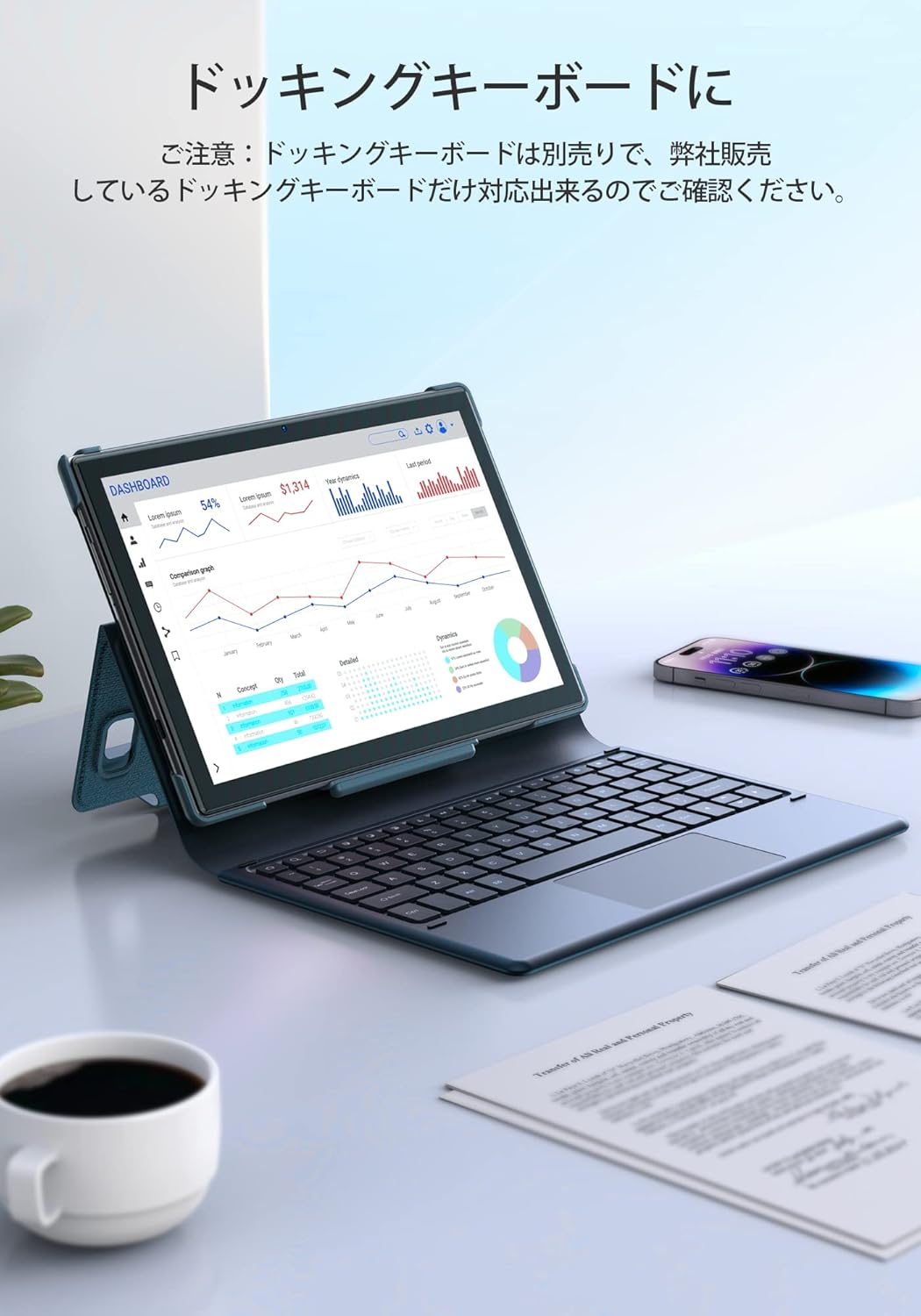
Immagine 5.2: The tablet docked with a keyboard accessory, displaying a dashboard with charts, illustrating its use for productivity.
6. Connettività
6.1. Wi-Fi
The tablet supports dual-band Wi-Fi (2.4GHz and 5GHz) with 802.11ac technology for stable and high-speed internet access. To manage Wi-Fi settings, go to Impostazioni > Rete e Internet > Wifi.
6.2. Bluetooth
Connect wireless headphones, speakers, or other Bluetooth-enabled devices. Access Bluetooth settings via Impostazioni > Dispositivi connessi > Bluetooth.
7. Gestione della batteria
The Notepad-102 is equipped with a 6000mAh battery. To charge, connect the included Type-C cable to the tablet's Type-C port and a compatible 5V/2A power adapter.
7.1. Suggerimenti per la durata della batteria
- Ridurre la luminosità dello schermo.
- Disattivare il Wi-Fi e il Bluetooth quando non vengono utilizzati.
- Chiudere le applicazioni in background.
- Attiva la modalità di risparmio batteria.
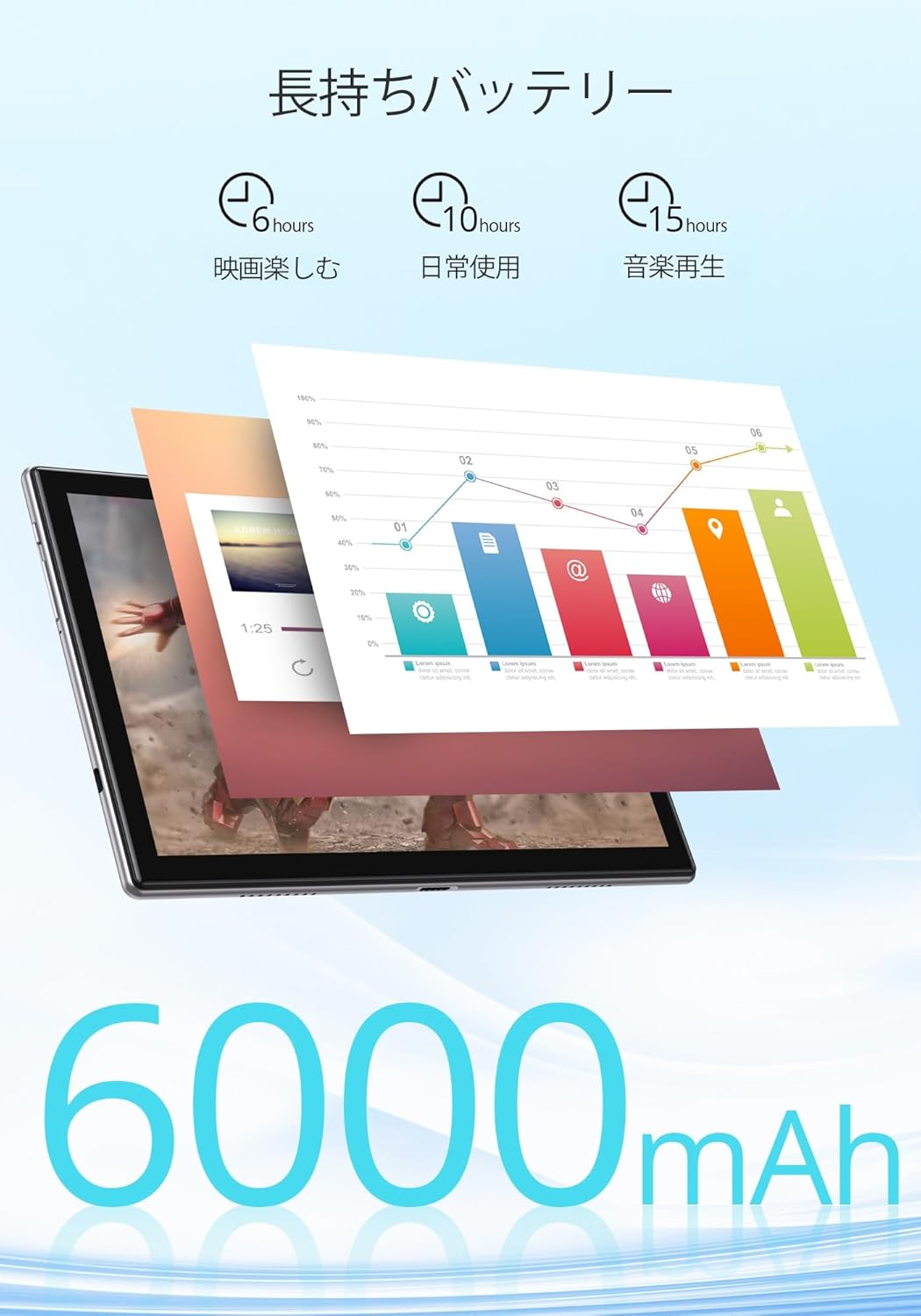
Immagine 7.1: An infographic showing estimated battery life for various activities: 6 hours for movies, 10 hours for daily use, and 15 hours for music playback, powered by the 6000mAh battery.
8. Manutenzione e cura
- Tenere la compressa lontana da temperature estreme e dalla luce solare diretta.
- Evitare di far cadere il tablet o di sottoporlo a forti urti.
- Pulisci lo schermo con un panno morbido e privo di lanugine. Non utilizzare prodotti chimici aggressivi.
- Assicurarsi che la porta di ricarica sia priva di polvere e detriti.
9. Risoluzione Dei Problemi
9.1. Il tablet non si accende
- Ensure the tablet is sufficiently charged. Connect it to a power source for at least 30 minutes.
- Per eseguire un riavvio forzato, tenere premuto il pulsante di accensione per 10-15 secondi.
9.2. Problemi di connettività Wi-Fi
- Riavvia il router Wi-Fi e il tablet.
- Assicurati di trovarti nel raggio d'azione del segnale Wi-Fi.
- Dimentica la rete nelle impostazioni Wi-Fi e riconnettiti.
- Controlla se altri dispositivi riescono a connettersi alla stessa rete Wi-Fi.
9.3. App che si bloccano o si bloccano
- Chiudere e riaprire l'app.
- Cancella la cache e i dati dell'app in Impostazioni > Applicazioni > [Nome dell'app] > Archiviazione e cache.
- Assicurati che l'app sia aggiornata all'ultima versione.
10. Specifiche
| Caratteristica | Specificazione |
|---|---|
| Marca | Tocco del drago |
| Modello | Notepad-102 |
| Sistema operativo | Android 12 (certificato GMS) |
| Dimensioni dello schermo | 10.1 pollici |
| Risoluzione dello schermo | 1280 x 800 pixel (IPS) |
| Processore | 8-core CPU (2.0GHz) |
| Memoria RAM | 8 GB |
| Memoria interna | 128 GB |
| Archiviazione espandibile | MicroSD fino a 128 GB |
| Wifi | 2.4Ghz/5Ghz Dual-band (802.11ac) |
| Bluetooth | SÌ |
| Fotocamera frontale | 8MP |
| Telecamera posteriore | 13MP |
| Capacità della batteria | 6000mAh |
| Porta di ricarica | Tipo C |
| Dimensioni | Dimensioni: 27.1 x 20 x 4.9 cm |
| Peso | 940 grammi |
11. Garanzia e supporto
The Dragon Touch Notepad-102 tablet comes with a one-year warranty. For any inquiries or support needs, please contact customer service through your Amazon purchase history, providing your order number. Our support team is dedicated to assisting you.
Nota: Please use the provided charging cable and a 5V/2A power adapter for optimal charging.


