Introduzione
This manual provides comprehensive instructions for the Silvergear XL Smartwatch. It covers setup, operation, maintenance, and troubleshooting to ensure you get the most out of your device. The Silvergear XL Smartwatch features a large 2.41-inch IPS display, integrated cameras, 4G connectivity, and extensive fitness tracking capabilities.
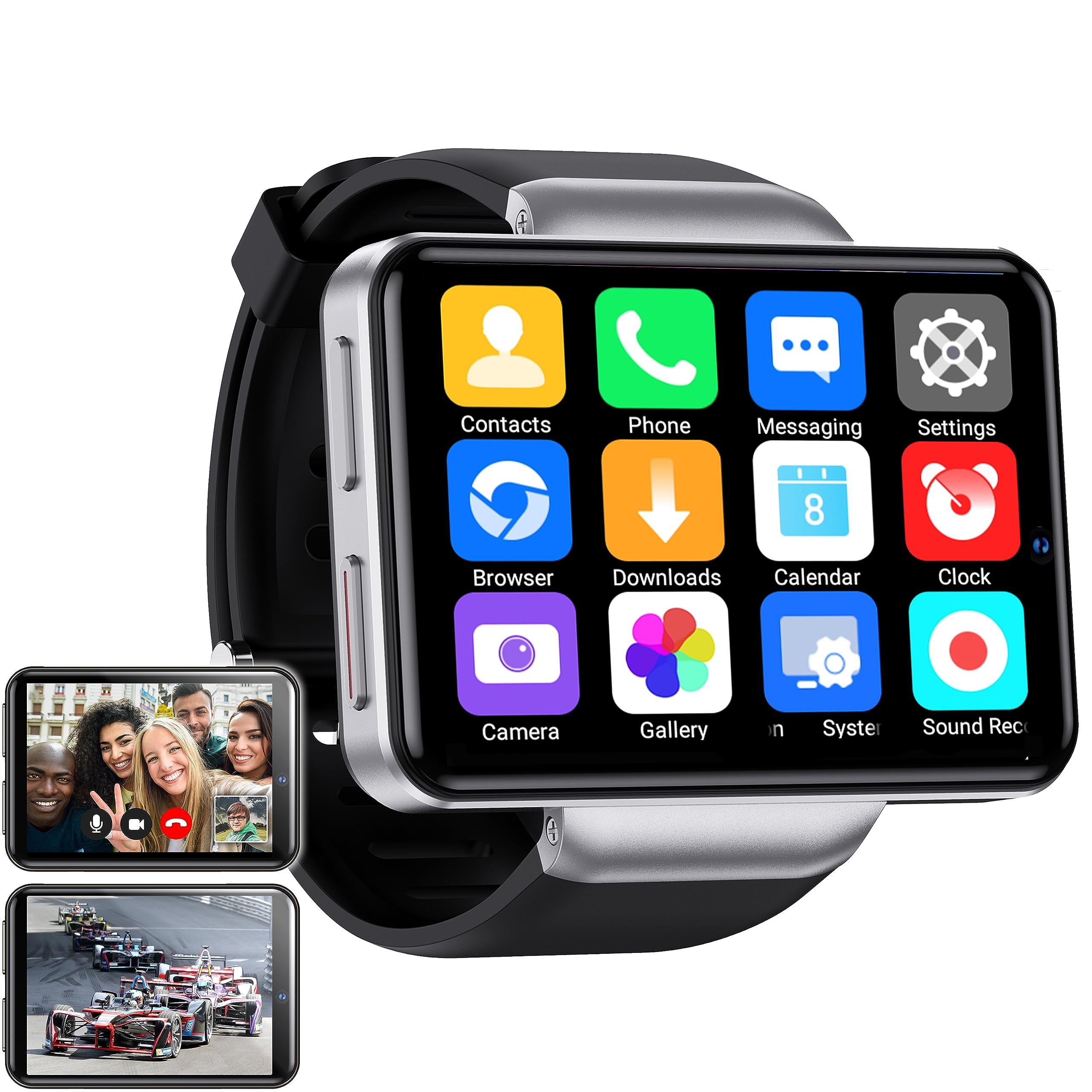
Figure 1: Silvergear XL Smartwatch overview.

Figure 2: The Silvergear XL Smartwatch offers a perfect balance of style, functionality, and advanced technology, including a 2.41-inch IPS display, live video streaming, app downloads, fitness tracking, and communication features.
1. Impostazione
1.1 Disimballaggio e contenuto della confezione
Carefully unpack your Silvergear XL Smartwatch and verify all contents.

Figure 3: Package contents including the Smartwatch XL, charging base, screen protector, and two screwdrivers. Dimensions are also shown: 4.5 cm height, 6.5 cm width, 1.5 cm thickness for the watch body, and strap lengths of 8.5 cm and 12 cm. The watch weighs 120 grams.
- Silvergear XL Smartwatch
- Base di ricarica
- Pellicola protettiva per lo schermo
- 2 cacciaviti (per il vassoio della scheda SIM)
- Manuale dell'utente (questo documento)
1.2 Ricarica dello smartwatch
Prima del primo utilizzo, caricare completamente lo smartwatch.
- Connect the charging base to a USB power adapter (not included) or a computer's USB port.
- Place the smartwatch onto the charging base, ensuring the charging pins align.
- Il display dell'orologio indicherà lo stato di carica. Per una carica completa sono necessarie circa 2-3 ore.
1.3 Installazione della scheda SIM
To enable 4G connectivity, calls, and internet access, install a Nano SIM card.

Figure 4: Illustration of how to insert a Nano SIM card into the smartwatch. The image also shows the watch's ability to download apps from the Play Store.
- Locate the SIM card tray on the side of the smartwatch.
- Use the provided screwdriver to open the SIM card tray.
- Carefully insert a Nano SIM card into the tray, ensuring correct orientation.
- Close the SIM card tray securely with the screwdriver.
1.4 Accensione iniziale e configurazione
Press and hold the power button until the Silvergear logo appears. Follow the on-screen prompts to complete the initial setup, including language selection, time zone, and network connection.
2. Utilizzo dello smartwatch
2.1 Navigazione di base
- Schermo tattile: Scorri verso sinistra, destra, in alto o in basso per navigare tra menu e schermate. Tocca per selezionare gli elementi.
- Pulsante di accensione: Premere per riattivare/sospendere lo schermo. Tenere premuto per accendere/spegnere o riavviare.
- Back Button (if applicable): Some watches have a dedicated back button or gesture. Refer to on-screen prompts.
2.2 Caratteristiche di comunicazione
With a Nano SIM card installed, you can make and receive calls and messages directly from your smartwatch.
- Chiamate: Tap the "Phone" icon to access the dialer or contacts.
- Messaggistica: Tap the "Messaging" icon to send and receive text messages.
- Applicazioni: Download communication apps from the Play Store for additional functionality.
Funzionalità della fotocamera 2.3
The smartwatch is equipped with both front and side cameras for capturing photos and videos.

Figure 5: The smartwatch features a 5MP front camera and a 2MP side camera, allowing you to capture photos and videos directly from your wrist.
- Accesso alla telecamera: Tap the "Camera" icon on the home screen or app drawer.
- Cambia telecamera: Use the on-screen icon to switch between the 5MP front camera and the 2MP side camera.
- Catturare: Tocca il pulsante di scatto per scattare una foto o avviare/interrompere la registrazione video.
2.4 Intrattenimento multimediale
Enjoy videos, TV programs, series, and music directly on your smartwatch's extra-large screen.

Figure 6: The extra-large screen allows you to enjoy multimedia content such as sport competitions, TV programmes, series, videos, and music.
- Video/TV: Use pre-installed apps or download streaming services from the Play Store.
- Musica: Play music stored on the device or stream from compatible apps.
2.5 Monitoraggio di fitness e salute
Monitor your physical activity and health metrics with the integrated sensors.

Figure 7: The smartwatch offers pedometer and fitness tracking for various activities including running, hiking, cycling, basketball, football, jumping rope, and badminton.
- Pedometro: Tiene traccia dei passi giornalieri, della distanza e delle calorie bruciate.
- Cardiofrequenzimetro: Provides accurate heart rate readings.
- Modalità di allenamento: Select from 9 pre-defined exercise types (e.g., running, walking, cycling, swimming) to track your performance.
- Monitoraggio del sonno: Monitors your sleep patterns (if supported by the device's software).
2.6 Download dell'app
Expand your smartwatch's functionality by downloading applications from the Play Store.
- Ensure your smartwatch is connected to Wi-Fi or has an active 4G data connection.
- Tap the "Play Store" icon and browse or search for desired applications.
- Follow on-screen instructions to download and install apps.
3. Manutenzione
3.1 Pulizia
Per mantenere l'aspetto e la funzionalità del tuo smartwatch:
- Pulire lo schermo e il corpo con un panno morbido e privo di lanugine.
- Per segni ostinati, leggermente dampLavare il panno con acqua. Evitare prodotti chimici aggressivi o materiali abrasivi.
- Prima di procedere alla ricarica, assicurarsi che i contatti di ricarica siano puliti e asciutti.
3.2 Resistenza all'acqua e alla polvere
The Silvergear XL Smartwatch is rated IP67 for water and dust resistance.

Figure 8: The smartwatch is IP67 water- and dustproof, designed to withstand various weather conditions. This includes IP67 splashproof and IP67 dustproof ratings.
- Grado di protezione IP67: This means the device is protected from dust ingress and can withstand immersion in water up to 1 meter for up to 30 minutes.
- It is suitable for splashes, rain, and incidental exposure to water.
- Avoid prolonged immersion, hot water, or high-pressure water jets.
- Assicurarsi che il vassoio della scheda SIM sia sigillato correttamente per garantire la resistenza all'acqua.
3.3 Aggiornamenti software
Controlla periodicamente la disponibilità di aggiornamenti software per garantire prestazioni ottimali e l'accesso a nuove funzionalità.
- Connect your smartwatch to Wi-Fi.
- Navigate to "Settings" > "About Watch" > "Software Update" (or similar path).
- Follow on-screen instructions to download and install any available updates.
4. Risoluzione Dei Problemi
| Problema | Possibile causa | Soluzione |
|---|---|---|
| Lo smartwatch non si accende. | Batteria scarica; dispositivo bloccato. | Caricare il dispositivo per almeno 30 minuti. Tenere premuto il pulsante di accensione per 10-15 secondi per forzare il riavvio. |
| Impossibile effettuare/ricevere chiamate. | Nessuna scheda SIM; scheda SIM non inserita correttamente; nessun segnale di rete; impostazioni di rete errate. | Ensure SIM card is correctly installed and activated. Check network signal strength. Verify network settings in the smartwatch. |
| Lo schermo non risponde. | Problema software; interferenza con la protezione dello schermo. | Restart the smartwatch. Remove and reapply the screen protector if it's causing issues. |
| Fitness tracking data is inaccurate. | Improper fit; sensor obstruction; software calibration needed. | Ensure the watch is worn snugly on your wrist. Clean the sensor area. Check for software updates. |
| Impossibile connettersi al Wi-Fi. | Password errata; fuori portata; problema con il router. | Verifica la password Wi-Fi. Avvicinati al router Wi-Fi. Riavvia il router. |
Se riscontri problemi non elencati qui o se le soluzioni suggerite non risolvono il problema, consulta la sezione di supporto.
5. Specifiche
Below are the technical specifications for the Silvergear XL Smartwatch (Model: 8711568088660).

Figure 9: Key technical specifications of the Silvergear XL Smartwatch, including Android 7.1.1 OS, MT6739 Quad-Core CPU (1.5 GHz), 2.41-inch full screen, 640x480 resolution, and 4G & WiFi connectivity.
| Caratteristica | Dettaglio |
|---|---|
| Marca | Ingranaggio argentato |
| Numero di modello | 8711568088660 |
| Sistema operativo | Android (version 7.1.1 from image) |
| Dimensioni dello schermo | 2.41 pollici |
| Tipo di visualizzazione | LCD (IPS from description) |
| Risoluzione | 640x480 (from image) |
| Processore | MT6739 Quad-Core CPU, 1.5 GHz (from image) |
| Connettività | 4G, Wi-Fi |
| Fotocamera frontale | 5 Megapixel |
| Fotocamera laterale | 2 Megapixel |
| Capacità di archiviazione della memoria | 500 MB |
| Resistenza all'acqua e alla polvere | Grado di protezione IP67 |
| GPS | Nessun GPS |
| Dispositivi compatibili | Smartphone |
6. Informazioni sulla garanzia
The Silvergear XL Smartwatch comes with a manufacturer's warranty.
- Garanzia del produttore: 2 anni.
- Questa garanzia copre i difetti nei materiali e nella lavorazione in condizioni di utilizzo normale.
- It does not cover damage caused by misuse, accidents, unauthorized modifications, or normal wear and tear.
- Conservare la prova d'acquisto per eventuali richieste di garanzia.
7. Supporto
For further assistance, technical support, or warranty claims, please contact Silvergear customer service.
- Refer to the Silvergear official websito per i contatti.
- Have your product model number (8711568088660) and proof of purchase ready when contacting support.


