1. Introduzione
Thank you for choosing the TEEHO Keyless Entry Door Lock with 2 Handles. This manual provides detailed instructions for installation, operation, and maintenance to ensure optimal performance and security. Please read this manual thoroughly before installation and keep it for future reference.
Contenuto della confezione
- 1 Electronic Keypad Deadbolt
- 1 Door Lever Handle Set (2 handles)
- 1 Keypad Deadbolt Lock
- 4 batterie AA
- Hardware di montaggio
- Manuale d'uso
Caratteristiche principali
- Accesso senza chiave: Supports up to 20 user access codes (4-10 digits) and one-time codes.
- Chiusura intelligente: Adjustable auto-lock feature (10-99 seconds) and one-touch auto-lock.
- Sicurezza avanzata: ANSI Grade 3 smart door lock cylinder, anti-peeping password function, mute mode, vacation mode, and backlit keypad.
- Design durevole: Constructed from durable alloy with an IP54 weather resistance rating.
- Installazione semplice: Progettato per una configurazione semplice.
2. Informazioni sulla sicurezza
Per evitare lesioni o danni al prodotto, osservare le seguenti precauzioni di sicurezza:
- Non tentare di smontare o modificare la serratura. Ciò potrebbe danneggiarla e invalidare la garanzia.
- Utilizzare solo le batterie AA specificate. Non mischiare batterie vecchie e nuove o tipi diversi di batterie.
- Tenere tutti i componenti fuori dalla portata dei bambini.
- Protect the keypad from excessive moisture or direct water exposure.
- Ensure proper installation to prevent malfunction. If unsure, consult a qualified locksmith or installer.
3. Prodotto finitoview
The TEEHO Keyless Entry Door Lock system combines a keypad deadbolt with a door lever for comprehensive security and convenience.
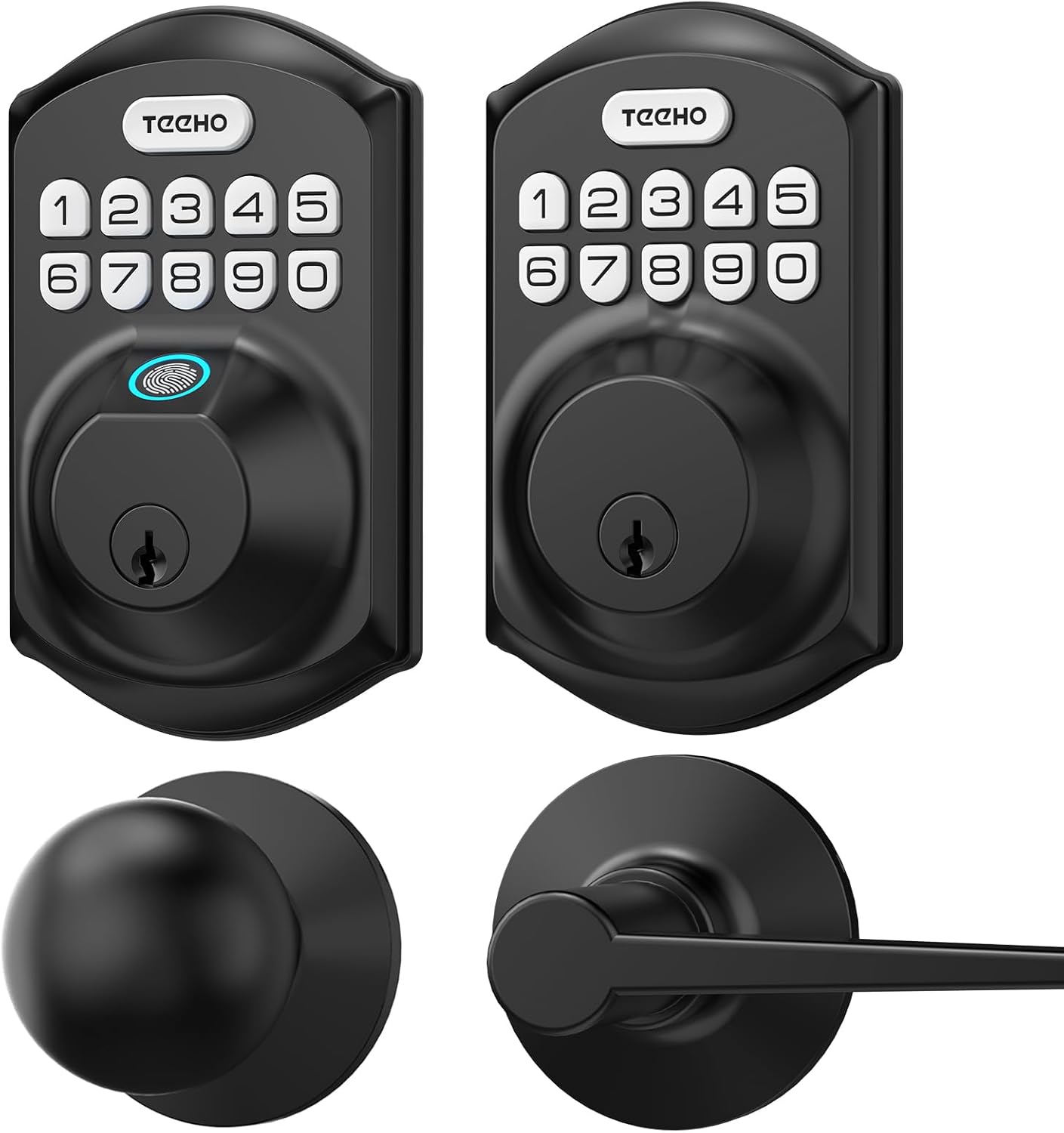
Immagine 3.1: Sopraview of the TEEHO Keyless Entry Door Lock components, including the electronic keypad deadbolt, a standard deadbolt, and two door lever handles, all in a matte black finish.

Immagine 3.2: The TEEHO Keyless Entry Door Lock installed on a white door, featuring the electronic keypad deadbolt above a matching door lever. The interior view shows the corresponding hardware.
4. Configurazione e installazione
The TEEHO Keyless Entry Door Lock is designed for easy installation. Follow these steps carefully.
4.1 Preparare la porta
- Ensure your door meets the required dimensions for installation (standard door thickness and backset).
- Remove any existing lock hardware.
4.2 Install the Deadbolt Latch
- Insert the deadbolt latch into the door edge. Ensure the “UP” marking is facing upwards.
- Secure the latch with screws.
4.3 Install the Exterior Keypad Assembly
- Feed the cable through the hole in the door.
- Align the exterior keypad assembly with the deadbolt latch and secure it to the door.
4.4 Install the Interior Mounting Plate
- Attach the interior mounting plate to the door, ensuring the cable passes through the plate.
- Fissare la piastra di montaggio con le viti.
4.5 Connect Cables and Install Interior Assembly
- Collegare il cavo dal gruppo esterno al gruppo interno.
- Mount the interior assembly onto the mounting plate and secure it with screws.
4.6 Installare le batterie
- Rimuovere il coperchio della batteria dal gruppo interno.
- Insert 4 AA batteries, observing polarity (+/-).
- Riposizionare il coperchio della batteria.

Immagine 4.1: Un esploso view of the TEEHO Keyless Entry Door Lock components, illustrating the internal mechanism and how the exterior keypad, interior assembly, and deadbolt latch fit together during installation.
4.7 Install Door Lever Handles
- Install the latch mechanism for the door lever into the door edge.
- Attach the exterior and interior door lever handles, securing them according to the provided instructions.
5. Istruzioni per l'uso
Learn how to use the various features of your TEEHO Keyless Entry Door Lock.
5.1 Apertura della porta
- Utilizzo di un codice utente: Enter your 4-10 digit user code on the keypad, then press the “Lock” button (or checkmark/enter button if present). The lock will retract.
- Utilizzo di una chiave fisica: Inserire la chiave fisica nella serratura e girare per sbloccare.

Immagine 5.1: A person using the TEEHO Keyless Entry Door Lock, highlighting the keypad and a fingerprint sensor for quick unlocking. The image suggests a rapid identification and unlocking process.
5.2 Chiusura della porta
- Bloccaggio automatico: If enabled, the lock will automatically engage after a set period (10-99 seconds) once the door is closed.
- Blocco con un solo tocco: Per bloccare immediatamente la porta, tenere premuto un tasto qualsiasi sulla tastiera per 2 secondi.
- Blocco manuale: From the interior, turn the thumb-turn to lock the deadbolt.

Immagine 5.2: A visual representation of the auto-lock and one-touch locking features of the TEEHO Keyless Entry Door Lock. It shows a timer icon indicating automatic locking after 10-99 seconds and a lock icon for the 2-second one-touch lock.
5.3 Password anti-spione
To prevent others from guessing your code, you can enter random digits before or after your actual code. The lock will still recognize the correct sequence within the longer entry.

Immagine 5.3: An illustration of the anti-peep tactile keypad feature. It demonstrates how random digits can be added before or after the actual password to obscure it from onlookers, enhancing security.
5.4 Modalità silenziosa
The lock can be set to mute mode to disable keypad tones for quiet operation.
5.5 Modalità Vacanza
Activate vacation mode for enhanced security when you are away for an extended period. This mode typically disables all user codes until manually deactivated.
6. Codici di programmazione
The lock supports up to 20 user codes and one-time codes.

Immagine 6.1: An infographic detailing the access options for the TEEHO Keyless Entry Door Lock, showing support for up to 20 user codes, one-time PIN codes, and two physical keys for unlocking.
6.1 Aggiunta di codici utente
- Press the “Program” button (usually located on the interior assembly).
- Enter the default master code (refer to quick start guide or factory settings).
- Follow the voice prompts or indicator lights to enter a new 4-10 digit user code.
- Confirm the new code.
6.2 Eliminazione dei codici utente
- Press the “Program” button.
- Inserisci il codice principale.
- Follow the prompts to select the option for deleting user codes.
- Enter the specific user code to be deleted or choose to delete all user codes.
6.3 Setting One-Time Codes
One-time codes are ideal for temporary access (e.g., for delivery personnel or service providers). Once used, the code is automatically deleted.
- Press the “Program” button.
- Inserisci il codice principale.
- Follow the prompts to select the one-time code option.
- Enter the desired one-time code.
7. Manutenzione
7.1 Sostituzione della batteria
The lock is powered by 4 AA batteries, providing over 1 year of use under normal conditions. Replace batteries when the low battery indicator appears or when the lock becomes unresponsive.
- Rimuovere il coperchio della batteria dall'assemblaggio interno.
- Rimuovere le vecchie batterie.
- Inserire 4 batterie AA nuove, assicurandosi della corretta polarità.
- Riposizionare il coperchio della batteria.
7.2 Pulizia
Pulisci l'esterno della serratura con un panno morbido eamp panno. Evitare detergenti abrasivi o solventi che potrebbero danneggiare la finitura o i componenti elettronici.
8. Risoluzione Dei Problemi
| Problema | Possibile causa | Soluzione |
|---|---|---|
| Il blocco non risponde all'immissione tramite tastiera. | Batterie scariche; codice errato; malfunzionamento della tastiera. | Sostituisci le batterie; reinserisci il codice con attenzione; contatta l'assistenza se il problema persiste. |
| La funzione di blocco automatico non funziona. | Feature disabled; incorrect time setting. | Ensure auto-lock is enabled and set to desired time in programming. |
| La serratura è difficile da girare o da azionare. | Disallineamento durante l'installazione; componenti usurati. | Check installation alignment; lubricate moving parts if necessary; contact support for severe issues. |
| Keypad backlight not working. | Batteries low; setting disabled. | Replace batteries; check programming settings for backlight. |
9. Specifiche
- Marca: TEEHO
- Modello: Keyless Entry Door Lock with 2 Handles
- Tipo di blocco: Keypad Deadbolt with Door Lever
- Caratteristica speciale: Keyless Entry, Auto-Lock, One-Time Code, Anti-Peep Password, Mute Mode, Vacation Mode, Backlit Keypad
- Valutazione di sicurezza: Grado ANSI 3
- Resistenza alle intemperie: Grado di protezione IP54
- Fonte di energia: 4 AA Batteries (approx. 1 year lifespan)
- Codici di accesso: Up to 20 user codes (4-10 digits)
- Metodo di controllo: Touch Keypad, Mechanical Key
10. Garanzia e supporto
TEEHO products are manufactured to high-quality standards. For warranty information, technical support, or assistance with your product, please refer to the warranty card included in your package or visit the official TEEHO websito. Quando contatti l'assistenza, tieni a portata di mano il modello del tuo prodotto e la data di acquisto.


