1. Introduzione
This manual provides essential information for the safe and efficient use of your CUBOT P80 smartphone. Please read it carefully before using the device and keep it for future reference.
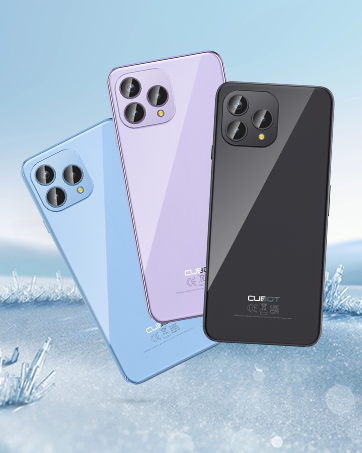
The CUBOT P80 is available in multiple color options.
2. Cosa c'è nella scatola
Verifica che tutti gli articoli siano presenti nella confezione del prodotto:
- Smartphone CUBOT P80
- Custodia protettiva per telefono
- Phone protection film (pre-applied or separate)
- Caricabatterie (9V2A)
- Cavo USB (tipo C)
- Type-C headphone
- SIM pin ejector tool
- Guida rapida
- Compliance regulation document

Included accessories with the CUBOT P80 smartphone.
3. Layout del dispositivo e caratteristiche fisiche
The CUBOT P80 features a sleek design with a 6.58-inch FHD+ display and a triple camera system on the rear.
Dimensioni e peso
- Spessore: 9.75 millimetri
- Peso: 217 grammi

The CUBOT P80's slim profile e design leggero.
Lettore di impronte digitali
The device includes a side-mounted fingerprint scanner for secure and quick unlocking.

Fingerprint sensor location for convenient unlocking.
4. Impostazione
Inserimento di schede SIM e schede TF
The CUBOT P80 supports dual SIM functionality or one SIM card with a TF (microSD) card for expanded storage.
- Individuare il vassoio della SIM sul lato del telefono.
- Inserire lo strumento di espulsione della SIM nel piccolo foro accanto al vassoio e premere con decisione finché il vassoio non fuoriesce.
- Place your Nano SIM card(s) and/or TF card into the designated slots on the tray. Ensure the gold contacts are facing down.
- Spingere con cautela il vassoio nel telefono finché non è a filo con il corpo del dispositivo.

SIM and TF card installation options.
Accensione iniziale
Press and hold the power button located on the side of the device until the CUBOT logo appears. Follow the on-screen instructions to complete the initial setup, including language selection, Wi-Fi connection, and Google account login.
5. Istruzioni per l'uso
Sistema operativo Android 13
The CUBOT P80 runs on Android 13, offering a user-friendly interface, enhanced privacy controls, and access to the Google Play Store for applications.

Sopraview of the Android 13 operating system.
Caratteristiche dello schermo
The device features a 6.58-inch FHD+ Capacitive Touch Screen with a resolution of 2408x1080 pixels, 400 nits peak brightness, and a 20:9 aspect ratio.

Key features of the CUBOT P80 display.
6. Caratteristiche della fotocamera
The CUBOT P80 is equipped with an AI Quad Camera System on the rear and a high-resolution front camera.
Specifiche della fotocamera
- Fotocamera principale: 48MP
- Fotocamera frontale: 24MP
- Fotocamera macro: 2MP

The CUBOT P80's AI Quad Camera System.
Fotocamera principale
The 48MP main camera captures images with high detail and clarity.

High-resolution capture with the 48MP main camera.
Fotocamera frontale
The 24MP front camera is designed for clear selfies and video calls, featuring beauty modes.

Selfie capabilities of the 24MP front camera.
Fotocamera macro
The 2MP macro lens allows for detailed close-up photography of small objects.

Detailed close-up shots with the 2MP macro camera.
Modalità multiple della fotocamera
The camera application includes various modes such as Night View, Portrait, and Panorama to enhance your photography experience.

Explore various photography modes.
7. Connettività
Rete e Wi-Fi
The CUBOT P80 supports Dual 4G Dual VoLTE for cellular connectivity and 2.4/5GHz Dual Wi-Fi for stable and faster internet access.
- Numero di modello: Frequenza 850/900/1800/1900 MHz
- Italiano: B1/2/4/5/6/8/19
- DDD: B1/2/3/4/5/7/8/12/13/17/18/19/20/26/28A/28B/66
- TDD: 38/39/40/41
Cellular and Wi-Fi network support.
NFC and GPS
The device includes Multifunctional NFC for cash-free mobile payments and supports GPS, GLONASS, and Galileo for accurate global satellite positioning.
NFC for payments and advanced GPS for navigation.
8. Batteria e ricarica
The CUBOT P80 is equipped with a 5200mAh battery, providing extended usage times. It supports 18W fast charging and OTG (On-The-Go) functionality.
- Stand-by: Fino a 26 giorni
- Chiamate: Fino a 29 ore
- Riproduzione musicale: Fino a 26 ore
- Riproduzione video: Fino a 7 ore

Battery life and charging features.
9. Archiviazione e prestazioni
The CUBOT P80 is powered by an MT8788 Octa-core processor and features ampla memoria e l'archiviazione.
- Processore: MediaTek MT8788 Octa-core (12nm process, 2.0 GHz clock speed)
- Memoria RAM: 8GB + 8GB Expansion RAM (total 16GB)
- Memoria interna (ROM): 256 GB
- Archiviazione espandibile: Fino a 1 TB tramite scheda TF

Processor and memory details.

RAM expansion technology for enhanced performance.

Internal and expandable storage options.
10. Avvisi importanti
Compatibilità con l'operatore
The CUBOT P80 smartphone does not support AT&T, Cricket, or Verizon networks in the United States. Please confirm your carrier's compatibility before purchasing o utilizzando questo dispositivo.

Important information regarding network compatibility.
11. Specifiche
| Caratteristica | Specificazione |
|---|---|
| Numero di modello | P80-schwarz-US |
| Sistema operativo | Androide 13.0 |
| Processore | MediaTek MT8788 Octa-core |
| Memoria RAM | 16 GB (espansione 8 GB + 8 GB) |
| Memoria interna | 256 GB |
| Archiviazione espandibile | Fino a 1 TB (scheda TF) |
| Dimensioni dello schermo | 6.58 pollici |
| Risoluzione | Risoluzione 1920 x 1080 (FHD+) |
| Fotocamera principale | 48MP |
| Fotocamera frontale | 24MP |
| Fotocamera macro | 2MP |
| Capacità della batteria | 5200 mAh |
| Ricarica | Ricarica rapida da 18 W |
| Connettività | 4G LTE, Dual SIM, Wi-Fi (2.4/5GHz), NFC, Bluetooth |
| Navigazione | GPS, GLONASS, Galileo |
| Presa audio | 3.5 millimetri |
| Dimensioni | 9.29 x 7.17 x 1.81 pollici (confezione) |
| Peso dell'articolo | 7.7 once |
12. Risoluzione Dei Problemi
Problemi comuni e soluzioni
- Il dispositivo non si accende: Assicurati che la batteria sia carica. Collega il telefono al caricabatterie e attendi qualche minuto prima di riprovare ad accenderlo.
- Segnale di rete scarso: Check SIM card insertion. Ensure you are within your carrier's coverage area. Note that the CUBOT P80 is not compatible with AT&T, Cricket, or Verizon.
- Applicazioni che si bloccano: Clear the cache of the problematic app (Settings > Apps > [App Name] > Storage > Clear Cache). If the issue persists, try reinstalling the app or performing a factory reset (backup data first).
- La batteria si scarica rapidamente: Ridurre la luminosità dello schermo, chiudere le app non utilizzate in esecuzione in background, disattivare le notifiche non necessarie e limitare i servizi di localizzazione.
- Lo scanner delle impronte digitali non funziona: Assicurati che il dito sia pulito e asciutto. Registra nuovamente le impronte digitali nelle impostazioni di sicurezza.
13. Garanzia e supporto
Per informazioni sulla garanzia e supporto tecnico, fare riferimento al sito ufficiale CUBOT webo contattare il rivenditore. Conservare la prova d'acquisto per eventuali reclami in garanzia.
Risorse online:
- Visitare il Negozio CUBOT su Amazon per informazioni e aggiornamenti sui prodotti.
14. Video del prodotto finitoview
Mostra video ufficiale del prodottoasing the CUBOT P80's features and design.


