1. Introduzione
This manual provides essential information for the proper use and maintenance of your Reflex Active Series 23 Smart Watch. Please read it thoroughly before using your device to ensure optimal performance and longevity.
The Reflex Active Series 23 Smart Watch is designed to integrate seamlessly into your daily life, offering features such as communication, health monitoring, and activity tracking. It features a black strap and a black brushed alloy case.
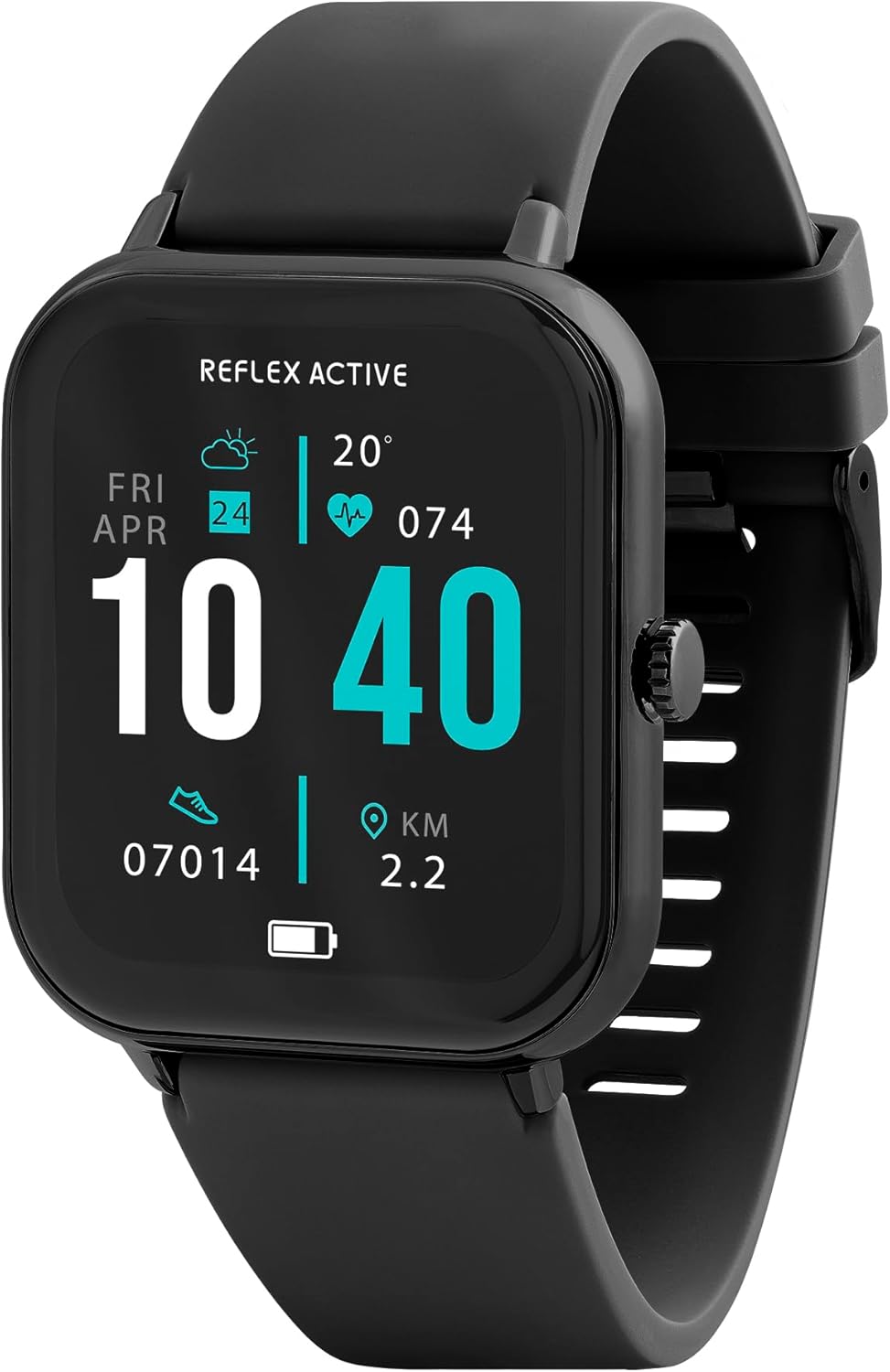
Image 1.1: Reflex Active Series 23 Smart Watch displaying key information.
2. Informazioni sulla sicurezza
- Disclaimer medico: This device is not a medical device. Data provided by the watch, including heart rate, blood oxygen, and activity tracking, is for reference only and should not be used for medical diagnosis or treatment. Consult a medical professional for any health concerns.
- Sicurezza della batteria: Do not attempt to replace the battery yourself. Improper battery replacement can lead to overheating, fire, or explosion.
- Resistenza all'acqua: The device is IP68 water resistant. This means it is protected against immersion in water up to 1.5 meters for up to 30 minutes. It is suitable for everyday use and shallow-water activities but not for diving or high-pressure water activities. Avoid exposure to hot water, steam, or chemicals.
- Rischio di soffocamento: Tenere il dispositivo e i suoi accessori fuori dalla portata dei bambini piccoli.
- Sicurezza di guida: Do not operate the watch or check notifications while driving or in situations that require full attention.
- Irritazione cutanea: If you experience skin irritation, redness, or discomfort, discontinue use and consult a doctor. Ensure the watch is clean and dry before wearing.
3. Impostazione
3.1. Disimballaggio e ispezione iniziale
Dopo aver aperto la confezione, verificare che siano presenti tutti i componenti:
- Orologio intelligente Reflex Active Series 23
- Cavo di ricarica USB
- Guida alle istruzioni (questo documento)
- Informazioni sulla garanzia di 2 anni

Image 3.1: Package contents of the Reflex Active Smart Watch.
3.2. Ricarica dello Smart Watch
Prima del primo utilizzo, carica completamente il tuo smartwatch. Collega il cavo di ricarica magnetico ai punti di ricarica sul retro dell'orologio e collega l'estremità USB a un adattatore di alimentazione compatibile (non incluso) o alla porta USB di un computer. Il display dell'orologio indicherà lo stato di carica.
3.3. Installazione dell'app
To unlock the full functionality of your Reflex Active Series 23 Smart Watch, you need to install the free Reflex Active Red App on your smartphone. The app is compatible with both iOS and Android devices.
- Scan the QR code in the instruction guide or search for "Reflex Active Red App" in your device's app store.
- Scarica e installa l'app.
- Segui le istruzioni sullo schermo per creare un account e configurare il tuo profile.

Image 3.2: Reflex Active Red App download options.
3.4. Associazione dello smartwatch
Dopo aver installato l'app, segui questi passaggi per associare l'orologio allo smartphone:
- Assicurati che l'orologio sia carico e acceso.
- Abilita il Bluetooth sul tuo smartphone.
- Apri l'app Reflex Active Red.
- Accedere alla sezione di associazione dei dispositivi all'interno dell'app.
- Seleziona il tuo Reflex Active Series 23 dall'elenco dei dispositivi disponibili.
- Conferma la richiesta di associazione sia sull'orologio che sullo smartphone.
4. Utilizzo dello smartwatch
4.1. Navigazione di base
The Reflex Active Series 23 features a responsive touchscreen and a side button for navigation:
- Scorri verso l'alto/il basso: Scorri i menu e le notifiche.
- Scorri verso sinistra/destra: Accesso rapido-view widgets or different watch faces.
- Rubinetto: Seleziona un elemento o apri un'applicazione.
- Pulsante laterale: Premi per tornare alla schermata iniziale o riattivare il display. Premi a lungo per le opzioni di risparmio energetico.
4.2. Funzionalità di comunicazione
Rimani connesso direttamente dal tuo polso.
- Effettuare e ricevere chiamate: Once paired, you can make and receive calls directly on your watch.
- Notifiche dei messaggi: Receive alerts for incoming messages from various apps.

Image 4.1: Receiving an incoming call on the smart watch.

Image 4.2: Smart watch displaying a wellness feature.
4.3. Monitoraggio della salute e dell'attività
The watch offers comprehensive tracking features:
- Cardiofrequenzimetro: Tiene traccia costantemente della tua frequenza cardiaca.
- Contapassi: Records your daily steps and distance.
- Monitoraggio del sonno: Monitora i tuoi ritmi e la qualità del sonno.
- Monitoraggio delle calorie: Stima le calorie bruciate in base all'attività.
- Monitoraggio del ciclo: Helps monitor menstrual cycles (via app).
- Monitoraggio multi-attività: Supports various sports modes.
- Esercizi di respirazione: Sessioni di respirazione guidata per il rilassamento.
- Avvisi di idratazione: Promemoria per bere acqua.
- Promemoria sedentarietà: Ti avvisa di muoverti dopo periodi di inattività.
- Connessione GPS: Utilizes your phone's GPS for accurate route tracking during outdoor activities.

Immagine 4.3: Passoview of Reflex Active Smart Watch features.
4.4. Funzionalità aggiuntive
- Controllo della musica: Controlla la riproduzione musicale sul tuo smartphone direttamente dall'orologio.
- Controllo della telecamera: Utilizza il tuo orologio come otturatore remoto per la fotocamera del tuo smartphone.
- Personalised Photo Dials: Customize your watch face with your own photos via the app.
- Localizzatore di orologi: Use the app to find your watch if it's misplaced nearby.
- Aggiornamenti meteorologici: Ottieni informazioni meteo in tempo reale.
- Torcia elettrica: A simple flashlight function on the watch display.
4.5. General Product Video
Il seguente video fornisce una panoramica generaleview of Reflex Active smartwatch features, including calling, notifications, health tracking, and customization. While it may feature other series, the core functionalities are similar to your Series 23.
Video 4.1: Generale sopraview of Reflex Active Smart Watch features (Note: Features shown may vary slightly by model series).
5. Manutenzione
5.1. Pulizia dello smartwatch
Per mantenere l'aspetto e la funzionalità del tuo orologio:
- Pulisci lo schermo e la custodia con un panno morbido e privo di lanugine.
- Per il cinturino, utilizzare l'annuncioamp cloth and mild soap if necessary, then rinse thoroughly and dry completely before wearing.
- Evitare l'uso di prodotti chimici aggressivi o materiali abrasivi.
5.2. Resistenza all'acqua (IP68)
Your Reflex Active Series 23 Smart Watch is rated IP68 water resistant. This means it can withstand dust, dirt, and sand, and is resistant to submersion up to a maximum depth of 1.5m underwater for up to thirty minutes. It is suitable for everyday use, such as washing hands or light rain exposure. However, it is not recommended for swimming, showering, or prolonged water exposure, especially in hot water or with soap, as this can compromise the seals.
5.3. Cura della batteria
- Caricare regolarmente l'orologio per evitare che si scarichi completamente.
- Avoid exposing the watch to extreme temperatures, which can degrade battery life.
- Utilizzare solo il cavo di ricarica fornito.
6. Risoluzione Dei Problemi
Se riscontri problemi con il tuo smartwatch Reflex Active Series 23, prova le seguenti soluzioni:
- L'orologio non si accende: Assicurati che l'orologio sia completamente carico. Collegalo al caricabatterie per almeno 30 minuti.
- Non si associa allo smartphone:
- Assicurati che il Bluetooth sia abilitato sul tuo telefono.
- Assicurati che l'orologio si trovi nel raggio d'azione del tuo telefono.
- Riavvia sia l'orologio che lo smartphone.
- Check if the Reflex Active Red App is updated to the latest version.
- Se è già stato associato in precedenza, prova a disassociare e riassociare il dispositivo tramite le impostazioni Bluetooth del telefono e l'app.
- Monitoraggio impreciso delle attività:
- Assicurati che l'orologio sia indossato comodamente al polso, circa un dito sopra l'osso del polso.
- Calibrate your stride length in the Reflex Active Red App if steps or distance are consistently off.
- Ensure your personal information (height, weight, age) is accurate in the app.
- Notifiche non visualizzate:
- Check notification settings within the Reflex Active Red App to ensure desired apps are enabled.
- Verify that your phone's notification settings allow the Reflex Active Red App to send notifications.
- Assicurati che l'orologio sia connesso tramite Bluetooth.
- Schermo non reattivo: Try restarting the watch by long-pressing the side button until power options appear, then select restart. If unresponsive, allow the battery to fully drain and then recharge.
7. Specifiche
| Numero di modello | RA23-2170 |
| Marca | Riflesso attivo |
| Materiale della cassa | Black Brushed Alloy |
| Materiale del cinturino | Silicone nero |
| Resistenza all'acqua | Grado di protezione IP68 |
| Tipo di batteria | 1 polimero di litio (incluso) |
| Dimensioni del pacco | Dimensioni: 18.4 x 8.9 x 2.4 cm |
| Peso dell'articolo | 38 grammi |
| Compatibilità | iOS & Android (via Reflex Active Red App) |
8. Garanzia e supporto
Il tuo Smart Watch Reflex Active Series 23 è dotato di un Garanzia di 2 anni dalla data di acquisto, a copertura dei difetti di fabbricazione. Si prega di conservare la prova d'acquisto per eventuali reclami in garanzia.
For further assistance, troubleshooting, or warranty inquiries, please contact the UK support team. Details can be found on the Reflex Active website or within the Reflex Active Red App.
Supporto online: Visit the official Reflex Active websito per FAQ e risorse di supporto.
Supporto per l'app: The Reflex Active Red App often includes a support section or contact information.


