1. Introduzione
This manual provides essential information for the safe operation and maintenance of your Holy Stone HS720S GPS Drone. Please read this manual thoroughly before operating the drone to ensure proper usage and to prevent damage or injury. The HS720S is a lightweight, foldable drone equipped with a 4K camera, GPS functionality, and intelligent flight modes, designed for both beginners and experienced pilots.
2. Linee guida di sicurezza
- Controllo pre-volo: Ispezionare sempre il drone, le eliche e la batteria prima di ogni volo. Assicurarsi che tutti i componenti siano saldamente fissati e non danneggiati.
- Ambiente di volo: Fly in open areas, away from people, animals, buildings, and power lines. Avoid flying in strong winds, rain, or fog. Maintain a safe distance from obstacles.
- Sicurezza della batteria: Use only original Holy Stone batteries. Do not overcharge or over-discharge batteries. Store batteries in a cool, dry place. Discontinue use if batteries show signs of damage or swelling.
- Sicurezza dell'elica: Tenere mani, viso e indumenti larghi lontani dalle eliche in rotazione. Assicurarsi che le eliche siano installate correttamente prima del volo.
- Segnale GPS: For optimal performance and safety features like Return-to-Home, ensure a strong GPS signal before takeoff.
- Conformità legale: Be aware of and comply with local drone regulations, including registration requirements (note: HS720S is under 249g, often exempt from FAA registration in the US, but check local laws).
- Procedure di emergenza: Familiarize yourself with emergency landing procedures and the Return-to-Home function.
3. Contenuto della confezione
Verifica che tutti gli articoli siano presenti nel tuo pacco:
- Drone GPS Holy Stone HS720S
- Telecomando
- 2 batterie di volo
- Eliche di ricambio
- Cavi di ricarica USB
- Manuale d'uso
- Cacciavite

Image: Contents of the Holy Stone HS720S package, including the drone, remote, batteries, and accessories.
4. Componente suview
4.1 drone
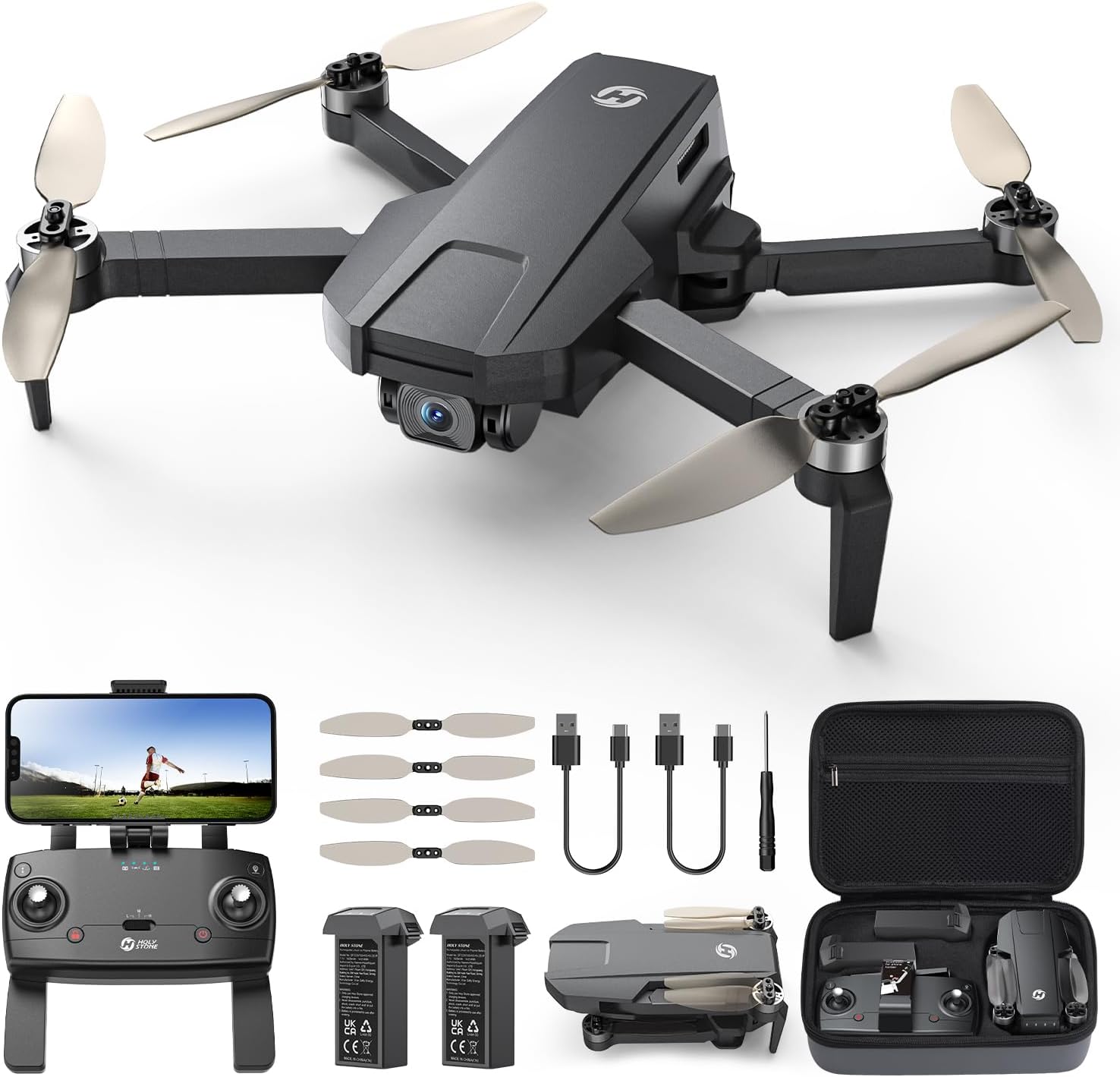
Image: The Holy Stone HS720S drone in its unfolded state.
The HS720S drone features a foldable design for portability. It is equipped with a 4K UHD camera, brushless motors for stable flight, and GPS modules for precise positioning. The drone's weight is under 249g, which may exempt it from certain registration requirements.
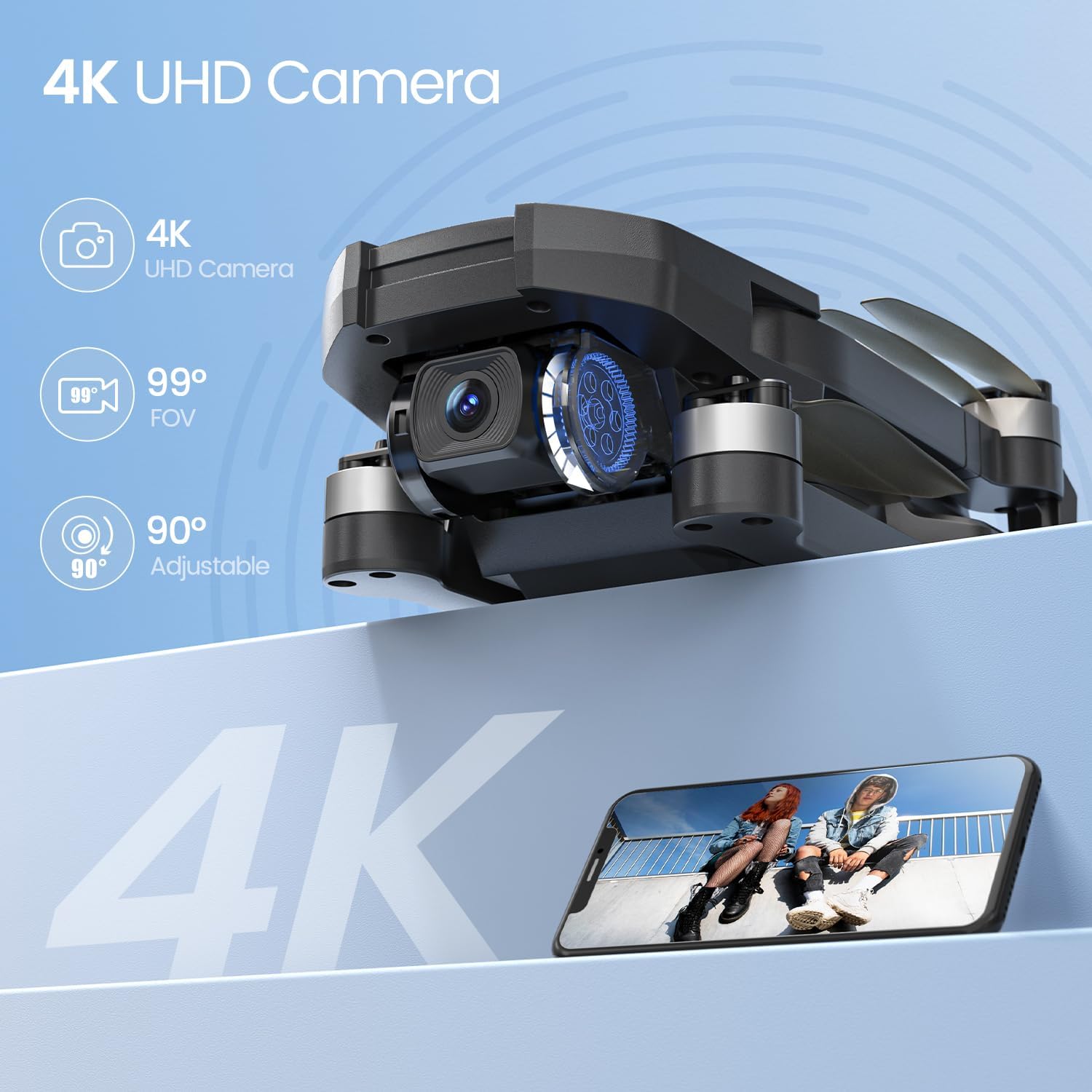
Image: Detail of the drone's 4K camera with adjustable angle.
4.2 telecomando

Image: The remote control with a smartphone attached, displaying the drone's camera view.
The remote control provides intuitive control over the drone's flight and camera functions. It features a smartphone holder to display the live FPV feed via the Holy Stone app. Ensure the remote control is charged or has fresh batteries before use.
5. Impostazione
5.1 Ricarica e installazione della batteria
- Charge the flight batteries using the provided USB charging cable and a compatible USB adapter (not included). The indicator lights on the battery will show charging status.
- Once fully charged, insert the battery into the drone's battery compartment until it clicks securely into place.
- Charge the remote control using its dedicated USB charging cable.

Image: Drone with two batteries, indicating extended flight time.
5.2 Installazione dell'elica
Assicurarsi che le eliche siano installate correttamente, seguendo le marcature (A e B) sui bracci motore corrispondenti. Utilizzare il cacciavite in dotazione per fissarle.
5.3 Download e connessione dell'app
- Download the official Holy Stone flight application (e.g., Ophelia Fly) from your smartphone's app store.
- Accendere il drone e il telecomando.
- Connect your smartphone to the drone's Wi-Fi network (usually named 'HolyStone-HS720S-XXXXXX').
- Apri l'app per stabilire una connessione e view il feed FPV in diretta.
5.4 Calibrazione
Before the first flight and after any significant change in location, perform compass and gyroscope calibration as instructed in the app or quick start guide. This ensures stable flight and accurate GPS positioning.
6. Istruzioni per l'uso
6.1 Controlli di volo di base
Familiarize yourself with the remote control's joysticks and buttons. The left joystick typically controls altitude and yaw (rotation), while the right joystick controls forward/backward and left/right movement.
6.2 One-Tap Takeoff/Landing
After successful calibration and GPS lock, press the One-Tap Takeoff button on the remote or in the app. The drone will automatically ascend to a safe height and hover. Press the One-Tap Landing button to initiate an automatic descent and landing.
6.3 Funzionamento della fotocamera
Use the dedicated buttons on the remote control or the app interface to take photos and record 4K video. The camera's angle can be adjusted remotely up to 90 degrees for optimal shot composition. The 5GHz FPV transmission provides a clear and smooth live video feed to your smartphone.
6.4 GPS and Return-to-Home (RTH)
The HS720S utilizes GPS for stable hovering and precise positioning. The Return-to-Home (RTH) function automatically brings the drone back to its takeoff point. This feature activates in cases of low battery, signal loss, or when manually triggered by the pilot.

Image: Drone demonstrating GPS Auto Return to Home functionality.
7. Smart Flight Modes
The HS720S offers several intelligent flight modes to enhance your flying experience:
- Seguimi: The drone will automatically follow the subject (e.g., the remote control or a person detected by the app) at a set distance and altitude, capturing dynamic footage.
- Waypoint/Tap-to-Fly: Plan a flight path by tapping points on the map within the app. The drone will then fly along the designated route.
- Punto di interesse: Select a central point on the map, and the drone will circle around it at a specified radius and altitude, keeping the point in the camera's view.
- Modalità principiante: This mode limits flight speed and range, making it easier for new pilots to learn and control the drone.
- Posizionamento del flusso ottico: In environments with sufficient light and clear ground patterns, optical flow sensors assist in maintaining stable hovering, especially indoors or when GPS signal is weak.

Image: Visual representation of Tap Fly, Follow Me, and Point of Interest smart flight modes.
8. Manutenzione
- Pulizia: Regularly clean the drone body, camera lens, and motors with a soft, dry cloth. Avoid using liquids or solvents.
- Ispezione dell'elica: Check propellers for cracks, bends, or damage before and after each flight. Replace damaged propellers immediately.
- Cura della batteria: Non conservare le batterie completamente cariche o completamente scariche per periodi prolungati. Caricarle al 50-60% circa per periodi di conservazione prolungati.
- Aggiornamenti del firmware: Periodically check the Holy Stone app or website for firmware updates for your drone and remote control. Follow update instructions carefully.
- Magazzinaggio: Store the drone and its components in a cool, dry place, away from direct sunlight and extreme temperatures. The foldable design allows for compact storage.

Image: The drone in its folded, portable configuration.
9. Risoluzione Dei Problemi
| Problema | Possibile causa | Soluzione |
|---|---|---|
| Il drone non si accende | Batteria scarica; batteria non installata correttamente | Caricare la batteria; Reinstallare la batteria in modo sicuro |
| Nessun feed FPV nell'app | Phone not connected to drone Wi-Fi; App not open | Connect to drone Wi-Fi; Open the Holy Stone app |
| Il drone va alla deriva durante il volo | Poor GPS signal; Uncalibrated compass/gyroscope; Strong wind | Fly in open area with strong GPS; Perform calibration; Avoid flying in strong winds |
| Il telecomando non si connette | Batteria del telecomando scarica; problema di associazione | Charge remote; Re-pair drone and remote as per manual |
| Scarsa qualità video/fotografica | Dirty camera lens; Insufficient light; SD card issue | Clean lens; Fly in good lighting; Ensure SD card is inserted and formatted |
10. Specifiche
| Caratteristica | Dettaglio |
|---|---|
| Nome del modello | HS720S |
| Peso dell'articolo | 240 grammi (8.5 once) |
| Dimensioni del prodotto | 10.24 x 8.27 x 2.36 pollici (aperto) |
| Risoluzione di acquisizione video | 4K |
| Caratteristiche della fotocamera | 99° Wide Angle, 90° Servo-Adjustable Angle |
| Tecnologia di connettività | 5G, Wi-Fi, Bluetooth |
| Gamma di controllo massima | 6562 Feet (approx. 2KM) |
| Tempo di volo | Up to 42 minutes (with 2 modular batteries) |
| Tipo di motore | Senza spazzole |
| Tipo di batteria | Polimero di litio |
| Caratteristiche speciali | GPS, 4K UHD Camera, Optical Flow Positioning, Smart Flight Modes (Follow Me, Waypoint, Point of Interest, Auto Return) |
11. Video ufficiali dei prodotti
11.1 HS720S Product Overview
Video: Una panoramica completaview of the Holy Stone HS720S drone's features and capabilities (Duration: 3:54).
11.2 Detailed Flight Instructions
Video: In-depth instructions for flying the HS720S drone, covering various flight maneuvers and controls (Duration: 6:01).
12. Garanzia e supporto
Holy Stone products typically come with a standard manufacturer's warranty. Please refer to the warranty card included in your package or visit the official Holy Stone websito per termini e condizioni di garanzia dettagliati.
Assistenza clienti
For technical assistance, troubleshooting, or any inquiries regarding your Holy Stone HS720S drone, please contact Holy Stone customer support:
- Telefono: +1 (833) 766-4733
- E-mail (Stati Uniti): usa@holystone.com
- E-mail (UE): eu@holystone.com
- E-mail (CA): ca@holystone.com
- E-mail (AU): au@holystone.com

Image: Holy Stone customer support representative.


