1. Introduzione
Welcome to the world of aerial photography and flight with your new ATTOP W10 Drone. This drone is designed for both adults and kids, offering a user-friendly experience with advanced features. It comes equipped with a 1080P HD camera for FPV live video, one-key operations, 360° flips, and multiple control methods including APP, remote, voice, gesture, and gravity control. This manual provides detailed instructions to help you set up, operate, and maintain your drone safely and effectively.

Figure 1.1: ATTOP W10 Drone with included accessories.
2. Contenuto della confezione
Si prega di controllare attentamente il contenuto della confezione al momento del disimballaggio. Se qualche articolo risulta mancante o danneggiato, si prega di contattare l'assistenza clienti.
- ATTOP W10 Drone (x1)
- Telecomando (x1)
- Batteria per drone (x1)
- Cavo di ricarica USB (x1)
- Eliche di ricambio (x4)
- Propeller Guards (x4)
- Cacciavite (x1)
- Supporto per telefono (x1)
- Manuale utente (x1)

Figura 2.1: dettagliata view di tutti gli articoli inclusi nel pacchetto.
3. Assembly and Preparation
Follow these steps to assemble your drone before its first flight.
3.1 Installazione della protezione dell'elica
Attach the propeller guards to the drone's arms. These guards help protect the propellers from damage during collisions and enhance safety.
3.2 Installazione del carrello di atterraggio
Securely attach the landing gear to the bottom of the drone. This provides stability during take-off and landing.
3.3 Phone Holder Installation
Slide the phone holder onto the remote control until it clicks into place. This allows you to mount your smartphone for FPV viewcontrollo e app.
Video 3.1: Prodotto finitoview and assembly guide for the ATTOP W10 Drone. This video demonstrates the installation of propeller guards, landing gear, and the phone holder, along with basic flight features.
4. Ricarica e installazione della batteria
4.1 Ricarica della batteria del drone
Connect the drone battery to the USB charging cable. Plug the USB cable into a 5V/1A USB adapter (not included) or a computer USB port. The indicator light on the USB cable will show the charging status. Charging typically takes approximately 60-90 minutes for a full charge.
4.2 Installazione della batteria del drone
Insert the fully charged battery into the battery compartment on the drone's underside. Ensure it is securely latched.
4.3 Installazione delle batterie del telecomando
Open the battery compartment on the back of the remote control. Insert 3 x AAA batteries (not included), ensuring correct polarity. Close the compartment securely.

Figure 4.1: The drone offers extended flight time and features a low battery alert on the remote control.
5. Controllo remoto finitoview
Familiarizzare con le funzioni del telecomando:
- Leva sinistra (acceleratore/imbardata): Controlla l'altitudine (su/giù) e la rotazione (sinistra/destra).
- Levetta destra (Pitch/Roll): Controlla il movimento avanti/indietro e sinistra/destra.
- Pulsante di decollo/atterraggio con un solo tasto: Avvia il decollo o l'atterraggio automatico.
- Pulsante interruttore di velocità: Toggles between different speed modes (low, medium, high).
- Pulsante di rotazione a 360°: Activates the 360-degree flip function.
- Pulsante modalità senza testa: Engages headless mode for simplified control.
- Pulsante foto/video: Scatta foto o avvia/interrompe la registrazione video.
- Pulsante di ritorno con un solo tasto: Commands the drone to return to its take-off point.
6. Drone sopraview
The ATTOP W10 drone features a compact and durable design. Key components include:
- Eliche: Quattro eliche principali per la portanza e la spinta.
- Motori: Power the propellers.
- Telecamera: Integrated 1080P HD camera for photo and video capture.
- Luci LED: Indica lo stato e l'orientamento del drone.
- Vano batteria: Located on the underside for the drone battery.
- Protezioni per eliche: Removable guards for added protection.
7. Installazione e connessione dell'app
To unlock the full potential of your ATTOP W10 drone, download and connect to the official ATTOP GO app.
7.1 Download the ATTOP GO App
Scan the QR code provided in the quick start guide or search for "ATTOP GO" in your device's App Store (iOS) or Google Play Store (Android).
7.2 Connect to Drone's Wi-Fi
- Accendi il drone. Il segnale Wi-Fi del drone diventerà attivo.
- On your smartphone, go to Wi-Fi settings and connect to the network named "W10-1080P-XXXXX" (the XXXXX will be unique to your drone).
- Once connected, open the ATTOP GO app.
- Select the drone model "W10" within the app and tap "Go to Connect" to enter the control interface.

Figure 7.1: The ATTOP GO app provides smart control options for your drone.
Video 7.2: Official APP Operation Guide for the ATTOP W10 Drone, detailing app download, Wi-Fi connection, and interface display.
8. Operazioni di volo di base
Before flying, ensure the drone and remote control are fully charged and properly synced.
8.1 Power On and Syncing
- Posiziona il drone su una superficie piana e livellata.
- Accendi il drone, quindi accendi il telecomando.
- Push the left throttle stick all the way up, then all the way down. The remote will beep, indicating successful syncing.
8.2 Calibrazione
After syncing, perform a calibration for stable flight. Push both control sticks to the bottom-left or bottom-right corners simultaneously until the drone's lights flash and then become solid, indicating successful calibration.
8.3 Unlocking Motors
To unlock the motors, push both control sticks to the bottom-left and bottom-right corners simultaneously (opposite of calibration) until the propellers begin to spin slowly.
8.4 Decollo e atterraggio con un solo tasto
Press the One-Key Take-off/Landing button on the remote control or in the app. The drone will automatically ascend to a stable hovering height or descend and land gently.
8.5 Mantenimento dell'altitudine
The drone features an altitude hold function, allowing it to maintain a stable height automatically, making it easier to control.
8.6 Toss-to-Launch
For quick launches, simply toss the drone horizontally into the air. Its intelligent sensors will detect the motion, unlock the blades, and initiate flight.

Figure 8.1: User-friendly features like One Key Take-off & Landing, Toss-to-Launch, and Altitude Hold simplify drone operation.


Figure 8.2: Visual representation of One Key Take-off/Landing, Toss to Launch, and Altitude Hold functions.
9. Funzioni di volo avanzate
The ATTOP W10 drone offers several advanced features for an enhanced flying experience.
9.1 Modalità senza testa
In Headless Mode, the drone's orientation is irrelevant. It will fly according to the direction of the remote control, making it easier for beginners to navigate without worrying about the drone's front or back.
9.2 Capovolgimento a 360°
Press the 360° Flip button and then push the right control stick in any direction to perform an exciting aerial flip.
9.3 Volo in traiettoria
Using the ATTOP GO app, draw a desired flight path on your smartphone screen. The drone will then automatically follow this trajectory.
9.4 Gravity Control
Activate Gravity Control in the app to control the drone's movement by tilting your smartphone. This provides an immersive and intuitive flying experience.
9.5 Controllo vocale
The app supports voice commands for basic flight operations, such as "Take off," "Land," "Forward," etc.
9.6 Controllo dei gesti
Perform specific hand gestures in front of the drone's camera to trigger actions like taking a photo or starting video recording.

Figure 9.1: Explore dynamic maneuvers with 360° Free Flips and pre-planned Trajectory Flight.

Figure 9.2: Advanced flight modes including Headless Mode, 360° Free Flips, and Trajectory Flight.

Figure 9.3: Control your drone intuitively with Smart App Control, featuring Gravity Control and Voice Control.
10. Camera and FPV Operation
The ATTOP W10 drone is equipped with a 1080P HD camera for capturing stunning aerial footage.
10.1 Scattare foto e video
Press the dedicated Photo/Video button on the remote control or tap the corresponding icon in the ATTOP GO app to capture images or start/stop video recording. All media will be saved directly to your connected smartphone.
10.2 First Person View (FPV)
The ATTOP GO app provides a real-time FPV feed from the drone's camera to your smartphone, allowing you to experience the flight from the drone's perspective.
10.3 1-Click Share
Easily share your captured photos and videos directly to social media platforms through the 1-Click Share function in the app.

Figure 10.1: Capture high-definition 1080P photos and videos to document your flights.

Figure 10.2: Share your aerial adventures instantly with the 1-Click Share feature.

Figure 10.3: Enjoy real-time FPV and share HD pictures and videos with ease.
11. Linee guida di sicurezza
To ensure a safe and enjoyable flight experience, please adhere to the following safety guidelines:
- Controllo pre-volo: Always inspect the drone, propellers, and battery before each flight. Ensure propeller guards are securely attached.
- Ambiente: Fly in open, clear areas away from people, animals, buildings, and obstacles. Avoid flying in strong winds or adverse weather conditions.
- Linea di vista: Durante il volo, mantieni sempre la visuale diretta con il tuo drone.
- Sicurezza della batteria: Use only the provided charging cable and battery. Do not overcharge or puncture batteries. Discontinue use if batteries are damaged or swollen.
- Sicurezza dell'elica: Keep hands, face, and loose clothing away from rotating propellers. The propeller guards are designed to prevent accidental cuts.
- Età consigliata: This drone is suitable for ages 8-12 and adults. Adult supervision is recommended for younger users.
- Normative FAA: This drone does not require an FAA license for recreational use. However, always be aware of local drone regulations and no-fly zones.
- Avviso batteria scarica: The remote will make a noise when the drone's battery is low, allowing you to recall the drone in time to prevent a crash.
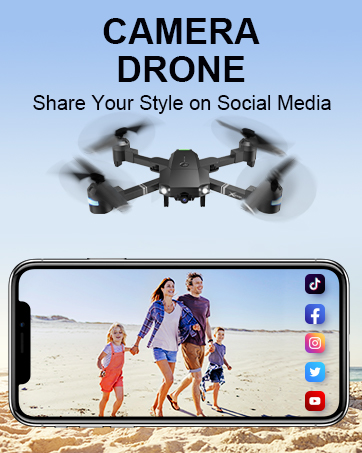
Figure 11.1: Propeller guards enhance safety by preventing accidental contact with rotating blades.
12. Manutenzione
Proper maintenance will extend the lifespan of your ATTOP W10 drone.
- Pulizia: Utilizzare un panno morbido e asciutto per pulire il drone e il telecomando. Evitare l'uso di prodotti chimici o solventi aggressivi.
- Sostituzione dell'elica: If propellers are damaged, replace them with the provided spare propellers. Ensure correct orientation (A and B propellers).
- Cura della batteria: Conservare le batterie in un luogo fresco e asciutto. Non conservare batterie completamente cariche o completamente scariche per periodi prolungati. Caricarle a circa il 50% per una conservazione a lungo termine.
- Magazzinaggio: Quando non in uso, conservare il drone e i suoi accessori in un luogo sicuro, lontano dalla luce solare diretta e da temperature estreme.
13. Risoluzione Dei Problemi
Se riscontri problemi con il tuo drone, fai riferimento ai seguenti problemi comuni e alle relative soluzioni:
| Problema | Possibile causa | Soluzione |
|---|---|---|
| Il drone non risponde al telecomando. | Not synced; low battery; out of range. | Re-sync drone and remote; charge batteries; ensure within control range (up to 328ft). |
| Il drone va alla deriva durante il volo. | Non calibrato; superficie irregolare al decollo; interferenza del vento. | Perform calibration on a flat surface; avoid windy conditions. |
| Poor camera quality/no FPV feed. | Segnale Wi-Fi debole; app non connessa; obiettivo della fotocamera sporco. | Ensure strong Wi-Fi connection; reconnect app; clean camera lens. |
| Le eliche non girano. | Motors not unlocked; damaged propellers; motor issue. | Unlock motors; replace damaged propellers; contact support if motor issue. |
| Breve tempo di volo. | Batteria non completamente carica; batteria vecchia; volo aggressivo. | Fully charge battery; consider replacing old batteries; fly more gently. |
14. Specifiche del prodotto
- Marca: IN ALTO
- Nome modello: W10
- Dimensioni: 11.5 cm L x 11.5 cm P x 2.7 cm A
- Peso dell'articolo: 1.34 libbre
- Risoluzione di acquisizione video: Formato: 1080p
- Risoluzione dell'uscita video: 1920x1080 pixel
- Tecnologia di connettività: Wifi
- Tecnologia di controllo remoto: Bluetooth
- Tipo di controllo: Remote Control, App Control (Voice, Gesture, Gravity)
- Livello di abilità: Principiante
- Batteria: 1 batteria ai polimeri di litio (inclusa)
- Caratteristiche speciali: Extended Flight Time, 360 Degree Flip, CPSIA Qualification Certified, First Person View (FPV), Altitude Hold, Toss-to-Launch, Headless Mode, Trajectory Fly, 3-Gear Speeds, One-Key Take-off/Landing/Return.

Figure 14.1: The drone offers a longer effective signal distance for extended flight range.
15. Garanzia e supporto
ATTOP is committed to providing high-quality products and customer satisfaction. For any product-related inquiries, technical support, or warranty claims, please contact our customer service team.
Per una guida utente dettagliata in formato PDF, fare riferimento al documento ufficiale: ATTOP W10 User Manual (PDF)
Contact Information: Please refer to the contact details provided on the product packaging or the official ATTOP websito per le informazioni di supporto più aggiornate.


