1. Introduzione
Grazie per l'acquistoasing the DAYTECH DA10 Window/Door Opening Sensor. This device is designed to provide alerts when a door or window is opened, serving various purposes such as a security alarm, a refrigerator door reminder, or a visitor chime. Please read this manual carefully to ensure proper installation and operation.

This image illustrates the benefit of using the sensor to prevent food spoilage and energy waste from an open refrigerator door, compared to a closed door with the sensor.
2. Prodotto finitoview
The DAYTECH DA10 sensor consists of a main unit and a magnetic strip. When the main unit and the magnet separate, the sensor detects the opening and triggers an alert based on the selected mode.
2.1 Componenti
- Main Sensor Unit: Contains the buzzer, LED indicator, power/mode switch, volume adjustment, and mode selection buttons.
- Magnetic Strip: Works in conjunction with the main unit to detect opening/closing.
- Double-sided Adhesive Tape: For easy installation.
2.2 Device Diagram and Dimensions

This diagram shows the main components of the sensor, including the buzzer, LED light, power switch, volume control, and mode selector. Dimensions are also indicated: Main unit approx. 9.90 cm (length) x 4.06 cm (width) x 2.18 cm (height); Magnet approx. 4.5 cm (length) x 1.19 cm (width).
3. Impostazione
3.1 Installazione della batteria
- Open the battery compartment cover on the back of the main sensor unit.
- Insert two AAA alkaline batteries, ensuring correct polarity (+/-). Batteries are not included.
- Chiudere saldamente il coperchio del vano batterie.

This image demonstrates the process of installing two AAA batteries into the main sensor unit.
3.2 Montaggio del sensore
- Choose a clean, flat surface on your door, window, refrigerator, or other desired location.
- Pulire accuratamente la superficie per garantire una buona adesione.
- Attach the main sensor unit and the magnetic strip using the provided double-sided adhesive tape.
- Ensure that the triangular marks on both the main unit and the magnetic strip are aligned.
- The gap between the main unit and the magnetic strip must be 1.5 cm o meno when the door/window is closed for proper operation.

This visual guide demonstrates the installation process on a refrigerator door, from cleaning the surface to attaching the sensor and magnet.
4. Istruzioni per l'uso
4.1 Accensione/spegnimento e selezione della modalità
Use the switch on the side of the main unit to select the desired operation mode:
- OFF: Turns the sensor off.
- CARRELLO: Activates the chime mode for immediate notification upon opening.
- ALLARME: Activates the alarm mode with a selectable delay.
4.2 Delay Alarm Modes
The sensor offers four delay alarm modes, primarily useful for refrigerator doors or situations where a delayed alert is preferred. Use the "Mode Selection" button on the main unit to cycle through the modes.

This image details the four available delay alarm modes for the sensor.
- Modalità 1 (ritardo di 1 minuto): The alarm will sound 1 minute after the door is opened, for 5 seconds. If the door remains open, it will sound every 15 seconds.
- Modalità 2 (ritardo di 2 minuto): The alarm will sound 2 minutes after the door is opened, for 10 seconds. If the door remains open, it will sound every 10 seconds.
- Modalità 3 (ritardo di 3 minuto): The alarm will sound 3 minutes after the door is opened, for 15 seconds. If the door remains open, it will sound every 5 seconds.
- Modalità 4 (ritardo di 4 minuto): The alarm will sound 4 minutes after the door is opened, for 20 seconds. If the door remains open, it will sound every 15 seconds.
In all delay modes, if the door remains open, the alarm will automatically stop after 30 minutes to conserve battery life.
4.3 Regolazione del volume
The sensor features 4-stage volume adjustment (0-120dB) to suit different environments and preferences. Use the "Volume Adjustment" button on the main unit to change the volume level.
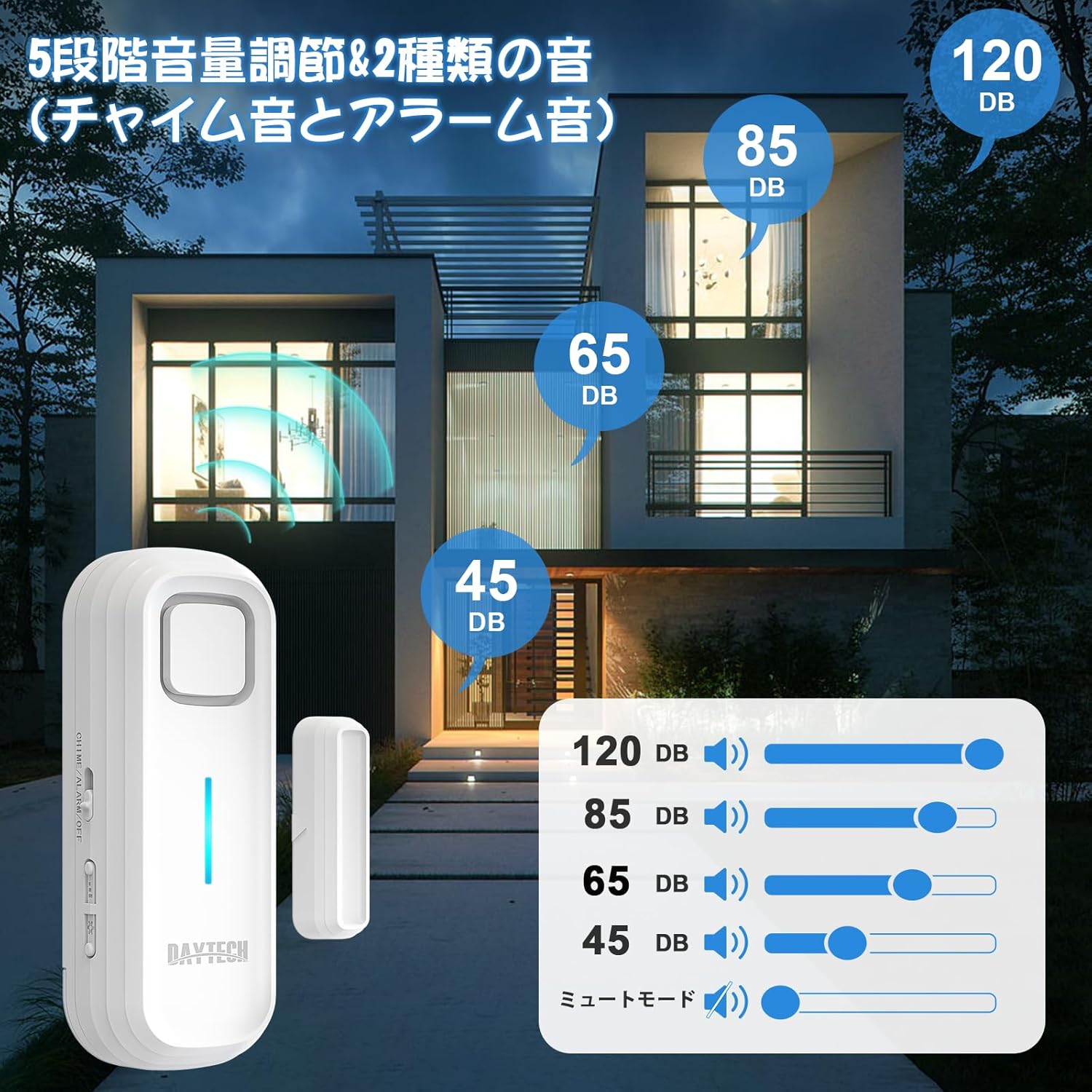
This image illustrates the different volume levels available, from mute to 120dB, allowing customization for various settings.
- Adjust the volume to avoid disturbing neighbors or to ensure it's audible in noisy environments.
- A mute mode (0dB) is also available.
4.4 Es. applicazioneamples

This image demonstrates various applications for the sensor, including refrigerators, freezers, display cases, windows, and doors.

This image shows the sensor installed on a refrigerator door, providing a subtle reminder without being overly intrusive.
5. Manutenzione
5.1 Promemoria batteria scarica
When the battery life is nearing its end, the sensor will emit a sound every 5 minutes to remind you to replace the batteries. Replace with two new AAA alkaline batteries promptly to ensure continuous operation.
5.2 Pulizia
To clean the sensor, gently wipe it with a soft, dry cloth. Do not use abrasive cleaners or immerse the device in water.
6. Risoluzione Dei Problemi
- Sensor not alarming/chime:
- Controllare che le batterie siano installate correttamente e non siano scariche. Sostituirle se necessario.
- Ensure the switch is set to CHIME or ALARM, not OFF.
- Verify that the main unit and magnetic strip are aligned and the gap is 1.5 cm or less when closed.
- Alarm sounds intermittently or falsely:
- Check the alignment and gap between the main unit and magnetic strip. Slight movements or vibrations might cause false triggers if the gap is too wide.
- Ensure the mounting surface is stable and not subject to vibrations.
- Volume basso:
- Adjust the volume using the volume adjustment button.
- Ensure the sensor is not in mute mode.
7. Specifiche
| Numero di modello | DA10 |
| Marca | DAYTECH |
| Fonte di alimentazione | 2 batterie alcaline AAA (non incluse) |
| Voltage | 6 Volt (CC) |
| Tipo di montaggio | Montaggio su porta |
| Tecnologia | Sensore di contatto |
| Regolazione del volume | 4 livelli (0-120 dB) |
| Delay Alarm Modes | 4 modes (1, 2, 3, 4 minute delays) |
| Dimensioni del prodotto | Main Unit: 9.90 x 4.06 x 2.18 cm; Magnet: 4.5 x 1.19 cm |
| Peso dell'articolo | 90 grammi |
| Colore | Bianco |
8. Garanzia e supporto
This DAYTECH product comes with a Garanzia di qualità di 1 anni from the date of purchase. If you encounter any issues or have questions during use, please do not hesitate to contact DAYTECH customer support.
For support, please refer to the contact information provided with your purchase or visit the official DAYTECH websito.


