1. Introduzione
The CALEX Smart Home Indoor Ambiance Aroma Diffuser 590100500 is designed to enhance your indoor environment by improving air quality, diffusing pleasant aromas, and providing ambient lighting. This smart device integrates seamlessly into your smart home ecosystem, offering control through the Calex app, voice commands, and programmable features.
Le caratteristiche principali includono:
- Aroma diffusion with essential oils.
- Realistic flame effect for ambiance.
- Adjustable ambient lighting with 16 million color options.
- Smart control via Calex app (timers, programmable scenarios).
- Voice control compatibility with Google Assistant, Siri, and Amazon Alexa.
- 300ml water tank capacity with automatic shut-off.
2. Informazioni sulla sicurezza
Per evitare lesioni o danni, leggere attentamente tutte le istruzioni di sicurezza prima di utilizzare il dispositivo.
- Always place the diffuser on a stable, flat surface away from direct sunlight, heat sources, and electronic devices.
- Non superare la linea di riempimento massimo dell'acqua (300 ml) per evitare traboccamenti.
- Utilizzare solo acqua di rubinetto pulita o acqua distillata. Non utilizzare acqua calda.
- Only use 100% pure, water-soluble essential oils. Other oils or corrosive liquids may damage the device.
- Tenere il dispositivo fuori dalla portata dei bambini e degli animali domestici.
- Non coprire l'uscita della nebbia durante il funzionamento.
- Scollegare il dispositivo dalla presa di corrente prima di pulirlo o ricaricarlo.
- The device features an automatic shut-off function when the water tank is empty, and sends a notification to your phone.
- A built-in safety configuration will cause the diffuser to flash if the remaining water in the tank needs to cool down after a maximum of 72 hours of continuous operation.
- Non tentare di riparare o modificare il dispositivo autonomamente. Contattare l'assistenza clienti per ricevere assistenza.
3. Contenuto della confezione
Verificare che tutti gli articoli siano presenti nel pacco:
- CALEX Smart Home Indoor Ambiance Aroma Diffuser (Model 5901000500)
- Adattatore di alimentazione
- Manuale d'uso
4. Prodotto finitoview
Familiarize yourself with the components of your aroma diffuser.
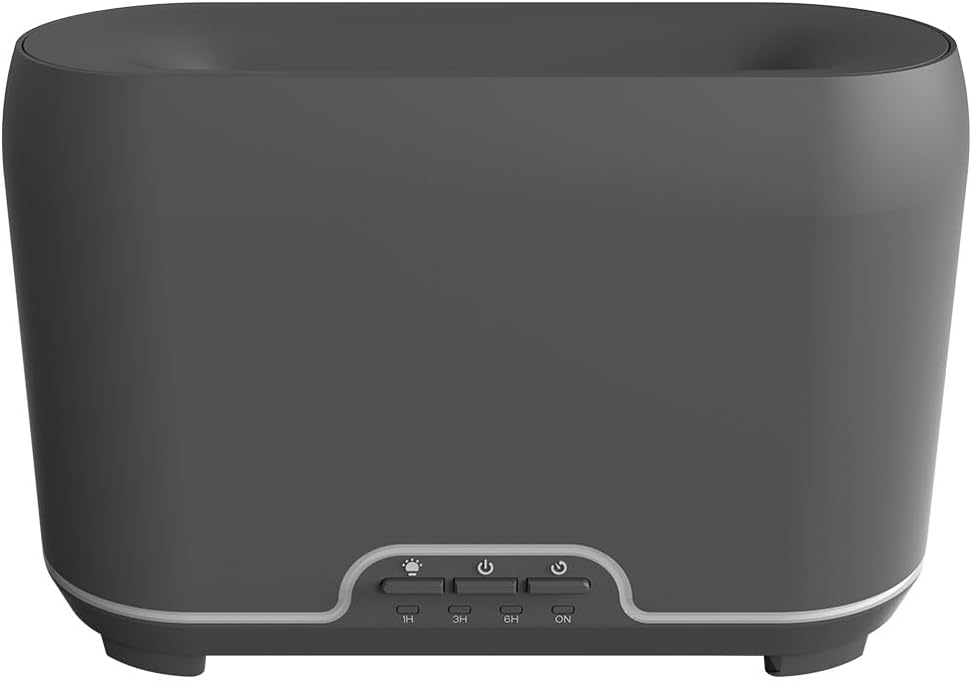
Immagine: Frontale view of the CALEX Smart Home Aroma Diffuser, showing the control panel with buttons for light, power, and timer settings (1H, 3H, 6H, ON).

Image: The CALEX Smart Home Aroma Diffuser operating on a wooden table, displaying its ambient flame effect and mist output.
The diffuser typically consists of a water tank, an ultrasonic plate, a mist outlet, and a control panel with buttons for power, light, and timer functions. The power input port is usually located at the back or bottom of the device.
5. Impostazione
Seguire questi passaggi per la configurazione iniziale:
- Posizionamento: Posizionare il diffusore su una superficie piana e stabile.
- Coperchio aperto: Rimuovere delicatamente il coperchio superiore del diffusore.
- Riempire il serbatoio dell'acqua: Fill the water tank with clean water up to the 300ml maximum fill line. Do not overfill.
- Aggiungi olio essenziale: Aggiungere qualche goccia del vostro olio essenziale preferito direttamente nel serbatoio dell'acqua.
- Chiudi coperchio: Riposizionare saldamente il coperchio superiore.
- Connetti alimentazione: Plug the power adapter into the diffuser's power input port, then plug the adapter into a wall outlet.
- Scarica l'app Calex: Download the free Calex Smart app from your smartphone's app store (available for iOS and Android).
- Connessione Wi-Fi: Follow the in-app instructions to connect your diffuser to your home WiFi network. Ensure your WiFi is 2.4GHz.
6. Istruzioni per l'uso
The CALEX Smart Home Aroma Diffuser can be operated via the Calex app or its integrated control buttons.
6.1 Using the Calex Smart App
The Calex app provides full control over your diffuser's functions:
- Accensione/spegnimento: Turn the diffuser on or off remotely.
- Controllo della nebbia: Adjust the mist output level.
- Controllo della luce: Change the ambient light color from over 16 million options, adjust brightness, and select lighting modes.
- Effetto fiamma: Activate or deactivate the flame effect.
- Timer: Set schedules for the diffuser to turn on or off automatically.
- Programmable Scenarios: Create custom scenarios based on time, weather, or other smart home triggers.
- Notifiche: Receive alerts when the water tank is empty.
6.2 Controllo vocale
Integrate your diffuser with voice assistants for hands-free control:
- Assistente Google: Link your Calex account in the Google Home app. Use commands like "Hey Google, turn on the diffuser."
- Siri: Create custom shortcuts in the Apple Home app or through the Calex app for Siri commands.
- Amazon Alexa: Enable the Calex skill in the Alexa app. Use commands like "Alexa, set diffuser light to blue."
6.3 Manual Control Buttons
The control panel on the diffuser allows for basic operation:
- Pulsante di accensione: Press once to turn on/off the mist and flame effect.
- Pulsante luce: Press to cycle through light colors or turn the light on/off.
- Timer Buttons (1H, 3H, 6H, ON): Select a desired operating duration. The diffuser will automatically shut off after the selected time. 'ON' typically means continuous operation until water runs out or manually turned off.
7. Manutenzione
Una pulizia regolare garantisce prestazioni ottimali e prolunga la durata del diffusore.
- Pulizia giornaliera: Dopo ogni utilizzo, svuotare il serbatoio dall'acqua residua. Pulire l'interno del serbatoio con un panno pulito e morbido.
- Pulizia settimanale: For a more thorough clean, unplug the device. Add a small amount of white vinegar (about 10ml) to the water tank and let it sit for 10-15 minutes to dissolve mineral buildup. Gently wipe the ultrasonic plate with a cotton swab or soft brush. Rinse the tank thoroughly with clean water, avoiding the air outlet.
- Pulizia esterna: Pulisci l'esterno del diffusore con un panno morbido eamp panno. Non usare detergenti abrasivi o solventi.
- Ensure the device is completely dry before refilling or storing.
8. Risoluzione Dei Problemi
In caso di problemi, fare riferimento ai seguenti problemi comuni e alle relative soluzioni:
| Problema | Possibile causa | Soluzione |
|---|---|---|
| Nessuna nebbia o nebbia debole | Basso livello dell'acqua Piastra ad ultrasuoni sporca Uscita nebbia bloccata | Riempire d'acqua fino al livello appropriato. Pulire la piastra a ultrasuoni secondo le istruzioni di manutenzione. Assicurarsi che l'uscita della nebbia sia libera. |
| Il dispositivo non si accende | Nessun potere Serbatoio dell'acqua vuoto Malfunzionamento del dispositivo | Controllare il collegamento elettrico e la presa a muro. Riempire il serbatoio dell'acqua. Contatta l'assistenza clienti se il problema persiste. |
| Problemi di connessione dell'app | Password Wi-Fi errata Router troppo lontano 2.4GHz vs 5GHz WiFi | Verifica la password Wi-Fi. Move diffuser closer to the router. Ensure your router is broadcasting a 2.4GHz network and connect to it. |
| L'effetto fiamma non funziona | Feature deactivated in app Malfunzionamento del dispositivo | Check app settings to ensure flame effect is enabled. Contatta l'assistenza clienti. |
9. Specifiche
| Caratteristica | Specificazione |
|---|---|
| Numero di modello | 5901000500 |
| Marca | CALEX |
| Capacità | 300 millilitri |
| Materiale | Plastica |
| Spegnimento automatico | SÌ |
| Connettività | Wi-Fi (2.4GHz) |
| Metodi di controllo | Calex Smart App, Voice Control (Google Assistant, Siri, Amazon Alexa), Manual Buttons |
| Opzioni di luce | 16 milioni di colori |
| Area di utilizzo consigliata | Medium space |
| Codice articolo internazionale (EAN/UPC) | 08712879157090 |
10. Garanzia e supporto
Per informazioni sulla garanzia o assistenza tecnica, consultare la documentazione fornita con l'acquisto o contattare direttamente il rivenditore/produttore. Conservare la prova d'acquisto per eventuali reclami in garanzia.


