Importanti istruzioni di sicurezza
Read all instructions before using this appliance. To reduce the risk of fire, electrical shock, or injury when using your air conditioner, follow these basic precautions:
- Questo apparecchio deve essere adeguatamente messo a terra.
- Never unplug the air conditioner by pulling on the power cord. Always grasp the plug firmly and pull straight out from the receptacle.
- Non pizzicare, piegare o annodare il cavo di alimentazione.
- Non utilizzare il condizionatore d'aria se il cavo di alimentazione o la spina sono danneggiati.
- Do not use an extension cord or an adapter plug with this unit.
- Always turn off the air conditioner and unplug it before cleaning or servicing.
- Do not block the air intake or exhaust openings.
- Utilizzare solo per lo scopo previsto, come descritto nel presente manuale.
- Tenere i materiali di imballaggio fuori dalla portata dei bambini.
Prodotto finitoview
The RCA 12000 BTU Wi-Fi Air Conditioner is designed to cool rooms up to 550 sq. ft. It features Wi-Fi connectivity, allowing remote control via a smart device. The unit includes multiple operating modes, a digital display, and a 24-hour timer for personalized comfort.
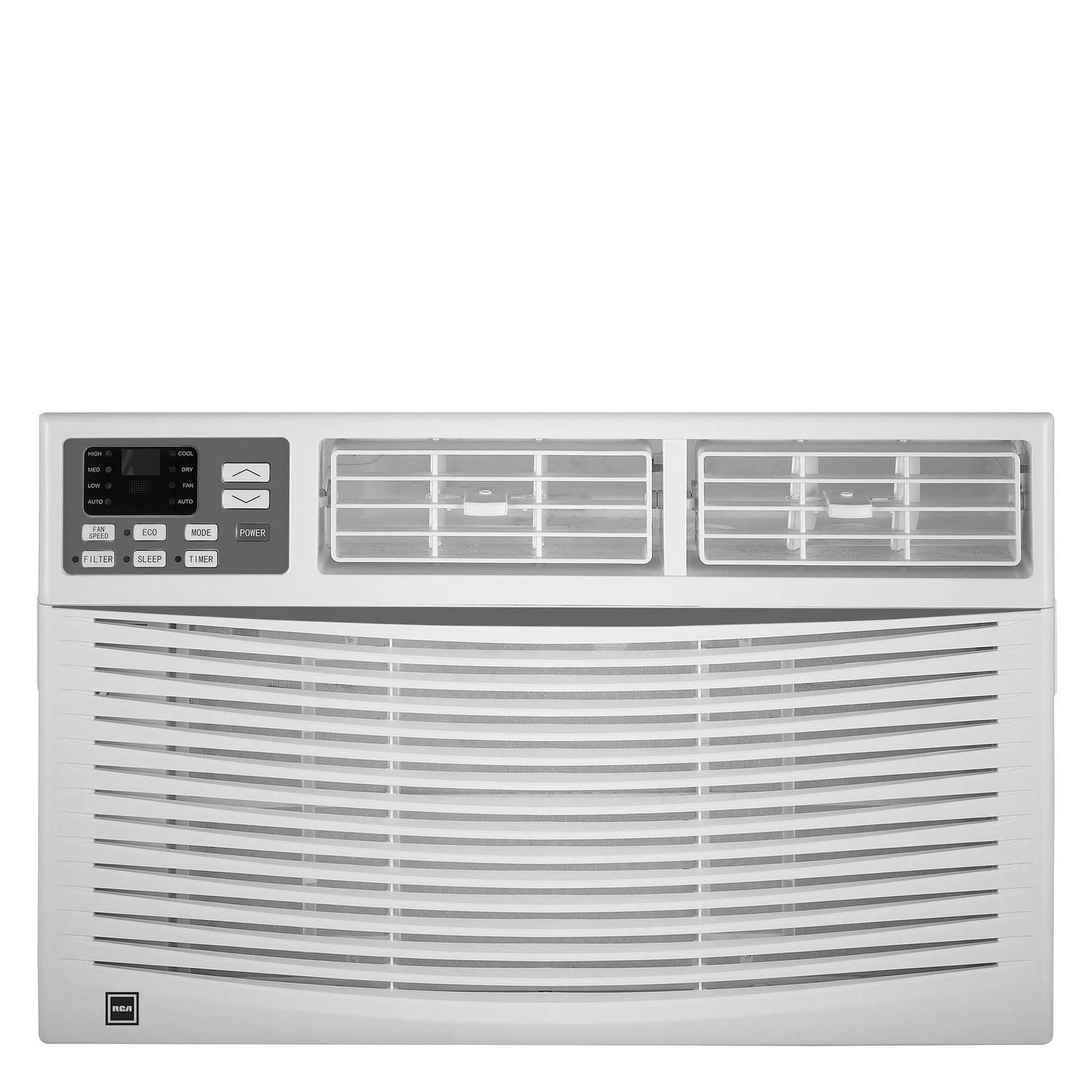
Immagine: Frontale view of the RCA 12000 BTU Wi-Fi Air Conditioner, showing the control panel and air vents.
Caratteristiche principali:
- 12,000 BTU cooling capacity, suitable for areas up to 550 sq. ft.
- Integrated Wi-Fi for remote control via smart devices.
- Three fan modes for customized airflow.
- Digital display for easy temperature and setting adjustments.
- Timer programmabile 24 ore.
- Eco mode for energy-efficient operation.
- Filter check reminder for timely maintenance.
- Auto restart function after power outages.
- Includes window installation kit and remote control.
Contenuto della confezione
Verify that all parts are included in the package before installation:
- RCA 12000 BTU Wi-Fi Air Conditioner Unit
- Telecomando con batterie
- Window Installation Kit (side panels, top rail, sash lock, foam seals)
- Manuale del proprietario
An image showing all included components laid out would typically be found here.
Installazione e configurazione
Installazione della finestra:
This air conditioner is designed for installation in standard double-hung windows with a minimum height of 16 inches and a width between 26 and 36 inches.
- Preparare la finestra: Ensure the window opening is clean and clear of obstructions.
- Attacca la guida superiore: Secure the top rail to the air conditioner unit using the provided screws.
- Installare i pannelli laterali: Slide the accordion side panels into the side panel frames on the unit.
- Place Unit in Window: Carefully lift the unit and place it in the window opening, ensuring the bottom rail rests against the window sill.
- Unità sicura: Extend the side panels to fill the window opening and secure them with screws. Install the sash lock to prevent the window from being opened from the outside. Apply foam seals to ensure an airtight fit.
- Drenaggio: Ensure the unit is slightly tilted outwards to allow for proper condensate drainage.
An image illustrating the step-by-step window installation process would be beneficial here.
Configurazione Wi-Fi:
To enable remote control functionality, connect your air conditioner to your home Wi-Fi network.
- Scarica l'app: Download the RCA Home app from your smartphone's app store (iOS or Android).
- Creare un account: Apri l'app e crea un nuovo account utente oppure accedi se ne hai già uno.
- Aggiungi dispositivo: Follow the in-app instructions to add a new device. This typically involves putting the air conditioner into pairing mode (refer to the unit's control panel or remote for specific instructions, often a Wi-Fi button press).
- Connettiti al Wi-Fi: Seleziona la tua rete Wi-Fi domestica e inserisci la password quando richiesto dall'app.
- Conferma: Once connected, the Wi-Fi indicator on the air conditioner's display will illuminate steadily, and the app will confirm successful pairing.
An image showing the Wi-Fi indicator on the unit's display and a screenshot of the app's pairing screen would be helpful.
Istruzioni per l'uso
Pannello di controllo e telecomando:
The air conditioner can be operated using the control panel on the unit or the included remote control. The remote control offers full functionality from a distance.
An image of the remote control with button labels would be useful here.
Funzionamento di base:
- Accensione/spegnimento: Premere il tasto ENERGIA pulsante per accendere o spegnere l'unità.
- Selezione della modalità: Premere il tasto MODALITÀ button to cycle through available modes: Cool, Fan, and Eco.
- Regolazione della temperatura: Utilizzare il UP (▲) E GIÙ (▼) arrows to set the desired temperature. The temperature range is typically 62°F to 86°F (17°C to 30°C).
- Velocità della ventola: Premere il tasto VELOCITÀ DELLA VENTOLA pulsante per selezionare la velocità della ventola Bassa, Media o Alta.
Funzioni avanzate:
- Timer: Premere il tasto TIMER button to set a delay for the unit to turn on or off. Use the UP/GIÙ arrows to adjust the time in 1-hour increments, up to 24 hours.
- Modalità ecologica: When activated, the unit will cycle the compressor on and off to maintain the set temperature, saving energy. The fan may continue to run during compressor off cycles.
- Modalità risparmio: (If available) This mode gradually increases the temperature over several hours to provide comfortable sleeping conditions while saving energy.
- Controllo Wi-Fi: Use the RCA Home app on your smart device to remotely turn the unit on/off, change temperatures, control modes, create custom schedules, and adapt fan speeds.
Manutenzione
Una manutenzione regolare garantisce prestazioni ottimali e prolunga la durata del tuo condizionatore.
Pulizia del filtro dell'aria:
The air filter should be cleaned every two weeks or when the 'Filter Check' indicator illuminates.
- Spegnimento dell'unità: Always turn off and unplug the air conditioner before cleaning.
- Rimuovi filtro: Aprire il pannello frontale ed estrarre con cautela il filtro dell'aria.
- Filtro pulito: Lavare il filtro con acqua tiepida e sapone. Risciacquare abbondantemente. Per i filtri molto sporchi, è possibile utilizzare un aspirapolvere per rimuovere lo sporco superficiale prima del lavaggio.
- Filtro a secco: Lasciare asciugare completamente il filtro all'aria prima di reinserirlo. Non esporre alla luce solare diretta o a fonti di calore elevate.
- Reinstalla filtro: Rimettere il filtro asciutto nel suo alloggiamento e chiudere il pannello anteriore.
An image demonstrating how to remove and clean the air filter would be helpful.
Pulizia generale:
- Esterno: Pulisci il mobile con un panno morbido eamp cloth. Do not use harsh chemicals, abrasive cleaners, or waxes.
- Bobine: Periodically check the condenser coils (located at the back of the unit) for dirt and debris. If necessary, gently brush them clean.
Risoluzione dei problemi
Prima di contattare il servizio clienti, consultare la seguente tabella per problemi comuni e relative soluzioni:
| Problema | Possibile causa | Soluzione |
|---|---|---|
| Il condizionatore non si avvia. | Nessuna alimentazione; interruttore automatico scattato; unità scollegata. | Check power cord connection; reset circuit breaker; ensure unit is plugged into a working outlet. |
| L'unità non raffredda in modo efficace. | Filtro dell'aria sporco; aspirazione/scarico dell'aria bloccati; stanza troppo grande; finestre/porte aperte. | Clean air filter; clear obstructions; ensure room size is within capacity; close all windows and doors. |
| Acqua che gocciola all'interno. | Unit not tilted properly; clogged drain pan. | Ensure unit is slightly tilted outwards for drainage; clear any blockages in the drain pan. |
| Problemi di connessione Wi-Fi. | Password Wi-Fi errata; router troppo lontano; app non aggiornata. | Verify Wi-Fi password; move unit closer to router or use a Wi-Fi extender; update RCA Home app. |
Specifiche
| Caratteristica | Dettaglio |
|---|---|
| Marca | RCA |
| Numero di modello | RACE1206WF |
| Capacità di raffreddamento | Potenza nominale: 12,000 BTU |
| Area di copertura | Fino a 550 mq. |
| Tasso di deumidificazione | 2 pinte all'ora |
| Altezza minima della finestra | 16 pollici |
| Window Width Range | 26 - 36 pollici |
| Dimensioni (LxPxA) | 22" x 24" x 17" (circa) |
| Peso dell'articolo | 78 libbre |
| Connettività | Wifi |
Informazioni sulla garanzia
This RCA air conditioner comes with a Garanzia limitata del produttore di 1 anni. Please refer to the warranty card included with your product for full terms and conditions, or visit the official RCA websito per maggiori dettagli.
Assistenza clienti
For technical assistance, troubleshooting beyond this manual, or warranty claims, please contact RCA Customer Support. Contact information can typically be found on the manufacturer's websito o sulla scheda di garanzia fornita con il prodotto.


