Introduzione
Questo manuale fornisce istruzioni dettagliate per il Blackview BV5200 Rugged Smartphone. Designed for durability and performance, the BV5200 features IP68/IP69K water and dust resistance, MIL-STD-810H drop protection, a large 5180mAh battery, and runs on Android 12. Please read this manual carefully to ensure proper use and maintenance of your device.

Immagine: anteriore e posteriore view del Neroview BV5200 Rugged Smartphone, highlighting its robust design and the 7GB+32GB storage capacity on the screen.
1. Impostazione
1.1 Disimballaggio e contenuto della confezione
Carefully open the package and ensure all items are present. The standard package for the Blackview BV5200 includes:
- Neroview Telefono robusto BV5200
- Cavo USB
- Adattatore di alimentazione (5V/2A)
- Strumento di espulsione della SIM
- Protective Film (Tempered Glass)
- Manuale d'uso

Immagine: una rappresentazione visiva del Neroview BV5200 package contents, including the phone, charger, USB cable, and documentation.
1.2 Installazione della scheda SIM e MicroSD
The BV5200 supports three card slots, allowing for two Nano-SIM cards and one MicroSD card simultaneously for expanded storage up to 1TB.
- Individuare il vassoio della scheda SIM sul lato del telefono.
- Inserire lo strumento di espulsione della SIM nel piccolo foro accanto al vassoio per aprirlo.
- Place your Nano-SIM cards and MicroSD card into the designated slots on the tray, ensuring correct orientation.
- Spingere delicatamente il vassoio nel telefono finché non scatta in posizione.

Image: An infographic detailing the internal components of the Blackview BV5200, including 4GB RAM + 3GB expansion, MediaTek Helio A22 processor, Face ID, 3 card slots (SIM1, SIM2, MicroSD), 32GB ROM + 1TB TF expansion, IP68/IP69K/MIL-STD-810H ratings, 5180mAh battery, and GPS capabilities.
1.3 Ricarica iniziale e accensione
Prima del primo utilizzo, si consiglia di caricare completamente il dispositivo.
- Connect the USB cable to the phone's charging port and the other end to the power adapter.
- Collegare l'adattatore di corrente a una presa a muro.
- Once charged, press and hold the Power button until the Blackview logo appears to turn on the phone.
2. Istruzioni per l'uso
2.1 Navigazione di base (Android 12)
The BV5200 runs on Android 12, offering an intuitive user experience. Navigate using gestures or on-screen buttons. Swipe down from the top for notifications and quick settings. Customize your home screen by long-pressing on empty space.
2.2 Utilizzo della fotocamera
The phone features a 13MP dual rear camera and a 5MP front camera. Open the Camera app to capture photos and videos.
- Modalità foto: Tocca il pulsante di scatto per scattare una foto.
- Modalità video: Passa alla modalità video e tocca per avviare/interrompere la registrazione.
- Panorama: Utilize the ArcSoft 360° panoramic capture for wide-angle shots.
- Impostazioni: Access settings within the camera app to adjust resolution, flash, and other parameters.
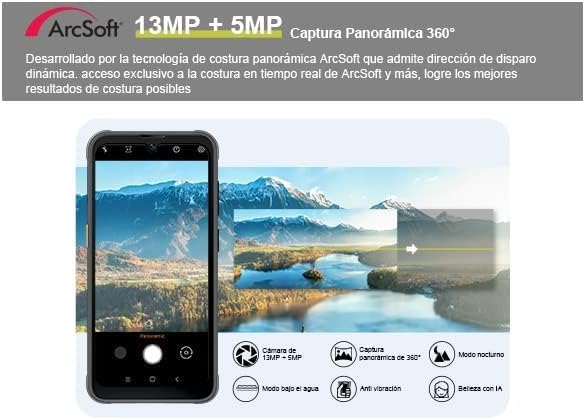
Image: A depiction of the Blackview BV5200's camera interface, highlighting its 13MP + 5MP dual camera system and the ArcSoft 360° panoramic capture feature.
2.3 Funzioni speciali
- Sblocco facciale: Configure Face ID in Security settings for quick and secure unlocking.
- Modalità guanto: Enable this feature in settings to use the touchscreen while wearing gloves, ideal for outdoor workers.
- NFC (comunicazione in campo vicino): Use NFC for contactless payments, quick pairing with devices, and data transfer. Enable NFC in Quick Settings or main Settings menu.
- OTG (in movimento): Connect USB peripherals like flash drives, keyboards, or mice using an OTG adapter (not included).
- Pulsante di scelta rapida personalizzato: The BV5200 features a customizable side button. You can assign up to 7 different functions for quick access, such as PTT (Push-to-Talk), flashlight, SOS, or camera. Configure this in the phone's settings.

Immagine: Un'illustrazione mostraasing il Neroview BV5200's customized shortcut button with various assignable functions (e.g., flashlight, SOS, camera), along with its MIL-STD-810H drop-proof, IP68 waterproof, and IP69K dustproof ratings.
2.4 Connettività
- Wifi: Supports 5G Wi-Fi for faster and more stable internet connections.
- Cellulare: Compatible with GSM network operators (e.g., T-Mobile, MetroPCS). Ensure your carrier is supported.
- Bluetooth: Pair with Bluetooth headphones, speakers, and other devices.
- Posizione GPS: Integrated GPS/GLONASS/Beidou/Galileo for accurate navigation.
3. Manutenzione
3.1 Rugged Features and Protection
Il Neroview BV5200 is built to withstand harsh conditions:
- IP68 impermeabile: Può essere immerso fino a 1.5 metri di profondità per 30 minuti. Assicurarsi che tutti i coperchi delle porte siano ben chiusi prima dell'esposizione all'acqua.
- IP69K antipolvere: Completamente protetto contro l'ingresso di polvere.
- MIL-STD-810H Anticaduta: Progettato per resistere a cadute da altezze fino a 1.5 metri.
While rugged, avoid intentional abuse. Always ensure port covers are sealed when in dusty or wet environments.
3.2 Istruzioni per la pulizia
Per pulire il dispositivo:
- Per pulire lo schermo e il corpo del dispositivo, utilizzare un panno morbido e privo di lanugine.
- Per sporco ostinato, leggermente dampLavare il panno con acqua. Evitare prodotti chimici aggressivi o materiali abrasivi.
- If the phone has been exposed to saltwater, rinse it thoroughly with fresh water and dry completely before charging or opening any ports.
3.3 Cura della batteria
The BV5200 is equipped with a 5180mAh battery, providing extended usage times.
- Per evitare danni, utilizzare solo il caricabatterie e il cavo forniti.
- Evitare temperature estreme, che possono ridurre la durata della batteria.
- Per una durata ottimale della batteria, evitare di scaricarla completamente frequentemente o di tenerla carica al 100% per periodi prolungati.

Image: An illustration showing the 5180mAh battery capacity of the Blackview BV5200 and its estimated usage times for standby (710H), music (25H), calling (18H), video (9H), and gaming (8.5H).
4. Risoluzione Dei Problemi
Se riscontri problemi con il tuo Blackview BV5200, try the following common solutions:
- Il dispositivo non si accende: Assicurarsi che la batteria sia carica. Collegare il dispositivo al caricabatterie e attendere qualche minuto prima di provare ad accenderlo.
- Schermo bloccato/non risponde: Per forzare il riavvio, tenere premuto il pulsante di accensione per circa 10-15 secondi.
- Segnale di rete scarso: Check if your SIM card is properly inserted. Move to an area with better network coverage. Verify your carrier is supported by the device.
- App che si bloccano: Cancella la cache dell'app problematica (Impostazioni > App > [Nome app] > Archiviazione > Cancella cache). Se il problema persiste, prova a reinstallare l'app.
- La batteria si scarica rapidamente: Reduce screen brightness, disable unused features like Wi-Fi, Bluetooth, GPS when not needed. Close background apps.
- Water exposure issues: If the phone gets wet, ensure all ports are sealed. If water enters, power off immediately and allow it to dry completely before powering on or charging.
Per problemi persistenti, contattare Blackview customer support or refer to their official websito per ulteriore assistenza.
5. Specifiche
Below are the key technical specifications for the Blackview BV5200 Rugged Smartphone:
| Caratteristica | Specificazione |
|---|---|
| Nome del modello | Rugged Smartphone Blackview BV5200/Black |
| Sistema operativo | Androide 12 |
| Processore | MTK Helio A22 (Quad-core) |
| Memoria RAM | 4 GB (espandibile fino a 7 GB di RAM virtuale) |
| Memoria interna | 32 GB di ROM |
| Archiviazione espandibile | Fino a 1 TB tramite scheda MicroSD |
| Display | 6.1-inch Incell HD+ (720*1560) |
| Telecamera posteriore | Doppia fotocamera da 13 MP |
| Fotocamera frontale | 5MP |
| Capacità della batteria | Polimero di litio da 5180 mAh |
| Valutazioni di durabilità | IP68 Waterproof, IP69K Dustproof, MIL-STD-810H Dropproof |
| Connettività | 4G LTE, 5G Wi-Fi, Bluetooth, NFC, OTG, USB |
| Navigazione | GPS/GLONASS/Beidou/Galileo |
| Caratteristiche speciali | Face ID, Glove Mode, Customized Shortcut Button |
| Dimensioni | 6.3 x 2.36 x 5.13 pollici |
| Peso dell'articolo | 15.5 once |

Image: An illustration detailing the MediaTek Helio A22 processor, 7GB RAM (4GB + 3GB expansion), and 32GB ROM (expandable up to 1TB) of the Blackview BV5200, emphasizing its performance capabilities.
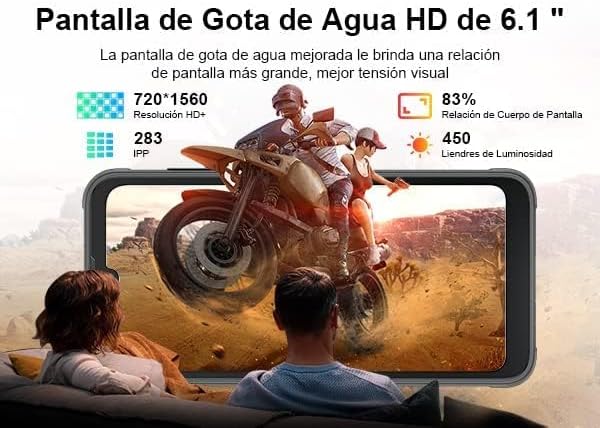
Immagine: una rappresentazione visiva del Neroview BV5200's 6.1-inch HD+ Incell display, showing its resolution (720*1560), pixel density (283 PPI), screen-to-body ratio (83%), and brightness (450 nits).
6. Garanzia e supporto
Neroview products typically come with a standard manufacturer's warranty. Please refer to the warranty card included in your package or visit the official Blackview websito per termini e condizioni di garanzia specifici.
Per supporto tecnico, assistenza per la risoluzione dei problemi o richieste di assistenza, contattare Blackview customer service through their official channels. Keep your purchase receipt and product serial number handy when seeking support.
Nero ufficialeview Negozio: Neroview Negozio su Amazon


