1. Introduzione
The Grandstream GWN7002 is a multi-WAN Gigabit VPN router designed to provide robust and secure network solutions for businesses. It features a built-in firewall and supports comprehensive wired, wireless, and VPN networks across single or multiple locations. This manual provides essential information for setting up, operating, and maintaining your GWN7002 router.
2. Prodotto finitoview
The GWN7002 router offers a versatile set of ports and features to meet diverse networking requirements.
2.1 Pannello frontale
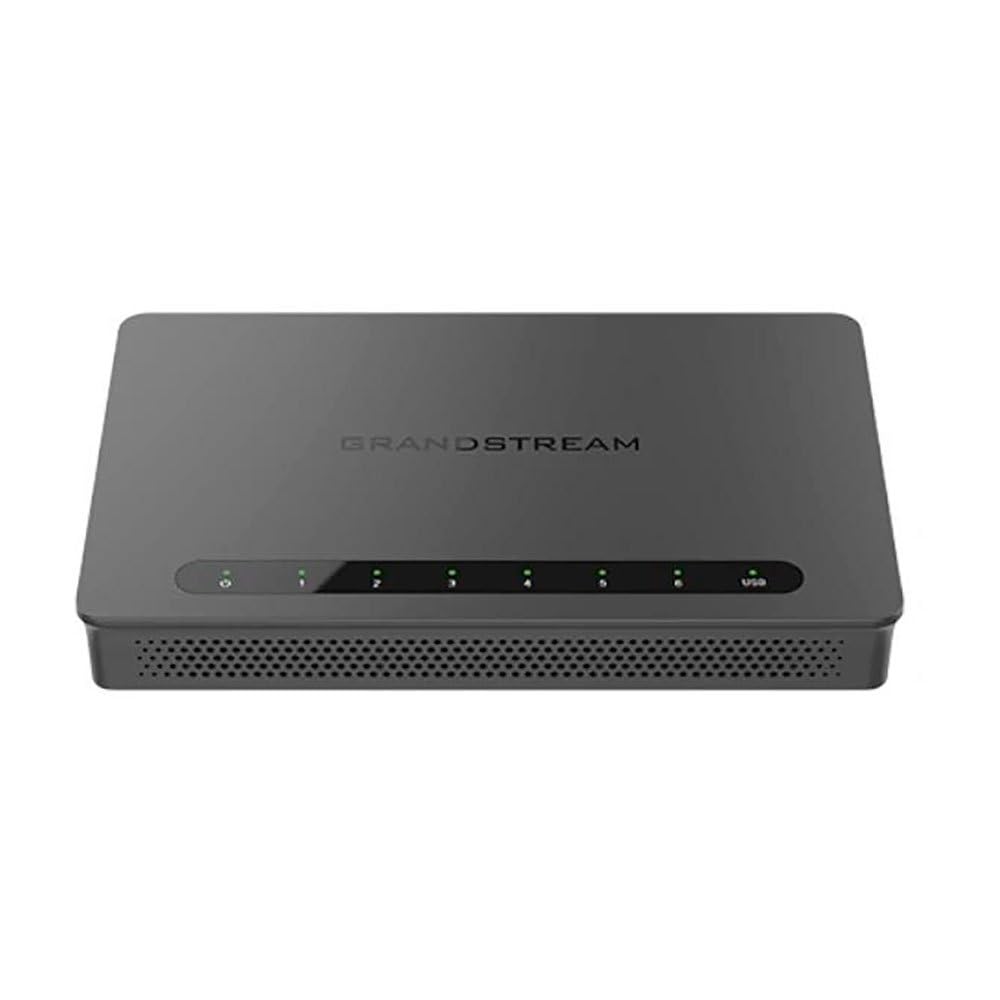
The front panel of the GWN7002 features LED indicators for power, system status, and port activity, providing a quick visual status of the device's operation.
2.2 Pannello posteriore e porte
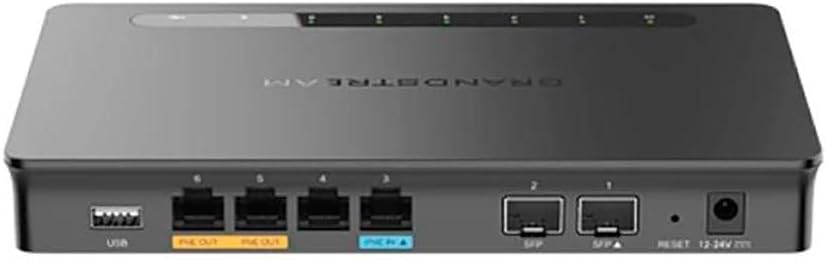
Il pannello posteriore include varie porte per la connettività:
- Porte WAN/LAN: Multiple Gigabit RJ45 ports for flexible WAN/LAN configuration.
- Ingresso PoE: One GbE RJ45 port with IEEE 802.3af/at PoE Input, allowing the router to be powered via Ethernet.
- Uscita PoE: Two GbE RJ45 ports with 48V Passive PoE output or IEEE 802.3af, capable of powering compatible devices.
- Porte SFP: Gigabit SFP ports for fiber optic connectivity.
- Porta USB: Per collegare dispositivi di archiviazione esterni o altri dispositivi USB.
- Pulsante di reset: Utilizzato per ripristinare il dispositivo alle impostazioni di fabbrica.
- Potenza in ingresso: DC power input (12-24V) for standard power adapter connection.
3. Impostazione
Follow these steps for initial setup of your Grandstream GWN7002 router.
3.1 Contenuto della confezione
Verifica che il pacco contenga i seguenti articoli:
- GWN7002 Router Unit
- Adattatore di alimentazione
- Guida rapida (o documentazione simile)
3.2 Installazione hardware
- Connetti alimentazione: Connect the provided power adapter to the router's DC power input. Alternatively, if using PoE, connect an Ethernet cable from a PoE switch or injector to the PoE Input port.
- Connetti WAN: Connect your internet service provider's modem or main network line to one of the configurable WAN ports using an Ethernet cable.
- Connetti dispositivi LAN: Connect your local network devices (computers, switches, access points) to the LAN ports using Ethernet cables.
- Accensione: Ensure all connections are secure, then power on the router. Wait for the system LED indicators to stabilize.
3.3 Configurazione iniziale
Accedi al router web-based configuration interface for initial setup:
- Connettiti alla LAN: Ensure your computer is connected to a LAN port of the GWN7002.
- Accesso Web Interfaccia utente: Aprire un web browser e inserisci l'indirizzo IP predefinito (di solito
192.168.1.1or check the Quick Start Guide) in the address bar. - Login: Enter the default username and password (typically 'admin' for both, or as specified in the guide).
- Segui la procedura guidata: The router may present an initial setup wizard. Follow the on-screen prompts to configure basic network settings, including WAN connection type, LAN IP address, and Wi-Fi settings (if applicable).
4. Operativo
This section covers key operational aspects of the GWN7002 router.
4.1 Impostazioni di rete
- Server DHCP: Configure the DHCP server to automatically assign IP addresses to devices on your local network.
- IP statico: Assign static IP addresses to specific devices if needed.
- VLAN: Create and manage Virtual Local Area Networks (VLANs) for network segmentation and improved security.
4.2 Configurazione multi-WAN
The GWN7002 supports multiple WAN connections for enhanced reliability and bandwidth.
- Bilancio del carico: Distribute internet traffic across multiple WAN links to optimize bandwidth utilization.
- Fallimento: Configure a backup WAN connection to automatically take over if the primary connection fails, ensuring continuous internet access.
4.3 Supporto VPN
Utilize the built-in VPN capabilities for secure remote access and site-to-site connections.
- Server VPN: Set up the router as a VPN server to allow remote users to securely connect to your local network.
- Cliente VPN: Configure the router to connect to an external VPN server.
- Protocolli supportati: The router supports various VPN protocols, including IPsec, L2TP, and OpenVPN.
4.4 Firewall e sicurezza
- Packet Filtering: Configure rules to filter incoming and outgoing network packets based on various criteria.
- Controllo degli accessi: Manage network access for specific devices or users.
- QoS (Qualità del servizio): Prioritize network traffic for critical applications to ensure optimal performance.
5. Manutenzione
Regular maintenance ensures the optimal performance and security of your router.
5.1 Aggiornamento del firmware
Keep your router's firmware updated to benefit from the latest features, security patches, and performance improvements. Download the latest firmware from the Grandstream website and follow the instructions in the web UI to perform the upgrade.
5.2 Configurazione di backup e ripristino
Regularly back up your router's configuration settings. This allows you to quickly restore your settings in case of a factory reset or device replacement.
5.3 Ripristino delle impostazioni di fabbrica
To restore the router to its factory default settings, press and hold the Reset button on the rear panel for approximately 10 seconds while the device is powered on. Release the button when the system LEDs begin to flash. The router will reboot with default settings.
6. Risoluzione Dei Problemi
This section addresses common issues you might encounter with your GWN7002 router.
6.1 Nessuna connessione Internet
- Verifica che il modem funzioni correttamente e che la connessione Internet sia attiva.
- Check the Ethernet cable connection between the modem and the router's WAN port.
- Verificare le impostazioni WAN nel router web UI are correctly configured (e.g., DHCP, Static IP, PPPoE).
6.2 Velocità di rete lente
- Controlla la velocità del tuo provider di servizi Internet.
- Ensure all Ethernet cables are Cat5e or higher for Gigabit speeds.
- Monitor network traffic in the router's web UI to identify any bandwidth-intensive applications or devices.
- Adjust QoS settings to prioritize critical traffic.
6.3 Problemi di connessione VPN
- Verify VPN server/client settings, including IP addresses, authentication methods, and encryption.
- Check firewall rules to ensure VPN traffic is not being blocked.
- Ensure the remote network is reachable.
7. Specifiche
| Dimensioni del prodotto | 9.25 x 9.84 x 2.17 pollici |
| Peso dell'articolo | 1.11 libbre |
| Numero modello articolo | GWN7002 |
| Produttore | Grande flusso |
| Tecnologia di connettività | Wi-Fi (Note: This is a wired router, Wi-Fi connectivity refers to its ability to manage Wi-Fi access points) |
| Caratteristica speciale | Qualità del servizio |
| Porti | Multiple Gigabit RJ45 ports (1x PoE Input, 2x PoE Output), Gigabit SFP ports, USB port |
| Supporto VPN | Built-in VPN support for secure access |
| Multi-WAN | Supports multiple WAN connections for load balancing and failover |
| Colore | Nero |
8. Informazioni sulla sicurezza
Per evitare danni al dispositivo o lesioni personali, osservare le seguenti precauzioni di sicurezza:
- Non esporre il dispositivo all'acqua o all'umidità.
- Non posizionare il dispositivo vicino a fonti di calore o alla luce solare diretta.
- Utilizzare solo l'alimentatore fornito con il dispositivo.
- Garantire un'adeguata ventilazione attorno al dispositivo per evitare il surriscaldamento.
- Non tentare di aprire o riparare il dispositivo autonomamente. Rivolgersi a personale qualificato.
9. Garanzia e supporto
For warranty information and technical support, please refer to the documentation included with your product or visit the official Grandstream webluogo. Conserva la ricevuta di acquisto per eventuali richieste di garanzia.


