1. Introduzione
This manual provides comprehensive instructions for the installation, operation, and maintenance of your QttyElok WiFi Tuya Access Control System Kit with Magnetic Lock. This system offers secure access control using RFID cards, passwords, and smartphone application integration. It is designed for outdoor use with an IP68 waterproof rating.
The kit supports a large user capacity of up to 10,000 users and features dual frequency compatibility (125KHz and 13.56MHz). The included 180KG electric magnetic lock provides robust security, locking when powered on and unlocking when power is removed (fail-safe NC type).
2. Prodotto finitoview
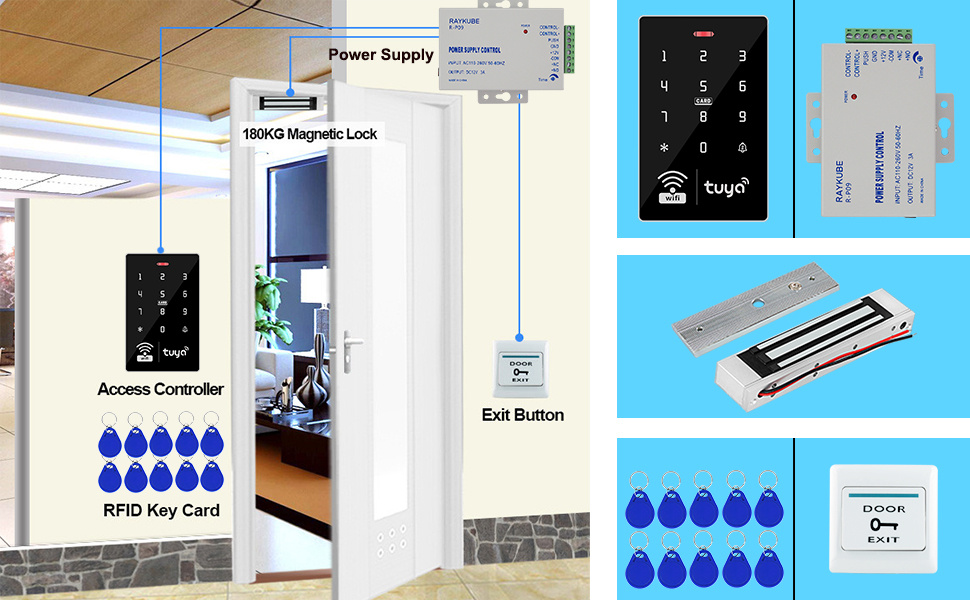
The QttyElok Access Control System Kit includes a touch keypad controller, a 180KG electric magnetic lock, a power supply control unit, a door exit button, and RFID keyfobs. The keypad features a blue backlight for visibility in low light and an integrated doorbell button.
2.1 Caratteristiche della tastiera
The access control keypad is IP68 waterproof, making it suitable for outdoor installation. It features a touch screen panel with a work indicator light and a doorbell button.

2.2 Magnetic Lock
The kit includes a 180KG (350lbs) electric magnetic lock. This is an NC (Normally Closed) type lock, meaning it remains locked when power is supplied and unlocks when power is removed. This fail-safe design ensures the door unlocks during a power outage.

2.3 Unità di controllo dell'alimentazione
The power supply control unit manages the power to the access control system and the magnetic lock. It accepts an input voltage of 110-240VAC and provides a 12V DC, 3A output. It also features an adjustable time delay for locking (0-15 seconds).

2.4 Door Exit Button and RFID Keyfobs
The kit includes a plastic door exit button (NC/NO mode support) and 10 RFID keyfobs (13.56MHz, Mi-fare 1k chip, 0-5cm reading distance).


3. Configurazione e installazione
The QttyElok Access Control System is designed for DIY installation. Proper wiring and component placement are crucial for optimal performance and security.
3.1 Schema elettrico
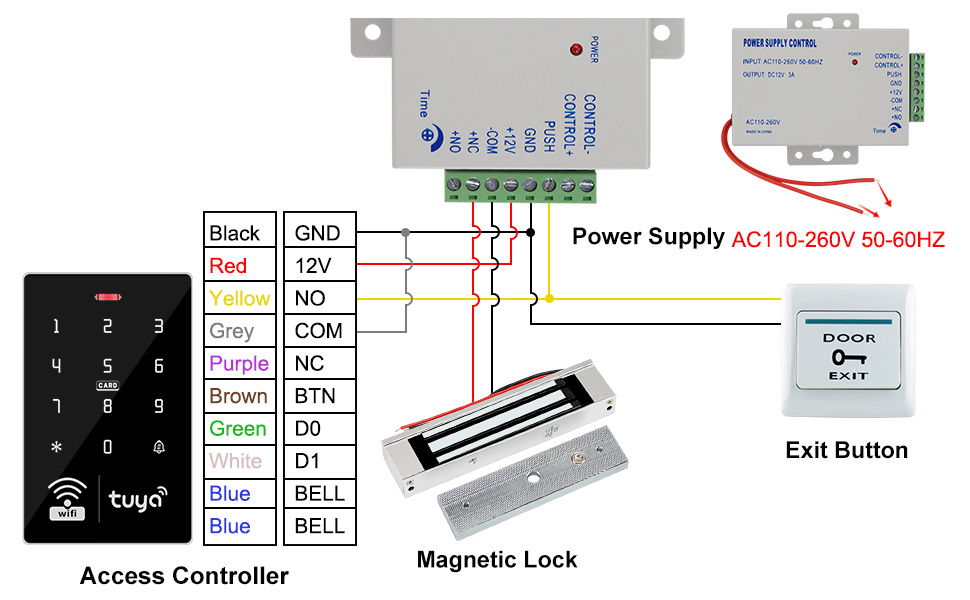
Refer to the following diagram for connecting the access controller, magnetic lock, power supply, and exit button.
3.2 Magnetic Lock Installation
The magnetic lock is suitable for wooden, metal, and glass doors. Ensure proper alignment of the electromagnet and armature plate for secure locking.
4. Istruzioni per l'uso
The system supports multiple verification modes: RFID Cards, Password, RFID Card plus Password, and Tuya APP. All programming can be done via the keypad or the Tuya APP.
4.1 Integrazione dell'APP Tuya
Connect the access control system to the Tuya APP for remote control, user management, and viewing unlock records. The Tuya APP supports English and Chinese languages.

4.2 Metodi di sblocco
The system allows unlocking via RFID card, password, or the Tuya APP. A combination of RFID card and password can also be configured.

4.3 Management Card Setup
A management card can be set up for easy programming of user cards. This simplifies adding and deleting user access credentials.

4.4 Guida video operativa
For a detailed demonstration of the system's operation, including adding users, setting passwords, and configuring various modes, please refer to the video below.
5. Manutenzione
Regular maintenance is minimal due to the durable and waterproof design. Periodically check wiring connections for security and ensure the keypad surface is clean for optimal touch response. Avoid using abrasive cleaners on the keypad.
6. Risoluzione Dei Problemi
If you encounter issues, verify all power connections and wiring according to the diagram. Ensure the Tuya APP is updated and the device is properly paired. For specific error codes or persistent problems, consult the manufacturer's support resources.
7. Specifiche
| Marca | QttyElok |
| Modello | with Magnetic Lock (B0CGVCK45R) |
| Fonte di alimentazione | Elettrico con cavo |
| Dispositivi compatibili | Smartphone (APP Tuya) |
| Dimensioni articolo (L x P x A) | 7.87 x 1.97 x 3.94 pollici |
| Tecnologia di connettività | Senza fili (WiFi) |
| Tipo di installazione | Fai da te |
| Voltage | 12 Volt |
| Metodo di controllo | Tocco |
| Capacità dell'utente | 10,000 |
| Frequenza RFID | 125KHz, 13.56MHz (Dual Frequency) |
| Forza di tenuta della serratura magnetica | 180 kg / 350 libbre |
| Grado di impermeabilità | IP68 (Keypad) |
8. Garanzia e supporto
For warranty information and technical support, please refer to the documentation included in your product packaging or contact QttyElok customer service directly. Keep your purchase receipt for warranty claims.


